
On this page
Start here
Quick answer
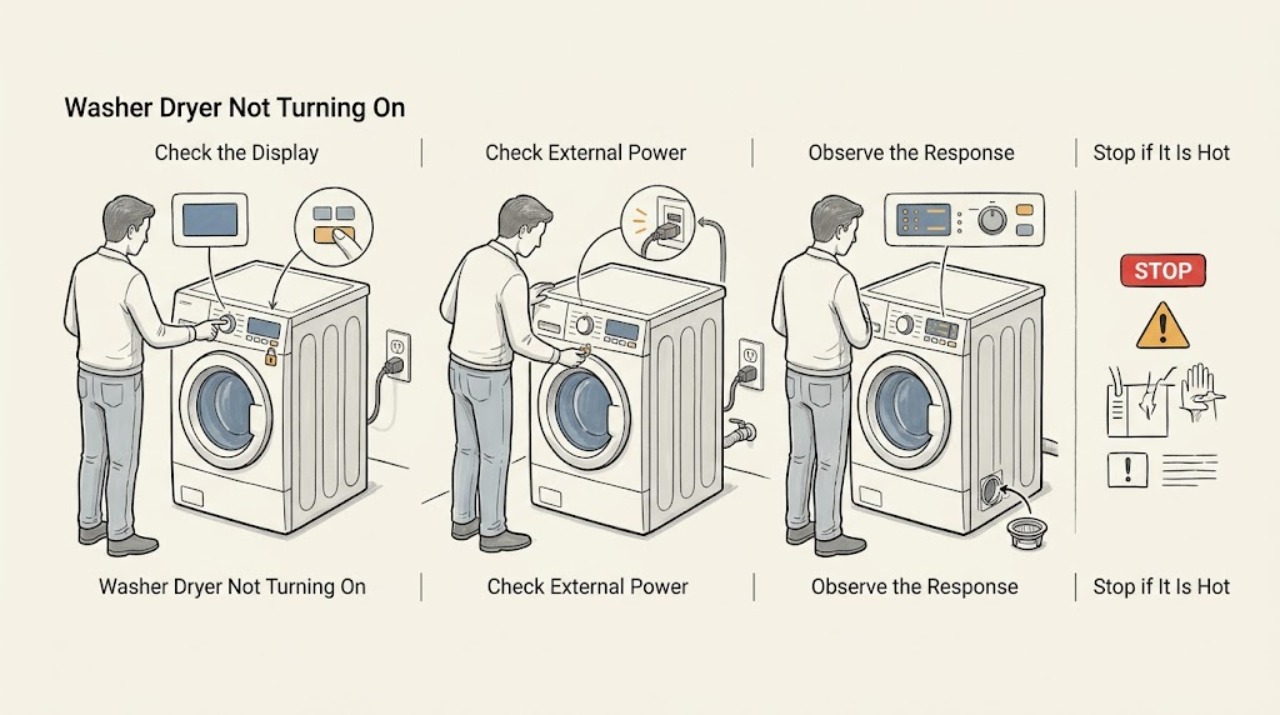
When a Whirlpool washer-dryer will not turn on, first decide whether the display is completely dead or the display works but a wash or dry cycle will not start. For a dead display, check the plug, outlet, breaker or GFCI, and control lock without opening the cabinet. For a lit display, unlock Control Lock, close and latch the door, select a valid cycle, hold Start as the model requires, and check the documented water and drain conditions. Whirlpool all-in-one models may also refuse a dry cycle when the water supply is off or the drain-pump filter is missing or clogged. Stop immediately for leakage, water near electrical parts, a hot cord, burning smell, gas odor, smoke, sparking, overheating, or repeated breaker trips; do not keep resetting or bypass a lock.
Work through in order
Diagnostic checks
Use only checks that match the exact appliance or system and its official guide.
-
Check 1
Press Power once and note whether the display, status lights, drum light, or control-lock indicator responds; record whether the failed function is wash, dry, or both and whether any code or message appears.
Expected result: A completely blank panel differs from a lit panel that ignores Start, shows a lock icon, or displays a cycle or error message.
Next step: For a blank panel, continue to the safe power check. For a lit panel, check Control Lock and door or lid closure before attempting a reset.
Why this matters
Why: A blank panel points first to external power, protection devices, cord or control lock. A lit panel narrows the issue to lock, door, cycle, Start, water, drain, or a control fault rather than total power loss.
-
Check 2
Without opening the washer-dryer, inspect the plug and cord for visible damage, confirm the plug is seated in the model-approved grounded outlet, and check the household breaker or GFCI once for a tripped state; do not use an extension cord.
Expected result: The outlet or GFCI is off, a breaker or fuse has opened, the cord or plug is damaged or hot, or the appliance remains completely blank with external power appearing normal.
Next step: Restore a simple external protection device only if there is no damage, odor, water, or repeat trip. If the appliance stays blank or trips again, stop and call a qualified electrician or appliance technician.
Why this matters
Why: A simple external protection trip can explain a blank display. A damaged or hot cord, repeated trip, wet outlet, or normal supply with no display is an electrical or appliance fault, not a reason to keep resetting.
-
Check 3
If the panel is lit, check for the Control Lock icon, light, or model-specific message and unlock it using the exact model instructions; then choose a valid wash, dry, or dry-only cycle rather than an unassigned selector position.
Expected result: Controls respond after unlocking and the selected cycle displays normally, or the lock remains, the controls stay unresponsive, or a message such as LoC, LC, Err, dr, or an unassigned-cycle indication remains.
Next step: Use the model manual to interpret any remaining message. Do not bypass a lock or force the selector; continue to the door and Start check only after the cycle is valid.
Why this matters
Why: Control Lock intentionally prevents cycles from starting. Whirlpool also documents messages and invalid cycle positions that can make a working machine appear not to start. A persistent message after the model-specific correction may indicate a door, control, or other fault.
-
Check 4
Remove any clothing or object from the door or lid path, close it firmly, confirm the required hot and cold water valves are open for the washer side, and hold Start or Start/Pause for the duration specified by the model instead of tapping repeatedly.
Expected result: The lock engages and the cycle begins, or the door looks closed but never locks, Start is ignored, the water supply is off, or the appliance shows a door, water, or start message.
Next step: Correct only a simple obstruction or closed water valve if there is no leak. Do not force the door, bypass the lock, or continue if water is leaking or near electrical parts; arrange service.
Why this matters
Why: Whirlpool says the door may look closed without engaging the lock, some Start controls require a hold, and the washer requires connected water supplies. A persistent door-lock or water fault prevents operation and needs service after low-risk checks.
-
Check 5
If wash starts but drying will not start, check the exact all-in-one manual for the Drying function, water-supply requirement, and drain-pump filter; inspect only the documented accessible filter and external hose with the machine stopped and no standing water near electrical parts.
Expected result: The drying mode was not selected, the water supply is off, the documented drain-pump filter is missing or clogged, or the dry prerequisites are normal but the dry side still does not run.
Next step: Correct a simple setting, valve, or accessible filter issue according to the manual. Persistent no-start, a drain problem, or any leak requires qualified service; do not remove panels.
Why this matters
Why: Whirlpool lists dry-cycle selection, water connection, and drain-pump filter status as all-in-one start conditions. If those conditions are correct, a control, door, pump, heater, or other internal fault becomes more likely.
-
Check 6
Stop immediately if you see leakage, standing water near the appliance or controls, a hot or damaged cord or plug, burning smell, smoke, visible sparking, overheating, gas odor, or a breaker that trips again.
Expected result: The hazard persists or the appliance remains unable to start after the safe external power, lock, door, cycle, water, and documented filter checks.
Next step: Stop the cycle and keep people away. If safe, unplug and close the water valves; for a gas model, close the gas valve only if safely reachable. If water, gas odor, or damaged wiring makes isolation unsafe, leave the area and contact the appropriate emergency or qualified service channel from a safe location. Do not remove panels, bypass locks, access energized wiring, or open gas lines.
Stop if: Stop using the Whirlpool washer-dryer and arrange qualified service.
Why this matters
Why: These signs can involve electric shock, fire, gas, water damage, moving parts, or a failed safety interlock. Repeated resets or bypass attempts can worsen the hazard.
Use your observations
Decision map
Find the observation that best matches what you see, then follow the next safe action.
-
PATH 01Next step
What you see
The display and indicators remain blank.
Do this next
Check the plug, approved outlet, breaker or GFCI, and visible cord condition once. If there is damage, odor, water, or a repeat trip, stop and use qualified electrical or appliance service.
-
PATH 02Next step
What you see
The panel is lit but a lock icon, Control Lock light, LoC, or LC appears and controls do not respond.
Do this next
Unlock Control Lock using the exact model instructions. Do not force a cycle or bypass the lock; service a persistent lock indication.
-
PATH 03Next step
What you see
A wash cycle is selected but the door does not lock, Start is ignored, or required water is off.
Do this next
Clear the door path, close it firmly, open the required water valves if there is no leak, and hold Start as the model directs. A persistent lock or water fault needs service.
-
PATH 04Next step
What you see
Washing works but the drying side will not start.
Do this next
Confirm the drying mode, water connection, and documented drain-pump filter or drain path. If the model-specific prerequisites are normal, arrange service for the dry-side control or internal fault.
-
PATH 05Next step
What you see
The display shows Err, dr, an unassigned cycle indication, or another model-specific message.
Do this next
Use the exact owner manual to interpret and clear only the documented user-level condition. Do not guess at a code or bypass the door or safety system.
-
PATH 06Next step
What you see
There is leakage, water near electrical parts, gas odor, smoke, burning smell, sparking, overheating, a damaged cord, or a repeat breaker trip.
Do this next
Stop immediately, isolate only if safe, leave a gas-smell or electrical danger area when necessary, and arrange qualified service. Do not restart or dismantle the appliance.
Helpful context
Understand the symptom
Separate no power from no start
A blank display and a lit display are different faults. A blank display sends the check toward the outlet, breaker or GFCI, cord, and control lock. A lit display means the appliance has at least some power, so the next checks are Control Lock, door or lid closure, a valid cycle, Start/Pause behavior, water supply, and any displayed message. On a washer-dryer, the wash and drying sides can have different prerequisites, so note which function you selected and whether the other function responds.
A lock indicator is not a dead machine
Whirlpool says Control Lock prevents controls from responding or cycles from starting. Depending on the model, the lock is shown by an icon, a light, or a message such as LoC or LC, and the unlock gesture or button differs. A door that looks closed may still not engage its lock, and the Start control may need to be held rather than tapped. Use the exact manual for the model instead of forcing the door or repeatedly pressing controls.
Do not overlook water and drain prerequisites
Whirlpool's all-in-one guidance says its dry cycle will not run unless the water supply is connected and turned on, and lists a drain-pump filter that is not in place or is clogged as another check. This does not mean every Whirlpool washer-dryer has the same filter or interface. Follow the model manual, inspect only accessible items, and treat leaks or water near electrical parts as a stop condition rather than a reason to keep testing.
Only after diagnosis
Potential parts
- door or lid lock assembly
Only consider this category after a qualified diagnosis confirms that the door or lid cannot signal a safe closed state after the path and controls are checked.
Confirm the complete Whirlpool model number and model-specific fit information before ordering; do not bypass the lock. - control or user-interface component
Only consider this after external power, Control Lock, cycle selection, door, and Start checks are normal but the display or controls remain unresponsive.
This is a diagnostic category, not a confirmed part or compatibility claim. - drain-pump filter or pump component
Only consider this if the exact model documents a drain-pump filter or pump condition that prevents operation and a qualified diagnosis confirms it.
Confirm the complete model and follow the owner's manual or qualified service diagnosis.
When checks do not resolve it
Need a professional?
Arrange qualified Whirlpool appliance service when the display stays blank after safe external power checks, Control Lock cannot be cleared, the door or lid will not lock, Start remains unresponsive, a code persists, the dry side alone will not start, or the washer-dryer needs internal electrical, pump, heater, control, or interlock diagnosis.
Common questions
FAQ
Why is my Whirlpool washer-dryer completely blank?
Check the plug, model-approved outlet, breaker or GFCI, and visible cord condition. A Control Lock indicator can also make controls appear unresponsive. A hot or damaged cord, water, odor, or repeated trip requires stopping and qualified service.
Why does the Whirlpool washer-dryer display light up but not start?
Check Control Lock, door closure and lock engagement, a valid cycle, the required Start hold, and water supplies for the washer side. Read any model-specific message rather than forcing the cycle or bypassing the lock.
Why does washing work but drying will not start?
Whirlpool's all-in-one guidance says to confirm the drying mode, connected water supply, and documented drain-pump filter. If the exact model's prerequisites are normal, the dry-side control or another internal fault needs service.
Should I keep resetting the breaker when the washer-dryer will not turn on?
No. Check it once only when there is no water, damage, odor, heat, or visible fault. A repeated trip is a stop condition that needs qualified electrical or appliance service.
When should I stop using the Whirlpool washer-dryer?
Stop for leakage, water near electrical parts, gas odor, smoke, burning smell, sparking, overheating, a hot or damaged cord or plug, repeated breaker trips, or a lock that needs bypassing. Isolate power or water only if safe and arrange qualified service.
Read the exact guide
Official sources
- Drying Function - All-In-One Washer Dryer - Product Help | WhirlpoolWhirlpool Product Help · Whirlpool all-in-one washer-dryer wash-and-dry, dry-only, Auto Drying, Timed Drying, and Drying Only selection
- Dry Cycle Will Not Run - All-In-One Washer Dryer - Product Help | WhirlpoolWhirlpool Product Help · Whirlpool all-in-one washer-dryer dry-cycle prerequisites including door, Start, drain-pump filter, protection devices, power, water, and mode
- No Power - Washer - Product Help | WhirlpoolWhirlpool Product Help · Whirlpool washer no-power, outlet, breaker or GFCI, extension-cord, and Control Lock checks
- Control Lock - All-In-One Washer Dryer - Product Help | WhirlpoolWhirlpool Product Help · Whirlpool all-in-one washer-dryer Control Lock behavior and unlocking
- Not Starting or Not Operating - Front Load Washer - Product Help | WhirlpoolWhirlpool Product Help · Whirlpool front-load washer no-start checks for Control Lock, door lock, water, messages, Start, and power cycle
- Not Starting or Not Operating - Dryer - Product Help | WhirlpoolWhirlpool Product Help · Whirlpool dryer no-start checks for power, Control Lock, Start, door latch, obstruction, and cycle selection
Community feedback
Share a repair observation
Share a plain-text repair observation. Accepted observations are published automatically; this page may take a moment to update.