
On this page
Start here
Quick answer
When a Wolf oven will not start, first separate a blank or unresponsive control from a control that responds but will not enter a cooking mode. From a safe, dry position, verify the oven has power, check for Control Lock, Sabbath or showroom mode, select the correct oven and cooking mode, and follow the exact model's start command. A single manufacturer-authorized power reset may help when there is no smoke, heat damage, gas odor, water, or repeated breaker trip. If the display stays blank, an error remains, the door will not close, or a gas model will not ignite, stop troubleshooting and arrange Wolf Factory Certified Service.
Before you begin
Safety first
- The homeowner scope ends at dry user controls, visible door and mode checks, one model-authorized power reset when safe, and recording symptoms. Electrical, gas, ignition, heating, control, latch, and internal oven work require qualified service.
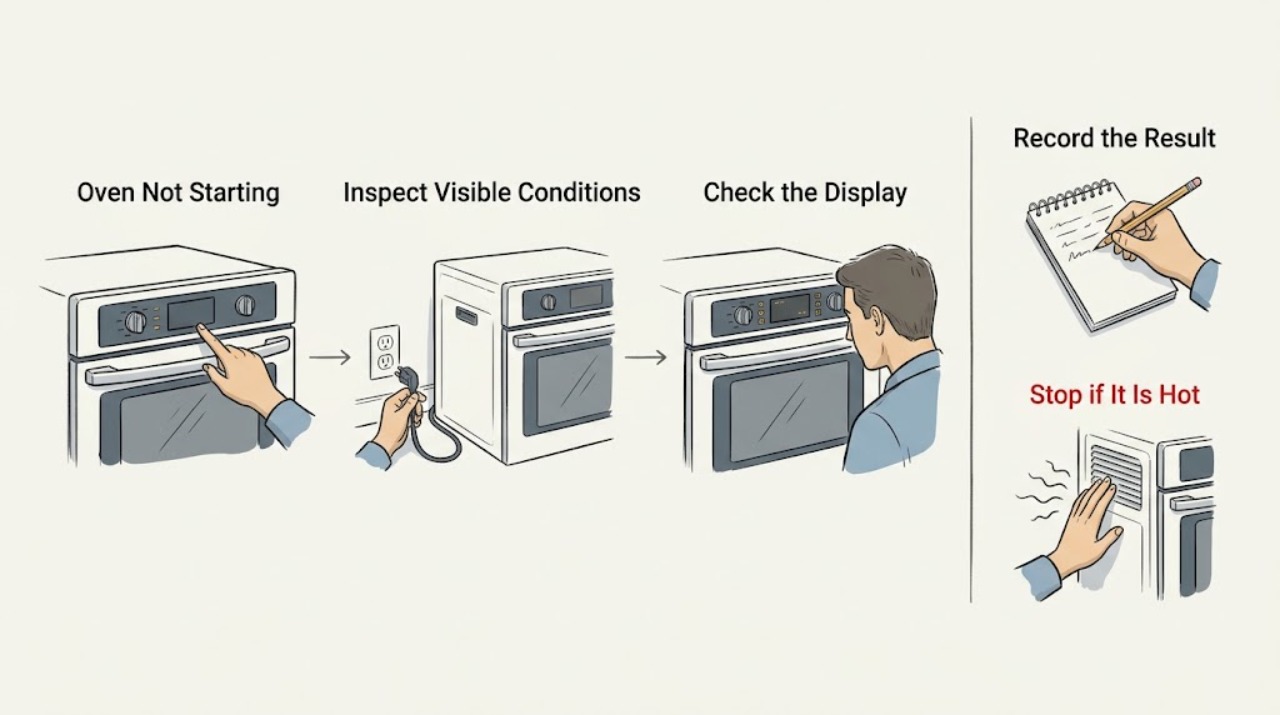
Work through in order
Diagnostic checks
Use only checks that match the exact appliance or system and its official guide.
-
Check 1
Look at the Wolf control panel and note whether it is completely blank, flashing, showing a lock or mode indicator, displaying an error, or responding to button presses; do not touch the oven if the panel or surrounding area is wet or damaged.
Expected result: The display is blank, it responds but will not start, a lock or special mode is shown, or an error message is present.
Next step: Record the exact message or symbol and use the matching branch below; do not guess an error-code meaning across Wolf models.
Why this matters
Why: A blank display points first to power or control availability, while a responsive display shifts the diagnosis toward selection, lock, mode, door, or fault-state conditions.
-
Check 2
Verify that the oven has household power using the normal user-visible controls and, only if the area is dry and there are no warning signs, check whether the oven's labeled breaker is in an obviously tripped position; do not open the panel or repeatedly reset it.
Expected result: The display is dead and the breaker appears tripped, the display is dead with no obvious breaker change, or the control panel has power.
Next step: If safe and permitted by the model instructions, perform no more than one normal power reset and retest. If it trips again, stays blank, or the panel area is unsafe, leave power off and call service.
Why this matters
Why: Wolf identifies no power and control or relay issues as causes of a blank panel; a powered panel means the problem is not simply a total loss of control power.
-
Check 3
With clean, dry hands, check the visible control state for Control Lock, Sabbath Mode, Showroom Mode, a delayed or timed program, or a selected upper/lower cavity, then use the exact model's normal unlock and mode-selection command.
Expected result: A lock or special mode is active, the wrong oven cavity or mode is selected, or the controls show the expected cooking mode but still do not begin.
Next step: Follow the model-specific Use and Care Guide for the control sequence once. If the command is rejected or the symptom returns, stop and arrange service rather than trying hidden combinations.
Why this matters
Why: Wolf documents lock and Sabbath or showroom settings as conditions that can prevent normal operation; a correct selection with no start suggests a control, door, power, or fault condition.
-
Check 4
Select the intended cooking mode and verify the door can close fully without an object, rack, or visible obstruction holding it open; do not force the door, defeat a latch, or reach into a hot cavity.
Expected result: The mode is accepted and the door closes normally, the door is obstructed or misaligned, or the mode will not be accepted.
Next step: Remove only an obvious cool obstruction from the user area. If the door remains misaligned, locked unexpectedly, hot, or unable to close, leave the oven off and call service.
Why this matters
Why: Wolf links mode-specific operation and a fully closing door to heating and starting behavior; a latch, door, or control problem needs model-specific service if the user-visible check does not resolve it.
-
Check 5
Identify whether the Wolf appliance is electric, gas, dual-fuel, induction-range oven, or another model variant before interpreting a no-start symptom; use only the controls and visible indicators that belong to that variant.
Expected result: The appliance type is confirmed, or the fuel and model cannot be confirmed from the rating plate or owner's documentation without opening the appliance.
Next step: Use the matching Wolf guide and give the model and fuel type to service. If a gas oven does not ignite or gas odor is present, discontinue use rather than attempting an ignition test.
Why this matters
Why: Wolf publishes different guidance for electric and gas ovens, and ignition or heating parts cannot be assumed across variants.
-
Check 6
If the control accepts a cooking command, note whether the preheat or heat indicator appears, whether the display returns an error, and whether the oven remains cold; do not remove panels or test an element, igniter, relay, sensor, or thermal cutout.
Expected result: The command is accepted and heat begins, the command is accepted but there is no heat, or an error appears during the start sequence.
Next step: Turn the oven off, record the exact mode and message, and arrange qualified service if heat does not begin as expected or the error returns.
Why this matters
Why: A command that starts but produces no heat is a heating or protection path rather than a simple start-command problem; Wolf lists thermal, fan, control, relay, and heating-element causes for some electric models.
-
Check 7
For a Wolf gas oven only, observe the normal user-visible ignition outcome without leaning into the cavity or repeating failed attempts; note whether the preheat indicator calls for heat, the burner lights, ignition is delayed, or gas odor remains.
Expected result: The burner lights normally, it fails to ignite, ignition is delayed, clicking continues, or gas odor is present without ignition.
Next step: Turn the control off and discontinue use for failed ignition, delayed ignition, or persistent gas odor. Do not search for a leak, disassemble the burner, or repeat the test.
Why this matters
Why: Wolf treats failure to ignite, delayed ignition, continuing clicking, and gas odor without ignition as service conditions; gas behavior cannot be inferred from an electric or induction model.
-
Check 8
For a double oven, record whether the other cavity responds normally without moving parts or swapping controls; also record the model, serial or rating-plate information, and the exact point where the non-starting cavity stops.
Expected result: Only one cavity fails, both cavities fail, or the model information cannot be safely read.
Next step: Give the service provider the cavity, mode, display state, and any recent self-clean or power event. Do not attempt internal access to compare components.
Why this matters
Why: A single-cavity symptom can narrow the service investigation, while both cavities or a blank panel points toward shared power or control conditions.
Use your observations
Decision map
Find the observation that best matches what you see, then follow the next safe action.
-
PATH 01Next step
What you see
The display is blank, the oven has no response, or the control panel remains dead after one safe manufacturer-authorized reset.
Do this next
Leave the oven off and arrange Wolf Factory Certified Service. Do not remove the panel or continue breaker resets.
Why this path and its safety boundary
Why it matters: Wolf lists power, control, and relay issues for a blank or unresponsive oven.
-
PATH 02Next step
What you see
The display works but a lock, Sabbath Mode, Showroom Mode, delay, wrong cavity, or wrong cooking mode prevents the start command.
Do this next
Use the exact model's owner guide to clear or select the setting once. If the mode cannot be changed or the symptom persists, call service.
Why this path and its safety boundary
Why it matters: The oven may be operating as configured rather than suffering a component failure.
-
PATH 03Next step
What you see
The controls respond and a mode is selected, but the door cannot close fully or a latch remains engaged.
Do this next
Do not force, pry, bypass, or disassemble the door. Allow a hot cycle to cool as directed by the model guide and call service if the door remains locked or misaligned.
Why this path and its safety boundary
Why it matters: A door or latch state can prevent safe operation, especially after a hot or self-clean cycle.
-
PATH 04Next step
What you see
The mode starts but the oven does not heat, an error appears, or heat behavior is abnormal.
Do this next
Turn the oven off, record the mode and exact message, and arrange qualified service. Do not test internal elements, sensors, relays, or cutouts.
Why this path and its safety boundary
Why it matters: Wolf lists thermal protection, fan, control, relay, and heating-element causes for electric oven heat failures; an error can change the service path.
-
PATH 05Next step
What you see
A gas Wolf oven does not ignite, ignition is delayed, clicking continues, or gas odor remains without ignition.
Do this next
Turn the control off, leave the area if odor is strong or persistent, avoid flames and electrical switching, and use qualified gas-appliance service. Do not perform a leak or ignition test.
Why this path and its safety boundary
Why it matters: Wolf treats these as discontinue-use and service conditions, not as a reason to keep trying.
-
PATH 06Next step
What you see
Smoke, arcing, burning odor, unusual heat, a damaged cord or receptacle, water near the appliance, or repeated breaker trips is present.
Do this next
Stop using the oven and keep clear. Do not touch wet equipment or reset protection; follow local emergency guidance for active smoke, fire, or a strong gas odor.
Why this path and its safety boundary
Why it matters: This is an immediate fire, shock, or equipment-damage boundary rather than ordinary oven troubleshooting.
Helpful context
Understand the symptom
Start by defining “not starting”
A Wolf oven may have no display, a display that responds but will not begin a mode, a mode that begins without heat, or a gas oven whose burner does not ignite. Those symptoms do not share one repair. The exact model, fuel type, oven cavity, display message, and point at which the sequence stops determine the next safe check.
What a homeowner can safely check
Use only ordinary controls and visible user-accessible areas. Do not remove covers, probe wiring, bypass a door or control interlock, or open the gas path. Do not keep resetting a breaker to force a start. If there is smoke, an electrical odor, arcing, unusual heat, a gas odor, or a door that is hot or jammed after a hot cycle, stop and obtain professional help.
Safety boundary
Stop conditions
- Stop immediately for smoke, arcing, burning odor, a hot or damaged outlet or cord, water near electrical parts, or repeated breaker trips.
- For a gas model, stop for persistent gas odor, failed or delayed ignition, abnormal flame, or continued clicking; do not relight, search for a leak, or repeat the test.
- Do not remove panels, probe wiring, test heating parts, bypass a door or control interlock, force a locked door, or work inside a hot cavity.
- Do not use a generic error-code interpretation, substitute a part, or perform repeated breaker resets without the exact model's authorized instruction.
- If the oven is wet, flooded, unstable, or unsafe to approach, leave it isolated and obtain qualified appliance or electrical service.
When checks do not resolve it
Need a professional?
Call Wolf Factory Certified Service when the panel stays blank, a reset does not restore operation, the controls reject a correct start sequence, an error returns, the door or latch is abnormal, the oven starts without heating, or a gas model fails to ignite.
Safety scope: The homeowner scope ends at dry user controls, visible door and mode checks, one model-authorized power reset when safe, and recording symptoms. Electrical, gas, ignition, heating, control, latch, and internal oven work require qualified service.
Common questions
FAQ
Why does my Wolf oven show a display but not start?
Check the selected cavity, cooking mode, Control Lock, Sabbath or showroom state, and the normal start command for the exact model. If the controls are correct but the oven still will not start, arrange service.
Can I reset the Wolf oven at the breaker?
Only follow the exact Wolf model's power-reset instruction when the area is dry and there are no smoke, odor, heat, water, or electrical warning signs. Make one normal reset attempt; if it trips again or does not restore operation, leave it off and call service.
What if my Wolf gas oven will not ignite?
Do not repeat failed ignition or search for a leak. Turn the control off and discontinue use for delayed ignition, continuing clicking, or gas odor without ignition, then arrange qualified service.
Read the exact guide
Official sources
- Wolf Electric Oven Does Not HeatSub-Zero, Wolf, and Cove · Wolf electric oven mode, door, showroom mode, heat and error-state troubleshooting
- Gas Oven Bake Burner Not WorkingSub-Zero, Wolf, and Cove · Wolf gas oven ignition, delayed ignition, gas odor and service boundaries
- Wolf Electric Oven Does Not Turn OnSub-Zero, Wolf, and Cove · Wolf electric oven blank display, power, control response, reset and service guidance
- Wolf Does Not Operate in One or All ModesSub-Zero, Wolf, and Cove · Wolf appliance power-up, oven start modes, Sabbath Mode, GFCI and service guidance
- TroubleshootingSub-Zero, Wolf, and Cove · Wolf E Series oven controls, lock, Sabbath state, power reset, door and service troubleshooting
- OVEN OPERATIONSub-Zero, Wolf, and Cove · Wolf oven mode selection, control lock and normal operation
Community feedback
Share a repair observation
Share a plain-text repair observation. Accepted observations are published automatically; this page may take a moment to update.