
On this page
Start here
Quick answer
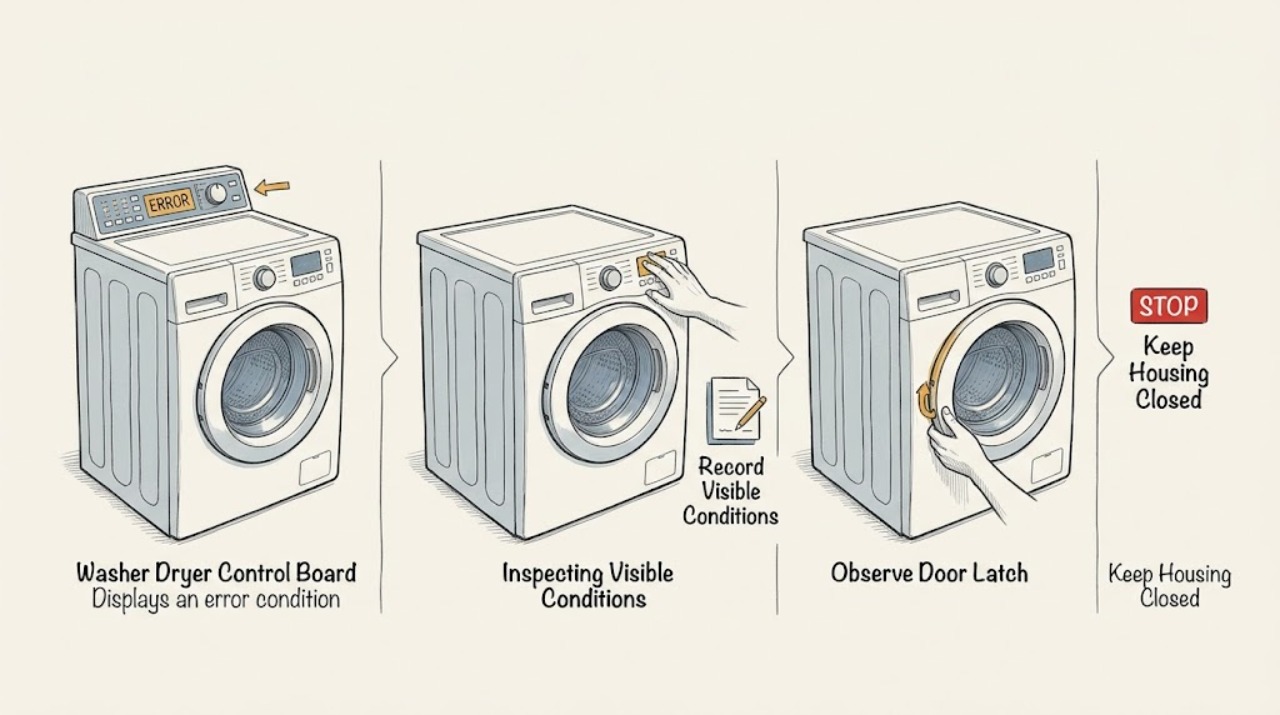
An error on an Electrolux washer-dryer control panel does not by itself prove that the control board has failed. Record every character, the cycle phase, whether the appliance is filling, draining, tumbling, heating, or locked, and the exact model and region. Use the model's Electrolux manual or support page to classify the code; similar-looking codes can represent a door interlock, drain or water condition, motor or drying circuit, power issue, configuration mismatch, or communication between the main board and display. Perform only a model-authorized visible check or single reset from a dry, safe position. Stop for flooding, a locked door with water inside, smoke, burning odor, a hot cord, arcing, shock, repeated breaker trips, or a code that returns, and arrange qualified appliance service. Do not open the control console, test live wiring, flash firmware, or order a control board from the code alone.
Before you begin
Safety first
- Keep the appliance off for flooding, uncontrolled filling, hot or standing water behind a locked door, wet electrical areas, smoke, burning or electrical odor, arcing, shock, hot connections, or repeated breaker trips. Do not open the console, bypass safety devices, or test energized circuits.
Work through in order
Diagnostic checks
Use only checks that match the exact appliance or system and its official guide.
-
Check 1
Stop changing settings and record the exact Electrolux model, region, complete displayed code, selected wash/dry cycle, stage, water level, door state, and whether the washer-dryer is filling, draining, tumbling, heating, or silent. From a dry position, look for water near electrical parts, smoke, burning odor, arcing, shock, a hot cord, or repeated breaker trips.
Expected result: The appliance is flooding, hot or smoking, electrically abnormal, still filling without stopping, or the door is locked over standing water.
Next step: Stop immediately, keep clear, and isolate water or power only from a dry, safe location. Arrange qualified or emergency help as appropriate; do not restart or touch the control board.
Why this matters
Why: This is a flooding, scalding, fire, or electrical safety event; the code should not be investigated first.
-
Check 2
Use the exact model's Electrolux manual or support search to identify the code and whether it applies to the washer, dryer, or combined washer-dryer portion. Compare the recorded cycle phase and behavior with the manual; do not substitute a code from a different series, region, or service document.
Expected result: The code is documented with a visible user check, is documented as a service condition, appears only on a different appliance family, or cannot be found for the exact model.
Next step: Follow only the matching manual's visible instruction. If the code is undocumented, mismatched, or service-directed, keep the appliance off and provide the exact record to qualified service.
Why this matters
Why: Code families and control configurations are platform-specific. A different-family match or undocumented code is not evidence that the control board itself is bad.
-
Check 3
For a door or control indication, inspect from outside whether the door is fully closed, clothing or debris is caught in the seal or latch, and Control Lock is active. Do not force a locked door, insert tools into the interlock, or open the console.
Expected result: The display indicates a door-open or lock state, a visible obstruction is present, Control Lock is active, the latch does not engage, or the door is correctly closed but the code returns.
Next step: Remove only a loose visible obstruction and clear Control Lock only as the exact manual directs. If the latch fails, the code returns, or water remains behind a locked door, stop and arrange service.
Why this matters
Why: The control may be correctly reporting an interlock condition; a clean, correctly closed door with a returning code makes the latch, wiring, board, or sensing path more likely.
-
Check 4
For a water, drain, or fill-related code, inspect only visible household valves, hose routing, drain connection, and obvious kinks from a dry position. Note whether the tub is full, the pump runs, water pressure changed, or a recent installation/move preceded the error; do not disconnect hoses or open filters unless the exact manual authorizes safe access.
Expected result: A supply valve is closed, a hose or drain route is visibly restricted, the tub is overfilled, the drain is backed up, or all visible paths are normal.
Next step: Correct only a clearly visible model-authorized condition. Use plumbing service for a household supply/drain problem and appliance service for a full tub, persistent code, inaccessible component, or suspected internal fault.
Why this matters
Why: A supply, drain, installation, or water-level condition can trigger an error without a control-board failure. Normal external paths make pump, valve, sensor, wiring, or board diagnosis more likely.
-
Check 5
If the code is associated with motor, spin, drying, or heating behavior, record whether the drum moves, drains, heats, stops with the door locked, or remains cool. Do not run repeated high-heat or spin tests, open panels, inspect energized wiring, or bridge a sensor or interlock.
Expected result: The drum never moves, the cycle stops after repeated attempts, drying or heating is skipped, the pump runs continuously, or the code points to board/display communication or configuration.
Next step: Keep the washer-dryer off and arrange qualified service. Provide the complete code, phase, lock state, sound, heat, and any recent installation or power event.
Why this matters
Why: Motor, inverter, sensor, heater, pump, wiring, board, and display faults can produce overlapping symptoms. A control-board or communication code may require configuration and harness checks, not a generic board swap.
-
Check 6
Only when the exact manual authorizes it and there is no safety warning, perform at most one model-specific cancel or power reset from a dry, safe position. Observe whether the same code returns immediately, after the same phase, or not at all; do not repeat resets to suppress a recurring alarm.
Expected result: The code clears and the cycle completes, returns at the same phase, changes to another code, or the display stays blank/unresponsive.
Next step: Stop after one authorized reset when the error returns or behavior remains abnormal. Give service the original and subsequent codes, exact model, phase, and reset result; do not open the console.
Why this matters
Why: A temporary clear does not prove the board is healthy. A repeat, a new related code, or a blank display keeps a control, communication, sensor, power, or component fault in focus.
Use your observations
Decision map
Find the observation that best matches what you see, then follow the next safe action.
-
PATH 01Next step
What you see
The code identifies or accompanies a door-open, door-lock, or Control Lock state, and the door/lid is obstructed or not fully latched.
Do this next
Clear only a loose visible obstruction and follow the exact model's lock instructions. Do not bypass or pry the lock; request service for a returning code or failed latch.
Why this path and its safety boundary
Why it matters: The interlock or control state is more likely than a confirmed control-board failure.
-
PATH 02Next step
What you see
A water-fill, overfill, drain, or pump-out code appears with a closed supply, restricted visible hose, backed-up household drain, or standing water.
Do this next
Correct only a visible manual-authorized condition and use plumbing service for household piping. Keep the appliance off and arrange appliance service for a full tub, persistent code, or internal access.
Why this path and its safety boundary
Why it matters: A water path, installation, pressure, or level condition is more likely than a board-only fault.
-
PATH 03Next step
What you see
A motor, drying, heating, or communication/configuration code appears at a repeatable cycle phase, while the door and visible water paths are normal.
Do this next
Stop repeated testing and arrange qualified Electrolux service. Provide the exact code and phase; do not replace or program a board without model-specific diagnosis.
Why this path and its safety boundary
Why it matters: A motor, inverter, sensor, heater, harness, main board, display board, or configuration fault is possible; the code cannot identify the failed part by itself.
-
PATH 04Next step
What you see
The code clears after one exact-model reset and the cycle completes normally once, with no safety symptom.
Do this next
Monitor only the next model-authorized use and record the result. If the code returns, stop using the appliance and request service rather than resetting repeatedly.
Why this path and its safety boundary
Why it matters: A transient control state is possible, but the reset does not establish that the board or underlying input is healthy.
-
PATH 05Next step
What you see
The code is undocumented for the exact model, the display is blank or garbled, or the same alarm returns after its visible check or one authorized reset.
Do this next
Keep the washer-dryer off and arrange qualified service. Provide the full model, region, original code, subsequent code, cycle phase, and safe observations; do not open the control console.
Why this path and its safety boundary
Why it matters: A model-specific control, display, communication, power, wiring, or configuration diagnosis is required.
Helpful context
Understand the symptom
Treat the displayed code as evidence, not a diagnosis
Washer-dryer electronics use the display to report a condition detected by the control system. The condition may be a door, drain, water-level, motor, drying, power, configuration, or communication problem, and the board may only be reporting input from another component. Electrolux's public support pages and service documents cover different platforms, so never transfer a code meaning or repair step to another model.
Capture the state before clearing anything
Write down the complete code exactly as shown, including letters, digits, punctuation, and whether a display or indicator is flashing. Note the selected wash/dry program, point of failure, water level, door state, pump or motor sound, heat, and whether the code appeared after installation or a power event. A code that disappears after a reset can still return and still needs the exact model record.
Separate visible checks from board work
A closed door, clear external drain route, open supply valves, and an exact manual-authorized reset may be reasonable checks when the appliance is dry and safe. Opening the console, probing connectors, programming a board, or testing mains voltage is not an owner-level confirmation. A board replacement is conditional on model-specific diagnosis and configuration, not on a generic error-code list.
Safety boundary
Stop conditions
- Stop immediately for flooding, uncontrolled filling, a locked door with hot or standing water, water near electrical parts, smoke, burning or electrical odor, arcing, shock, a hot plug or cord, or repeated breaker trips.
- Do not force or bypass a door/lid interlock, open the control console, remove a board, flash firmware, bridge a sensor, test live wiring, or run repeated high-heat, spin, or drain tests.
- Do not apply a code meaning, reset, filter location, configuration, or part choice from another Electrolux model, region, or appliance family.
- Use at most one exact-model, safety-permitted reset. If the code returns, the display is blank/garbled, or the appliance remains abnormal, leave it off and arrange qualified service.
Only after diagnosis
Potential parts
- door or lid interlock assembly
Consider this only when the door/lid closes correctly but the exact model continues to report an interlock condition after visible obstruction and closure checks.
Interlocks vary by Electrolux washer-dryer platform and model. Confirm the exact model and qualified diagnosis before selecting a part. - drain pump, filter, or hose
Consider this only when a documented drain-related code or standing water remains after the visible drain route is clear and the exact model identifies the component.
Pump, filter, and hose access and fitment are model-specific. Do not choose a part from a code alone. - inlet valve or pressure sensor
Consider this only when a qualified diagnosis links a fill, overfill, or level error to the valve, sensor, or associated water circuit after supply checks.
Water-system parts and connectors vary by model. Confirm exact fitment and service documentation before any part decision. - main control board, display board, or communication harness
Consider this professional-repair category only when qualified testing confirms a board, configuration, or communication fault after external causes and harness conditions are assessed.
Boards require exact model configuration and may not be interchangeable across platforms. Do not replace or program one based on an error code alone.
When checks do not resolve it
Need a professional?
Arrange qualified Electrolux appliance service when a control/display, communication, configuration, motor, drying, heating, water-level, drain, or interlock code returns; the display is blank or garbled; the door remains locked; or visible checks do not resolve the condition. Use plumbing service for a confirmed household supply or drain problem. Treat flooding, uncontrolled water, wet electrical parts, hot water, smoke, arcing, shock, and repeated breaker trips as immediate safety issues.
Safety scope: Keep the appliance off for flooding, uncontrolled filling, hot or standing water behind a locked door, wet electrical areas, smoke, burning or electrical odor, arcing, shock, hot connections, or repeated breaker trips. Do not open the console, bypass safety devices, or test energized circuits.
Common questions
FAQ
Does an error on an Electrolux washer-dryer mean the control board is bad?
No. The board can report a door, drain, fill, motor, drying, power, sensor, configuration, or communication condition. Record the exact code and phase, consult the matching model manual, and have service diagnose the board before selecting a replacement.
How should I read an Electrolux washer-dryer error code?
Copy every character and note whether it appeared during wash, drain, spin, dry, or startup. Use the exact model and region support page or manual; codes from another platform can have different meanings and repair boundaries.
What should I check for a door-related error?
From outside, confirm the door is fully closed and that clothing or debris is not blocking the latch. Do not force or bypass the lock. A returning door code or a latch that will not engage needs qualified service.
Can I reset an Electrolux washer-dryer error?
Only use a reset when the exact model documentation authorizes it and there is no water or electrical hazard. A reset may clear a temporary state, but a recurring code, blank display, locked door, or abnormal heating/drain behavior requires service.
Read the exact guide
Official sources
- Laundry front loading washer displaying Error Code E35 pressure sensor indicates water overfill.Electrolux · Electrolux front-load support page; E35 behavior and reset guidance are model-specific.
- What should I do if my washer does not start?Electrolux · Electrolux washer support guidance; exact washer-dryer model manual controls.
- SERVICE MANUALElectrolux · Technical service manual for named Electrolux platforms and revision; not a universal code chart for every washer-dryer.
- Laundry front loading washer displaying Error Code E41 door is open.Electrolux · Electrolux front-load support page; E41 is not a universal washer-dryer code.
- Owner Center Resource LibraryElectrolux · Electrolux support library; exact product model and region determine applicable code guidance.
- Microsoft Word - 724080EN.docElectrolux · Technical quick guide for named EWM platforms; codes, boards, and reset status must not be generalized beyond the matching model family.
Community feedback
Share a repair observation
Share a plain-text repair observation. Accepted observations are published automatically; this page may take a moment to update.