
On this page
Start here
Quick answer
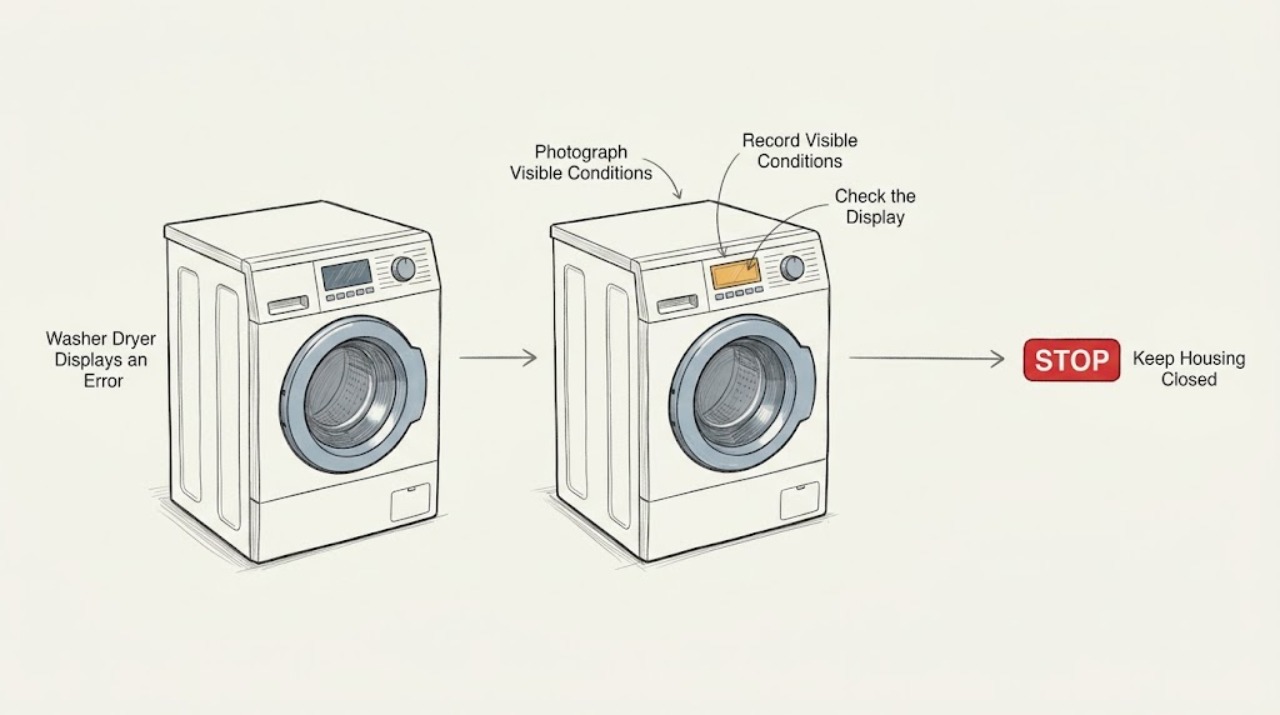
Do not diagnose an LG washer-dryer display from the letters alone. Record the code exactly, including capitalization, punctuation, icons, and whether it appeared during washing, draining, spinning, drying, or cool-down; also record the full model number. LG states that codes and remedies vary by product, and some messages are status indicators rather than failures: for example, CL can indicate Control Lock and Cd can indicate a combo unit's cool-down after drying. Use the exact model's LG manual or Help Library entry, perform only its external user steps, and stop if there is a leak, burning odor, smoke, abnormal heat, damaged cord, or a door that will not safely unlock. Do not bypass a door lock, reach into a moving or hot drum, open panels, or test live wiring. If the exact code returns after the model-approved reset or check, arrange qualified appliance service.
Before you begin
Safety first
- The user should not bypass locks, reach into moving or hot parts, open panels, test live wiring, or continue a cycle with smoke, burning odor, abnormal heat, leaks, or damaged power equipment.
Work through in order
Diagnostic checks
Use only checks that match the exact appliance or system and its official guide.
-
Check 1
Photograph or write down the display exactly as shown, including capitalization, punctuation, icons, and any alternating message; record whether the machine is a washer-dryer combo, separate washer, or separate dryer.
Expected result: The complete display and product type are captured, or the message is partial, flickering, or unreadable.
Next step: If the display is unclear, do not guess or keep restarting cycles. Photograph the panel and move to model identification or qualified service.
Why this matters
Why: A complete code and product family are needed because LG's error lists and remedies are product-specific; a partial display cannot support a reliable code interpretation.
-
Check 2
Record the full model number from the appliance label or manual, and note the exact stage when the display appeared: fill, wash, drain, spin, drying, or cool-down after drying.
Expected result: The model and stage are known, or the code appeared at more than one stage.
Next step: Open only the LG support entry or manual for that model and stage. Do not apply a washer-only explanation to the dryer portion or a separate dryer explanation to a combo unit.
Why this matters
Why: The stage narrows the relevant subsystem, while a code appearing across unrelated stages may indicate a control or power issue rather than a single water or airflow fault.
-
Check 3
Compare the display with the exact LG manual or Help Library entry and classify it as a status message, a user-correctable condition, or a code that calls for service; do not choose a code from a different model merely because the letters look similar.
Expected result: The exact entry identifies Control Lock, cool-down, a simple door or filter reminder, a water or drain condition, or an unresolved service condition.
Next step: Follow only the exact entry's external user instructions. If no exact match exists, preserve the code and model information and arrange qualified diagnosis.
Why this matters
Why: A status or reminder may clear through the model's normal user control, while recurring or component-related codes need the model-specific next step and may require service.
-
Check 4
For a wash-stage display, inspect only the outside of the door, inlet hoses, drain hose, and visible floor area for a door obstruction, kink, leak, or standing water; do not force the door or reach into the drum.
Expected result: The door closes normally and the area is dry, or the door is locked, water remains, a hose is kinked, or a leak is present.
Next step: Follow the exact model's door, inlet, or drain guidance only when there is no hazard. If water leaks, the door will not safely release, or the code returns, stop and arrange service without bypassing the lock.
Why this matters
Why: Door, inlet, and drain conditions can produce different washer codes; a leak, trapped water, or locked door can make continued operation unsafe.
-
Check 5
For a dry-stage display, inspect only user-accessible lint-filter and exhaust or drain areas described by the exact model, and note whether the drum is cool, excessively hot, damp, or still in a documented cool-down state.
Expected result: The filter or hose is obstructed, the appliance is in normal cool-down, or abnormal heat, odor, smoke, or repeated code behavior is present.
Next step: Perform only the model's external filter or hose care. If there is abnormal heat, smoke, odor, or a recurring code, stop the dryer portion and arrange qualified service.
Why this matters
Why: Airflow or drain restrictions can affect drying, Cd can be a normal combo cool-down state, and abnormal heat or odor is a stop condition rather than a cleaning experiment.
-
Check 6
Check for a Control Lock or Child Lock indication and use only the exact model's documented button sequence; do not force buttons, door, drum, or a cycle that the lock is preventing.
Expected result: CL or a lock symbol is present and clears as documented, or the lock remains, the controls stay unresponsive, or another error appears.
Next step: If the exact manual does not clear the lock, stop trying combinations and arrange service. Never bypass the lock or open a panel to reach it.
Why this matters
Why: LG documents CL as a control-lock state on washer and dryer products, but button combinations vary by model; a persistent lock or unrelated code needs model-specific help.
-
Check 7
If the exact model entry permits a reset, first ensure the machine is cool, dry, not actively filling or draining, and free of smoke or burning odor; then perform only that documented user reset and record whether the code returns.
Expected result: The message clears and the next cycle completes, or the same code returns, a different code appears, or the appliance remains unresponsive.
Next step: Do not repeat resets as a substitute for diagnosis. Preserve the original and new codes, stage, model, and symptoms, then arrange qualified LG appliance service.
Why this matters
Why: A one-time electronic interruption may clear, but recurrence or a changed symptom indicates that a reset did not resolve the underlying condition.
-
Check 8
Prepare the service record with the exact code, full model, serial information if requested by the manual, cycle and stage, load condition, water or lint observations, and any leak, heat, odor, noise, or door-lock behavior.
Expected result: The record describes a single resolved status message, a recurring code, or a code accompanied by a safety symptom.
Next step: Keep the appliance out of service when a code recurs or a safety symptom is present, and provide the complete record to qualified service.
Why this matters
Why: This separates a normal status or simple external condition from a recurring component fault and helps a technician avoid cross-model assumptions.
Use your observations
Decision map
Find the observation that best matches what you see, then follow the next safe action.
-
PATH 01Next step
What you see
Do this next
Use the exact model's documented lock sequence. If the lock remains or the controls are physically damaged, arrange service without bypassing it.
-
PATH 02Next step
What you see
Do this next
Follow the exact model's cool-down guidance and wait for safe door access. If Cd will not clear as documented or another symptom appears, arrange service.
-
PATH 03Next step
What you see
Do this next
Perform only external checks named by the exact model. Do not force the door or reach into the drum; stop and arrange service for leaks, a persistent lock, or a recurring code.
-
PATH 04Next step
What you see
Do this next
Stop the dry function for heat, smoke, odor, or fuel concerns and arrange qualified service. Only perform the model's external lint or hose check when the appliance is cool and safe.
-
PATH 05Next step
What you see
Do this next
Stop cycling the appliance, preserve every code and stage, and arrange qualified LG appliance service; do not open panels or test live circuits.
-
PATH 06Next step
What you see
Do this next
Do not operate or open the appliance. Keep clear, isolate use only through a safe accessible control if the manual and conditions permit, and arrange qualified service; use emergency help for smoke or fire.
Helpful context
Understand the symptom
Why the exact code matters
LG uses displays for washer, dryer, and washer-dryer combo conditions. The same-looking letters may have different meanings by product family, and the same appliance can show a fault during the wash portion, the drain or spin portion, the dry portion, or a normal cool-down. The official error lists therefore begin by having the owner select the displayed code and identify the product rather than guessing from a generic list.
Status messages are not always failures
A combo display may report a state that looks like an error. LG documents CL as Control Lock on washer or dryer controls, and Cd after a drying cycle as cool-down that lowers the tub temperature. Those meanings do not apply to every code or every model, so use the exact model guidance and note when the message appeared.
Wash and dry safety are different
A wash-stage code can involve the door, water inlet, drain path, balance, or motor. A dry-stage code can involve airflow, lint, gas on a gas dryer, drain water on a condensing model, temperature sensing, or cool-down. Keep the door and panels intact, keep hands out of the drum, and stop for water, smoke, burning odor, abnormal heat, or a damaged cord.
Safety boundary
Stop conditions
- Stop immediately for a leak, smoke, burning odor, abnormal heat, damaged cord or outlet, sparking, or a door that will not safely unlock.
- Do not bypass a door lock, force the door, reach into a moving or hot drum, or remove a panel to clear a code.
- Do not perform live electrical testing, move internal wiring, or repeatedly reset the appliance when the code returns.
- Do not interpret a code from another LG model, product family, or wash or dry stage as if it were the assigned machine's code.
- Stop the dry function for suspected airflow, thermal, gas, or drain hazards and arrange qualified service after the appliance is safe.
- Keep the appliance out of service when the exact model entry does not clear the display or the same code returns after the documented user step.
Only after diagnosis
Potential parts
- Door lock or latch assembly
Consider only after the exact model code and qualified diagnosis link the problem to a door-lock or latch fault rather than a load obstruction or control-lock state.
Lock assemblies vary by washer, dryer, and combo model; confirm the exact model and have service verify fit and safe installation. - Drain pump or drain-path component
Consider only when the exact model's drain code and qualified diagnosis show that the pump or drain component is failing after external hose and filter checks.
Drain parts and access procedures vary by product family; do not order or open the appliance from a generic code match. - Temperature sensor or control component
Consider only after a recurring temperature, thermistor, or control code is confirmed for the exact model by qualified diagnosis.
Sensor and control fit is model-specific and internal replacement requires safe appliance service.
When checks do not resolve it
Need a professional?
Arrange qualified LG appliance service when the exact code is not listed for the model, returns after the model-approved check, or appears with a component symptom., Use urgent service for leaks, door-lock problems, abnormal heat, burning odor, smoke, damaged electrical equipment, or a dry-stage fuel concern., Provide the exact code, model, cycle stage, and the sequence of events rather than a generic description such as error displayed.
Safety scope: The user should not bypass locks, reach into moving or hot parts, open panels, test live wiring, or continue a cycle with smoke, burning odor, abnormal heat, leaks, or damaged power equipment.
Have this ready
- Provide the exact display, full model, wash or dry stage, load condition, external hose or filter observations, reset result, and any leak, heat, odor, noise, or door-lock behavior.
Common questions
FAQ
Why should I record the exact LG code and model?
LG says error codes can vary by product model, and washer, dryer, and combo stages have different systems. Record the code exactly and use the matching model entry before trying a remedy.
Is CL always a failure on an LG washer-dryer?
No. LG documents CL as Control Lock or Child Lock, which disables controls to prevent operation by children or others. The button sequence varies by model, so use that model's manual and do not bypass the lock.
Is Cd an error on an LG washer-dryer combo?
LG documents Cd after drying as a cool-down status that lowers the tub temperature; it is not necessarily a product failure. Follow the exact model guidance and arrange service if it will not clear as documented or another symptom appears.
Can I reset the washer-dryer whenever an error appears?
Only use a reset when the exact model's LG entry permits it and the appliance is cool, dry, and free of safety symptoms. If the code returns, stop repeating resets and arrange qualified diagnosis.
What if the code appeared during drying rather than washing?
Record that stage because drying can involve different airflow, drain, gas, and temperature conditions than washing. Use the exact model's dryer or combo guidance and stop for abnormal heat, smoke, burning odor, or a suspected fuel problem.
Can I open the door or remove a panel to clear the display?
No. Do not force a locked door, reach into a moving or hot drum, remove a panel, or work around the lock or wiring. Follow only the model's external user steps and arrange qualified service when the display persists.
Read the exact guide
Official sources
- [LG front load washing machine error codes] Cd is displayed after using the drying cycle. | LG USA SupportLG Electronics · lg washer dryer displays an error; combo drying cool-down status message
- LG Washer - Troubleshooting Unresponsive Washer Buttons | LG USA SupportLG Electronics · lg washer dryer displays an error; unresponsive controls, Control Lock, reset, and service guidance
- LG Front Load Washer - Error Code List(New) | LG USA SupportLG Electronics · lg washer dryer displays an error; front-load washer and combo code identification and service boundary
- LG Washer & Dryer - How to Use the Child Lock Feature (CL Error Code) | LG USA SupportLG Electronics · lg washer dryer displays an error; CL control lock and model-dependent button guidance
- LG Dryer - Error Code List | LG USA SupportLG Electronics · lg washer dryer displays an error; dryer and combo code stages, airflow, drain, gas, sensor, and service guidance
Community feedback
Share a repair observation
Share a plain-text repair observation. Accepted observations are published automatically; this page may take a moment to update.