
On this page
Start here
Quick answer
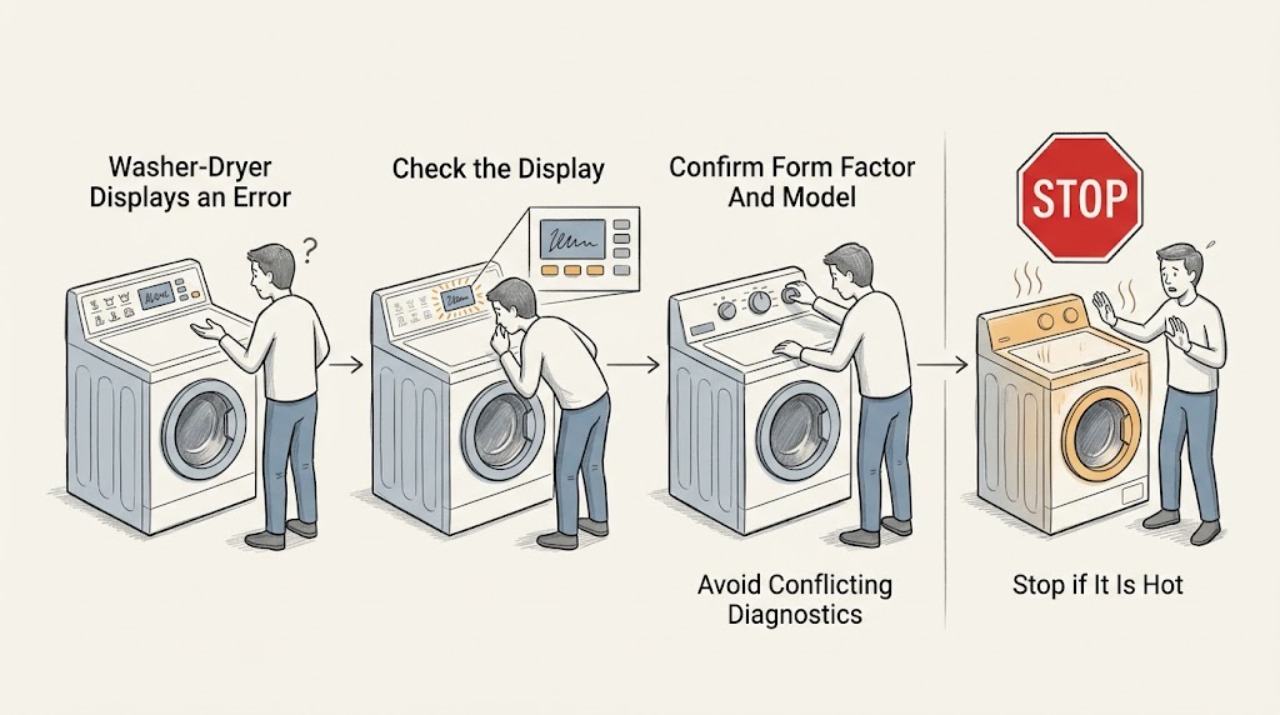
Do not guess what a Samsung washer-dryer error means from the letters alone. Photograph or write down the exact code, icon, or blinking-light pattern, the full model, and whether it appeared during washing, filling, draining, spinning, drying, heating, or a connected-app event. Samsung uses different code meanings across models, and a combined laundry appliance may be a single-drum combo, a Laundry Hub with separate washer and dryer drums, or two stacked machines. If the code is already displayed, do not start Smart Install; first use the exact model's Samsung error guide or manual. Check only the matching safe branch: water, door, drain, vent/heat, power, or communication. Do not reset a dryer showing `dn` because Samsung says that code is a firmware download in progress. For other codes, record the code before any permitted power cycle, follow the model-specific step once, and request service if the code returns, the appliance leaks, overheats, smells electrical, will not unlock, or the display and behavior do not match the guide.
Work through in order
Diagnostic checks
Use only checks that match the exact appliance or system and its official guide.
-
Check 1
Before pressing Reset, Start, or a diagnostic sequence, photograph the complete display or blinking-light pattern and write the full model identifier from the appliance label or manual.
Expected result: Record every character and symbol, whether the display is steady or flashing, the selected cycle, and the exact stage: filling, washing, draining, spinning, drying, heating, or software/network activity. Note water in the tub, laundry in the drum, a locked door, and any leak or odor.
Next step: Keep the appliance in its current safe state and use the exact Samsung model manual or the washer/dryer guide that matches the stage. If the display is not readable, preserve a photo and request service rather than forcing a test.
Stop if: Stop immediately for smoke, burning odor, sparking, a gas odor, a hot or damaged power cord, active leaking onto electrical areas, or a door that will not release safely.
Why this matters
Why: A complete code and stage can distinguish a washer event from a dryer event and can prevent a zero/O, 1/I, or code-family mistake. A partial code or a code copied from another model is not enough for a diagnosis.
-
Check 2
Confirm whether the appliance is a single-drum washer-dryer combo, a Laundry Hub with separate washer and dryer drums, or a stacked/side-by-side pair; then match the code to that appliance's model documentation.
Expected result: Record whether the error appears on the washer controls, dryer controls, shared Laundry Hub panel, or a mobile alert, and whether another unit in the pair is operating normally.
Next step: Search only the exact model's Samsung support page or manual and retain the matching page with the service record. Do not apply a code meaning from a visually similar Samsung appliance.
Stop if: Do not remove the stacking kit, move the appliance, pull it out of a tight space, or open a panel to find a model label or inspect wiring.
Why this matters
Why: The same display area can represent different machines in a shared laundry setup. Samsung states that a Laundry Hub's washer and dryer remain separate drums, while an all-in-one combo uses one drum; the correct code table depends on that distinction.
-
Check 3
If an error code is already on the display, do not start Samsung Smart Install; instead, compare the captured code with the exact model's error-code guide.
Expected result: Classify the display as an actual code or blinking-light pattern, a normal cycle status, a child-lock/icon message, or an unreadable/unknown message.
Next step: Follow only the listed step for the captured code and stage. If the code is absent from the model guide or the appliance is not working normally, stop and request service with the photo and model information.
Stop if: Do not enter a hidden test mode, repeatedly start a cycle, or use a diagnostic sequence that adds water, heat, or drum motion while the cause is unknown.
Why this matters
Why: Samsung describes Smart Install as a way to check for an error code and specifically says not to run it when a washer or dryer is already displaying one. A normal icon or status message needs the manual's feature explanation, not a forced diagnostic run.
-
Check 4
For a code that appeared during the washer portion, perform only the matching external check: inspect for water around the unit and kinked hoses for a water/leak code; confirm hot and cold valves and hose routing for a fill code; check that the door closes without trapped laundry for a door code; or observe whether water remains for a drain code.
Expected result: Record the exact code family, whether there is a leak, whether both supply valves are open and hoses are not kinked, whether the latch closes, and whether the tub drains; do not remove the rear drain-hose retaining screw or open the cabinet.
Next step: Correct only an obvious external condition allowed by the exact model guide, then use the guide's specified retry. If water is leaking, the latch or hose is damaged, the tub will not drain, or the code returns, keep the washer off and request service.
Stop if: Do not reach into a locked drum, remove cabinet panels, loosen pressure hoses under load, run an empty cycle over an active leak, or handle standing water near power connections.
Why this matters
Why: Samsung's washer guide associates different code families with water level/leakage, not filling, door, and drain conditions, but it also notes that some codes have different meanings on some models. An external condition that matches the model guide supports that branch; a mismatch or repeat code needs service.
-
Check 5
For a code that appeared during drying, match the exact code to the Samsung dryer guide, then make only the external check named there: clean the lint screen and accessible exhaust path for a temperature, heating, or vent code; check that the door and latch are clear for a door code; and leave voltage, wiring, motor, sensor, or control faults for qualified service.
Expected result: Record whether the lint screen or vent is blocked, whether the drum is empty or loaded, whether the door closes, whether the dryer is electric or gas, and whether heat, smoke, or an unusual odor is present.
Next step: After the permitted external check, follow the exact model's retry instruction once. Stop using the dryer for smoke, burning odor, abnormal heat, a gas odor, a damaged cord, or a code that returns.
Stop if: Do not measure voltage, open the heater or gas system, bypass a door or thermal safety, run the dryer with a blocked vent, or continue a cycle that produces smoke or burning odor.
Why this matters
Why: Samsung links many temperature and heating codes to restricted lint or vent airflow, while voltage, communication, motor, sensor, and gas-ignition examples require model-specific troubleshooting or service. A clear vent does not prove an internal heater or sensor is safe.
-
Check 6
Only after the code, model, stage, and external checks are recorded, use the exact Samsung guide's permitted power-cycle or restart step; treat a dryer `dn` display as an exception and leave it powered.
Expected result: After the allowed restart, note whether the same code returns immediately, returns at the same wash/dry stage, changes to another code, or clears while the appliance still behaves abnormally.
Next step: If the code returns or the appliance still leaks, will not fill, drain, lock, spin, dry, or heat normally, keep it out of service and request Samsung or qualified appliance service with the original photo and sequence.
Stop if: Do not repeat resets to erase a code, unplug or shut off a dryer showing `dn`, or restore power if there is smoke, water on electrical parts, a gas odor, or a damaged cord.
Why this matters
Why: A cleared display does not prove the underlying issue is fixed. Samsung says washer resets can erase error history, and Samsung's dryer guide says `dn` is a firmware download and power must not be interrupted. A recurring code is evidence for service, not a reason to repeat resets.
Use your observations
Decision map
Find the observation that best matches what you see, then follow the next safe action.
-
PATH 01Safety boundary
What you see
The code appears during washer filling or washing and the model guide identifies a water, level, leakage, or fill family; hoses, valves, or water around the unit provide the matching external clue.
Do this next
Close water supply valves if a leak is active and it is safe to do so, keep power and water separated, perform only the model guide's external hose/valve check, and request service if the code or leak persists.
Why this path and its safety boundary
Why it matters: A supply, hose, leak, suds, or sensor condition is more plausible than a dryer fault, but Samsung's code meaning remains model-specific and an active leak can damage the appliance or surrounding area.
Safety stop: Do not run a cycle over an active leak, remove rear fasteners, or touch electrical connections in wet conditions.
-
PATH 02Safety boundary
What you see
The washer stops at the door-lock, drain, or spin transition, and the captured code matches the exact model's door or drain guidance.
Do this next
Check only visible door clearance, latch engagement, hose kinks, and water remaining as allowed by the guide. Do not force a locked door; request service for latch damage, standing water that will not drain, or a recurring code.
Why this path and its safety boundary
Why it matters: A blocked latch path, trapped item, drain path, or model-specific sensor/motor issue is more likely than a generic display glitch. A door code can also be ambiguous across Samsung models, so the model manual decides.
Safety stop: Stop if the door will not unlock, glass or latch is damaged, water is near power, or the check requires cabinet disassembly.
-
PATH 03Safety boundary
What you see
The dryer stops with a temperature, heating, or vent-blockage code, and the lint screen or accessible exhaust path is visibly restricted.
Do this next
Clean only the lint screen and accessible exhaust path as Samsung directs, then follow the exact model retry. If the code returns, heat is abnormal, or smoke/odor occurs, stop the dryer and request service.
Why this path and its safety boundary
Why it matters: Restricted airflow or accumulated lint is a plausible contributor, but a clean screen does not rule out a concealed restriction, heater fault, sensor fault, or unsafe temperature condition.
Safety stop: Do not run the dryer with a blocked exhaust, bypass a thermal safety, open the cabinet, or continue after smoke or a burning odor.
-
PATH 04Safety boundary
What you see
The dryer display is `dn` during a firmware download, rather than a normal wash or dry fault.
Do this next
Leave the dryer powered and allow the update to finish. If `dn` remains after Samsung's stated update window or another fault appears, request service with the model and display photo.
Why this path and its safety boundary
Why it matters: Samsung says this is a download in progress and warns that shutting off or unplugging the dryer can make it inoperable and require service.
Safety stop: Do not unplug, switch off the breaker, or restart the dryer while `dn` is displayed unless emergency conditions require power isolation.
-
PATH 05Safety boundary
What you see
The code is not listed for the exact model, its meaning conflicts with the current stage, or it returns after the model-approved check or one permitted restart.
Do this next
Stop using the affected washer or dryer function, preserve the original code and sequence, and request Samsung or qualified appliance service. Give the complete model and whether the other drum or machine still works.
Why this path and its safety boundary
Why it matters: The issue may involve a sensor, motor, control, communication, power, or a model-specific condition that cannot be safely narrowed from a generic code list.
Safety stop: Do not keep clearing the code, enter a hidden diagnostic mode, measure live power, or substitute a part based only on the code letters.
Helpful context
Understand the symptom
A washer-dryer is not one universal code table
Samsung's public guides have separate washer and dryer error-code pages, and the same-looking display can behave differently by model. A Laundry Hub can put a washer and dryer behind one control panel, while an all-in-one combo uses one drum for both operations; stacked pairs keep separate machines and controls. Identify which appliance and stage produced the message before interpreting it. A code such as dC can have different meanings on different washer models, so do not carry a meaning from a search result or another Samsung model into this one.
Preserve the evidence before resetting
Write the code exactly, including a leading 1, a lower-case-looking letter, a zero versus O, a five versus S, or a blinking-light pattern. Note whether the drum contained water or clothes, whether the door was locked, and whether the event occurred during fill, wash, drain, spin, dry, heat, or a download. Samsung says a washer power cycle can clear error history, which can make diagnosis harder if the code returns, so capture the evidence before changing power.
Use the branch that matches the stage and hazard
Washer codes commonly point toward water entry, leakage, door locking, draining, motor, sensor, or control communication. Dryer codes can point toward voltage, a stuck button, door sensing, temperature, heating, vent blockage, communication, or firmware download. These are decision categories, not permission to open the cabinet or test live electrical parts. Water, heat, gas, and electrical symptoms can overlap in a combined appliance; stop when the safe external check does not explain the exact code.
Safety boundary
Stop conditions
- Stop and isolate the affected appliance only from a safe location for smoke, burning odor, sparking, a damaged cord, active leaking onto electrical areas, or a gas odor; do not continue the cycle.
- Do not run Smart Install when an error is already displayed, and do not enter an undocumented diagnostic mode.
- Do not unplug or shut off a Samsung dryer showing `dn` during a firmware download; follow Samsung's update guidance unless an immediate emergency requires isolation.
- Do not repeatedly reset or clear a code. Preserve the first code, stage, model, and behavior so service can diagnose the recurring fault.
- Do not open panels, measure live voltage, bypass a door or thermal safety, force a locked door, or handle wet electrical parts.
When checks do not resolve it
Need a professional?
Request Samsung or qualified appliance service when the exact code is not listed for the model, returns after the model-approved check or one permitted restart, appears with a leak or failed door lock, or points to voltage, heating, motor, sensor, communication, control, or gas-ignition work. Treat smoke, burning odor, sparking, gas odor, abnormal heat, a damaged cord, or water at electrical parts as an immediate stop-and-escalate condition.
Common questions
FAQ
Should I reset a Samsung washer-dryer as soon as an error appears?
First photograph and record the exact code, model, and wash or dry stage. Samsung says a washer power cycle can clear error history, and its Smart Install guide says not to run that diagnostic when an error is already displayed. Use a reset only when the exact model guide permits it, and do not repeat it when the code returns.
Can I unplug a Samsung dryer showing dn?
Do not unplug or shut off the dryer while `dn` is displayed unless an immediate emergency requires power isolation. Samsung identifies `dn` as a firmware download in progress and warns that interruption can make the dryer inoperable and require service.
Why is the same Samsung error code described differently on different pages?
Samsung code meanings can depend on the model, appliance, and stage. Confirm whether the message came from the washer, dryer, shared Laundry Hub panel, or a single-drum combo, then use that exact model's guide. Do not carry a door, motor, or voltage meaning from another Samsung model.
When should a Samsung washer-dryer error become a service call?
Request service when the code is not listed for the exact model, returns after the approved external check or one permitted restart, or appears with a leak, failed door lock, abnormal heat, smoke, burning odor, sparking, a damaged cord, or a gas odor. Keep the original code and sequence for the technician.
Read the exact guide
Official sources
- Samsung washing machine information and error codesSamsung · Samsung washing machine code meanings, model caveats, external checks, and service boundaries
- Run diagnostics on your Samsung washer or dryerSamsung · Samsung washer and dryer Smart Install conditions and stage-specific checks
- Samsung dryer displays an error codeSamsung · Samsung dryer error categories, safe external checks, firmware exception, and service boundaries
- Cycles, settings, and features on your Samsung washing machineSamsung · Samsung washer cycle and panel differences across models
- Samsung Laundry Hub FAQSamsung · Samsung Laundry Hub and washer-dryer form factors, model-specific troubleshooting, and service
- How to reset your Samsung washing machineSamsung · Samsung washer power-cycle limits, error-history preservation, and escalation
Community feedback
Share a repair observation
Share a plain-text repair observation. Accepted observations are published automatically; this page may take a moment to update.