
On this page
Start here
Quick answer
An error on a washer-dryer display does not by itself prove that the control board has failed. Write down the exact code or message, identify it in the manual for the appliance's model, and follow the matching low-risk check for the door, water supply, drain path, or lockout. If the message remains after the manual's permitted check and one documented reset, or it points to a control/display communication fault, stop resetting and arrange appliance service; do not open the cabinet or test live wiring.
Before you begin
Safety first
- Internal control, display, wiring, and service-diagnostic work should be performed by a qualified technician with the appliance made safe.
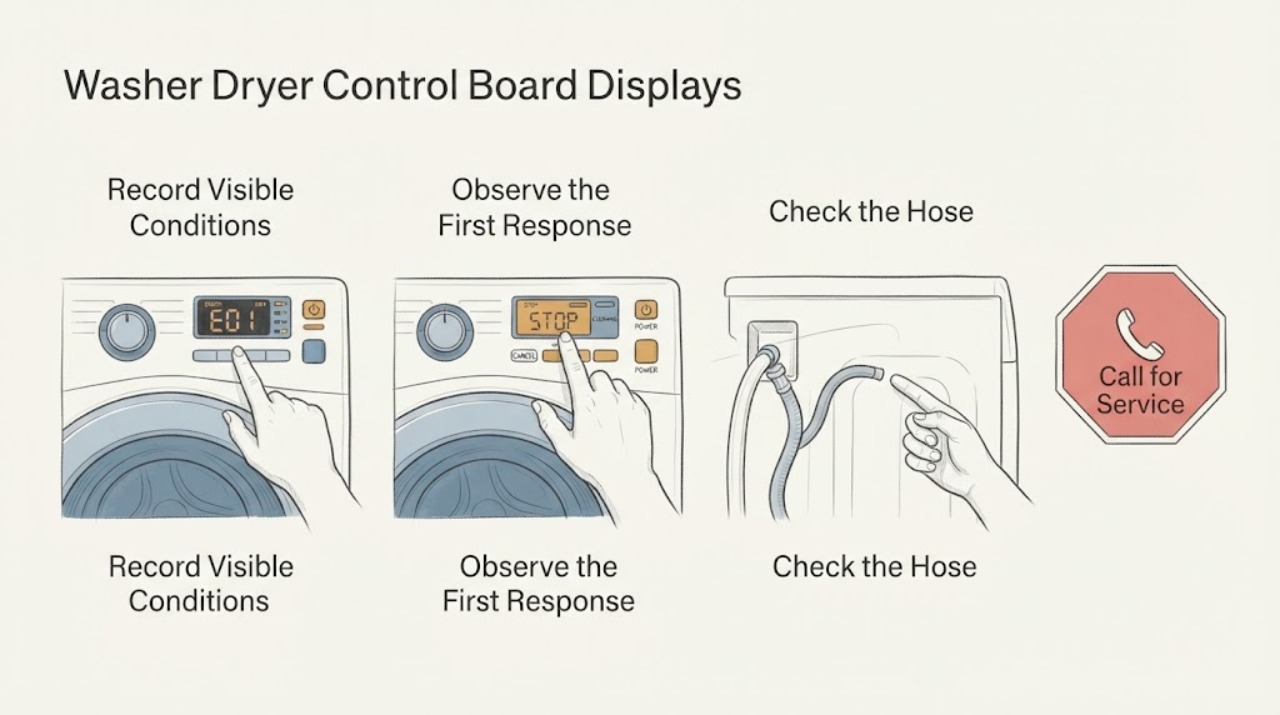
Work through in order
Diagnostic checks
Use only checks that match the exact appliance or system and its official guide.
-
Check 1
Record the exact letters, numbers, symbols, or plain-language message before turning the appliance off. Note whether it appears during wash, dry, drain, or startup, whether the door is locked, and whether one or both appliance functions are affected.
Expected result: The message is stable and can be matched to the model's manual, or it is only a transient status such as a door, water, drain, or lock condition.
Next step: Keep the note or a photo, then use the exact model manual or manufacturer support page for the next check. If the display is blank, sparking, or accompanied by smoke or a burning smell, stop using the appliance and skip to service.
Stop if: Stop if the appliance smells burned, smokes, sparks, leaks water near electrical parts, or becomes unusually hot.
Why this matters
Why: A complete code and its timing are more useful than the general statement that the control board shows an error; a status message may not indicate an electronic board failure.
-
Check 2
Look up the recorded message in the owner's manual or the manufacturer's support page for the exact washer-dryer model. Check whether it is labeled as information, lockout, status, or an error and follow only the check listed for that message.
Expected result: The guide assigns the message to a door, water, drain, overload, power, display, or control communication condition, or it says that service is required if the message persists.
Next step: Proceed to the model guide's low-risk check for the named system. Do not substitute a code list from a different brand or model family.
Why this matters
Why: The assigned system narrows the diagnosis. A control-board-related message can be a connection or communication issue, while a door, water, or drain message points to a condition that should be checked first.
-
Check 3
With the appliance stopped, perform only the external checks named by the guide: confirm the door is fully closed and unobstructed, verify the water supply is available when the message concerns filling, and inspect the accessible drain hose or filter only if the manual permits it.
Expected result: The condition clears after the matching external check, or the same message remains even though the named condition is corrected.
Next step: If clear, run the shortest appropriate supervised test described by the manual. If unchanged, record the result and continue to the single documented reset or service decision; do not remove panels.
Stop if: Do not reach into a moving drum, defeat a door lock, remove a panel, or work around exposed wiring.
Why this matters
Why: A cleared door, water, or drain message makes the control board less likely to be the first part to replace. A recurring message after the correct check points to a sensor, actuator, wiring, or control issue that needs more diagnosis.
-
Check 4
If the manual specifically allows a reset for that message, disconnect the appliance using its normal plug or appliance disconnect, wait for the manual's interval, reconnect it, and observe one startup or short test cycle. Do not repeat resets as a substitute for diagnosis.
Expected result: The message stays cleared, returns immediately, or returns only when a particular function such as filling, draining, spinning, or drying begins.
Next step: If it returns, save the code and the operating stage for service. If it stays clear, monitor the next normal load and stop if the message or unsafe symptom comes back.
Stop if: Do not reset an appliance that is wet around electrical parts, visibly damaged, smoking, or repeatedly tripping its circuit protection.
Why this matters
Why: A one-time clear can indicate a temporary state or power interruption, but a returning message ties the fault to the associated operating stage and does not confirm that the control board alone is bad.
-
Check 5
Compare the display behavior with the code result: determine whether the display remains readable and responsive, becomes blank, or shows a persistent communication or control fault after the permitted checks.
Expected result: The display is blank or unresponsive, or a communication/control message returns; alternatively, the display works and the code consistently identifies a non-board system.
Next step: Arrange a qualified appliance technician for persistent display or communication symptoms. Provide the model, exact message, timing, external checks, and reset result; do not open the cabinet or enter service diagnostic mode yourself.
Stop if: Stop user troubleshooting at this point when the fault persists or requires internal access or electrical testing.
Why this matters
Why: A blank display can involve incoming power, the human-machine interface, or the main control. A persistent communication message can involve a connector, display, wiring, or board; the observation is not enough to identify which part.
Use your observations
Decision map
Find the observation that best matches what you see, then follow the next safe action.
-
PATH 01Next step
What you see
Do this next
Follow the exact manual check, then run one supervised test if allowed. If the same message returns, escalate with the recorded code and result rather than ordering a board.
Why this path and its safety boundary
Why it matters: The appliance is reporting a condition that should be corrected or verified before a control board is considered.
-
PATH 02Next step
What you see
Do this next
Monitor the next normal load and keep the code note. Stop using the appliance and seek service if the message returns or an unsafe symptom appears.
Why this path and its safety boundary
Why it matters: A temporary condition or operating-state interruption is more likely than a confirmed board failure, although recurrence remains important.
-
PATH 03Next step
What you see
Do this next
Book appliance service and give the technician the exact message, model, cycle stage, and checks already completed. Keep the appliance disconnected if the guide or technician advises it.
Why this path and its safety boundary
Why it matters: The fault may involve the display interface, wiring, connector, main control, or another system identified by the model guide; the code does not select a replacement board by itself.
-
PATH 04Next step
What you see
Do this next
Check only the ordinary external power connection allowed by the manual. If power is present or the problem returns, stop and arrange professional diagnosis; do not test live circuits.
Why this path and its safety boundary
Why it matters: Power delivery, the user interface, or the main control may be involved, and the appliance cannot provide reliable self-diagnosis from the display.
-
PATH 05Next step
What you see
Do this next
Stop the appliance, keep clear of exposed or wet areas, and use the appliance's normal disconnect only if it can be done without contact with a hazard. Arrange qualified service or emergency help appropriate to the immediate danger.
Why this path and its safety boundary
Why it matters: This is a safety condition, not a routine error-code exercise, and continued operation could increase damage or shock and fire risk.
Helpful context
Understand the symptom
Why an error display is not automatically a bad control board
The control board displays what the appliance is sensing or what its software has detected. A door that is not recognized as closed, a water or drain condition, a protective lockout, and a communication problem can all produce different messages. The exact meaning is model-specific, so the safest diagnosis starts with the complete message and the appliance manual rather than a guessed replacement board.
Use the message to choose the next safe check
Some displays describe a condition that can be corrected without opening the appliance. Other codes identify a suspected system or a communication path between the display and main control. A code that returns after its documented check is useful evidence for a technician; repeatedly clearing it can erase that context without fixing the cause.
Safety boundary
Stop conditions
- Stop using the washer-dryer for smoke, sparking, a burning smell, unusual heat, water near electrical parts, or repeated circuit trips.
- Stop after one model-documented reset if the same message returns; record the message and operating stage for service.
- Do not remove panels, bypass a door lock, enter service diagnostic mode, or measure live voltage as an ordinary-user check.
- Arrange qualified appliance service when the display is blank or unresponsive, a control or communication message persists, or the manual directs service.
Only after diagnosis
Potential parts
- washer-dryer main control board
Consider this only when model-specific diagnosis confirms the main control is defective after external conditions, wiring, and the display interface have been evaluated.
Confirm the complete appliance model and revision with the manufacturer or technician before ordering; an error message alone does not establish fit or failure. - washer-dryer display or user-interface module
Consider this only when the display is blank, unresponsive, or has a confirmed communication fault and testing separates the interface from the main control.
Use the exact appliance model and manufacturer fit information; display and control modules are not interchangeable based on appearance. - model-specific door, water, or drain component
Consider the particular component only when the exact message and technician testing identify a door-lock, water-inlet, or drain fault rather than a control-board fault.
The correct part depends on the exact model and the diagnosed system; do not choose among these categories from a generic error description.
When checks do not resolve it
Need a professional?
Call a qualified appliance technician when an exact code persists after the model's permitted external checks and one documented reset, when the display is blank or unresponsive, or when the guide identifies a control or communication fault.
Safety scope: Internal control, display, wiring, and service-diagnostic work should be performed by a qualified technician with the appliance made safe.
Have this ready
- Provide the appliance brand and model, the exact displayed message, when it appears, whether the door is locked, and the external checks and reset result.
Common questions
FAQ
Does an error on a washer-dryer display mean the control board is bad?
No. The message may describe a door, water, drain, lockout, power, or communication condition. Use the exact model guide and consider a board only after diagnosis confirms it.
Should I keep resetting the washer-dryer until the error disappears?
No. Perform only the reset the model guide permits, once after the named external check. If the message returns, keep the code and cycle stage for service.
What if the washer-dryer display is blank instead of showing a code?
Check only the ordinary external power connection allowed by the manual. A blank or unresponsive display can involve power, the interface, or the main control and should receive professional diagnosis if it persists.
Can I replace the washer-dryer control board from the error code alone?
No. A code can identify a suspected system, but it does not prove which component failed. A technician should separate the board, display, wiring, and the named appliance system before parts are ordered.
When should I stop troubleshooting and call for service?
Stop for smoke, sparks, burning odor, unusual heat, water near electrical parts, or repeated circuit trips. Also call when the display or communication fault persists after the model's permitted checks and one documented reset.
Read the exact guide
Official sources
- Use Smart Care on your Samsung washer and dryerSamsung · Manufacturer guidance that Smart Care information codes and actual error codes require the correct model-specific interpretation.
- GE Profile™ UltraFast Combo Washer/Dryer - Display Not RespondingGE Appliances · Manufacturer support guidance for a GE washer-dryer display that does not respond.
- GE Profile™ UltraFast Combo Washer/Dryer - Fault & Error Codes and Status MessagesGE Appliances · Manufacturer code and status-message guidance for a specific GE washer-dryer family; use the matching model guide.
- Tech Sheet - W11156991 - RevAWhirlpool Corporation · Manufacturer service documentation used to set the professional boundary for control, interface, and diagnostic-mode faults.
- LG Front Load Washer - Error Code List(New)LG Electronics · Manufacturer examples showing that error codes can identify power, over-current, water, and display or control communication conditions.
Community feedback
Share a repair observation
Share a plain-text repair observation. Accepted observations are published automatically; this page may take a moment to update.