
On this page
Start here
Quick answer
An LG oven that heats unevenly is often affected by the selected cooking mode, incomplete preheating, rack position, pan placement, blocked airflow, or a temperature setting that needs model-specific calibration. First describe whether one side browns faster, the top and bottom differ, or the whole cavity runs consistently hot or cool. Preheat using the exact LG instructions, center the pan, leave air space, and do not line the oven bottom or cover racks with foil. If the pattern remains with correct settings and placement, or an error code, failed fan, damaged gasket, unusual smell, smoke, or electrical concern appears, stop repeated testing and arrange qualified appliance service.
Work through in order
Diagnostic checks
Use only checks that match the exact appliance or system and its official guide.
-
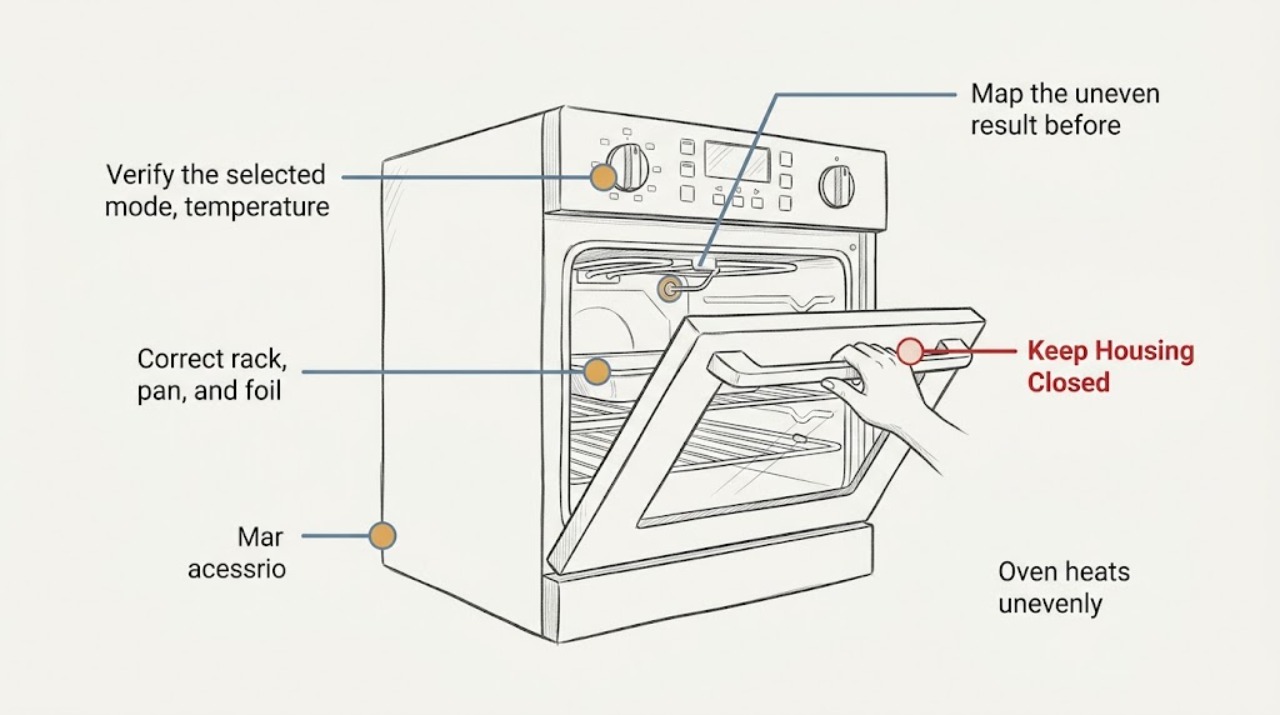
Map the uneven result before changing anything
Write down which food area cooks first or last, whether the difference is left-to-right, front-to-back, top-to-bottom, or only between racks, and whether the result occurs in Bake, Convection Bake, or another mode. Note the rack, pan, load size, preheat state, and any display code or safety symptom.
Expected result: Only one edge or corner differs; the top is much darker than the bottom; multiple racks differ; or the entire dish is consistently too light or too dark.
Next step: Keep the notes and use them to choose the matching branch below. Stop testing if there is smoke, a burning smell, sparking, a damaged cord, a repeated breaker trip, or any unsafe condition.
Stop if: Do not open the oven controls, move a connected range, or repeatedly run cycles just to reproduce a hazardous symptom.
Why this matters
Why: A localized pattern points toward placement, airflow, fan circulation, or a heating-system distribution issue. A consistent whole-dish bias points more toward settings, preheat, temperature scale, or calibration.
-
Verify the selected mode, temperature scale, and preheat
Use the exact LG manual to confirm the intended mode, temperature scale, and rack recommendation. Preheat when the recipe or mode calls for it, confirm the temperature entry using the model's documented control sequence, and avoid opening the door repeatedly while the oven is coming to temperature.
Expected result: The oven was not preheated, the temperature scale or mode was wrong, the setting was not confirmed, or the same uneven result remains after one correctly preheated and documented test.
Next step: Repeat one supervised test with the correct mode and preheat only if there are no safety symptoms. If the pattern remains, continue to the placement and airflow checks rather than raising the set temperature at random.
Stop if: Do not defeat a door lock, use a mode outside the manual's instructions, or continue testing if the oven shows a heating or sensor error.
Why this matters
Why: An incomplete preheat or incorrect mode can imitate a heating fault. A repeatable pattern after correct setup makes rack placement, airflow, calibration, or a component issue more likely.
-
Correct rack, pan, and foil placement
With the oven cool enough to handle safely, place a single pan on the rack position recommended by the LG manual, center the pan, and leave clearance from the oven walls. Remove any foil or liner covering the oven bottom or an entire rack; do not block slots, holes, or passages.
Expected result: The pan was off-center, touching a wall, crowded with other pans, on an unsuitable rack, or surrounded by foil; or the same side-to-side difference remains with the recommended position and clear airflow.
Next step: Run one comparable test with the corrected placement and record whether the hot or cool area moves with the pan. If the hot spot stays in the same oven location, arrange model-specific service.
Stop if: Do not line the oven bottom, cover a full rack, block vent openings, or touch hot surfaces to inspect the result.
Why this matters
Why: Incorrect rack height, crowded cookware, and coverings can change the heat path and air circulation. Persistence with a centered, correctly spaced pan makes a machine-side airflow, sensor, or heating issue more likely.
-
Compare conventional and convection behavior
If the LG oven has convection, use the exact manual to identify the convection mode and whether its fan should operate. Compare one similar, correctly placed test in the recommended conventional mode and one in convection without changing the rack or pan placement at the same time.
Expected result: Convection produces a more even result; the fan never runs or makes unusual noise; only conventional Bake is uneven; or both modes have the same fixed hot or cool area.
Next step: Use the mode that the manual and recipe call for only if results are safe and repeatable. If the fan behavior is abnormal or both modes remain uneven, stop repeated tests and request qualified service.
Stop if: Do not reach through a hot cavity to inspect a fan, remove a fan cover, or operate with a damaged blade, unusual noise, smoke, or exposed wiring.
Why this matters
Why: Improvement in convection supports an air-circulation or rack-distribution difference. A fan that fails to operate when the manual expects it, or a fixed hot spot in both modes, makes a fan, sensor, element, burner, or control fault more likely.
-
Check for a consistent temperature offset
If the entire dish is reliably too hot or too cool rather than just one area, use a suitable oven thermometer or the model's documented temperature-check method without touching hot elements. Compare the result after the oven has completed its normal preheat, then consult the LG manual for any user-accessible thermostat adjustment.
Expected result: The measured temperature is consistently offset from the selected setting; it varies widely between checks; or the measured temperature is reasonable but one area still cooks differently.
Next step: Apply only the exact model's documented calibration procedure, if one is provided. If temperature varies widely, the adjustment does not help, or local unevenness remains, arrange qualified appliance service.
Stop if: Do not remove the control panel, probe live wiring, alter a sensor position, or use an improvised high-heat test.
Why this matters
Why: A stable whole-cavity offset can support a calibration or temperature-sensing issue. A large variation or a local hot spot is not safely corrected by simply changing the set temperature and may involve sensing, control, airflow, or heating components.
-
Check the door seal and display for escalation clues
When the oven is cool, inspect the visible door gasket and frame for a tear, gap, obstruction, or door that does not close evenly. Read and record any error code exactly as shown, then use LG's error-code guidance for that code; do not remove the gasket, bypass a lock, or open the control area.
Expected result: The door does not seal evenly, the gasket is damaged, an oven sensor, heating, or convection-fan code appears, or there is no visible door or code issue.
Next step: Keep the oven off and arrange qualified service for a damaged seal, recurring code, unreliable heating, smoke, odor, or a persistent uneven pattern after the low-risk checks.
Stop if: Do not continue cooking with a damaged door seal, active error, exposed wiring, smoke, sparking, or a burning smell.
Why this matters
Why: A failed seal can let heat escape, while LG maps some codes to oven heating, sensor, or convection-fan faults that require model-specific handling. A clear seal and no code do not rule out an internal component fault if the fixed pattern persists.
Use your observations
Decision map
Find the observation that best matches what you see, then follow the next safe action.
-
PATH 01Next step
What you see
One side, corner, front edge, or fixed oven location browns faster while a centered pan, correct rack, and clear passages are used.
Do this next
Stop repeated baking comparisons and arrange qualified LG appliance service, especially if the pattern occurs in more than one cooking mode.
Why this path and its safety boundary
Why it matters: Because the hot or cool area stays with the cavity instead of moving with the pan, placement alone is less likely; airflow, fan circulation, sensing, or a heating-system distribution fault becomes more plausible.
-
PATH 02Next step
What you see
The result improves when the pan is centered, the model-recommended rack is used, foil is removed, and space is left around the cookware; or the hot area moves when the pan moves.
Do this next
Keep the model's rack and spacing guidance for comparable recipes. If uneven cooking returns with correct placement, continue to the mode and temperature branches instead of adding foil or raising heat.
Why this path and its safety boundary
Why it matters: Rack height, pan position, crowding, or foil interference was likely changing the heat path rather than the oven producing a fixed internal hot spot.
-
PATH 03Next step
What you see
Dishes are consistently too light or too dark throughout, and an independent temperature check shows a repeatable offset after normal preheat without a fixed local hot spot.
Do this next
Use only the exact LG model's documented calibration option; if the offset is unstable or calibration does not resolve it, request qualified service.
Why this path and its safety boundary
Why it matters: A setting, temperature-scale, thermostat-calibration, or sensor issue is more likely than pan placement.
-
PATH 04Next step
What you see
Unevenness appears mainly in Convection Bake, the fan is absent or unusually noisy, or the result improves in a documented non-convection mode.
Do this next
Follow the exact manual for the intended mode and rack. If fan operation is abnormal, an error code appears, or imbalance persists, keep the oven out of service and arrange qualified repair.
Why this path and its safety boundary
Why it matters: The convection fan or its airflow path becomes more relevant, while the mode-specific rack and pan arrangement may also be wrong.
-
PATH 05Safety boundary
What you see
Unevenness remains across correct settings and placement, the door does not seal, an oven heating/sensor/fan code appears, or smoke, odor, sparking, or another safety symptom occurs.
Do this next
Stop using the oven and arrange qualified appliance service. Record the exact code and symptom pattern, but do not open panels or bypass a safety device.
Why this path and its safety boundary
Why it matters: An internal heating, temperature-sensing, control, airflow, or door-sealing fault is more likely than a recipe or rack issue, and further homeowner testing could be unsafe.
Safety stop: Do not continue cooking or attempt live electrical, gas, heating-element, fan, sensor, or control work.
Helpful context
Understand the symptom
Start by naming the uneven pattern
Uneven browning on one side is a different clue from an oven that is uniformly too cool, a top that cooks much faster than the bottom, or a result that changes only when using multiple racks. Note the food, rack, pan material, cooking mode, preheat state, and which area cooks first. LG's guidance is model-specific, so use the full model number to retrieve the correct manual before changing calibration or removing any part.
Air circulation matters
LG says convection uses a fan to circulate heat more evenly, while rack position and pan spacing change the heat distribution. Center the pan, leave clearance around it and the oven walls, and keep racks and vent passages free of foil or other coverings. Do not assume a convection setting behaves like conventional bake; follow the mode and rack guidance for the exact model.
Separate repeatable temperature error from local hot spots
If every properly placed dish is consistently undercooked or overcooked, the temperature setting, temperature scale, preheat behavior, or thermostat calibration becomes more relevant than a single pan position. If only one area changes color or doneness, placement, airflow, fan operation, or a heating-system fault is more plausible. Use LG's model documentation for any temperature adjustment; do not open the control panel or test energized wiring.
Treat codes and safety symptoms as escalation clues
LG's range error-code guidance maps some codes to oven heating, oven sensor, and convection-fan issues and directs service when the code returns. A damaged door gasket, smoke beyond normal cooking residue, burning smell, sparking, or a tripped breaker is not an invitation to keep comparing pans. Stop using the oven and arrange qualified service when those symptoms occur.
Safety boundary
Stop conditions
- Stop using the oven for smoke, a burning smell, sparking, exposed wiring, a damaged door or gasket, repeated breaker trips, or an active heating or sensor error.
- Do not open the control panel, probe energized wiring, remove heating or fan covers, bypass a door or safety device, or alter a gas connection.
- Do not cover the oven bottom, an entire rack, or vent passages with foil or another material; do not use foil to compensate for uneven heat.
- Stop repeated cooking tests when the fixed hot spot remains after correct settings, preheat, rack, pan, and spacing checks; arrange qualified service.
Only after diagnosis
Potential parts
- oven temperature sensor
Consider this category only if model-specific testing confirms a sensor or temperature-feedback fault after the whole-cavity offset or error-code pattern is documented.
Confirm the complete LG model and qualified diagnosis before selecting a sensor; an uneven result alone does not establish fit or failure. - convection fan motor or fan assembly
Consider this category only when the model has convection and testing links the uneven result to absent, abnormal, or fault-coded fan operation.
Verify the exact LG model and the technician's findings before ordering; do not remove a fan cover or fit a generic assembly. - heating element or burner and ignition assembly
Consider this category only after qualified testing identifies a heating-side fault, such as a persistent local temperature pattern, incomplete heating, or a matching code.
Electric and gas LG ovens use different heating systems; confirm the full model, fuel type where applicable, and diagnosed component before any part selection.
When checks do not resolve it
Need a professional?
Arrange qualified appliance service when an LG oven remains uneven after one correctly preheated, correctly placed comparison, when a hot or cool area stays fixed in the cavity, when temperature varies widely, or when a door seal, fan, heating, sensor, control, smoke, odor, sparking, or error-code concern appears. Do not open panels or attempt live electrical, gas, fan, sensor, or heating-system work.
Have this ready
- Provide the full LG model number, cooking mode, selected temperature, preheat behavior, rack and pan position, food and load pattern, which cavity area cooks first, whether the result changes with convection, any measured temperature comparison, door-seal observations, and exact error codes.
Common questions
FAQ
Why does my LG oven cook one side faster than the other?
First correct the rack position, center the pan, leave space around it, and remove any foil that blocks airflow. If the same oven location remains hotter with correct placement and in more than one mode, airflow, temperature sensing, or a heating-system fault is more likely and needs qualified service.
Can the wrong rack position make an LG oven heat unevenly?
Yes. LG says heat distribution differs by rack position and recommends using the model manual, centering pans, and leaving clearance from the oven walls. Do not cover racks or the oven bottom with foil to compensate for a placement problem.
Does convection make an LG oven cook more evenly?
LG describes convection as using a fan to circulate heat for more even cooking, but the correct mode and rack arrangement are model-specific. If the fan is absent, unusually noisy, code-labeled, or convection remains uneven, stop repeated tests and arrange service.
Should I adjust the thermostat when my LG oven is uneven?
Only consider calibration when the whole cavity is consistently hot or cool and a safe, repeatable temperature check supports an offset. Use only the exact LG model's documented adjustment. A fixed local hot spot, unstable temperature, error code, or damaged seal requires qualified diagnosis instead.
Read the exact guide
Official sources
- LG Range - Oven Cooking ModesLG USA Support · LG range Bake, Convection Bake, Convection Roast, cleaning, and heat-circulation mode guidance
- Oven Under Cooking - Gas RangesLG USA Support · LG gas-range oven cooking performance, settings, preheat, load, rack position, pan spacing, foil, and thermostat guidance
- Oven Over Cooking - Gas RangesLG USA Support · LG gas-range oven preheat behavior, thermostat settings, fuel setup, and combustion-related guidance
- Oven Not Heating - Gas RangesLG USA Support · LG gas-range oven controls, power, door, gas valve, igniter, and model-specific no-heat escalation
- LG Range - Error Codes ListLG USA Support · LG range oven sensor, heating, and convection-fan error-code meanings and service escalation
- Oven Cooking Issues (Under or Over Cooking)LG USA Support · LG oven and range undercooking or overcooking troubleshooting entry point
Community feedback
Share a repair observation
Share a plain-text repair observation. Accepted observations are published automatically; this page may take a moment to update.