
On this page
Start here
Quick answer
If an air conditioner will not start, first check whether the thermostat is actually calling for cooling, then distinguish a blank indoor unit, no indoor airflow, and an outdoor unit that stays silent. Check only the thermostat mode and setpoint, an accessible filter, visible registers, and clearly visible power status. Record whether the indoor blower responds, whether the outdoor unit is silent or hums, and whether ice, water, smoke, odor, heat, or a previous breaker trip is present. A compressor can fail to start, but a thermostat, control, drain safety, power interruption, contactor, capacitor, fan motor, filter, frozen coil, or refrigerant problem can produce the same symptom. Do not open the air handler or outdoor cabinet, touch the compressor or electrical parts, test energized wiring, handle refrigerant, or repeatedly reset a breaker. Stop for smoke, burning odor, arcing, a hot connection, water near electrics, ice, severe noise, or repeated trips and arrange qualified HVAC service.
Before you begin
Safety first
- Keep the system off for smoke, burning or electrical odor, arcing, hot connections, water near electrics, persistent ice, severe noise or vibration, or repeated trips. Do not open panels, touch the named components, perform energized work, handle refrigerant, or bypass safety devices.
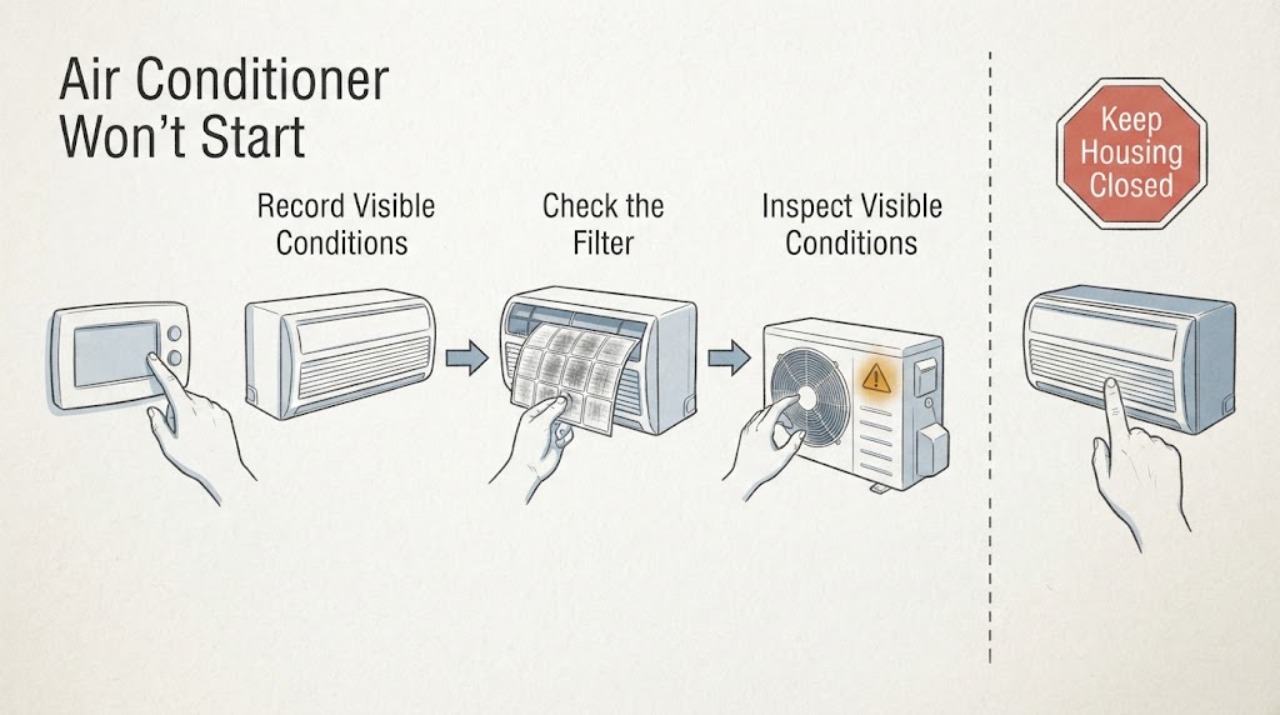
Work through in order
Diagnostic checks
Use only checks that match the exact appliance or system and its official guide.
-
Check 1
Read the thermostat without removing its faceplate. Record whether the display is on, the mode is Cool, the setpoint is below the room temperature, the fan is Auto or On, and whether a delay, alert, or code appears. If there is no safety warning, make one user-level correction to Cool and a lower setpoint.
Expected result: The display is blank, the mode or setpoint is wrong, a delay or alert is shown, or the thermostat is correctly calling for cooling.
Next step: Follow only the thermostat manual's user-level battery or power guidance for a blank display. If the call is correct and the unit remains off, continue with the external checks without removing the thermostat or inspecting wiring.
Why this matters
Why: A blank display or absent cooling call can explain a quiet system. A correct call shifts attention toward power, filter, drain safety, indoor response, and outdoor-unit branches; a displayed delay may be normal for that control or may require model-specific service.
-
Check 2
Set the thermostat to Off before inspecting the accessible air filter. If the model manual allows a user filter change or cleaning, compare the filter with a clean one and restore the correct orientation and fit. Do not open a furnace, air handler, or blower compartment to reach a filter.
Expected result: The filter is visibly clogged, wet, damaged, clean, or inaccessible without opening equipment.
Next step: Correct one accessible filter issue as the manual permits and make one normal cooling call. If the system remains off, airflow is weak, the filter is wet, or access requires a cover removal, leave the system off and call HVAC service.
Why this matters
Why: A restricted filter can reduce airflow and contribute to freezing, overheating, poor cooling, or a protective shutdown. A clean filter does not rule out a thermostat, compressor, contactor, capacitor, fan motor, control, drain, power, or refrigerant fault. A wet filter points to a moisture problem.
-
Check 3
During one normal, non-hazardous cooling call, stand at several open supply registers and the return grille. Observe whether the indoor blower produces no air, weak air, or normal airflow, and whether the response begins, stops, or never appears. Keep hands and tools away from registers and equipment openings.
Expected result: There is no indoor airflow, weak airflow, normal airflow with no cooling, or normal airflow and cooling begins.
Next step: Record the result and do not repeat a failed start. Request HVAC service for absent or weak airflow, for normal airflow with no outdoor response, or for a recurring start failure.
Why this matters
Why: No or weak airflow keeps the filter, return path, blower, control, door interlock, and power path in scope. Normal indoor airflow with no cooling or no outdoor response makes the outdoor power, compressor, contactor, capacitor, fan motor, control, or safety-lockout path more plausible. Normal cooling suggests the initial issue may have been a thermostat or delay state.
-
Check 4
From a safe standing position, look at the outdoor unit during one cooling call. Without touching the cabinet or approaching the fan, note whether the fan turns, the compressor starts, the unit hums and stops, remains completely silent, or shows visible damage. Never insert an object through the grille and never remove a panel.
Expected result: The outdoor fan runs, the unit hums without starting, the fan does not run, the unit is silent, or visible ice, damage, smoke, or odor is present.
Next step: Turn the system off for ice or any warning sign and arrange qualified service. For a quiet but otherwise normal-looking unit, provide the exact sequence to the technician instead of testing the compressor or its electrical parts.
Why this matters
Why: A hum or fan/compressor mismatch can involve the compressor, capacitor, contactor, motor, control, or power path. A silent unit can have a missing thermostat call, open protective device, drain safety, control fault, or other condition. Ice, smoke, odor, or damage overrides ordinary observation.
-
Check 5
Without opening the electrical panel, note whether a clearly labeled HVAC protective device at the household panel or an accessible indoor service switch appears off. Do not reset a device if it is hot, damaged, wet, accompanied by odor, or has opened before. If the equipment manual permits one safe reset, do not repeat it if the device opens again.
Expected result: The device is on, visibly off, repeatedly opens, or its condition cannot be safely assessed.
Next step: Leave a repeated or unsafe trip off and arrange HVAC or electrical service. Never replace a fuse, alter breaker size, bypass protection, or open a disconnect enclosure as a troubleshooting step.
Why this matters
Why: An open device can interrupt indoor or outdoor equipment. A repeat opening suggests an electrical, motor, capacitor, compressor, contactor, wiring, or other fault; it is not proof that the protective device itself needs replacement.
-
Check 6
Look from outside closed equipment for water near the indoor unit, a wet filter, or a full or visibly overflowing condensate drain pan. Do not pour chemicals, remove a drain fitting, open a panel, or handle a float switch or safety circuit.
Expected result: No water is visible, water or a wet filter is present, or water is near electrical equipment.
Next step: Keep the system off for water, overflow, or a wet filter and request HVAC service. If water is approaching electrical equipment, keep clear and isolate power only from a safe dry location if possible.
Why this matters
Why: A plugged condensate path can cause water damage and can stop some systems through a safety switch. Water near electrics makes the electrical safety boundary more important than restarting the compressor or system.
-
Check 7
Record the timing and sound of the failed call from a safe position: no response, indoor-only response, outdoor hum, rapid stop, repeated attempt, or protective-device event. Also note whether the coil or accessible refrigerant line has frost or ice and whether the filter was dirty. Do not touch refrigerant tubing or chip ice.
Expected result: The system is silent, hums and stops, starts then stops, cycles repeatedly, or shows frost or ice.
Next step: Turn the system off for ice, repeated starts, unusual noise, or a persistent no-start. Give the technician the exact sequence and do not order a compressor or electrical part from the sound alone.
Why this matters
Why: Timing helps separate a thermostat or control call from a starting component, motor, compressor, airflow, frozen-coil, or refrigerant protection branch. Low refrigerant and frozen coils require professional diagnosis; repeated attempts can further stress equipment.
-
Check 8
From a dry, safe distance, check for smoke, burning or electrical odor, visible arcing, a hot connection or enclosure, severe vibration, exposed damage, or a shock or tingle. Do not touch a suspect surface, continue a noisy call, use water near a live system, or open a panel to identify the source.
Expected result: No hazard sign is present, or smoke, odor, heat, arcing, severe vibration, exposed damage, or shock is present.
Next step: Stop the system and keep clear. Isolate power only from a safe dry location if possible; use emergency help for smoke or fire and qualified HVAC/electrical service for other hazards.
Why this matters
Why: A normal visual check permits only the limited thermostat, filter, and airflow observations. Any electrical, fire, water, or mechanical warning sign overrides normal troubleshooting.
Use your observations
Decision map
Find the observation that best matches what you see, then follow the next safe action.
-
PATH 01Next step
What you see
The thermostat is blank, not in Cool mode, not calling below the room temperature, or shows a model-specific delay or alert.
Do this next
Follow only the thermostat manual's user-level battery or setting guidance. If the display remains blank or the delay/alert persists, request HVAC service without opening the thermostat.
Why this path and its safety boundary
Why it matters: The equipment may not be receiving a normal cooling request, or a control may be withholding a start for protection.
-
PATH 02Next step
What you see
The filter is clogged or wet, airflow is weak, or the return path is visibly blocked.
Do this next
Correct only the accessible filter or obstruction according to the manual and make one normal call. If the problem remains, leave the system off and call HVAC service.
Why this path and its safety boundary
Why it matters: Airflow restriction can contribute to freezing, overheating, poor cooling, and protective shutdown, but it does not identify the compressor or thermostat as the cause.
-
PATH 03Next step
What you see
Indoor airflow is normal but the outdoor unit is silent, hums without starting, or the outdoor fan does not run.
Do this next
Do not touch the outdoor unit or perform a starting test. Arrange qualified HVAC service and report the sound, fan response, thermostat setting, and any prior trip.
Why this path and its safety boundary
Why it matters: The outdoor power, compressor, contactor, capacitor, fan motor, control, or safety-lockout path is in scope; the symptom cannot identify one component.
-
PATH 04Next step
What you see
The indoor and outdoor sections start, then stop quickly or repeat attempts, especially with frost or reduced airflow.
Do this next
Turn the system off for ice or repeated short attempts and request professional diagnosis. Do not add refrigerant, thaw ice with heat, or replace a compressor based on timing alone.
Why this path and its safety boundary
Why it matters: A filter or airflow issue, frozen coil, low refrigerant, control protection, motor, compressor, or another fault may be causing the stop.
-
PATH 05Next step
What you see
A breaker or fuse is open, opens again, or is accompanied by a hot connection, odor, smoke, or arcing.
Do this next
Leave the protective device off and keep clear. Request qualified HVAC or electrical service; use emergency help for smoke, fire, or active arcing. Do not repeatedly reset or replace protection.
Why this path and its safety boundary
Why it matters: An electrical fault or overloaded component may be present, including the contactor, capacitor, fan motor, compressor, or wiring.
-
PATH 06Next step
What you see
Water is near electrical equipment, the condensate area is overflowing, or a wet filter is present.
Do this next
Keep the AC off and request HVAC service. Isolate power only from a safe dry location if possible; do not handle a float switch, drain wiring, or wet equipment.
Why this path and its safety boundary
Why it matters: A drain, moisture, or safety-switch issue may be preventing operation and creates a water/electrical hazard.
Helpful context
Understand the symptom
A no-start symptom has more than one meaning
The thermostat may not be requesting cooling, the indoor section may have lost power, the indoor blower may run while the outdoor section stays off, or a protection circuit may be preventing a start. A compressor that does not run is therefore an observation, not a diagnosis. Start with the visible thermostat and airflow response, then record the outdoor behavior without opening or touching the unit.
Why the compressor should not be the first part ordered
The compressor depends on a valid thermostat call, controls, protective devices, a contactor, a capacitor or other starting circuit, a condenser fan, and the correct refrigerant conditions. A drain safety switch, dirty filter, frozen coil, power interruption, or control fault can also prevent operation. A silent or humming outdoor cabinet cannot safely distinguish these paths for a homeowner.
Keep the cabinet and refrigerant circuit closed
Air-conditioning equipment contains moving parts, stored electrical energy, and a refrigerant circuit. The compressor, contactor, capacitor, and fan motor may remain hazardous after the thermostat is turned off. Keep panels closed and do not probe, bridge, spin, discharge, or replace an internal component. Give a technician the timing, sound, airflow, thermostat, filter, ice, water, and power observations instead.
Safety boundary
Stop conditions
- Stop immediately for smoke, burning or electrical odor, visible arcing, a hot connection or enclosure, a shock or tingle, water near electrical equipment, severe vibration or noise, exposed damage, or repeated breaker or fuse operation. Keep clear and obtain emergency or qualified service help as appropriate.
- Stop operating the system for persistent ice, a wet filter, condensate overflow, a fan that does not run normally, a compressor hum that does not start, or repeated start-and-stop attempts. Do not keep restarting the equipment.
- Do not open the air handler or outdoor cabinet, touch the compressor, capacitor, contactor, fan motor, or wiring, perform high-voltage tests, handle refrigerant, chip ice, bypass a safety switch, or use a stick or tool to start a fan.
- Do not treat a no-start symptom as proof of a failed compressor or thermostat. Confirm the thermostat, filter, airflow, power response, timing, and safety signs, then request system-level diagnosis.
Only after diagnosis
Potential parts
- thermostat
Consider this only if qualified diagnosis confirms that the thermostat is not issuing or communicating the correct cooling call after power, settings, controls, and system wiring are evaluated.
Thermostat type, staging, heat-pump features, wiring, and equipment requirements must be confirmed for the exact system; a blank display or no-start alone does not establish fit. - air conditioner compressor
Consider this only if professional testing confirms compressor failure after the thermostat, controls, contactor, capacitor, fan motor, power, airflow, and refrigerant conditions are evaluated.
Compressor type, electrical data, refrigerant, oil, system design, and model fit require qualified diagnosis and installation; no compatibility can be inferred from silence or humming. - run or dual capacitor
Consider this only after qualified testing identifies a failed starting component and separates it from the compressor, contactor, motor, thermostat, and power causes.
Electrical ratings and terminal arrangement are model-specific. A capacitor can retain hazardous charge; installation belongs to a qualified HVAC professional. - air filter
Consider this only if the accessible filter is visibly clogged or damaged and the manual identifies a user-replaceable filter; it will not repair a compressor or thermostat fault.
Confirm dimensions, airflow rating, orientation, and model requirements from the manual or technician; do not force a filter into an inaccessible compartment.
When checks do not resolve it
Need a professional?
Call after the safe thermostat, accessible filter, register, airflow, and visible protective-device checks fail, or immediately for hum-without-start, repeated attempts, ice, water, unusual noise, odor, heat, smoke, arcing, shock, or a repeated trip.
Safety scope: Keep the system off for smoke, burning or electrical odor, arcing, hot connections, water near electrics, persistent ice, severe noise or vibration, or repeated trips. Do not open panels, touch the named components, perform energized work, handle refrigerant, or bypass safety devices.
Common questions
FAQ
What should I check first when my air conditioner will not start?
Check the thermostat display, Cool mode, setpoint, and fan setting; inspect the accessible filter; observe indoor airflow; and note a clearly labeled protective device without opening equipment. If the cooling call is correct and the system stays silent, request HVAC service rather than testing a compressor or electrical part.
Does a silent outdoor unit prove that the compressor has failed?
No. A silent outdoor unit can reflect no thermostat call, missing power, a safety lockout, a contactor or control issue, a capacitor or motor issue, or a compressor fault. Record the indoor response, thermostat state, and timing and have the system tested by a qualified HVAC professional.
Can a thermostat stop the air conditioner from starting?
Yes. A blank display, incorrect mode or setpoint, dead battery where applicable, alert, delay, or failed control signal can prevent a cooling call. Check only the user-level settings and follow the exact thermostat manual; do not remove the faceplate or inspect wiring.
Can a dirty filter cause a no-start condition?
A dirty filter can restrict airflow and contribute to freezing, overheating, poor cooling, or a protective shutdown, but it does not prove that the filter is the only cause. Change or clean only an accessible user filter as the manual permits, then make one normal call and arrange service if the problem remains.
When should I stop trying to start the air conditioner?
Stop for smoke, burning odor, arcing, a hot connection, water near electrical equipment, persistent ice, severe noise or vibration, a compressor hum that does not start, or a repeated breaker or fuse event. Keep clear, isolate power only from a safe dry location if possible, and obtain emergency or qualified service help as appropriate.
Read the exact guide
Official sources
- CPSC Guide to Home Wiring HazardsU.S. Consumer Product Safety Commission · General U.S. home-wiring safety guidance; it is not an air-conditioner repair procedure.
- Maintenance ChecklistENERGY STAR · ENERGY STAR consumer maintenance checklist; manufacturer instructions and qualified service control equipment-specific work.
- Troubleshoot an Air Conditioner | AC TroubleshootingCarrier · Carrier consumer troubleshooting guidance; refrigerant and electrical work require qualified service.
- AC Unit Not Turning On: Reasons Why And What To DoCarrier · Carrier consumer guidance; exact equipment and local installation instructions vary.
- Home Electrical SafetyElectrical Safety Foundation International · General residential electrical-safety guidance; local emergency and code requirements also apply.
- HVAC Parts | Air Conditioner PartsCarrier · Carrier parts guidance used for general component-role explanations; exact fit and installation are model-specific.
- AC Not Turning OnTrane · Trane consumer guidance; use the exact model manual and qualified service for equipment-specific work.
- AC Fan Not Working? Reasons Why It Stopped SpinningTrane · Trane consumer guidance; do not use it to select parts for another model.
Community feedback
Share a repair observation
Share a plain-text repair observation. Accepted observations are published automatically; this page may take a moment to update.