
On this page
Start here
Quick answer
Confirm the thermostat is calling for cooling and inspect the accessible air filter before treating a no-start as a compressor failure. Then observe from a safe distance whether the indoor blower, outdoor fan, or compressor area responds, and record any hum, click, ice, water, odor, or protection trip without opening equipment. A compressor may not start because of a control or safety condition, capacitor or contactor fault, wiring problem, refrigerant issue, or compressor failure. Do not open the condenser, touch or test the compressor or capacitor, measure voltage, handle refrigerant, spin a fan, or repeatedly restart a unit that hums, trips, overheats, or shows ice; use licensed HVAC service.
Before you begin
Safety first
- This article supports thermostat, accessible-filter, and safe-distance visual or audible checks only. Compressor, capacitor, high-voltage, wiring, motor, contactor, and refrigerant work belongs to a licensed HVAC professional.
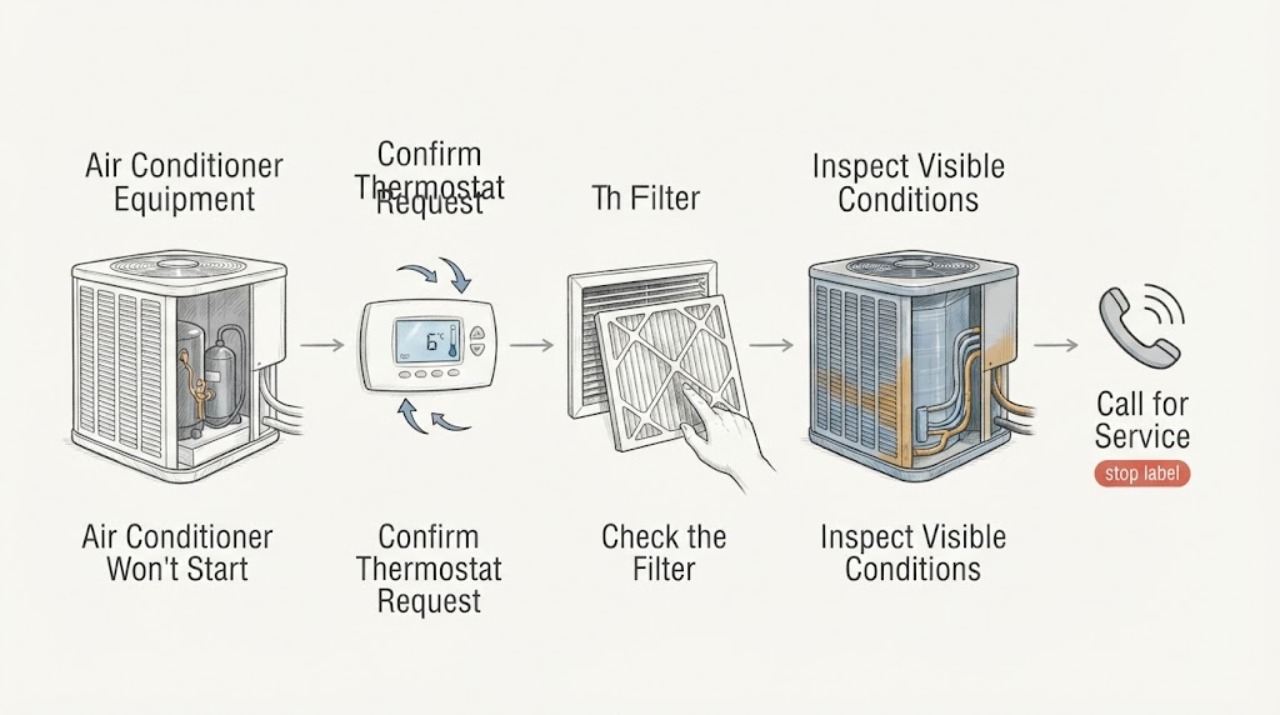
Work through in order
Diagnostic checks
Use only checks that match the exact appliance or system and its official guide.
-
Check 1
Use only the thermostat's ordinary controls to confirm its display, cooling mode, and request for a temperature below the room temperature; do not remove the thermostat cover or touch its wiring.
Expected result: Record blank display, incorrect mode, no cooling request, a valid cooling request with no indoor response, or a valid request where the indoor blower runs but the outdoor unit does not.
Next step: Correct only an ordinary user setting or battery step allowed by the thermostat instructions, then observe one normal call; arrange HVAC service if the request remains valid but the system does not start.
Stop if: Do not bridge terminals, open the thermostat, or continue if it is wet, hot, scorched, or smells burned.
Why this matters
Why: A thermostat state can prevent a start request. A valid call with no compressor response shifts attention to a safety, control, supply, capacitor, contactor, motor, compressor, or refrigerant condition.
-
Check 2
Inspect the accessible air filter according to the equipment instructions without opening the air handler, coil, or electrical compartment.
Expected result: Record clean, gray or blocked, wet, collapsed, incorrectly seated, or inaccessible, and note any weak register airflow.
Next step: Replace only an accessible filter with the exact type and direction specified; keep the system off and arrange HVAC service if ice, poor airflow, or no-start remains.
Stop if: Do not reach past guards, clean internal coils, or continue if there is ice, water near electrical parts, smoke, odor, or exposed wiring.
Why this matters
Why: A blocked filter can restrict airflow and contribute to freezing or overheating, but it cannot prove a compressor failure. A wet or damaged filter may indicate another system issue.
-
Check 3
After one normal thermostat cooling request, observe from a safe distance whether the indoor blower, outdoor fan, and compressor area respond; do not remove a grille, disconnect, or service cover.
Expected result: Record indoor blower only, outdoor fan only, a click or hum without rotation, complete silence, short cycling, or unusual vibration or noise.
Next step: Keep the system off after an abnormal response and provide the sequence to a licensed HVAC technician rather than repeating the call.
Stop if: Do not touch the fan, insert tools through a grille, open the unit, test voltage, or try to turn the compressor or fan by hand.
Why this matters
Why: Indoor-only operation can indicate an outdoor control, capacitor, contactor, motor, compressor, or safety issue. A hum without start is only a symptom pattern; complete silence can reflect a control or supply interruption.
-
Check 4
From a safe distance, look only for visible ice on tubing or the indoor coil area, water around the air handler, scorch marks, or damaged insulation; do not touch tubing or electrical components.
Expected result: Record no abnormality, ice, water, scorching, unusual odor, or a unit that had been running continuously without cooling.
Next step: Use the thermostat's normal control to stop cooling if ice or abnormal operation is visible, keep the system off, and arrange HVAC service.
Stop if: Do not chip ice, cut tubing, handle refrigerant, wipe water from electrical parts, or restart to see whether the symptom returns.
Why this matters
Why: Ice may reflect restricted airflow or low refrigerant and continued operation can stress the compressor. Water may indicate thawing or drainage problems; scorching or odor raises an electrical safety concern.
-
Check 5
Without approaching electrical equipment, record whether the system stopped after a visible protection event, outage, or safety indication; do not operate a breaker, disconnect, or fuse as a test.
Expected result: Record when the system stopped, whether both indoor and outdoor sections changed, whether protection appears tripped from a safe existing view, and whether power is flickering.
Next step: Leave the air conditioner off and give the event sequence to an HVAC technician or electrician; do not restore power from an enclosure.
Stop if: Do not reset repeatedly, hold protection on, replace a fuse, open a panel, or continue after heat, odor, smoke, arcing, or water.
Why this matters
Why: A protection event can follow an overload, short, water backup, capacitor, compressor, motor, or other fault. A trip that recurs is an unresolved fault, not permission for more resets.
-
Check 6
Prepare a service handoff with thermostat state, filter condition, indoor and outdoor response, sound, ice or water, and protection history; do not open the condenser to identify the compressor or capacitor.
Expected result: Record exterior model information if already visible, the last normal operation, and whether the symptom is silence, humming, short cycling, or compressor no-start.
Next step: Keep the system off for abnormal symptoms and arrange licensed HVAC diagnosis; provide the record and exterior model information to the technician.
Stop if: Do not touch or discharge a capacitor, test voltage or capacitance, handle refrigerant, remove covers, or repeatedly restart the unit.
Why this matters
Why: The record helps HVAC service distinguish a control request, airflow issue, safety lockout, capacitor or contactor symptom, compressor condition, wiring fault, or refrigerant issue without exposing you to stored charge or high voltage.
Use your observations
Decision map
Find the observation that best matches what you see, then follow the next safe action.
-
PATH 01Safety boundary
What you see
The thermostat is blank, not in cooling mode, or not requesting cooling.
Do this next
Correct only the ordinary user setting or battery step allowed by the thermostat instructions, then make one normal observation; call HVAC service if the control remains abnormal.
Why this path and its safety boundary
Why it matters: The compressor may not be receiving a start request; the component is not yet implicated.
Safety stop: Do not open the thermostat, touch wiring, or bypass the control.
-
PATH 02Safety boundary
What you see
The filter is blocked, airflow was weak, or ice is visible.
Do this next
Stop cooling with the normal thermostat control, replace only an accessible filter as specified, and arrange HVAC service for ice or persistent airflow trouble.
Why this path and its safety boundary
Why it matters: Airflow restriction or refrigerant-related trouble may be causing a safety shutdown or compressor stress.
Safety stop: Do not chip ice, open the coil, handle refrigerant, or restart to see whether ice returns.
-
PATH 03Safety boundary
What you see
The indoor blower responds but the outdoor fan and compressor do not start.
Do this next
Keep the system off and arrange HVAC diagnosis, reporting the indoor response and any outdoor sound or protection event.
Why this path and its safety boundary
Why it matters: An outdoor power, control, capacitor, contactor, compressor, motor, or safety-lockout condition is possible; no single component is proven.
Safety stop: Do not approach the service compartment, touch the capacitor or wiring, test voltage, or repeatedly restart.
-
PATH 04Safety boundary
What you see
The outdoor unit clicks or hums without starting, starts and stops quickly, vibrates, or makes unusual noise.
Do this next
Stop the cooling call and request prompt HVAC service with the sound and timing recorded.
Why this path and its safety boundary
Why it matters: A capacitor, contactor, motor, compressor, control, airflow, or refrigerant safety problem may be present.
Safety stop: Do not spin the fan, open the unit, discharge a capacitor, or keep trying to start it.
-
PATH 05Safety boundary
What you see
There is smoke, burning odor, arcing, heat, exposed wiring, water near electrical parts, repeated protection trips, or visible equipment damage.
Do this next
Move away, keep others away, contact emergency responders for smoke, fire, or arcing, and arrange licensed HVAC or electrical service from a safe location.
Why this path and its safety boundary
Why it matters: The no-start is accompanied by an electrical, fire, water, or high-energy equipment hazard.
Safety stop: Do not touch, open, unplug, reset, spray, or closely inspect the equipment; do not use water on electrical equipment.
Helpful context
Understand the symptom
A no-start is not automatically a failed compressor
The thermostat must request cooling before the compressor can start. A blank display, an incorrect mode, a setting that is not calling, a safety shutdown, a power interruption, or a blocked filter can all make the system appear to have a compressor problem. Confirm the request with the thermostat's normal controls, then observe the indoor and outdoor response without opening a service compartment.
Use the indoor and outdoor response as a decision point
If the indoor blower runs but the outdoor unit is silent, the fault may be outdoors or in a control or safety circuit. A click or hum without compressor start can be consistent with a capacitor, contactor, motor, or compressor issue, but sound does not identify the failed component. If neither section responds, a control or supply issue is possible. Leave high-voltage diagnosis to HVAC service.
Filter, ice, and refrigerant clues need different handling
A blocked filter restricts airflow and can contribute to a frozen coil or overheating. Ice on visible tubing or an indoor coil, water from thawing, or continuous operation without cooling can also indicate refrigerant or airflow trouble. Use the normal thermostat control to stop cooling when ice or abnormal operation is visible, replace only an accessible filter as specified, and do not cut tubing or handle refrigerant.
The compressor and capacitor are closed-service components
The compressor is in the outdoor condensing unit and works with the fan, controls, and refrigerant circuit. A capacitor supplies starting energy to the compressor and fan motors and may retain a dangerous charge after power is disconnected. Do not remove a cover, test capacitance or voltage, discharge a capacitor, or attempt to make the compressor start. Give the technician the symptom pattern and model information from an exterior label only.
Safety boundary
Stop conditions
- Do not open the condenser, disconnect, air handler, electrical panel, or service compartment; do not touch wiring, terminals, capacitor, compressor, motor, or refrigerant tubing.
- Do not test voltage or capacitance, discharge a capacitor, handle refrigerant, spin a fan, bypass a safety control, or select a generic compressor part from a symptom alone.
- Do not repeatedly restart the unit or reset protection after humming, short cycling, a trip, unusual noise, ice, water, or no outdoor response.
- Stop for smoke, burning odor, arcing, sparks, heat, exposed wiring, damaged equipment, or water near electrical components and obtain professional help.
- Do not touch wet equipment or stand in water; keep people away and arrange qualified HVAC or electrical service.
Only after diagnosis
Potential parts
- air-conditioner compressor
Consider this category only after professional electrical and refrigerant diagnosis confirms compressor failure and evaluates the system-specific repair path.
Compressor selection depends on the exact system, refrigerant circuit, electrical characteristics, and qualified installation; do not order from a no-start symptom. - air-conditioner run capacitor
Consider this category only when a licensed HVAC technician confirms a failed capacitor associated with the exact compressor and equipment.
Match the exact unit, capacitor role, ratings, mounting, and manufacturer requirements; a capacitor may retain dangerous charge and is not a homeowner replacement.
When checks do not resolve it
Need a professional?
Arrange licensed HVAC service when the thermostat calls for cooling but the compressor does not start, the indoor blower runs without the outdoor unit, the system hums or short cycles, ice or water is visible, or an accessible filter check does not restore operation. Compressor, capacitor, contactor, wiring, high-voltage, and refrigerant diagnosis belongs to HVAC professionals; use an electrician for a suspected supply fault. Treat smoke, burning odor, arcing, exposed wiring, heat, water near electrical parts, or repeated protection trips as urgent.
Safety scope: This article supports thermostat, accessible-filter, and safe-distance visual or audible checks only. Compressor, capacitor, high-voltage, wiring, motor, contactor, and refrigerant work belongs to a licensed HVAC professional.
Common questions
FAQ
What should I check first when the compressor will not start?
Confirm the thermostat is calling for cooling, inspect the accessible filter, and observe whether the indoor blower or outdoor unit responds. Do not open the outdoor unit; compressor, capacitor, wiring, and refrigerant diagnosis belongs to HVAC service.
Does a hum prove the compressor capacitor is bad?
No. A hum without starting can be consistent with a capacitor, motor, contactor, compressor, or control issue. Stop repeated starts and arrange HVAC diagnosis without touching the capacitor.
Can a dirty filter stop the air conditioner?
A blocked filter restricts airflow and can contribute to freezing or overheating, which may stop normal cooling. Replace only an accessible filter as specified and call for service if ice, poor airflow, or no-start remains.
Can I test or discharge an AC capacitor?
No. The capacitor can retain high-voltage charge even after power is disconnected. Do not open the unit, test capacitance or voltage, or discharge it; use a licensed HVAC technician.
When should I stop trying to start the AC?
Stop for ice, smoke, burning odor, arcing, exposed wiring, a hot enclosure, water near electrical parts, repeated protection trips, or loud abnormal noise. Keep the system off and arrange emergency or qualified HVAC or electrical help as appropriate.
Read the exact guide
Official sources
- HomeCooling101U.S. Department of Energy · DOE consumer cooling guidance; equipment-specific instructions control.
- What is an AC Capacitor?Carrier · Carrier consumer HVAC guidance; capacitor designs and ratings vary by system.
- Troubleshoot an Air Conditioner: 6 Steps to Fix an AC Not WorkingCarrier · Carrier residential troubleshooting guidance; exact equipment type and professional instructions control.
- AC Fan Not Working? Reasons Why It Stopped SpinningTrane · Trane residential guidance used for general symptom interpretation; the installed unit's manual controls.
- AC CompressorCarrier · Carrier compressor education; exact system diagnosis and repair require a qualified HVAC professional.
- AC Unit Not Turning On? Troubleshooting Steps & SolutionsCarrier · Carrier residential guidance used for general symptom separation; exact model instructions and qualified service control.
Community feedback
Share a repair observation
Share a plain-text repair observation. Accepted observations are published automatically; this page may take a moment to update.