
On this page
Start here
Quick answer
If the HVAC blower motor will not start, first separate a thermostat command problem from a loss of power, a loaded filter, blocked airflow, an open access-door safety switch, or a failed motor or starting component. Confirm the thermostat call, observe whether the indoor fan and outdoor unit respond, inspect only the accessible filter and grilles, and look for visible ice or water. A dirty filter can strain the motor, but a silent or humming motor may also involve a capacitor, control, safety switch, or wiring fault. Do not open the blower compartment, touch the motor or capacitor, work on high-voltage wiring, or handle refrigerant. Smoke, burning odor, heat, ice, water near electrical equipment, unusual noise, or a repeated breaker trip means stop and arrange qualified HVAC service.
Before you begin
Safety first
- Keep the system off for ice, water, smoke, odor, heat, abnormal noise, arcing, or repeated protective-device operation. Motor, capacitor, control, wiring, high-voltage, and refrigerant work belongs to qualified HVAC personnel.
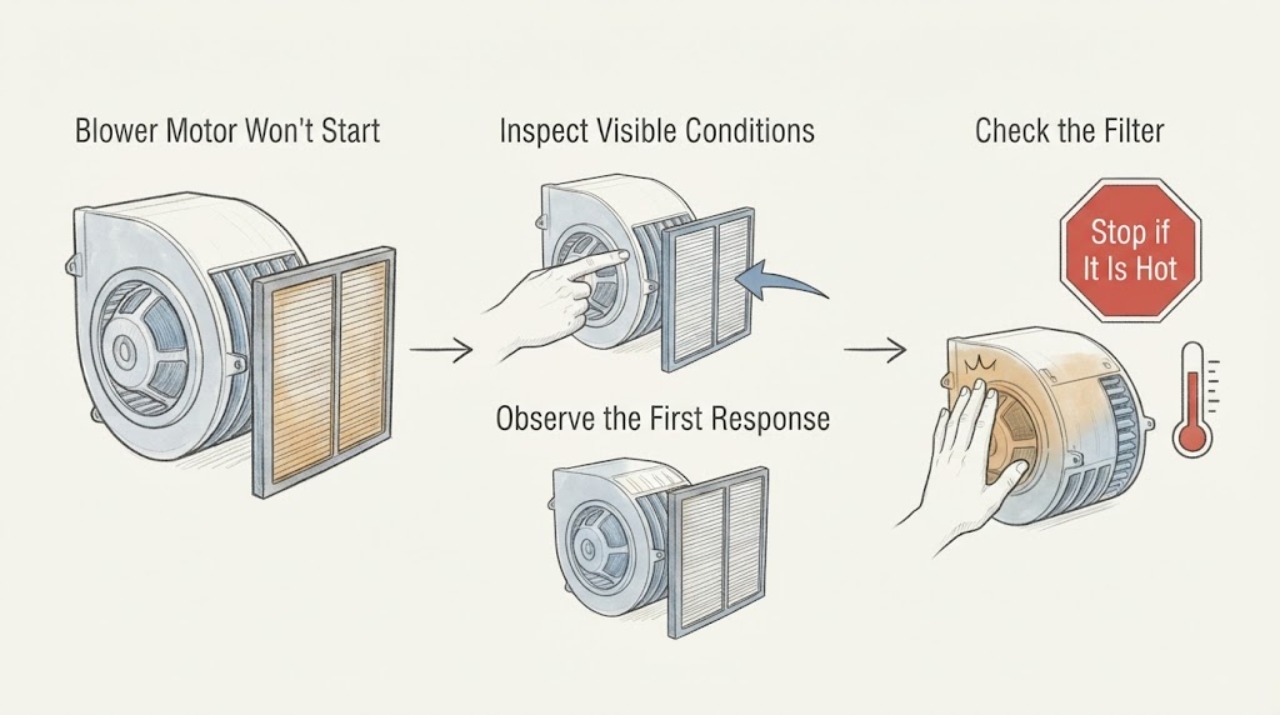
Work through in order
Diagnostic checks
Use only checks that match the exact appliance or system and its official guide.
-
Check 1
From a dry, safe position, observe the air handler and nearby floor for smoke, burning or hot-insulation odor, a hot surface, water, ice, exposed wiring, loud mechanical noise, or a breaker that opens when the system is called; do not approach a wet or damaged installation.
Expected result: Any warning sign is present, or the blower is hot, smoky, noisy, or repeatedly unable to start.
Next step: Stop the system using a safe accessible control if possible, keep clear, and arrange urgent HVAC help. If smoke or fire is present, leave and use the local emergency route from a safe location.
Stop if: Stop immediately for smoke, fire, burning odor, heat, ice, water near electrical equipment, exposed wiring, severe noise, or repeated protective-device operation.
Why this matters
Why: The no-start may involve fire, electrical, water, freeze, motor, or mechanical risk rather than a routine filter issue.
-
Check 2
At the thermostat, observe whether the system is set to the requested heating or cooling mode, the target should call for operation, the fan setting is intended, and a schedule, lock, alert, or delay is displayed; use only documented user controls and do not touch wiring.
Expected result: The thermostat is off, in the wrong mode, not calling, locked, alerting, delayed, or calling normally while the blower remains silent.
Next step: Correct only an obvious setting through the thermostat manual and observe one normal call. If the blower remains silent or the symptom returns, leave the control and cabinet untouched and call HVAC.
Stop if: Stop for a blank or damaged control, exposed wiring, smoke, heat, odor, or any need to remove the thermostat or reach its terminals.
Why this matters
Why: A control state can mimic a failed blower. A valid call with no airflow shifts attention toward power, an access-door safety, filter, condensate protection, control, motor, or starting component.
-
Check 3
With the system stopped through its normal control, inspect only the accessible filter and return and supply grilles; replace a visibly loaded filter in the exact orientation and type specified by the equipment manual, without opening the blower compartment.
Expected result: The filter is loaded, airflow was weak, grilles are blocked, the filter is clear, or the blower remains silent after the documented filter change.
Next step: After a safe filter change, make one ordinary call only if there is no ice, water, odor, heat, or abnormal noise. If the blower still will not start, keep the compartment closed and arrange HVAC diagnosis.
Stop if: Stop for ice, water, burning odor, smoke, a hot cabinet, abnormal noise, or any need to open the blower compartment.
Why this matters
Why: Restricted airflow can strain the blower motor and contribute to overheating or freezing. A clear filter does not rule out power, control, door-switch, motor, capacitor, or safety causes.
-
Check 4
From outside the equipment, observe whether an accessible service door appears fully seated, whether the thermostat display and other HVAC indicators remain powered, and whether the labeled equipment breaker appears open or intermediate; do not open the panel, touch the door switch, or reset protection.
Expected result: The door appears ajar, the thermostat or equipment display is blank, the breaker appears open, or the visible power state looks normal while the blower remains silent.
Next step: Record the visible state and arrange HVAC or electrical service. Do not force the door, operate the breaker repeatedly, remove a panel, or bypass an interlock.
Stop if: Stop for a hot or buzzing panel, smoke, odor, exposed conductors, repeated breaker operation, water, or any need to touch the interlock or wiring.
Why this matters
Why: An access-door interlock or power interruption can prevent a blower call, but the exact safety arrangement varies by model. A normal display and closed-looking door leave motor, control, capacitor, or other equipment faults possible.
-
Check 5
From outside the cabinet, look for visible ice on tubing or coil surfaces, water below the air handler, a full accessible pan, or a wet-switch indication; do not scrape ice, add heat, open the cabinet, or disturb a safety control.
Expected result: Ice, water, a full pan, or a water-protection indication is present, or no visible ice or water is present.
Next step: Turn the system off and arrange qualified HVAC service for ice, water, overflow, or suspected safety shutdown. Do not handle refrigerant or force a restart.
Stop if: Stop for standing water near electrical equipment, an overflowing pan, ceiling or floor damage, visible ice, or any need to touch a drain switch, coil, pump, or wiring.
Why this matters
Why: Restricted airflow, low refrigerant, condensate overflow, or a safety shutdown can stop the blower or the wider system. No visible water or ice does not clear an internal fault.
-
Check 6
During one ordinary call, observe from a safe distance whether the indoor blower starts, whether the outdoor fan responds, whether one side runs while the other is silent, and whether the blower hums, twitches, or stops; do not remove a service cover or reach toward moving parts.
Expected result: The outdoor unit runs while the blower is silent, neither side responds, the blower hums without airflow, or both sides start and stop.
Next step: Record the sequence and arrange qualified HVAC service. Leave the motor, capacitor, controls, wiring, high-voltage parts, and refrigerant circuit to the technician.
Stop if: Stop for humming that becomes hot, grinding, smoke, burning odor, exposed wiring, ice, water, or repeated breaker operation.
Why this matters
Why: The sequence helps separate a blower-side issue from a whole-system control or power issue, but a hum or silence cannot identify a capacitor, motor, control, or wiring fault by itself.
-
Check 7
Prepare a service note with the equipment and thermostat models, mode and target, filter condition, airflow, door indication, breaker state as found, ice or water, indoor and outdoor response, sound and odor, recent power event, and whether the blower worked before; leave the blower motor, capacitor, controls, and wiring untouched.
Expected result: Safe thermostat, filter, and external observations do not restore airflow, the blower hums or stops, or a safety or power symptom recurs.
Next step: Keep the system off for abnormal sound, odor, heat, ice, water, smoke, or electrical symptoms and request HVAC diagnosis. Provide the response sequence instead of selecting a motor or capacitor from the symptom.
Stop if: Stop all user diagnosis if it would require opening a cabinet, touching a motor, capacitor, control, door switch, wiring, high-voltage part, or refrigerant circuit.
Why this matters
Why: The remaining possibilities include a door interlock, control or safety circuit, blower motor, capacitor, power fault, airflow restriction, freeze or condensate condition, or another model-specific fault.
Use your observations
Decision map
Find the observation that best matches what you see, then follow the next safe action.
-
PATH 01Next step
What you see
The thermostat is off, in the wrong mode, not calling, locked, alerting, or showing a delay.
Do this next
Use only documented user settings and observe one normal call; arrange HVAC service if the alert, no-airflow symptom, or no-start returns.
Why this path and its safety boundary
Why it matters: The control state may be preventing the blower call and can mimic a motor failure.
-
PATH 02Next step
What you see
The filter is loaded or return and supply grilles are blocked and airflow is weak.
Do this next
Use the manual for an accessible filter change, then observe one cycle. Call HVAC if the blower remains silent or ice or water appears.
Why this path and its safety boundary
Why it matters: Restricted airflow can strain the blower motor and contribute to overheating or freezing.
-
PATH 03Next step
What you see
An access door appears ajar, the equipment display is blank, or a labeled breaker appears open.
Do this next
Leave the system off and arrange HVAC or electrical service; do not force the door, operate protection repeatedly, or open a panel.
Why this path and its safety boundary
Why it matters: A door interlock or power interruption can prevent the blower from starting, but the exact cause is not established from the outside.
-
PATH 04Next step
What you see
Ice, water, an overflowing pan, or a water-protection indication is visible.
Do this next
Turn the system off and call qualified HVAC service; do not scrape ice, add heat, open the cabinet, or handle refrigerant.
Why this path and its safety boundary
Why it matters: Airflow, refrigerant, condensate, or safety conditions may have stopped the system to prevent damage.
-
PATH 05Next step
What you see
The thermostat calls or the outdoor unit responds, but the indoor blower is silent, hums, twitches, or stops immediately.
Do this next
Stop repeated calls and request HVAC service. Keep the blower compartment closed and leave internal electrical work to the technician.
Why this path and its safety boundary
Why it matters: A blower motor, capacitor, control, safety, power, or airflow fault is possible; sound alone cannot identify the component.
-
PATH 06Next step
What you see
Neither indoor nor outdoor equipment responds to a valid call, or the visible power state is abnormal.
Do this next
Record the visible state and arrange HVAC or electrical service without repeated resets or panel access.
Why this path and its safety boundary
Why it matters: A thermostat, power, control, safety, or branch-circuit issue may affect the whole system.
-
PATH 07Next step
What you see
The blower starts after a setting or filter change but the no-start symptom returns.
Do this next
Record the recurrence and arrange HVAC diagnosis rather than repeatedly restarting or replacing the motor from symptoms.
Why this path and its safety boundary
Why it matters: A temporary control or airflow improvement may have masked a recurring safety, motor, control, or power fault.
Helpful context
Understand the symptom
A dead blower is not automatically a bad motor
No airflow can mean the thermostat is not calling, the equipment has lost power, a door safety switch is open, a filter has restricted airflow, a condensate or freeze protection has stopped operation, or the motor and its controls have failed. A hum, a brief twitch, and complete silence are different observations. Record the pattern before arranging service, and keep the blower compartment closed.
Why the assigned filter clue matters
A filter protects the air-handler motor, but it is not a motor diagnosis. A visibly loaded filter and weak airflow can be a useful maintenance clue; a clean filter with a silent blower shifts attention to power, control, safety, motor, or starting components. Filter location and replacement type vary, so use the equipment manual and only an accessible filter position.
Door switches, ice, and water are model-dependent
Some equipment uses an access-door interlock, while other installations use a different safety arrangement. An evaporator coil may freeze when airflow is restricted or refrigerant is low, and condensate may collect around the indoor unit. These symptoms do not justify opening the cabinet or bypassing a safety device. Keep the system off for ice, water, odor, heat, or electrical signs and call HVAC.
Safety boundary
Stop conditions
- Stop immediately for smoke, fire, burning or hot-insulation odor, heat, arcing, exposed wiring, severe noise, or repeated protective-device operation.
- Stop for visible ice, standing water near electrical equipment, an overflowing pan, ceiling or floor damage, or a wet air handler.
- Do not open the blower compartment or outdoor cabinet, touch the motor, capacitor, controls, door switch, or wiring, work on high-voltage parts, handle refrigerant, or bypass a safety device.
- Stop repeated calls or resets when the blower hums, twitches, overheats, starts and stops, or the breaker opens again.
- If smoke or fire is present, leave the area and use the local emergency route from a safe location; do not return to investigate.
Only after diagnosis
Potential parts
- air filter
- blower motor or starting component
- access-door safety or control component
When checks do not resolve it
Need a professional?
The blower remains silent, hums, twitches, overheats, or stops immediately after a valid thermostat call., A clean or correctly installed accessible filter does not restore airflow, or the filter becomes loaded unusually quickly., The thermostat calls while the indoor blower stays silent, the outdoor unit runs alone, or neither side responds., Ice, water, a full condensate pan, a door interlock concern, a blank equipment display, or a repeat breaker opening is present., Diagnosis would require opening an enclosure, touching the motor, capacitor, controls, wiring, high-voltage parts, or refrigerant circuit.
Safety scope: Keep the system off for ice, water, smoke, odor, heat, abnormal noise, arcing, or repeated protective-device operation. Motor, capacitor, control, wiring, high-voltage, and refrigerant work belongs to qualified HVAC personnel.
Common questions
FAQ
Why will the blower motor not start?
Possible causes include thermostat or power state, a loaded filter, blocked airflow, an access-door safety, condensate or freeze protection, a capacitor, control, wiring, or motor fault. Check only external settings, filter, grilles, ice, water, and response; leave internal diagnosis to HVAC service.
Can a dirty filter stop the blower?
A loaded filter can restrict airflow, strain the motor, and contribute to overheating or freezing. Replace only an accessible filter as directed by the equipment manual; if the blower remains silent or the symptom returns, arrange HVAC diagnosis.
What if the blower hums but does not turn?
A hum can accompany a starting-component, motor, control, or power fault, but it does not identify the failed part. Stop repeated calls and leave the blower compartment closed for qualified HVAC service.
Could a door switch prevent the blower from starting?
Some installations use an access-door interlock, but the exact safety arrangement varies. Observe whether the door appears seated from outside; do not force it, bypass it, or open the compartment.
When should I stop and call HVAC?
Stop for smoke, burning odor, heat, ice, water near electrical equipment, exposed wiring, severe noise, or a repeat breaker trip. Also call when a valid thermostat call produces a silent, humming, or repeatedly stopping blower after safe filter and external checks.
Read the exact guide
Official sources
- HVAC Proper Installation of FiltersU.S. Department of Energy Building Science Education · U.S. Department of Energy HVAC filter guidance; filter location and replacement procedure vary by air-handler installation.
- AC Fan Not Working? Reasons Why It Stopped SpinningTrane · Trane residential split-system guidance; fan locations, controls, and safe access vary by equipment.
- Furnace Blower Motor Repair & Replacement GuideCarrier · Carrier furnace blower guidance applied to the shared air-handler/blower concepts; exact motor and control design varies by HVAC model.
- Air Handler Troubleshooting - Contact a Local DealerTrane · Trane residential air-handler guidance; exact filter access, safety switches, and equipment behavior vary by installation.
Community feedback
Share a repair observation
Share a plain-text repair observation. Accepted observations are published automatically; this page may take a moment to update.