
On this page
Start here
Quick answer
Start with the exact Admiral model and configuration: the brand's current refrigerator range includes single-door, top-mount, and side-by-side designs, so controls and airflow paths are not interchangeable. From a normal user position, verify that the refrigerator is powered and cooling is enabled, check the model's temperature setting, clear food from any labeled vents, and confirm the doors close against an intact gasket. Allow the unit time to stabilize after a setting change, new installation, or large warm load. If the freezer is cold but the fresh-food section is warm, an airflow path or control issue is more plausible; if both sections remain warm after these checks, stop troubleshooting and arrange model-specific service. Protect perishable food while the temperature is uncertain, and do not remove panels or test energized parts.
Before you begin
Safety first
- The owner checks in this article are limited to normal controls and safe external observation or rearrangement of contents. They do not authorize cabinet, liner, vent-cover, compressor, wiring, refrigerant, energized electrical, or forced-defrost work.
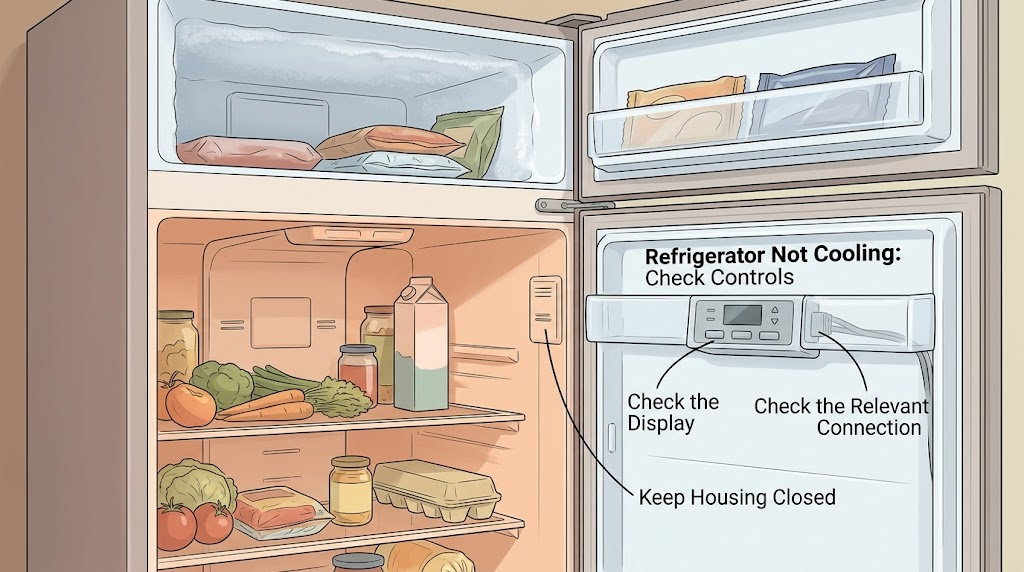
Work through in order
Diagnostic checks
Use only checks that match the exact appliance or system and its official guide.
-
Check 1
Read the Admiral model number and inspect only the normal user controls, display, and interior light. Confirm that the refrigerator has power and that any cooling-off, showroom, holiday, or vacation setting is not intentionally disabling cooling. Follow the exact owner guide for turning a mode on or off; do not try an undocumented button sequence.
Expected result: The display or controls show cooling disabled, the appliance is off after a power interruption, the light and controls are normal, or the configuration cannot be identified.
Next step: If the model guide confirms cooling is disabled, restore it as directed and monitor the compartments. If power and cooling are already enabled, continue to the temperature, loading, and airflow checks. If the model cannot be identified or controls behave abnormally, use the model guide or arrange service.
Stop if: Do not remove electrical covers, probe wiring, bypass a control, or test live voltage.
Why this matters
Why: A disabled cooling function or an unrecognized model setting can make both compartments warm without establishing a mechanical failure. A normal display does not prove that the cooling system is healthy.
-
Check 2
Check the temperature controls against the Admiral owner guide and make only a small user-accessible adjustment if needed. After a change, leave the doors closed as much as practical and allow the documented stabilization period before judging the result. Also note whether the refrigerator was recently installed or loaded with many warm items.
Expected result: Cooling improves after the stabilization period; the refrigerator was just installed or heavily loaded; or the compartments remain warm despite a normal setting and adequate recovery time.
Next step: Keep the setting at the model's normal range while it stabilizes. If it remains warm, continue with airflow and door-seal checks; if the controls will not hold a setting or show an error, record the display and request service.
Stop if: Do not keep changing the control repeatedly and do not use a temperature setting copied from a different Admiral model.
Why this matters
Why: A recent installation, large warm load, or repeated control changes can temporarily raise the temperature. Failure to recover after a model-appropriate wait makes a simple setting explanation less likely, but it does not identify a specific failed part.
-
Check 3
For an Admiral model with separate freezer and fresh-food compartments, locate the user-accessible supply and return vents shown in its guide. Move packages, bins, and containers away from those vents without removing covers. Check that the door gasket is visibly seated and clean, that no packaging or shelf prevents the door from closing, and that the door closes fully.
Expected result: A vent was covered, food was packed against the airflow path, frost or moisture is concentrated near a vent, the gasket or door closure is visibly compromised, or the vents and door seal appear clear.
Next step: Rearrange contents and close the door, then allow the appliance to stabilize. If the freezer is cold but the refrigerator remains warm, keep the model number and symptom pattern for service. If both compartments are warm or frost is behind a cover, stop at external checks and arrange service.
Stop if: Do not chip ice, remove an evaporator or vent cover, use a heat source to defrost, or reach behind panels.
Why this matters
Why: Blocked vents can restrict the circulation that transfers cold air between compartments, while a door that does not seal admits warm air. Clear external obstructions can explain uneven cooling, but clear vents and a good seal do not rule out an internal fault.
-
Check 4
From outside the cabinet, note the cooling pattern and environment: whether the freezer is cold, whether the fresh-food section alone is warm, whether both sections are warm, whether the refrigerator is next to a heat source or in an unusually hot location, and whether the base grille is visibly blocked. Do not move the refrigerator or open the rear compartment to investigate.
Expected result: Only the fresh-food section is warm; both sections are warm; the cabinet is exposed to a heat source or restricted grille; or the environment and external openings appear normal.
Next step: Correct only an obvious external placement or grille obstruction that the model guide says the owner may address, then allow recovery. If both compartments remain warm, or if the refrigerator cycles abnormally, makes unusual noises, leaks, trips power, or shows damage, leave internal diagnosis to qualified service.
Stop if: Do not pull the appliance out, remove the base grille, access the compressor or wiring, or add refrigerant.
Why this matters
Why: A cold freezer with a warm fresh-food section is more consistent with an airflow or compartment-control path on models that use shared circulation. Warmth in both compartments after settings and external checks is a service symptom, not proof of a particular compressor or refrigerant problem. Excess heat or a blocked grille can reduce performance.
Use your observations
Decision map
Find the observation that best matches what you see, then follow the next safe action.
-
PATH 01Next step
What you see
The controls show cooling disabled or the appliance was turned off after a power interruption, and the model guide identifies a user-accessible way to restore cooling.
Do this next
Restore cooling exactly as the Admiral model guide directs and allow the refrigerator to stabilize. If it remains warm with cooling enabled, continue to the airflow pattern and arrange service when needed.
Why this path and its safety boundary
Why it matters: A control state can make both compartments warm without proving a failed cooling component.
-
PATH 02Next step
What you see
The unit was recently installed, had a large warm load, or had its control changed, and the freezer or refrigerator begins recovering during the model-appropriate stabilization period.
Do this next
Keep doors closed as much as practical and recheck after stabilization. If temperatures do not recover, proceed to the compartment pattern and request model-specific service.
Why this path and its safety boundary
Why it matters: The timing makes a temporary recovery condition more likely than an immediately proven component failure.
-
PATH 03Next step
What you see
The freezer is cold but the fresh-food compartment is warm on a model that uses freezer-to-refrigerator vents, especially when a vent is covered or frost is concentrated around the airflow path.
Do this next
Clear only visible food obstructions, keep covers in place, allow recovery, and arrange service if the fresh-food section remains warm. Do not force a damper or fan and do not remove frost behind a cover.
Why this path and its safety boundary
Why it matters: Shared-airflow restriction or a compartment-control problem is more plausible than a complete loss of cooling, although the exact part cannot be identified without the model and professional diagnosis.
-
PATH 04Next step
What you see
Both compartments remain warm after power, cooling-mode, setting, door-seal, loading, and external-airflow checks, or the refrigerator shows abnormal cycling, damage, a leak, or repeated power interruption.
Do this next
Protect perishable food, leave the cabinet closed as much as practical, record the exact model and observations, and arrange qualified appliance service. Do not restore operation repeatedly just to reproduce the symptom or open the cabinet.
Why this path and its safety boundary
Why it matters: A persistent whole-appliance symptom requires model-specific cooling-system diagnosis; the external observations do not establish whether the cause is a control, fan, defrost, compressor, sealed system, or supply issue.
Helpful context
Understand the symptom
Identify the Admiral refrigerator layout before interpreting the symptom
Admiral's product catalog shows single-door, top-mount, and side-by-side refrigerators. Some listed models have frost-free or multi-flow features, while another model may use a mechanical control or a different compartment layout. Without the model number, do not assume that a control combination, vent location, or freezer-to-refrigerator airflow path from another Admiral model applies. Record the model from the rating label and use its owner guide for control-specific instructions.
Use external checks to separate a setting problem from a cooling fault
The first safe distinction is whether the appliance is powered and whether cooling has been disabled in a user-accessible mode. Next, look for a recent temperature change, installation, large grocery load, blocked vent, poorly closing door, heat source, or obstructed base grille. These observations can explain a temporary warm condition without proving that a compressor, fan, defrost system, or sealed system has failed. Keep the diagnosis external and model-specific.
The freezer-versus-refrigerator pattern is a useful service clue
On models that move cold air between a freezer and fresh-food compartment, a cold freezer with a warm refrigerator points more toward an airflow or compartment-control problem than a total loss of cooling. When both compartments are warm, or when the unit never recovers after the documented checks and stabilization period, the cause cannot be confirmed safely from the outside. Leave internal electrical, sealed-system, fan, and defrost diagnosis to a qualified appliance technician.
When checks do not resolve it
Need a professional?
Arrange qualified appliance service when both compartments remain warm after the model-specific setting and stabilization checks, when the freezer is cold but the fresh-food section stays warm after visible airflow obstructions are cleared, or when the refrigerator shows a leak, damaged cord or outlet, repeated power interruption, unusual cycling, or an error display. Do not remove covers, access the compressor or wiring, add refrigerant, or test energized components. Protect perishable food while the refrigerator is not maintaining its normal temperature.
Safety scope: The owner checks in this article are limited to normal controls and safe external observation or rearrangement of contents. They do not authorize cabinet, liner, vent-cover, compressor, wiring, refrigerant, energized electrical, or forced-defrost work.
Common questions
FAQ
Why is my Admiral refrigerator warm when the freezer is still cold?
On Admiral models that circulate freezer air into a fresh-food compartment, a cold freezer with a warm refrigerator points first to a blocked airflow path or compartment-control issue. Check only the visible vents and food placement shown in the model guide. If the refrigerator remains warm after the obstruction is cleared and the unit has time to recover, arrange service rather than removing a cover.
How long should I wait after changing the refrigerator setting?
Official refrigerator guidance says to allow a full stabilization period after an adjustment and to avoid repeated changes before rechecking. The exact behavior depends on the Admiral model, so use its owner guide and allow the stated recovery time after installation or a large warm load.
Should I remove the back panel or test the compressor if my Admiral refrigerator is not cooling?
No. A model number is needed to select the correct service procedure, and internal electrical, fan, defrost, compressor, and sealed-system checks can expose shock, fire, refrigerant, or equipment hazards. Keep the diagnosis to normal controls and safe external observations, then use a qualified appliance technician for persistent warming.
Read the exact guide
Official sources
- How to Check the Air Vents for Blockage-Ensuring Proper Air Flow - Product Help | WhirlpoolWhirlpool Product Help · Official Whirlpool refrigerator airflow guidance; vent locations and compartment architecture vary by model.
- Tips for Properly Setting the Controls - Product Help | WhirlpoolWhirlpool Product Help · Official Whirlpool refrigerator control guidance; the page explicitly notes that control panels vary and directs owners to the exact owner manual.
- Admiral Refrigerators, Freezers, and Chillers - Keep Your Food FreshAdmiral Appliances · Official Admiral Appliances regional product catalog; listed models and features vary by country and exact model.
- Not CoolingWhirlpool Product Help · Official Whirlpool refrigerator support sheet used for general refrigerator checks; controls and procedures vary by model and brand, so Admiral owners must follow the exact Admiral guide.
Community feedback
Share a repair observation
Share a plain-text repair observation. Accepted observations are published automatically; this page may take a moment to update.