
On this page
Start here
Quick answer
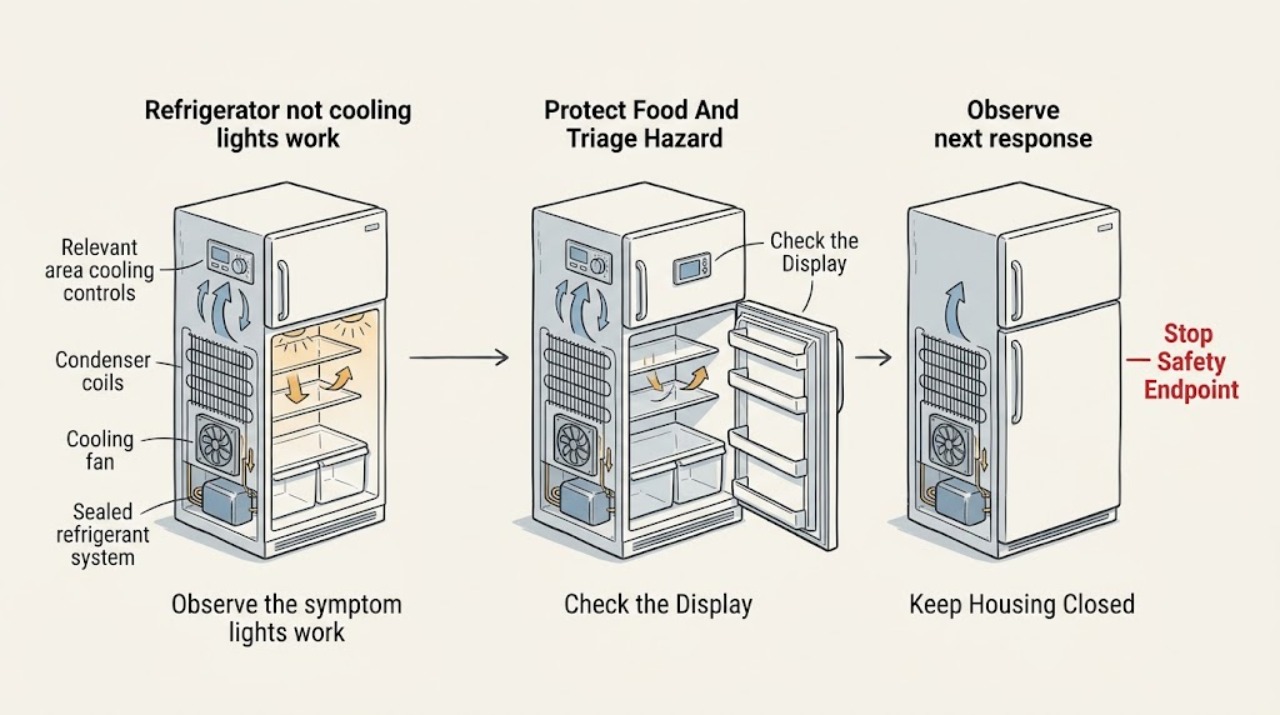
Interior lights can work even when a refrigerator is not cooling, so they confirm only that some power or control functions are present. Check the external power connection, cooling-on or showroom setting, temperature control, door closure, visible airflow, recent installation or power interruption, and the room conditions. Keep food safely cold elsewhere if temperatures are rising. Do not remove panels, reach into a fan, clean hidden coils, or test live parts. If cooling does not return after safe control and airflow checks, or the compressor/fan is abnormal, the refrigerator is warm, or there is a burning smell, smoke, water near electrical parts, or damaged wiring, stop and arrange qualified appliance service.
Before you begin
Safety first
- Owner checks are limited to safe food relocation, external power and control observation, accessible food, vent, door, and gasket checks, model-approved user settings or defrost, and documentation. A qualified professional must handle panel access, live electrical testing, fans, compressors, capacitors, controls, refrigerant circuits, sealed-system work, and model-specific component replacement.
Work through in order
Diagnostic checks
Use only checks that match the exact appliance or system and its official guide.
-
Check 1
Check food temperature and move perishable food to a safe cold location if the refrigerator or freezer is warming. From a dry position, look only for smoke, sparks, burning odor, exposed wiring, water near the cord or outlet, or a damaged cabinet; do not touch wet electrical equipment.
Expected result: Food is warming; the interior is merely a little above normal; water is near electrical parts; smoke, sparks, or burning odor is present; or no immediate hazard is visible.
Next step: Keep food safely cold elsewhere. Leave the area and obtain emergency help for fire or active sparking; keep clear and call qualified appliance or electrical service for smoke, odor, exposed wiring, or water near electrical parts.
Stop if: Stop immediately for smoke, flame, sparks, burning odor, exposed conductors, a wet outlet or cord, rapidly spreading water, or any need to move or open the refrigerator while it is wet.
Why this matters
Why: Warm food is a food-safety problem, while smoke, arcing, odor, exposed wiring, or water at electrical parts is an immediate equipment hazard. A safe external observation supports troubleshooting only when no electrical or fire hazard is present.
-
Check 2
Without opening the appliance, confirm the power cord is seated normally, the wall switch or outlet is not obviously off, and the external control panel does not show Cooling Off, Demo, Showroom, Vacation, or a fault indication. Use only the exact model manual's normal control sequence; do not repeatedly power-cycle the refrigerator.
Expected result: Lights work but cooling is off in the display; Demo or Showroom appears; a recent outage or cleaning preceded the symptom; the outlet is loose or dead; or controls show normal cooling with no alert.
Next step: Correct only an obvious user-level cooling setting according to the exact manual and give the unit time to stabilize. If the outlet is suspect, stop using it and have an electrician check it; do not use an extension cord or multi-plug adapter as a workaround.
Stop if: Stop if checking power requires a damaged outlet, wet cord, panel removal, live testing, breaker-panel access, or a control sequence not documented for the exact model.
Why this matters
Why: A cooling-off or showroom setting can leave lights and display active while stopping cooling. An outlet or power issue can affect compressor operation even if stored electrical energy or a light briefly remains. Normal controls with no alert keep a fan, compressor, airflow, or sealed-system fault in consideration.
-
Check 3
Check the user-facing temperature setting and confirm doors and drawers close fully. Remove only packages or bins that visibly hold a door open, and inspect the accessible gasket for dirt, gaps, tears, or splits. Do not adjust hinges, remove doors, or use a hand test to claim the seal is airtight.
Expected result: A door or drawer was obstructed; the gasket has a visible gap or damage; the temperature setting is unusually warm; the unit was recently installed; or closure and settings are normal.
Next step: Remove only the obvious obstruction and clean an accessible gasket according to the manual. Use a stable setting and allow the model's stated stabilization period; call service if the gasket is damaged or temperatures remain unsafe.
Stop if: Stop if the door is sagging, the gasket is torn or permanently distorted, glass or liner is damaged, or correction requires door removal, hinge work, or panel access.
Why this matters
Why: A warm-air leak, incorrect setting, or recent installation can make a working-light refrigerator appear to have a failed cooling system. A damaged gasket or persistent warm cabinet after normal closure needs service rather than repeated temperature changes.
-
Check 4
From inside the compartments, move tall containers away from visible vents and leave space around airflow openings. Note whether a large warm load, frequent door opening, unusually hot or cold installation area, or blocked exterior clearance is present. Clean a condenser only if the exact manual explicitly permits it and only after safely disconnecting power as directed; do not remove a rear cover.
Expected result: A vent or rear clearance was blocked; a large warm load was recently added; the room is unusually hot or cold; the manual permits accessible condenser cleaning; or external airflow and room conditions are normal.
Next step: Clear only accessible obstructions and follow model-specific cleaning instructions. Observe without opening panels; arrange service if the refrigerator remains warm or the compressor and fans do not behave normally.
Stop if: Stop if condenser cleaning requires a rear cover, reaching behind a fan, moving a heavy refrigerator, touching coils or wiring, or working near water or an energized part.
Why this matters
Why: Blocked vents, warm food, frequent opening, and unsuitable room or clearance conditions can delay cooling. If these are normal and lights work while both sections remain warm, a fan, compressor, control, or sealed-system fault becomes more likely.
-
Check 5
With doors closed as much as possible, observe from outside whether the freezer is colder than the refrigerator, whether accessible vents move air, and whether the compressor or fan runs, clicks, hums, or stays silent during a normal cooling demand. Do not remove an evaporator cover, touch a fan, or use a tool to clear frost.
Expected result: The freezer is cold but the refrigerator is warm; both sections are warm; airflow is weak; the fan is noisy or silent; the compressor clicks repeatedly; or no abnormal sound is noticed.
Next step: Record the pattern and stop owner checks at this point. Arrange qualified appliance service for abnormal sounds, absent airflow, repeated clicking, or continued warming; keep food safely stored elsewhere.
Stop if: Stop if frost surrounds a hidden fan, a fan guard or evaporator panel must be removed, the compressor area is hot or damaged, or live electrical or sealed-system access is required.
Why this matters
Why: One cold section with poor transfer can point to airflow or damper conditions, while both warm sections with lights working can point to cooling-off mode, power, compressor, control, or sealed-system trouble. Weak or abnormal fan behavior and repeated clicking need professional diagnosis; sound alone cannot identify a failed part.
-
Check 6
Record the model and serial information from a safely visible label, the control mode and setting, whether the lights stay on, time since the symptom began, recent outage or installation, freezer-versus-refrigerator temperature difference, airflow, sounds, frost, and any alerts. Take photos without opening panels.
Expected result: Cooling returns after a user-level setting or airflow correction; the unit remains warm; frost or water appears; a fan or compressor behaves abnormally; or the cause remains uncertain.
Next step: Give the record to the manufacturer or a qualified appliance technician and keep perishables safely cold. Do not repeat power cycles, bypass a control mode, or order a compressor, board, fan, or sealed-system part from the symptom alone.
Stop if: End owner troubleshooting when diagnosis requires an internal panel, live electrical test, fan or compressor access, refrigerant work, control-board access, or an unverified replacement part.
Why this matters
Why: A returned symptom after an external correction, continued warming, frost or water, abnormal running sounds, or uncertainty requires model-specific diagnosis. The light working is useful history but does not identify the failed cooling component.
Use your observations
Decision map
Find the observation that best matches what you see, then follow the next safe action.
-
PATH 01Next step
What you see
The interior lights and display work, but Cooling Off, Demo, Showroom, Vacation, or a similar mode is shown, or the symptom followed cleaning, installation, or a power event.
Do this next
Use only the exact manual's normal procedure to restore cooling and allow the specified stabilization period. If the mode cannot be identified or cooling stays off, request service.
Why this path and its safety boundary
Why it matters: A user-facing mode can leave lights active while cooling is disabled or limited, without proving a compressor or sealed-system failure.
-
PATH 02Next step
What you see
A gasket gap, obstructed door, blocked vent, large warm load, frequent opening, or unsuitable room or clearance condition is found, and cooling changes after it is corrected.
Do this next
Keep doors sealed, food and vents arranged correctly, and observe with a stable setting. Escalate if the temperature remains unsafe or the frost and warmth return.
Why this path and its safety boundary
Why it matters: Warm-air entry, restricted airflow, or temporary heat load is more likely than an immediate internal cooling failure.
-
PATH 03Next step
What you see
The freezer is cold but the refrigerator compartment is warm, airflow is weak, or frost blocks an accessible vent while controls and doors appear normal.
Do this next
Clear only accessible food obstructions and use the model manual's defrost instructions if applicable. Call service for persistent frost, weak airflow, or panel and fan access.
Why this path and its safety boundary
Why it matters: Air transfer, damper, fan, or frost-related restriction becomes more likely than a total loss of cooling, but the hidden cause may require internal service.
-
PATH 04Next step
What you see
Lights and controls work, but both refrigerator and freezer sections remain warm after external settings, power, door, load, and airflow checks.
Do this next
Keep food safely cold elsewhere and arrange qualified appliance service. Do not remove covers, test capacitors, bypass controls, or handle refrigerant lines.
Why this path and its safety boundary
Why it matters: A compressor, condenser airflow, fan, control, power, or sealed-system issue is more likely than a light or simple temperature-setting problem.
-
PATH 05Next step
What you see
Smoke, burning odor, sparks, water near electrical parts, damaged wiring, repeated compressor clicking, severe frost, or an unexplained persistent warm condition is present.
Do this next
Leave fire or active-sparking hazards and contact emergency help. Otherwise keep clear, protect food, and request prompt qualified appliance or electrical service without recreating the symptom.
Why this path and its safety boundary
Why it matters: The immediate priority is fire, shock, food, and equipment safety; lights working do not make the appliance safe to keep operating or open.
Helpful context
Understand the symptom
Working lights do not prove that the cooling system is running
A refrigerator has separate lighting, controls, fans, compressor, and temperature functions. Whirlpool documents showroom or demo modes in which the display and interior lights work while cooling is disabled. A working light therefore narrows the symptom away from a total loss of power, but it does not rule out cooling-off settings, a control fault, a fan problem, or a sealed-system issue.
Start with settings, doors, and airflow that are safe to reach
Check the control panel for cooling-off, showroom, demo, vacation, or another model-specific mode, and consult the exact manual before changing a setting. Make sure doors and drawers close fully, packages are not blocking vents, and a recent large warm food load or frequent opening is not masking normal pull-down time. Do not assume a generic button sequence applies to your model.
Protect food while separating an external cause from an internal fault
Move perishable food to safe cold storage if temperatures are rising. From outside the cabinet, note whether the compressor or fan ever runs, whether the freezer is colder than the refrigerator, and whether frost blocks a vent. Do not remove rear or evaporator covers, touch a fan, probe a live circuit, or handle refrigerant tubing. A qualified technician can test the system without guessing from the light alone.
Safety boundary
Stop conditions
- Stop for smoke, flame, sparks, burning odor, exposed wiring, a wet outlet or cord, water near electrical parts, or a damaged cabinet; leave and obtain emergency or qualified help as appropriate.
- Do not remove the rear, evaporator, condenser, or control covers; reach into fans; test live circuits; handle capacitors or compressors; access sealed refrigeration tubing; or assume the light proves any part is safe.
- Do not repeatedly power-cycle, reset, bypass Demo or Cooling Off controls, use an extension cord or multi-plug adapter, or install a larger protective device to force operation.
- Do not chip frost, use a heat source to defrost, pour hot water into the appliance, or use a generic button sequence or replacement part without the exact model procedure.
- Call a qualified appliance technician when both sections stay warm, a fan or compressor is abnormal, frost returns, water appears, food is warming, or the next step requires internal, electrical, mechanical, or sealed-system access.
Only after diagnosis
Potential parts
- refrigerator control board or cooling control
Consider this only after a qualified technician confirms a control fault and rules out cooling-off mode, power, airflow, fan, compressor, and sealed-system causes.
Verify the exact refrigerator model, control revision, connectors, programming requirements, and manufacturer fit information; do not replace a board from the light symptom alone. - refrigerator evaporator or condenser fan assembly
Consider this only when a technician confirms that a specific fan assembly is failed or damaged rather than merely obstructed by frost or affected by a control or wiring fault.
Confirm exact model, fan location, connector, voltage, and airflow direction; do not reach into or bypass a fan to test it. - refrigerator door gasket
Consider this only when a visible gap or qualified diagnosis confirms that a damaged or permanently distorted gasket is allowing warm air in and preventing stable cooling.
Confirm exact model, door configuration, gasket profile, and installation method before ordering; do not improvise a seal or choose by appearance. - refrigerator compressor or sealed-system component
Consider this only after professional testing confirms a compressor or sealed-system fault and determines whether repair is appropriate for the exact appliance.
Sealed-system work requires qualified service, model-specific specifications, specialized equipment, and refrigerant handling; do not order or install from the lights-on symptom.
When checks do not resolve it
Need a professional?
Call a qualified appliance technician when the refrigerator remains warm after verifying a user-level cooling setting, power connection, door closure, airflow, load, and room conditions; when the freezer and refrigerator are both warm; when a fan or compressor is silent, noisy, or repeatedly clicking; when frost or water returns; or when an internal part may be involved. Protect perishable food while temperatures are uncertain. Stop and seek emergency help for smoke, fire, sparks, exposed wiring, or water contacting electrical equipment.
Safety scope: Owner checks are limited to safe food relocation, external power and control observation, accessible food, vent, door, and gasket checks, model-approved user settings or defrost, and documentation. A qualified professional must handle panel access, live electrical testing, fans, compressors, capacitors, controls, refrigerant circuits, sealed-system work, and model-specific component replacement.
Common questions
FAQ
Why are my refrigerator lights working but it is not cooling?
Lights and cooling are separate functions. The refrigerator may be in Cooling Off or Demo mode, have blocked airflow or a door-seal issue, or have a fan, control, compressor, or sealed-system fault. Check only safe external items and arrange service if it stays warm.
Can Demo or Showroom mode make a refrigerator look powered but not cool?
Yes. Some models keep lights and displays on while Demo or Showroom mode disables cooling. Check the exact model manual for the mode indicator and exit procedure; do not use a generic button sequence.
Should I reset or unplug a refrigerator that has lights but no cooling?
Do not repeatedly power-cycle it. Check the manual for a model-specific reset only when the cord, outlet, and area are dry and safe; persistent no cooling requires service, especially if food is warming or the unit makes abnormal sounds.
What if the freezer is cold but the refrigerator section is warm?
Blocked vents, frost, damper or fan airflow, and door conditions become more likely. Clear accessible food obstructions and follow the manual; do not remove panels or reach into a fan. Call service if airflow or temperature does not recover.
Can a door gasket cause a refrigerator to stop cooling even though the light works?
A door gap lets warm humid air in and can prevent stable cooling. Check closure and clean an accessible gasket. A torn or distorted gasket, misaligned door, or recurring warmth needs qualified repair.
Can blocked vents cause a refrigerator with working lights to stay warm?
Yes. Packages or frost can restrict air between compartments. Move only accessible packages away from vents and the rear wall. If frost or weak airflow persists, arrange service rather than opening an evaporator cover.
Should I clean the condenser coils when the refrigerator is not cooling?
Only if the exact model manual says the coils are accessible and user-cleanable, and only after safely disconnecting power as directed. Many models differ, and a rear cover should not be removed by a homeowner.
What if the compressor clicks but the lights work?
Repeated clicking can accompany a start, control, compressor, or electrical problem, but sound alone cannot identify the failed part. Stop trying to recreate it and have a qualified technician inspect the appliance.
When should I move food out of a refrigerator that is not cooling?
Move perishable food as soon as the refrigerator or freezer is warming or its temperature is uncertain. Keep food safely cold elsewhere while checking settings and arranging service.
When is lights-on but no-cooling an emergency?
Leave and seek emergency help for fire or active sparking. Treat smoke, burning odor, exposed wiring, water near electrical parts, severe damage, or rapidly worsening heat as urgent; do not open or touch the appliance.
Read the exact guide
Official sources
- Not Cooling - Top Freezer RefrigeratorWhirlpool Corporation · Whirlpool official troubleshooting page used for general external checks; style, controls, and service requirements vary by model.
- Demo Mode - Top Freezer RefrigeratorWhirlpool Corporation · Whirlpool official product-support guidance used to explain how a lights-on refrigerator can have cooling disabled; exact mode indicators and controls vary by model.
- Refrigerator - Not Cooling EnoughGE Appliances · GE Appliances official guidance used for general external checks and the distinction between a light that remains on and cooling performance; exact refrigerator model instructions remain controlling.
- LG Refrigerator - How to Remove Dust/Debris from the Rear of My RefrigeratorLG Electronics USA · LG official guidance used only for the boundary against rear-cover and mechanical-compartment access during a no-cooling diagnosis; exact model cleaning instructions govern.
- How to resolve no power and no cooling issues on a Samsung refrigeratorSamsung Electronics · Samsung official regional support guidance used for external power and safety boundaries; its voltage and model context are not generalized to every refrigerator.
Community feedback
Share a repair observation
Share a plain-text repair observation. Accepted observations are published automatically; this page may take a moment to update.