
On this page
Start here
Quick answer
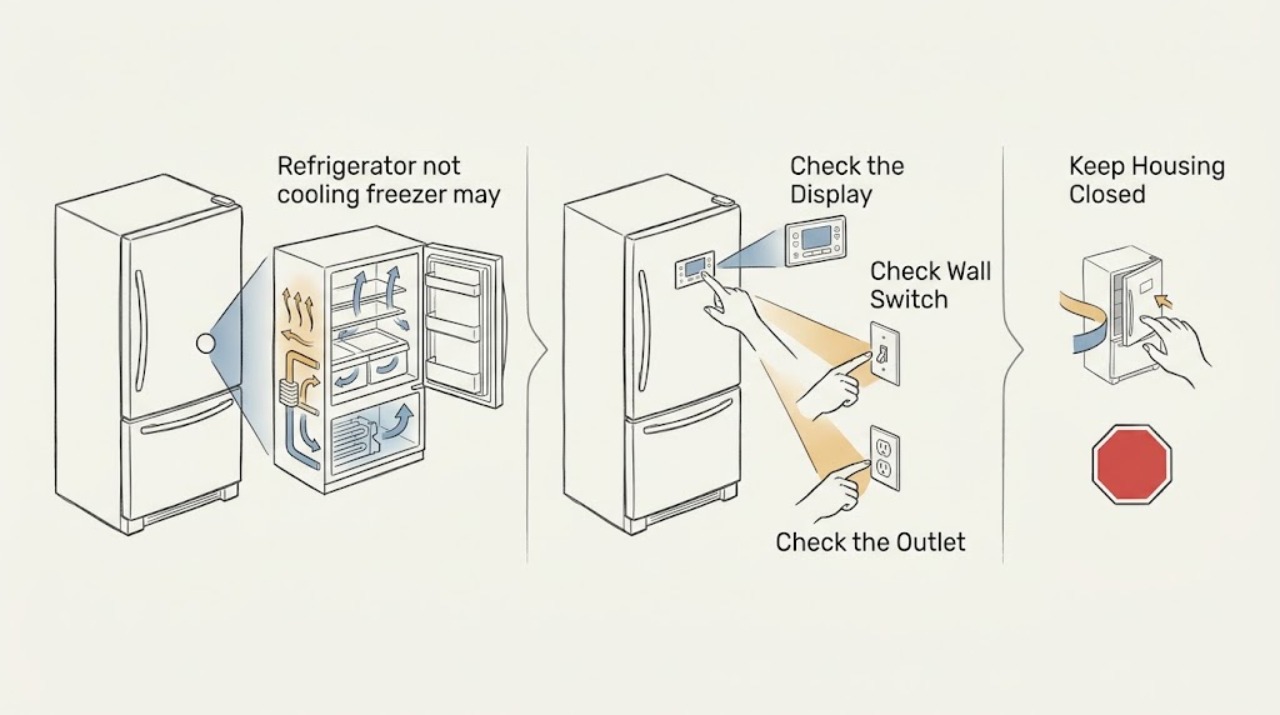
When the refrigerator compartment is warm but the freezer may still be cold, the cooling system may be running while cold air is not reaching the fresh-food section. First verify the actual temperatures and that the refrigerator is powered and not in Cooling Off, Demo, or Showroom mode. Then keep food away from the vents, check for frost blocking the air path, confirm the refrigerator door gasket closes, and listen for normal fan or compressor operation. A cold freezer with a warm refrigerator makes blocked airflow, a damper or fan issue, frost, or a door-seal problem more likely than a complete loss of cooling, but it does not identify a part. Do not chip ice, open sealed refrigeration tubing, or remove electrical covers. If temperatures remain unsafe, food is spoiling, a code appears, or the unit does not recover after model-appropriate checks and stabilization time, arrange appliance service.
Before you begin
Safety first
- The homeowner-safe checks are food and temperature observation, normal controls or mode status, accessible vents and loading, door closure and gasket cleaning, and external sounds or clearance. Internal fans, dampers, defrost systems, sensors, compressors, sealed refrigeration, electrical covers, and refrigerant work require model-specific professional service.
Work through in order
Diagnostic checks
Use only checks that match the exact appliance or system and its official guide.
-
Check 1
Check the refrigerator compartment's actual temperature with the appliance display or a thermometer placed among food, and inspect whether food is warming or spoiling; minimize door openings while checking.
Expected result: The freezer is cold but the fresh-food section is clearly warmer, both compartments are warm, the display shows an alarm or error, or food is already unsafe or spoiling.
Next step: Move perishable food to a known-safe cold location if needed. Record the temperatures and any code, then continue only with the external checks below; request service promptly if food is spoiling or a code is present.
Why this matters
Why: A warm fresh-food section with a cold freezer points toward air distribution, frost, a door seal, or a compartment control. Both sections warm suggests a power, control, compressor, or broader cooling problem. Spoilage or an error code raises the priority for food protection and service.
-
Check 2
Confirm the refrigerator has interior or control-panel power, is switched on, and is not showing Cooling Off, Demo, or Showroom mode; follow the owner's manual for any model-specific mode change.
Expected result: Interior lights or controls are off, the cooling function is disabled, an OFF or demo indication appears, power was recently interrupted, or the appliance appears powered and cooling is enabled.
Next step: Restore only an accidentally disabled normal setting or a safe, clearly tripped receptacle or breaker as the manual permits. Do not repeatedly reset a breaker. If power is unstable or cooling remains absent, arrange appliance service.
Why this matters
Why: No power or a cooling-off mode can stop cooling in both compartments. A powered unit with cooling enabled makes a compartment-specific airflow or temperature problem more likely, especially when the freezer remains cold.
-
Check 3
With doors open only briefly, locate the air inlets and outlets in both compartments and move food, containers, and liners away from them; do not force a damper or remove an interior panel.
Expected result: A package blocks a vent, the refrigerator is tightly packed, air can move freely, or no obvious obstruction is visible.
Next step: Leave clearance around the vents and close the doors. Allow the unit to stabilize according to the manual, then recheck the fresh-food temperature. If the compartment remains warm with an open air path, stop disassembling and arrange service.
Why this matters
Why: A blocked passage can leave the freezer cold while restricting cold air to the fresh-food section. If vents and food spacing are clear, an internal fan, damper, frost, or control issue becomes more likely than simple loading.
-
Check 4
Inspect the visible rear walls and vent openings for a blanket of frost or ice, and note whether the refrigerator has weak or no airflow at a vent; do not chip ice, use a hair dryer, or remove covers.
Expected result: Frost covers a vent or rear wall, airflow is weak, there is no visible frost and airflow feels normal, or water is collecting after a previous thaw.
Next step: Keep food clear and follow only the exact manual's defrost or reset procedure if one is provided. If frost returns, the unit cannot be safely defrosted according to the manual, or airflow remains absent, arrange appliance service.
Why this matters
Why: Frost can restrict the return or supply path and reduce cooling in the refrigerator section. Normal visible airflow makes a simple frost blockage less likely but does not rule out a fan, damper, sensor, defrost, or sealed-system fault.
-
Check 5
Inspect the refrigerator door and gasket for packages, debris, warping, or a gap; clean a dirty gasket with the model-approved mild cleaning method and close the door on a sheet of paper to check for slight resistance.
Expected result: The door is obstructed, the gasket is dirty or damaged, the paper slides out without resistance, or the door closes and seals evenly.
Next step: Remove the obstruction and clean the gasket if appropriate, then monitor the temperature with the door closed. Do not bend hinges or attempt a gasket replacement without model instructions; request service if the seal is damaged or the compartment stays warm.
Why this matters
Why: A poor seal admits warm moist air, creates temperature instability, and can promote frost that blocks airflow. A good seal makes the gasket a less likely primary cause, though a misaligned door or internal airflow fault can remain.
-
Check 6
From outside the appliance, listen for the compressor and fans and inspect the installation area for blocked exterior clearance, a heat source, unusually hot or cold room conditions, or a recent large load of warm food; do not remove the rear cover.
Expected result: The unit is silent, fans or compressor run, the room or clearance is abnormal, or the appliance has recently been installed or heavily loaded.
Next step: Correct only an obvious external clearance or door-use issue and allow the model's stabilization period. If the appliance runs continuously without cooling, remains silent while warm, or never recovers, arrange service rather than opening the sealed or electrical system.
Why this matters
Why: A running compressor or fan indicates the appliance is attempting to cool but does not prove that air is reaching the refrigerator. Poor clearance, extreme ambient conditions, installation recovery, or a warm load can delay stabilization. Silence with warm food in both compartments keeps power or an internal fault in consideration.
-
Check 7
After one round of safe setting, vent, gasket, and exterior checks, keep the doors closed and recheck the compartment temperature after the time specified by the model manual; record any change, code, frost return, or food-safety concern.
Expected result: The refrigerator cools normally, improves only briefly, remains warm while the freezer stays cold, or both compartments remain warm.
Next step: Arrange appliance service for persistent or recurring symptoms, for any error code, or for food spoilage. Provide the technician with temperatures, sound pattern, frost location, door-seal result, recent power event, and the steps already tried.
Why this matters
Why: Stable recovery supports a setting, loading, sealing, or temporary airflow issue. A brief improvement followed by warming suggests recurring frost, fan, damper, sensor, or control trouble. Both compartments remaining warm broadens the concern to power or the overall cooling system.
Use your observations
Decision map
Find the observation that best matches what you see, then follow the next safe action.
-
PATH 01Next step
What you see
The freezer is cold, the fresh-food section is warm, and food or packaging is blocking a vent or the air path is packed tightly.
Do this next
Restore space around the vents, close the doors, and allow the appliance to stabilize. If the refrigerator remains warm with clear vents, arrange service for the fan, damper, sensor, or control path.
Why this path and its safety boundary
Why it matters: Air distribution is more likely than a complete loss of refrigeration.
-
PATH 02Next step
What you see
A thick frost pattern covers a vent or rear wall, especially after a door-seal problem or repeated warm-air entry.
Do this next
Use only the model's documented defrost procedure and never chip or heat the liner. If frost returns or airflow does not recover, arrange appliance service.
Why this path and its safety boundary
Why it matters: Frost may be restricting the return or supply airflow; a recurring frost pattern may indicate a defrost, seal, fan, or control fault.
-
PATH 03Next step
What you see
The gasket fails the paper-resistance check, the door is not closing fully, or warm air and condensation appear around the door edge.
Do this next
Remove obstructions and clean the gasket. If it is warped, damaged, or still does not seal, request service rather than forcing the hinge or ordering an unverified gasket.
Why this path and its safety boundary
Why it matters: Door sealing is a plausible source of warm-air entry and unstable temperature, and it may also be contributing to frost.
-
PATH 04Next step
What you see
Vents are clear, the door seals, the freezer stays cold, but the refrigerator has weak or no airflow and remains warm.
Do this next
Keep the doors closed and arrange qualified appliance service. Do not remove interior or rear panels, bypass a fan or sensor, or chip frost to reach a part.
Why this path and its safety boundary
Why it matters: An internal evaporator fan, damper, sensor, defrost, or control issue is more likely than a user setting; the freezer's temperature alone cannot select which component failed.
-
PATH 05Next step
What you see
Both compartments are warm, the unit has no power, Cooling Off or Demo mode is displayed, or an error code appears.
Do this next
Restore only a clearly disabled normal mode or safe power control. Protect perishable food and arrange appliance service for an error code, persistent loss of cooling, or unstable power.
Why this path and its safety boundary
Why it matters: The issue is broader than the reported freezer-cold pattern and may involve power, control settings, or a system fault.
Helpful context
Understand the symptom
A cold freezer does not prove the refrigerator section is receiving cold air
In many designs, the fresh-food section is cooled by air moving from the freezer through vents and a controlled passage. If a package blocks a vent, frost covers the return path, a door does not seal, or an internal fan or damper is not working, the freezer can feel cold while the refrigerator stays warm. The pattern helps choose the next safe check, but it cannot identify a failed part by itself.
Use food and temperature evidence, not one brief air reading
Opening a door lets cold air escape, and a recently installed or heavily loaded unit needs time to stabilize. Check the appliance display and, if available, a thermometer in the food area. Keep the doors closed as much as practical while the unit recovers. If perishable food is warming or spoiling, protect the food first and do not wait for a lengthy home experiment.
Look for airflow and frost before considering sealed-system work
Rearrange food so the refrigerator and freezer vents are open, and inspect for visible frost around those vents. A clean, unobstructed air path makes a blocked-vent explanation less likely. Do not scrape or chip ice with a sharp tool, use heat on plastic liners, or open the evaporator or sealed refrigeration system; those repairs require model-specific procedures and a qualified technician.
The safe homeowner boundary is external
Power, controls, door closure, gaskets, food placement, accessible frost, and audible operation can be checked without removing panels. Condenser access and cleaning vary by model, and some manufacturers state that only a certified technician should clean certain designs. Keep the refrigerator unplugged only for a model-approved reset or cleaning step, and stop if water, damaged wiring, smoke, or unusual heat is present.
Safety boundary
Stop conditions
- Do not chip or pry ice, use a heat tool on the liner, remove electrical or evaporator covers, open sealed refrigeration tubing, bypass a fan or sensor, or handle refrigerant. Stop if water reaches wiring, there is smoke, sparking, a burning odor, or unusual heat.
- Protect or relocate perishable food and arrange appliance service when food is spoiling, a temperature or error alarm persists, or either compartment remains outside the model's safe range after the documented stabilization period.
- Stop after one safe round of power or mode, vent, gasket, frost observation, and external-operation checks if the refrigerator remains warm, if it cools only briefly, or if the freezer stays cold while the refrigerator has no airflow.
- Do not repeatedly reset the breaker or unplug and replug the refrigerator as a substitute for diagnosis; a recurring power trip or unstable outlet needs qualified appliance or electrical evaluation.
When checks do not resolve it
Need a professional?
Safety scope: The homeowner-safe checks are food and temperature observation, normal controls or mode status, accessible vents and loading, door closure and gasket cleaning, and external sounds or clearance. Internal fans, dampers, defrost systems, sensors, compressors, sealed refrigeration, electrical covers, and refrigerant work require model-specific professional service.
Common questions
FAQ
Why is my refrigerator warm if the freezer is still cold?
Many refrigerators send cold air from the freezer through vents or a controlled passage. A blocked vent, frost, poor door seal, fan, damper, sensor, or control issue can leave the refrigerator warm while the freezer remains cold. Clear only accessible obstructions and arrange service if airflow or temperature does not recover.
Can blocked refrigerator vents cause the fresh-food section to warm up?
Yes. Food or frost over a vent can restrict circulation between compartments. Move items away from the openings and follow the model manual for any defrost procedure. Do not chip ice or remove panels; recurring frost or absent airflow needs service.
How can I check the refrigerator door gasket?
First make sure no package prevents the door from closing. Clean a dirty gasket using the model-approved method, then close the door on a sheet of paper; slight resistance suggests contact, while paper that slides out easily suggests a sealing or alignment problem. A damaged gasket needs model-specific service or replacement.
Should I reset or unplug a refrigerator that is not cooling?
Only use a power cycle if the manufacturer's instructions for the model allow it and the appliance is safe to unplug. Follow the specified wait and stabilization period, keep the doors closed, and do not repeatedly cycle power. If cooling does not return or a breaker trips, arrange service.
When should I call for refrigerator service?
Arrange service when food is spoiling, an error code or alarm persists, the refrigerator stays warm after accessible vents and seals are addressed, frost returns, the unit runs without cooling, or both compartments are warm. Electrical covers, fans, dampers, defrost parts, compressors, sealed tubing, and refrigerant are not homeowner repairs.
Read the exact guide
Official sources
- Cooling issues with Samsung refrigerator or freezerSamsung Support · Samsung refrigerator and freezer guidance; exact settings and cooling modes vary by model
- Freezer - Not Freezing or Not CoolingFrigidaire · Frigidaire freezers and refrigerators with freezers; exact temperatures and procedures vary by model
- Not Cooling - Top Freezer RefrigeratorWhirlpool Product Help · Whirlpool top-freezer refrigerator guidance; control locations and cleaning requirements vary by model
Community feedback
Share a repair observation
Share a plain-text repair observation. Accepted observations are published automatically; this page may take a moment to update.