
On this page
Start here
Quick answer
A refrigerator that is not cooling may have an evaporator-fan problem, but the same symptom can come from loss of power, demo or cooling-off mode, blocked vents, a door-seal leak, heavy frost, a defrost fault, a sensor problem, or another internal failure. First separate whether the freezer, fresh-food compartment, or both are warm. Check power and controls, door closure and seals, clear airflow paths, and visible frost without removing panels or touching a fan. Listen and observe from the normal user-accessible area; a silent fan, weak airflow, repeated fan error, or cooling that does not recover after the model's normal stabilization period needs appliance service rather than improvised disassembly.
Before you begin
Safety first
- This article supports ordinary-access observation and model-approved user settings only. Do not remove panels, reach toward or touch the fan, bypass a door switch, perform electrical tests, chip frost, or work on refrigeration components.
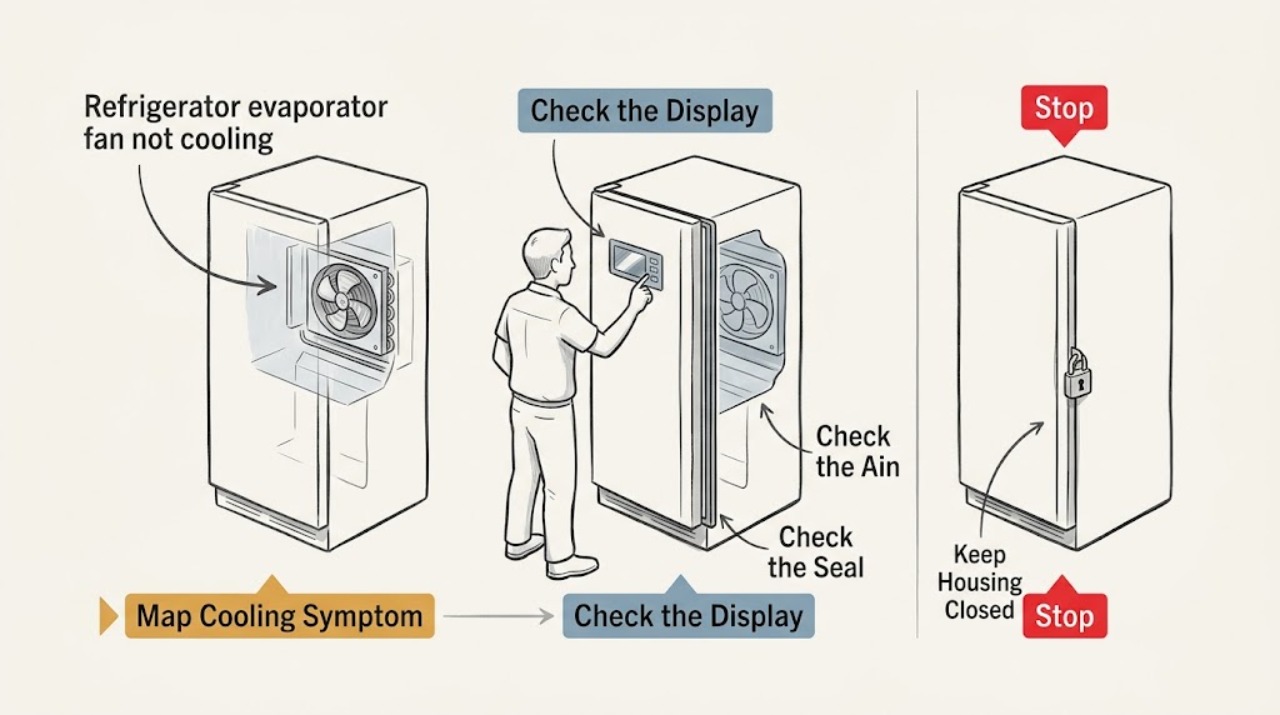
Work through in order
Diagnostic checks
Use only checks that match the exact appliance or system and its official guide.
-
Check 1
With the refrigerator operating normally, identify whether the freezer, fresh-food compartment, or both are warm and note the model's displayed temperature, food condition, and any accessible airflow sound.
Expected result: Record the affected compartment, whether either compartment is still cold, whether food is softening or spoiling, and whether cooling stopped suddenly or declined gradually.
Next step: Continue with the power and control check, keep doors closed as much as practical, and move perishable food to safe cold storage if the refrigerator cannot maintain safe cooling.
Stop if: Stop relying on the appliance for perishable food when temperatures are rising, food is spoiling, there is a burning smell, smoke, arcing, or a damaged power cord; arrange appliance service.
Why this matters
Why: Only the fresh-food compartment being warm while the freezer remains cold makes a blocked vent or airflow imbalance more plausible. Both compartments warming makes power, controls, fan, defrost, compressor, or another system fault more urgent; neither pattern proves an evaporator-fan motor failure.
-
Check 2
Confirm the refrigerator is receiving power, cooling is enabled, and a showroom or demo mode is not active; check the model-specific temperature setting and note any recent installation, move, outage, or setting change.
Expected result: Observe whether lights and controls respond, whether a demo or cooling-off indication is present, whether a breaker or outlet has a problem, and whether the unit has had the stabilization period specified by its manual.
Next step: Restore only a clearly incorrect user setting or power connection that can be corrected without opening electrical parts, then allow the model's stated stabilization period and recheck both compartments.
Stop if: Do not remove electrical covers, probe wiring, bypass a door switch, or reset a breaker repeatedly; stop for heat, smoke, arcing, a damaged cord, or an outlet problem.
Why this matters
Why: No power or an active cooling-off mode can explain warm compartments without a fan diagnosis. A recent change can require stabilization, but a unit that remains warm after the model's stated period or repeatedly loses cooling needs service.
-
Check 3
Inspect the closed doors, hinge-side alignment, visible gasket, and exterior clearance from ordinary access; clean a dirty gasket with the model-approved method and check that no container prevents full closure.
Expected result: Look for a torn, cracked, loose, dirty, or visibly warped gasket, a door that rebounds or remains ajar, frost around the gasket, or insufficient clearance around the cabinet.
Next step: Remove only the obstruction or clean the seal as directed by the model manual, then observe whether the door closes evenly and whether cooling improves after stabilization; arrange service for a damaged gasket or misalignment.
Stop if: Do not pry, stretch, glue, heat, or replace a gasket without model-specific fit guidance; stop if the door is sagging, glass is damaged, or the cabinet or hinge needs adjustment beyond ordinary access.
Why this matters
Why: A failed seal or blocked clearance lets heat in and can create frost that interferes with airflow. A clean, continuous gasket and properly closed door make a fan, vent, defrost, control, or other internal cause more likely if cooling remains poor.
-
Check 4
Inspect visible interior supply and return vents, food loading, and any visible frost without removing an interior cover or reaching toward the evaporator fan.
Expected result: Record whether food blocks a vent, airflow is weak or absent, frost is localized near a vent or rear panel, or the interior is clear with no visible frost pattern.
Next step: Rearrange only food containers that block a visible vent and allow the model's normal recovery time. If frost persists, returns, or blocks the air path, use the model's approved defrost/service guidance rather than removing panels.
Stop if: Do not chip ice, use a knife or heat gun, remove the evaporator cover, or touch the fan or wiring; stop for water near electrical components or any need for internal access.
Why this matters
Why: A blocked vent can explain a warm fresh-food compartment while the freezer remains cold. Frost or repeated ice near the air path can make a frozen fan, door-seal, defrost, sensor, or airflow fault more likely; a clear path with no airflow makes service more important.
-
Check 5
From normal user-accessible openings, listen for and note the evaporator-fan symptom while the appliance is calling for cooling; photograph any displayed fan code and do not touch the fan, guard, or wiring.
Expected result: Classify the observation as normal airflow, no airflow, a silent fan, scraping or intermittent noise, a fan that starts and stops, or a model-specific fan code such as 21E, 22E, or 22C where the manual confirms its meaning.
Next step: Record the exact model, code, compartment, frost pattern, and timing, then arrange qualified appliance service if the symptom persists or recurs. Use only model-specific instructions for any user-level reset or approved defrost step.
Stop if: Do not remove panels, bypass a door switch, spin the fan by hand, perform voltage or continuity tests, or attempt to free or replace the fan motor.
Why this matters
Why: Weak or absent airflow, unusual fan noise, or a confirmed fan code makes a frozen obstruction, fan motor, wiring, control, or related internal fault more likely. Samsung notes that applicable fan errors may follow a door-left-open or gasket-gap condition or may require service; the code does not identify a universal replacement part.
-
Check 6
Prepare a service record containing the model and serial information, compartment temperatures or display readings, power and control observations, door-seal result, vent and frost pattern, fan sound, error codes, and the time line of any recovery or recurrence.
Expected result: Confirm whether the refrigerator cooled after a setting correction, vent rearrangement, approved defrost, or stabilization period, and whether the same symptom returned.
Next step: Give the record and photos to a qualified appliance technician or the manufacturer so they can test the evaporator fan circuit, defrost system, sensors, controls, and refrigeration system using model-specific procedures.
Stop if: Stop using the refrigerator for perishable storage and seek prompt service for persistent warming, repeated fan codes, burning smell, smoke, arcing, water near electrical parts, or a damaged cord.
Why this matters
Why: Temporary recovery followed by recurrence points to an unresolved fan, defrost, sensor, control, or sealed-system problem. No recovery, food spoilage, repeated code, or both compartments warming supports prompt professional diagnosis rather than more user disassembly.
Use your observations
Decision map
Find the observation that best matches what you see, then follow the next safe action.
-
PATH 01Safety boundary
What you see
The fresh-food compartment is warm, the freezer remains cold, and a visible vent is blocked or airflow is weak.
Do this next
Move only the food obstructing the visible vent, keep the door closed, and recheck after the model's normal recovery time; arrange service if airflow remains weak or the symptom returns.
Why this path and its safety boundary
Why it matters: A blocked or restricted air path is more likely than a complete loss of refrigeration, although a fan or defrost fault remains possible if airflow does not recover.
Safety stop: Do not remove the evaporator cover, chip ice, or reach toward the fan to force airflow.
-
PATH 02Safety boundary
What you see
Both compartments are warm, but power, cooling mode, or a recent installation or outage has not yet been confirmed.
Do this next
Confirm power and controls without opening electrical parts, correct only an obvious user setting, and allow the model's specified stabilization period; call service if cooling does not return.
Why this path and its safety boundary
Why it matters: Power loss, demo or cooling-off mode, or insufficient stabilization is more likely than a compartment-only vent issue at this stage.
Safety stop: Do not repeatedly reset a breaker or leave perishable food in a refrigerator that is warming.
-
PATH 03Safety boundary
What you see
A model-specific refrigerator or freezer fan code appears, or the fan is silent with little or no airflow after power and controls are confirmed.
Do this next
Photograph the code, document the model and frost pattern, and arrange qualified service for model-specific fan and defrost diagnosis.
Why this path and its safety boundary
Why it matters: A frozen fan, fan-motor failure, wiring or control fault is more likely; the code alone does not establish which component is bad.
Safety stop: Do not bypass a door switch, touch the fan, remove panels, or attempt motor replacement or electrical testing.
-
PATH 04Safety boundary
What you see
The gasket is dirty, damaged, or failing to seal and frost is visible around the door or near the air path.
Do this next
Clean the gasket only as directed, remove door obstructions, and request model-specific gasket or door service when the seal is damaged or alignment is not an ordinary adjustment.
Why this path and its safety boundary
Why it matters: Warm humid air entering through the door can account for frost and poor airflow, but persistent frost after a seal correction can indicate a defrost or airflow fault.
Safety stop: Do not glue, heat, stretch, or force the gasket or door; do not chip frost with a sharp object.
-
PATH 05Safety boundary
What you see
Power, controls, door seal, visible vents, and clearance are normal, but cooling remains poor or returns only temporarily after a reset or stabilization period.
Do this next
Stop further trial-and-error, preserve the service record, and arrange qualified appliance diagnosis with the exact model and symptom history.
Why this path and its safety boundary
Why it matters: An internal evaporator-fan, defrost, sensor, control, compressor, or sealed-system fault is more likely than a user-correctable blockage.
Safety stop: Do not open rear or evaporator panels, test live circuits, add refrigerant, or order a fan motor based only on the symptom.
Helpful context
Understand the symptom
Confirm which compartment is warm before blaming the evaporator fan
Note whether the freezer, fresh-food compartment, or both are warmer than the model setting, and whether any food is softening or spoiling. A fresh-food compartment that is warm while the freezer remains cold can fit an airflow or vent problem, while both compartments warming raises the priority of power, controls, fan, defrost, compressor, or other system checks. This symptom pattern does not prove that the evaporator fan motor itself has failed. Keep doors closed as much as practical and move perishable food to a safe cold-storage location if cooling is not being maintained.
Rule out settings, power, clearance, and door-seal losses
Verify that the refrigerator has power, cooling is enabled, and a showroom or demo mode is not active. Check the model's temperature guidance and allow the stabilization time specified for a recent installation, move, power interruption, or setting change. Look for a door that cannot close, a dirty or damaged gasket, blocked exterior clearance, or food pressing against the door. Samsung and Whirlpool both identify seals, clearance, controls, and airflow as cooling checks; a failed seal can also create frost that interferes with airflow.
Inspect vents and frost from ordinary access only
Look at the visible supply and return vents inside the compartments and move only food containers that obstruct them. Record whether a vent is blocked, whether frost is concentrated around a vent or rear interior panel, and whether air is weak or absent. Do not remove the evaporator cover, rear access panel, or any guard to reach the fan. A heavy or recurring frost pattern can indicate a door-seal, defrost, airflow, or sensor issue and should be evaluated according to the model manual or by a qualified technician.
Observe fan symptoms without touching or testing live parts
From the normal compartment opening, listen for the fan when the refrigerator is calling for cooling and note whether airflow is audible or felt at an accessible vent. A fan that is silent, scraping, intermittently stopping, or associated with a displayed fan code makes a fan obstruction, frozen fan, motor, wiring, control, or related fault more likely; the observation cannot identify which part failed. Samsung lists 21E for a freezer-fan error and 22E/22C for a refrigerator-fan error on applicable models, but codes vary by model. Photograph the display and use the model-specific manual rather than forcing a fan or bypassing a switch.
Use a recurrence pattern to decide how quickly to call
If cooling returns after correcting a mode, door, vent, or temporary power issue but the refrigerator warms again, record the timing and any recurring frost or code. A recurring symptom is more consistent with an unresolved fan, defrost, sensor, control, or sealed-system problem than with a one-time blocked container. Do not repeatedly power-cycle a refrigerator that is warming or leave food in it while waiting for an uncertain recovery.
Safety boundary
Stop conditions
- Do not remove the evaporator cover, rear access panel, fan guard, wiring, or other internal parts to reach the fan.
- Do not touch, spin, bypass, force, lubricate, or attempt to replace the evaporator fan or its circuit, and do not perform voltage or continuity tests.
- Do not chip frost with a knife or other sharp tool, use a heat gun, or improvise a defrost method near plastic, wiring, food, or electrical components.
- Stop using the appliance for perishable storage and arrange service for persistent warming, food spoilage, repeated fan codes, smoke, burning smell, arcing, water near electrical parts, or a damaged power cord.
- Do not assume that a fan symptom identifies a fan motor; a qualified technician must distinguish obstruction, defrost, sensor, wiring, control, compressor, and sealed-system causes.
- Do not repeatedly reset a breaker or bypass a door switch to keep the refrigerator running.
Only after diagnosis
Potential parts
- refrigerator evaporator fan motor
Consider this class only if model-specific service diagnosis confirms that the evaporator fan motor is defective rather than frozen by a seal or defrost problem, blocked by ice, or affected by wiring or control failure.
Match the exact refrigerator model, motor voltage and connector, mounting, airflow direction, and manufacturer fit information; do not order from the symptom alone or install it without qualified service. - refrigerator condenser coil brush
Consider this class only when the exact model's instructions permit user-accessible condenser cleaning and inspection confirms dust or debris at an accessible coil; it is not a substitute for evaporator-fan diagnosis.
Use a non-damaging tool and the model-approved access and cleaning procedure; some refrigerator designs restrict coil cleaning to qualified service, and no brush should contact wiring or internal fan parts. - refrigerator temperature sensor
Consider this class only if model-specific diagnostics identify a failed temperature sensor or related sensor circuit after airflow, power, controls, seals, and frost causes are assessed.
Confirm the exact model, sensor location, connector, resistance specification, and manufacturer part compatibility through qualified service; do not infer sensor failure from a warm compartment alone.
When checks do not resolve it
Need a professional?
Arrange qualified appliance service when both compartments remain warm after power and controls are confirmed, airflow is absent or a fan code recurs, frost returns or blocks the air path, the door seal or alignment is damaged, cooling is only temporarily restored, or the cause would require panel removal, electrical testing, fan replacement, defrost work, sensor diagnosis, or refrigeration-system access. Move perishable food to safe cold storage while waiting.
Safety scope: This article supports ordinary-access observation and model-approved user settings only. Do not remove panels, reach toward or touch the fan, bypass a door switch, perform electrical tests, chip frost, or work on refrigeration components.
Common questions
FAQ
Does a refrigerator that is not cooling always need a new evaporator fan motor?
No. Power loss, cooling-off or demo mode, blocked vents, a door-seal leak, frost, defrost trouble, a sensor or control issue, compressor trouble, and other faults can look similar. A silent or coded fan observation supports service diagnosis but does not identify a replacement motor by itself.
How can I tell whether the evaporator fan is running?
Listen and observe airflow only from normal user-accessible openings while the refrigerator is calling for cooling. Do not remove a cover, bypass a door switch, reach toward the fan, spin it by hand, or perform electrical tests. Record weak or absent airflow, unusual noise, and any model-specific code for service.
Why is the freezer cold but the refrigerator section warm?
A blocked vent, food loading, weak airflow, frost, door-seal problem, or a fan or defrost fault can prevent cold air from reaching the fresh-food compartment. Clear only visible food obstructions, inspect the seal and frost pattern, and arrange service if airflow stays weak or the pattern returns.
Can I remove ice around the evaporator fan?
Do not remove the evaporator cover or chip ice with a sharp tool. Frost may result from a gasket, defrost, airflow, sensor, or fan problem, and an improvised defrost can damage the appliance or create an electrical hazard. Follow only the exact model's approved defrost guidance or arrange qualified service.
When should I stop troubleshooting and call an appliance technician?
Call when both compartments remain warm after power and controls are confirmed, a fan code recurs, airflow is absent, frost returns, a seal is damaged, cooling returns only temporarily, food is spoiling, or any diagnosis would require panel removal, electrical testing, fan replacement, defrost work, or refrigeration-system access.
Read the exact guide
Official sources
- Cooling issues with Samsung refrigerator or freezerSamsung · Samsung consumer troubleshooting; use the exact model manual for controls, stabilization, defrost, and access procedures.
- Samsung refrigerator error codesSamsung · Samsung error-code guidance; codes and procedures vary by model and do not establish a universal replacement part.
- Why is my refrigerator not cooling? 7 possible causes and fixesWhirlpool · Whirlpool consumer guidance for refrigerator cooling symptoms; exact model instructions control cleaning, clearance, settings, and service access.
- My Samsung fridge isn't coolingSamsung · Samsung UK consumer guidance; model-specific instructions and regional requirements may differ.
- Not Cooling - Freezer Section - RefrigeratorWhirlpool · Whirlpool product-help guidance for the identified refrigerator family; exact model manual controls access and cleaning eligibility.
Community feedback
Share a repair observation
Share a plain-text repair observation. Accepted observations are published automatically; this page may take a moment to update.