
On this page
Start here
Quick answer
An Amana dryer can seem not to cool when the load is removed before its cool-down portion ends, when a high-temperature Timed Dry setting is used, or when restricted exhaust airflow keeps heat inside the dryer. First read the cycle status and settings, then—only with the dryer stopped and safe to inspect—clean the lint screen and look for a crushed or blocked vent and exterior hood. If the dryer continues heating after its Cool Down or End stage, remains abnormally hot, or shows smoke, scorching, burning odor, or a fire concern, stop using it and arrange qualified appliance or vent service. This is a not-cooling/overheating symptom, not a substitute diagnosis for a dryer that never produces heat.
Before you begin
Safety first
- Do not open the dryer cabinet, test energized wiring, reach into a moving drum, bypass a thermal or door safety device, or continue operation when smoke, scorching, burning odor, melting, flame, or abnormal heat is present.
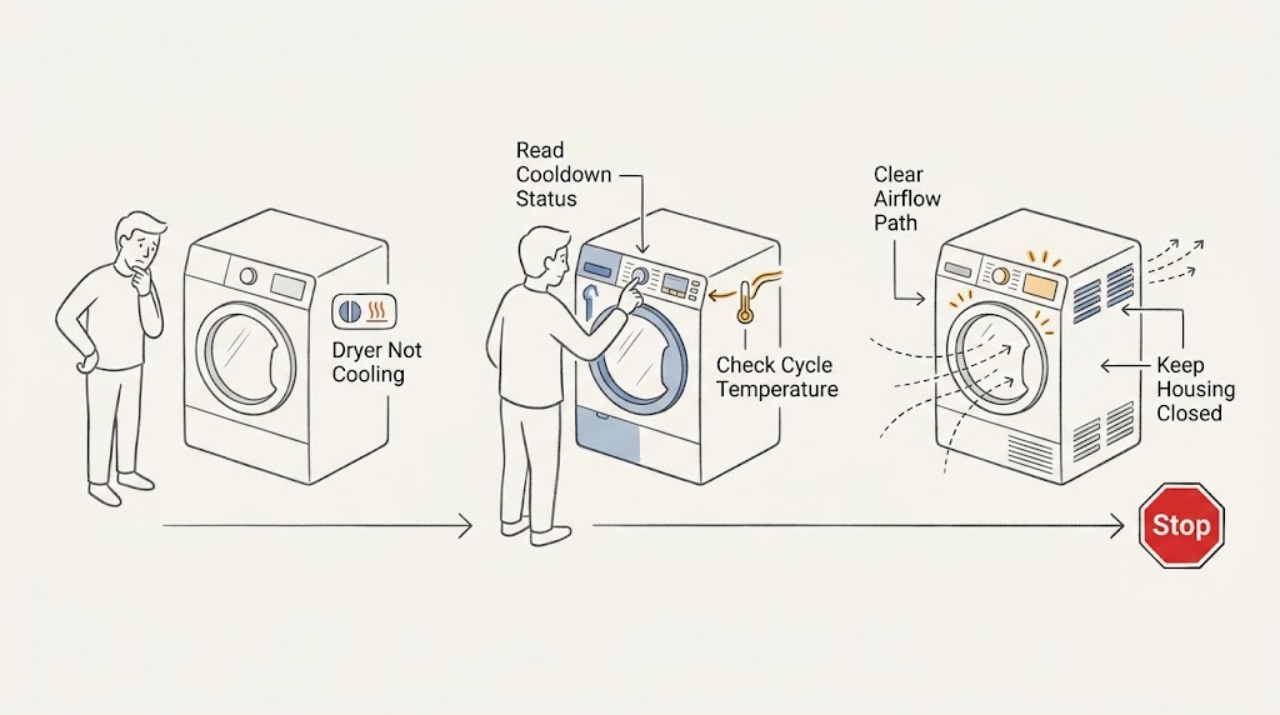
Work through in order
Diagnostic checks
Use only checks that match the exact appliance or system and its official guide.
-
Check 1
Without reaching into the drum, read the cycle-status display while the dryer is finishing and again when it indicates Cool Down or End, if those indicators are available on your model.
Expected result: Record whether Cool Down appears and the drum tumbles without heat, whether End appears while the load is gradually losing warmth, or whether heat continues after Cool Down or End; also note whether Wrinkle Prevent is selected.
Next step: Let a normal Cool Down finish. If heat persists after the expected stage, stop the dryer when the controls respond, do not repeat heated cycles, and arrange qualified service.
Stop if: Stop using the dryer for smoke, flame, scorching, a burning odor, melting, a drum or cabinet that becomes abnormally hot, or any sign of fire; leave the area and contact emergency help when appropriate.
Why this matters
Why: Cool Down with tumbling but no heat is the expected cooling phase. Continued tumbling after End can be normal when Wrinkle Prevent is selected, but continued heating after Cool Down or End is not explained by that option and needs service if it repeats.
-
Check 2
Record the selected cycle, temperature, dryness level, and options, and note whether clothes were removed before the cycle’s cool-down portion finished.
Expected result: A hot load occurs only after Timed Dry or a high temperature, or the load was removed early; alternatively, the same excess heat occurs on a normal Sensor/Automatic cycle after its cool-down stage.
Next step: For a settings-related pattern, follow the garment label and the exact model guide, use a lower suitable temperature or an Automatic/Sensor cycle, and allow cool-down to finish. For persistent heat on the expected cycle, continue only with the safe airflow check and stop if any hazard is present.
Stop if: Do not keep running a dryer that remains hot after the documented cooling stage or that produces smoke, odor, scorching, or unusual heat.
Why this matters
Why: Timed Dry and high-temperature selections can leave a load overly warm, and early removal bypasses cool-down. Repeated heat after a normal cycle’s cooling stage is not explained by those settings alone and shifts attention to airflow or a service fault.
-
Check 3
After stopping the dryer and allowing it to cool, clean the lint screen and inspect the visible vent run behind the dryer and the exterior exhaust hood from a safe position; do not open the cabinet or reach into the drum.
Expected result: Record a loaded lint screen, a crushed or kinked vent, a blocked hood, weak or absent outside airflow during a later normal observation, steam or moisture, a very warm cabinet, or no visible restriction.
Next step: Clean the lint screen and remove only loose, safely accessible debris from the exterior hood. Arrange qualified vent cleaning or appliance service for a crushed, inaccessible, repeatedly restricted, or uncertain vent path, or when the symptom returns.
Stop if: Do not climb, dismantle the vent system, push tools into the duct, move a heavy dryer, defeat a vent or safety control, or continue testing when lint accumulation, smoke, burning odor, or abnormal heat is present.
Why this matters
Why: Amana associates poor airflow with heat and moisture remaining in the dryer, unusual warmth, long dry times, and fire risk. No visible restriction does not rule out a concealed or undersized vent path, so it does not justify an internal repair guess.
-
Check 4
Prepare a service record from safe observations: model and serial information, cycle and temperature, when the load stayed hot, Cool Down/End/Wrinkle Prevent indicators, vent and lint findings, and any code or warning sign.
Expected result: The record shows a normal cool-down and settings pattern, an airflow pattern, continued heat after the expected stage, a recurring code, or a hazard such as smoke, scorching, or burning odor.
Next step: Give the record to an Amana-qualified appliance technician or qualified vent professional. Keep the dryer out of normal use until a persistent not-cooling or overheating symptom is assessed.
Stop if: Do not remove panels, test energized terminals, bypass thermal or door safety devices, or replace an internal part based only on this symptom.
Why this matters
Why: A normal cool-down with a settings pattern supports a use or cycle-selection explanation. Airflow signs support vent assessment. Continued heat, a recurring code, or a hazard needs appliance diagnosis rather than a guessed replacement part.
Use your observations
Decision map
Find the observation that best matches what you see, then follow the next safe action.
-
PATH 01Next step
What you see
Cool Down is displayed or the model's documented cooling phase is tumbling without heat, the load is cooling, and no warning sign is present.
Do this next
Allow the cycle to complete and use the exact model guide for cycle-status behavior. Do not call this a failed cooling component solely because the load is warm during the normal cool-down stage.
-
PATH 02Next step
What you see
The load is warm mainly after Timed Dry or high temperature, or it was removed before Cool Down completed, while the dryer otherwise reaches its expected no-heat cooling stage.
Do this next
Use a suitable lower-temperature or Automatic/Sensor setting and let cool-down finish. If the load remains unusually hot on the expected cycle, move to airflow and service assessment rather than changing settings repeatedly.
-
PATH 03Next step
What you see
The dryer is very warm and the load is hot or damp, with a loaded lint screen, weak outside airflow, steam or moisture, a crushed/kinked vent, or a blocked exterior hood.
Do this next
Stop heated use, clean only the normal lint-screen access, and arrange qualified vent cleaning or inspection. Restricted airflow can be a fire risk; do not keep running the dryer to see whether it cools.
-
PATH 04Next step
What you see
Heat continues after Cool Down or End, the symptom repeats after safe external checks, an error/service code returns, or smoke, scorching, burning odor, melting, or flame is present.
Do this next
Stop using the dryer and arrange qualified appliance service; use emergency help for an active fire or immediate danger. Do not infer a thermostat, sensor, heater, or control-board failure without model-specific professional diagnosis.
Helpful context
Understand the symptom
What “not cooling” means on a dryer
A dryer’s cool-down stage is a real operating phase: the Amana guide describes it as tumbling the load without heat after heated drying. A warm load immediately after a high-temperature or Timed Dry cycle, or one removed before cool-down completes, does not by itself prove a failed part. The useful distinction is whether the dryer is tumbling without heat and cooling as expected, or whether heat continues after the selected cycle should have entered cool-down or ended.
Airflow can turn excess warmth into a safety concern
Amana identifies a lint-loaded screen, crushed or obstructed vent, or blocked exterior hood as airflow problems. Restricted airflow can leave a dryer very warm, trap steam, lengthen drying, and reduce the air movement needed to carry heat and moisture outside. Check only the normal user-accessible areas; do not open the cabinet, reach into a moving drum, or treat a vent symptom as permission to bypass a safety control.
Do not guess at an internal repair
A persistent hot-load symptom after the external checks does not identify a thermostat, sensor, heater, motor, control, or other part. The exact model and cycle behavior determine what a technician should test. Record the model, cycle and temperature setting, whether Cool Down or End appeared, airflow observations, and any warning signs for service.
When checks do not resolve it
Need a professional?
Arrange appliance or qualified vent service when heat persists after the documented Cool Down or End stage, the symptom repeats after cycle and airflow checks, airflow remains restricted or inaccessible, a service code returns, or any smoke, scorching, burning odor, melting, or fire concern appears.
Safety scope: Do not open the dryer cabinet, test energized wiring, reach into a moving drum, bypass a thermal or door safety device, or continue operation when smoke, scorching, burning odor, melting, flame, or abnormal heat is present.
Have this ready
- Amana model and serial information
- Selected cycle, temperature, dryness level, and options
- Whether Cool Down, End, or Wrinkle Prevent appeared
- Lint, vent, airflow, steam, moisture, and unusual-heat observations
Common questions
FAQ
Does an Amana dryer have a cool-down stage?
Many Amana models do. The model guide describes Cool Down as tumbling the load without heat after heated drying, but available indicators and cycle behavior vary by model. Let that stage finish before deciding the dryer is not cooling.
Why is the dryer still tumbling after it says End?
The Amana guide says Wrinkle Prevent can continue periodic tumbling even when End is displayed. Continued tumbling is not the same as continued heating; if heat persists after the expected cooling stage, stop using the dryer and arrange service.
Is a dryer that is not cooling the same as a dryer that is not heating?
No. This page addresses a load that stays hot or heat that continues after the expected cool-down stage. If the load is cool from the beginning, that is a separate no-heat symptom and should be matched to the exact Amana model's heating guidance rather than treated as a cooling fault.
Can I replace the thermostat or thermal fuse for this symptom?
Do not choose an internal part from the words “not cooling” alone. Continued heat can involve cycle selection, airflow, controls, or another model-specific condition; internal testing and part fitment should be handled by qualified service.
Read the exact guide
Official sources
- Clothing Too Dry - DryerAmana Product Help · Amana dryer high-temperature and incomplete-cooldown explanations for overly dry or warm clothing
- Dryer Too HotAmana Product Help · Amana dryer cycle selection, temperature settings, airflow restrictions, and service guidance for an overly hot dryer
- W11691187A Use and Care Guide: Electronic DryerAmana · Amana electronic dryer Cool Down, End, Wrinkle Prevent, Check Vent, and overheating-related user guidance in the identified model guide
- Dryer Vent may be Blocked or RestrictedAmana Product Help · Amana dryer restricted-vent symptoms including excess warmth, steam, moisture, weak airflow, lint, and vent obstructions
Community feedback
Share a repair observation
Share a plain-text repair observation. Accepted observations are published automatically; this page may take a moment to update.