
On this page
Start here
Quick answer
If an Amana oven appears to be leaking, first identify what the liquid is, where it appears, and whether it started during cooking, Steam Bake, or Steam Clean. Moisture on or between the door glass can be normal condensation from a gas oven or high-moisture food, and a steam feature can intentionally leave water in its reservoir or oven bottom. If water is pooling outside the cavity, continues when no steam feature or spill is involved, reaches controls or wiring, or is accompanied by gas odor, smoke, sparking, or a damaged door, stop using the oven and arrange qualified appliance service. Let hot surfaces and any steam-clean water cool before wiping; do not remove panels, disturb the door gasket, or investigate a hidden water path yourself.
Work through in order
Diagnostic checks
Use only checks that match the exact appliance or system and its official guide.
-
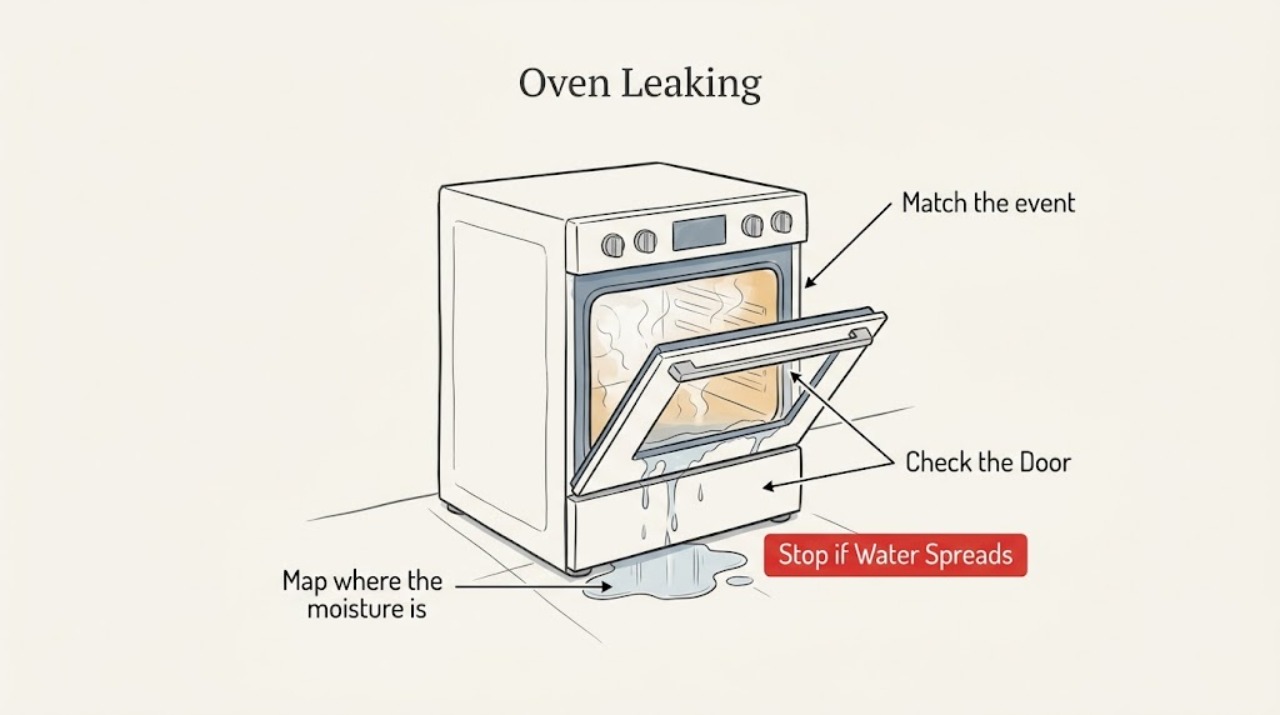
Map where the moisture is appearing
From a safe position, look at the door glass, the inner door edge, the oven cavity bottom, the area below the oven, and nearby controls without opening a hot door or touching an unknown liquid. After the oven is fully cool, use a clean cloth to note the location of accessible moisture.
Expected result: Moisture is only on or between the door glass, water is confined to the cavity bottom, liquid remains in a steam reservoir, a trail reaches the exterior or controls, or the source cannot be seen.
Next step: Record the exact location and continue to the timing and function check. If liquid reached controls, wiring, the floor, or an inaccessible area, stop using the oven and arrange qualified service.
Stop if: Stop for hot water, active dripping onto electrical areas, smoke, sparking, gas odor, a damaged door, or any need to remove a panel.
Why this matters
Why: Door-glass moisture can be condensation; cavity or reservoir water may relate to a steam function; an exterior trail or hidden source is not explained by a simple condensation check and needs a more cautious path.
-
Match the event to the oven function
Check the display, selected mode, and recent use history to determine whether the moisture appeared during ordinary baking, Steam Bake, Steam Clean, or while the oven was off. Do not restart a hot or wet cycle just to reproduce the symptom.
Expected result: Steam Bake or Steam Clean was active, a high-moisture food was cooking, a gas burner had recently heated the oven, or no water-related function or food spill explains the moisture.
Next step: For a documented steam or food event, let the oven cool and follow the exact model manual for removing residual water or cleaning a spill. For unexplained or recurring external moisture, leave the oven unused and request service.
Stop if: Do not open the door during Steam Clean, add water based on a generic instruction, or continue heating when the source is unexplained.
Why this matters
Why: Amana identifies steam and high-moisture cooking as expected sources of temporary moisture. If no such event occurred, or if water escaped outside the intended area, the symptom should be treated as unexplained rather than assumed normal.
-
Check for normal door condensation
If the moisture is limited to the door glass during or shortly after heating, note whether the oven is gas and whether the food has high water content. Keep the door closed during cooking except when the recipe requires otherwise, and observe from outside as the oven reaches temperature and later cools.
Expected result: A light film on the glass dissipates as the oven heats or cools, high-moisture food was present, or water beads persist, run down the exterior, or collect below the door.
Next step: Wipe only accessible moisture after the oven is cool. If moisture persists, escapes outside, or the door is not closing evenly, stop using the oven and arrange qualified appliance service.
Stop if: Do not pull, clean aggressively, bend, or replace the gasket or remove the door to test the seal.
Why this matters
Why: Amana says steam from a gas burner and high-moisture food can temporarily condense on or between the door glass. Persistent beads, a stream, or water outside the door are not established as normal by that guidance and may indicate a door, seal, or another model-specific issue.
-
Check steam-feature water only after cooling
If Steam Bake or Steam Clean was used, wait for the oven and water to cool completely. Then compare the remaining water or moisture with the exact model manual: inspect only the user-accessible reservoir or cavity area described there, and do not fill, drain, or disassemble anything not specified for your model.
Expected result: Residual water is in the designated steam reservoir or cavity area, water is outside that area, the reservoir is overfilled or damaged, or no steam feature was used.
Next step: For designated residual water, follow the model-specific cool-down, emptying, and wiping instructions. For water outside the intended area or a damaged component, stop using the feature and arrange service.
Stop if: Do not open a hot Steam Clean door, handle hot water, puncture a reservoir, or start another cycle to force drainage.
Why this matters
Why: Amana states that Steam Bake uses a reservoir and that some water may remain after the cycle; Steam Clean places water in the oven bottom and requires the door to remain closed while hot. Water outside the designated area or a damaged reservoir is not a routine cleanup result.
-
Separate a food spill from a supply leak
When the oven is fully cool, inspect the cavity bottom and door edge for a visible food spill or residue, and compare it with the liquid found outside. Clean only an accessible food spill using the model instructions and a soft cloth; do not use oven cleaner or line the cavity with foil.
Expected result: The residue matches a recent boilover or spill inside the cavity, moisture is clear and keeps returning with no food event, or liquid has reached the underside or surrounding cabinetry.
Next step: Clean and dry a confirmed accessible food spill after cooling. If liquid returns, reaches outside the cavity, or affects cabinetry, stop use and request qualified diagnosis.
Stop if: Do not scrape with metal tools, spray cleaner into openings, flood the cavity, or continue if liquid is near electrical parts.
Why this matters
Why: Amana directs owners to clean food spills once the oven cools and warns that lining the oven bottom can trap spills and debris. A clear, recurring external liquid or damage to surrounding cabinetry points beyond routine spill cleanup.
-
Check the door and gasket without disturbing them
With the oven cool, visually check that the door closes evenly and that no food, rack, or cookware is obstructing the door edge. Look for a visibly torn, displaced, or damaged gasket, but do not pull, bend, clean aggressively, or remove it.
Expected result: The door closes evenly and the gasket looks intact, the door is misaligned, or the gasket or glass is visibly damaged or displaced.
Next step: Remove only a loose visible obstruction after the oven is cool. If the door or gasket is damaged, misaligned, or still allows external moisture, leave the oven unused and arrange appliance service.
Stop if: Stop for broken glass, a door that will not close or latch, a hot leak, or any need to remove the door or gasket.
Why this matters
Why: A door or gasket problem can change where steam and moisture escape, but a visual symptom cannot identify the failed component. Amana specifically warns not to clean, rub, damage, or move the gasket during its range cleaning guidance.
-
Record recurrence and model details
From a safe, normal position, record the model number, gas or electric type, selected function, whether the moisture is on glass or outside the cavity, when it began, whether the oven was recently cleaned or moved, and whether any control, odor, heat, or electrical symptom occurred.
Expected result: The symptom repeats with a particular mode, occurs while the oven is off, follows cleaning or installation, or is accompanied by a damaged part, odor, smoke, sparking, or water near electrical areas.
Next step: Provide the record and clear photos taken only when safe to qualified appliance service. For gas odor or electrical danger, follow local emergency or utility guidance and do not operate the oven.
Stop if: Do not move the appliance, open its cabinet, disconnect hidden plumbing, test live wiring, adjust gas, or replace an unconfirmed part.
Why this matters
Why: The pattern helps a technician distinguish condensation, a steam-feature issue, a spill, and a model-specific leak path. It does not prove that a valve, hose, gasket, sensor, or other part has failed.
Use your observations
Decision map
Find the observation that best matches what you see, then follow the next safe action.
-
PATH 01Safety boundary
What you see
Moisture is only on or between the door glass and dissipates during or after heating, especially with a gas oven or high-moisture food.
Do this next
Treat it as likely temporary condensation, monitor the next cool cycle, and wipe accessible moisture only after the oven is cool.
Why this path and its safety boundary
Safety stop: If water runs outside the door, pools below it, persists between cycles, or the door is damaged, stop use and arrange service.
-
PATH 02Safety boundary
What you see
Steam Bake was used and residual water remains in the designated steam reservoir after the oven has cooled.
Do this next
Empty or wipe the reservoir only as the exact model instructions direct; do not fill past the model's marked limit on a future cycle.
Why this path and its safety boundary
Safety stop: If water is outside the reservoir, the reservoir is cracked, or water returns without Steam Bake, stop using the feature and request service.
-
PATH 03Safety boundary
What you see
Steam Clean was active or recently completed and water is still hot or present in the intended oven-bottom area.
Do this next
Keep the door closed while hot, wait for complete cooling, then remove remaining water only according to the model instructions.
Why this path and its safety boundary
Safety stop: Do not open a hot door, add cleaners or additives, or continue if water escaped the intended area.
-
PATH 04Safety boundary
What you see
A recent boilover or food spill accounts for residue inside the cool oven, with no liquid outside the cavity.
Do this next
Clean the cool cavity using the model's approved method and a soft cloth or nonabrasive material; dry it before the next use.
Why this path and its safety boundary
Safety stop: Do not flood the oven, use oven cleaner, line the bottom with foil, or continue if moisture reaches controls or wiring.
-
PATH 05Safety boundary
What you see
Water appears outside the cavity, returns while the oven is off, reaches cabinetry or controls, or has no identifiable steam or spill cause.
Do this next
Stop using the oven, keep the area safe and dry without dismantling the appliance, and arrange qualified appliance service for model-specific diagnosis.
Why this path and its safety boundary
Safety stop: Do not run another cycle, remove panels, disconnect hidden lines, or attempt an internal repair.
-
PATH 06Safety boundary
What you see
The door does not close evenly, or the gasket, glass, or door frame is visibly damaged or displaced.
Do this next
Leave the oven unused and arrange appliance service; provide the model and a photo only if it can be taken safely after cooling.
Why this path and its safety boundary
Safety stop: Do not move, bend, remove, or replace the gasket or door as a leak test.
-
PATH 07Safety boundary
What you see
The leak is accompanied by smoke, sparking, gas odor, a hot cord or control area, or active water near electrical parts.
Do this next
Stop operation, keep people away, and use appropriate local emergency, gas-utility, or qualified electrical/appliance help for the hazard.
Why this path and its safety boundary
Safety stop: Do not touch wet electrical areas, relight or adjust gas, open panels, or continue the cycle.
Helpful context
Understand the symptom
Start with the location and timing
A damp door window is different from water on the floor or below the control panel. Note whether the moisture forms during preheating or cooking, after a high-moisture meal, during Steam Bake, during Steam Clean, or while every oven function is off. Do not taste or touch an unknown liquid while the oven is hot; use only a visual check from a safe position.
Normal moisture still has limits
Amana says gas-oven combustion produces steam that can condense on cool door surfaces, and foods such as roasts or casseroles can temporarily create moisture. A steam feature is a separate case because its reservoir or cleaning process is designed to use water. These explanations do not establish that an unexplained, persistent external pool is safe.
Keep hot water and internal work out of the DIY check
Do not open the door during Steam Clean, pour water into an oven unless the exact model instructions call for it, or start another heat or cleaning cycle to test a leak. Once the oven is fully cool, wipe accessible moisture with a soft cloth. Do not remove the door, gasket, covers, plumbing, or electrical panels to find a hidden source.
When checks do not resolve it
Need a professional?
Arrange qualified appliance service when water appears outside the oven cavity, returns while the oven is off, escapes from a steam feature's intended area, damages the door or gasket, reaches controls or cabinetry, or has no clear food, condensation, or model-documented steam explanation. Seek urgent local help for gas odor, smoke, sparking, fire, or electrical danger.
Have this ready
- Provide the Amana model number, gas or electric type, the exact liquid location, when it appears, the selected function, whether Steam Bake or Steam Clean was used, recent food spills or cleaning, door and gasket observations, recurrence pattern, and any odor, heat, smoke, code, or electrical symptom.
Common questions
FAQ
Is moisture on my Amana oven door a leak?
Not necessarily. Amana says gas-oven steam and high-moisture foods can temporarily condense on or between the door glass. Water that runs outside the door, pools below it, persists between cycles, or has no such cause should be treated as unexplained and checked by qualified service.
Why is there water after using Steam Bake?
Steam Bake uses a water reservoir, and Amana says some water may remain there after the cycle. Wait until the oven is cool, then empty or wipe it only as your model instructions direct. Water outside the reservoir or recurring water without Steam Bake needs service.
Can I open my Amana oven during Steam Clean to stop the leak?
Do not open the door while Steam Clean water is hot. Amana says to keep the door closed during the cycle; wait for complete cooling and follow the model-specific instructions for removing remaining water. Escaped water or a damaged feature should be handled by qualified service.
Can I replace or pull the oven gasket to fix leaking steam?
Do not pull, bend, or remove the gasket as a test. Amana's range manual warns not to clean, rub, damage, or move it. If the door is misaligned or the gasket is visibly damaged, leave the oven unused and arrange appliance service.
When should I stop using an Amana oven that is leaking?
Stop when water is outside the cavity, returns while the oven is off, reaches controls or electrical areas, damages the door, or has no clear condensation, spill, or documented steam explanation. Stop immediately for gas odor, smoke, sparking, fire, or a hot electrical area and seek appropriate local help.
Read the exact guide
Official sources
- Moisture On Door - RangeAmana Product Help · Official Amana range support page used to distinguish normal condensation and Steam Bake moisture from an external or persistent leak; exact functions vary by model.
- Moisture on the Inner WindowAmana Product Help · Official Amana support page for moisture on or between the door glass; it explains gas-oven steam and high-moisture food as temporary causes, not unexplained external leaks.
- Cleaning and Maintenance of RangeAmana Product Help · Official Amana range care page used for cool-down and routine spill handling; it does not diagnose an internal water leak.
- Owner's ManualAmana · Official Amana owner manual for a range family; model-specific instructions control. Used for safety boundaries, cool cleaning, no oven cleaners, and not moving the gasket.
- Steam Cleaning the OvenAmana Product Help · Official Amana range support page for models equipped with Steam Clean; it is not proof that water outside the intended cavity area is normal.
Community feedback
Share a repair observation
Share a plain-text repair observation. Accepted observations are published automatically; this page may take a moment to update.