
On this page
Start here
Quick answer
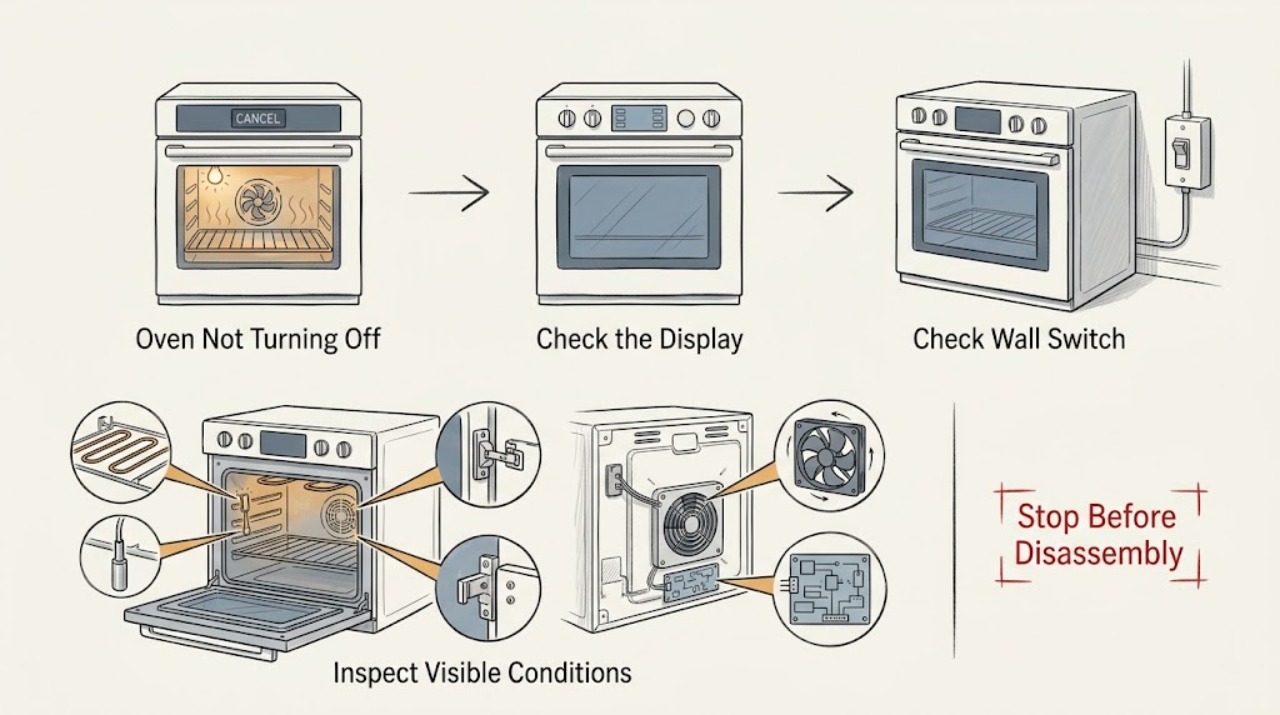
First identify what is still operating. A cooling fan can continue for several minutes after Bake, Broil, or Clean to cool the cavity and electronic controls, and that is normal. If the heating element or gas burner remains active, the display will not cancel, or the oven repeatedly returns to heat, treat it as a control or safety fault: press Cancel/Off once using the model instructions, keep people away from the hot cavity, and disconnect power at the accessible breaker only if doing so is safe. If there is a gas odor, smoke, fire, sparking, a damaged cord, or an electrical hazard, leave the area and use emergency help. A fan that never stops after the oven is cool, or heat that continues with controls Off, needs qualified service rather than repeated resets.
Work through in order
Diagnostic checks
Use only checks that match the exact appliance or system and its official guide.
-
Check 1
From a safe position, determine whether the remaining activity is only a fan, the oven light, a visibly hot/heating element, a gas-burner ignition or flame, or an active display mode. Do not put a hand into the cavity or touch the element to test heat.
Expected result: Only the fan runs, only the light is on, the display remains in Bake/Broil/Clean, heat continues, a flame remains, or the appliance sparks/smokes.
Next step: Use the matching branch below. For flame, smoke, gas odor, sparking, or other immediate danger, stop checking and use the emergency boundary.
Why this matters
Why: A post-cycle fan can be normal; light and mode symptoms have their own controls; continued heat, flame, smoke, or sparking indicates a possible control, gas, or electrical fault.
-
Check 2
If the cooking mode has canceled and only the cooling fan is audible, leave the oven undisturbed while the cavity cools. Keep the vent area clear and do not switch the fan off by opening the control panel.
Expected result: The fan stops after the oven cools, continues while the cavity is hot, or continues indefinitely after the oven is cool and no mode is active.
Next step: If it stops after cooling, no repair is indicated. If it never stops, record the duration and arrange qualified service; do not disconnect internal fan wiring.
Why this matters
Why: Amana says the fan may run for several minutes after cooking to cool the appliance and controls. A fan that runs indefinitely after cool-down may indicate a sensor, control, or fan-circuit problem.
-
Check 3
If the display still shows Bake, Broil, Clean, a timed cycle, or another active mode, press the model's Cancel/Off control once and observe the display without repeatedly pressing keys. Keep the door closed if the cavity is dangerously hot.
Expected result: The mode clears and heat stops, the display ignores Cancel/Off, or the mode returns after clearing.
Next step: Check the exact model manual for Control Lock, Sabbath Mode, Demo Mode, or delayed/timed operation. If heat persists with the display Off or the mode returns, isolate power only if safe and arrange service.
Why this matters
Why: A mode that clears points to a control-state issue or normal operation; an unresponsive or recurring mode can indicate Control Lock, Sabbath/other mode, a control fault, or a stuck output.
-
Check 4
If the cavity is not heating but the light stays on, check the model's oven-light button and look for Sabbath Mode indications. Use only the owner manual's exit procedure; do not dismantle the door or switch wiring.
Expected result: The light button was on, Sabbath Mode is active, the light changes after the documented control, or the light remains on with no mode explanation.
Next step: Use the model-specific light or Sabbath controls once. If the light remains on unexpectedly, arrange service for the door switch, control, or light circuit; avoid leaving the appliance operating unattended.
Why this matters
Why: Amana says the light behavior can be controlled separately and Sabbath Mode changes oven and light behavior, so a light-only symptom is not the same as an oven heating fault.
-
Check 5
If an element continues heating, the display is frozen, or Cancel/Off does not stop the oven, turn the oven's accessible circuit breaker off only if you can do so without approaching smoke, flame, water, exposed wiring, or another hazard. Do not repeatedly reset a breaker that trips again.
Expected result: Power isolation stops the activity, the breaker trips again, the appliance is hard-wired or the correct circuit is uncertain, or activity continues despite the expected isolation.
Next step: Leave the appliance isolated and arrange qualified service or an electrician for the supply. Do not restore power just to see whether a stuck relay or element recurs.
Why this matters
Why: Power removal may stop a control or heating output, but a repeated trip or uncertain isolation points to an electrical fault or unsafe supply; a gas supply may require a separate qualified assessment.
-
Check 6
For an Amana gas range, if the oven remains lit or you smell unburned gas, do not relight, move, or disassemble it. From a safe location, note whether the cooktop and oven were recently installed or reconnected, but do not inspect the gas valve or connector yourself.
Expected result: There is gas odor, a flame when the control is Off, recent installation/reconnection, or no gas odor and no visible flame.
Next step: For gas odor or an uncommanded flame, evacuate and contact the gas supplier from outside; use emergency services if directed. Otherwise keep the oven unused and arrange qualified gas-appliance service.
Why this matters
Why: Gas odor or an uncommanded flame can represent a gas-supply or valve fault; recent installation can also involve supply and connection conditions that require qualified review.
-
Check 7
Stop user troubleshooting for persistent heat with controls Off, a fan that never stops after cool-down, repeated control-mode return, a breaker that trips, uncommanded gas flame or odor, smoke/fire, sparking, a damaged cord, or any need to open the console.
Expected result: The oven remains active, unsafe, or mechanically/electrically abnormal after the model-directed control check.
Next step: Keep the appliance isolated and arrange qualified appliance service; use the gas supplier or emergency responders for active gas danger and an electrician for uncertain electrical supply. Provide the model number, mode, display, fan/heating behavior, and isolation result.
Why this matters
Why: The fault may involve a relay/control board, temperature sensor, door switch, cooling circuit, gas valve, igniter, wiring, or installation and cannot be safely confirmed by repeated operation.
Use your observations
Decision map
Find the observation that best matches what you see, then follow the next safe action.
-
PATH 01Next step
What you see
Only the cooling fan runs after Bake, Broil, or Clean has ended
Do this next
Allow the oven and controls to cool. Amana says the fan may continue for several minutes; service is appropriate if it continues indefinitely after the oven is cool.
-
PATH 02Next step
What you see
The oven is still heating or the display remains in an active cooking mode
Do this next
Press Cancel/Off once using the model instructions. If heat persists with controls Off or the mode returns, isolate power only if safe and arrange qualified service; do not open the console.
-
PATH 03Next step
What you see
Only the oven light stays on and there is no continuing heat
Do this next
Check the light control and the exact model's Sabbath Mode status. If the light remains on unexpectedly after the documented controls, schedule service for the light/door-control circuit.
-
PATH 04Next step
What you see
The oven does not respond to controls or a lock/mode message is present
Do this next
Check the owner manual for Control Lock, Demo Mode, Sabbath Mode, delayed operation, and the model-specific reset. Stop if the control remains frozen or the oven heats unexpectedly.
-
PATH 05Next step
What you see
The breaker trips, the cord or outlet is damaged, or power isolation is uncertain
Do this next
Leave the circuit off and have a licensed electrician or qualified appliance technician assess the supply and appliance. Do not keep resetting the breaker to operate the oven.
-
PATH 06Next step
What you see
A gas burner or flame remains on with controls Off, or gas odor is present
Do this next
Do not create a spark or relight the appliance. Evacuate and contact the gas supplier from outside; use emergency services if instructed. Keep the oven out of service until cleared.
Helpful context
Understand the symptom
Do not confuse the cooling fan with continued cooking
Amana says a cooling fan may run for several minutes after a cooking cycle to cool the appliance and its electronic controls. The fan can therefore sound as if the oven is still on even when heating has stopped. Check whether the cavity is still producing heat, whether a burner or element is visibly active, and whether the display still shows an active cooking mode before deciding there is a fault.
A light staying on is a separate symptom
If only the oven light remains on, check the model's light button and whether Sabbath Mode is enabled. Amana notes that Sabbath Mode can keep the oven in a Bake setting and can change how the display, tones, and light behave. Do not assume a light symptom proves that the heating circuit is stuck.
Persistent heat is the professional boundary
If an element or gas burner continues heating after the control is Off, do not open the console, pull an element, probe wiring, or repeatedly reset the breaker. A relay, control board, sensor, valve, or wiring fault can leave an energized or fuel-fed circuit in an unsafe state. Isolate the appliance only through a safe, accessible user control and arrange qualified service.
Use the exact model manual for modes and resets
Amana controls differ by model: Control Lock, Demo Mode, Delayed Start, Sabbath Mode, Cancel/Off behavior, and breaker-reset timing are not universal. Record the model number and display message, then follow the matching owner manual. A single documented reset may clear a control event; a recurring condition is evidence for service, not permission to keep cycling power.
Only after diagnosis
Potential parts
- oven electronic control or relay board
Consider only after qualified testing confirms that the control remains active or an output relay is stuck after normal mode and power checks.
Control boards are exact-model and revision-specific and require qualified diagnosis and installation. - oven temperature sensor
Consider only when testing links incorrect heat or persistent cooling-fan operation to the sensor rather than the control or heating system.
Sensor specification and connector vary by model; do not replace it based solely on a fan sound. - cooling fan or fan control component
Consider only if the fan continues after normal cool-down and a technician confirms a fan, sensor, or control-circuit fault.
Fan assemblies and control paths are model-specific; internal wiring work is not a user repair. - gas safety valve or oven igniter
Consider only for a gas model after qualified diagnosis confirms an uncommanded flame, delayed ignition, or valve/igniter fault and the gas area is safe.
Gas components require exact fuel/model matching, qualified installation, and leak/combustion testing.
When checks do not resolve it
Need a professional?
Arrange qualified appliance service when heating continues after Cancel/Off, a fan never stops after the cavity is cool, a control mode returns, the light stays on unexpectedly, or a breaker trips. Use a licensed electrician for an uncertain or damaged electrical supply. For a gas odor or uncommanded gas flame, leave immediately and contact the gas supplier from outside; use emergency services if directed. Do not open the console, bypass a relay or door switch, disconnect a safety device, or keep operating the oven unattended.
Common questions
FAQ
Why does my Amana oven sound like it is still on after I turn it off?
If only the cooling fan is running and the heat has stopped, Amana says this can be normal for several minutes while the cavity and controls cool. If heating continues, the display stays active, or the fan never stops after cool-down, isolate the appliance if safe and arrange service.
What should I do if my Amana oven keeps heating after Cancel/Off?
Press Cancel/Off once using the model instructions. If an element or gas burner remains active, do not open the control panel or keep resetting it. Turn off the accessible circuit only if safe, keep the oven unused, and arrange qualified service; use the gas-supplier emergency route for an uncommanded gas flame or odor.
Why is my Amana oven light staying on?
The light can have its own button, and Amana says Sabbath Mode changes oven and light behavior on applicable models. Check those model-specific controls when there is no continuing heat. A light that remains on unexpectedly after the documented control check needs service.
Can I unplug an Amana oven that will not turn off?
Only use an accessible plug or breaker if doing so is safe and there is no smoke, flame, water, exposed wiring, or gas danger. Do not approach a hazardous appliance or repeatedly restore power. If the condition returns or the circuit trips, leave it isolated and use qualified service.
Read the exact guide
Official sources
- Oven Not Working - ElectricAmana Product Help · Official Amana electric-range guidance used for general control and supply boundaries; exact model instructions take precedence and gas models require their gas guidance.
- Oven Not Working - GasAmana Product Help · Official Amana gas-range guidance; follow local gas-safety requirements and the exact model installation instructions.
- Oven Not Shutting OffAmana Product Help · Official Amana range guidance; fan behavior varies by model and cavity temperature.
- Oven Light Staying On - RangeAmana Product Help · Official Amana range guidance; the light button and available modes vary by model.
Community feedback
Share a repair observation
Share a plain-text repair observation. Accepted observations are published automatically; this page may take a moment to update.