
On this page
Start here
Quick answer
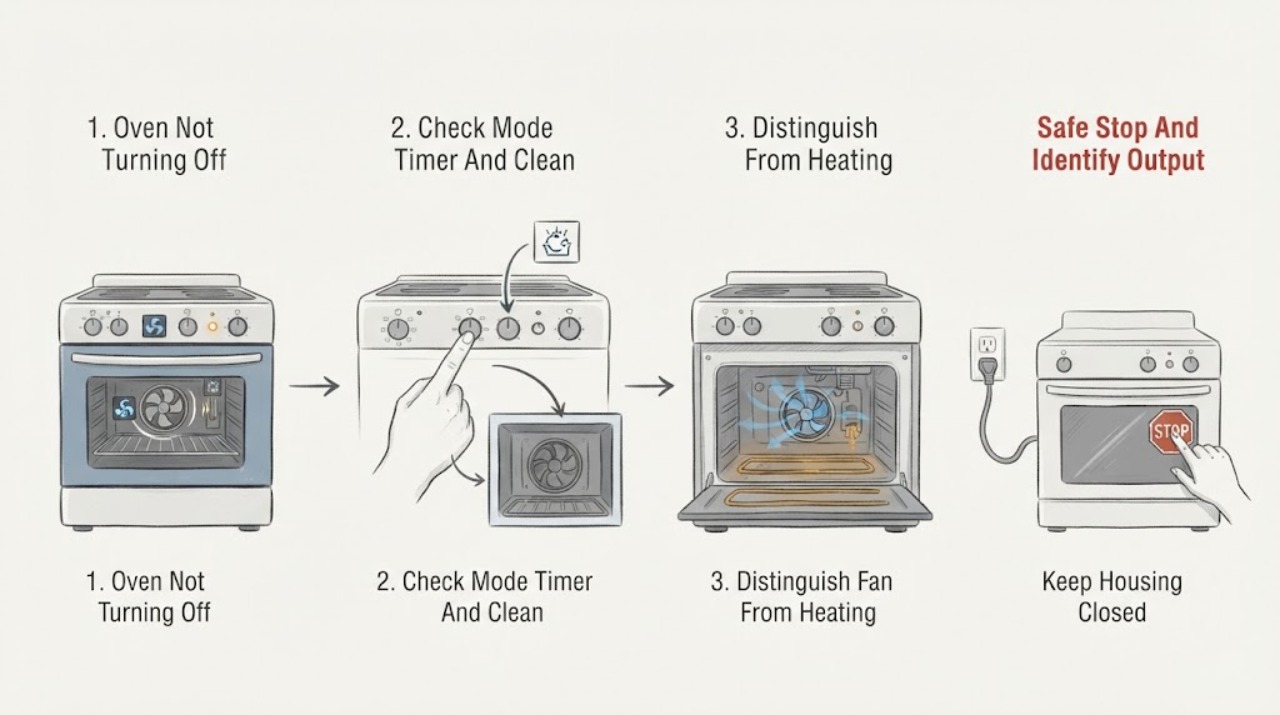
First decide whether only the cooling fan is running or whether the oven is still heating. Hotpoint says a cooling fan may cycle on and off for up to about 30 minutes after switch-off to protect the controls, and other oven makers likewise describe a temperature-controlled fan after cooking or self-cleaning as normal; the exact model manual controls the expected behavior. If the heating elements remain energized, the cavity keeps getting hotter, the controls do not respond, or the oven is in a self-clean or delayed program you did not intend to run, stop cooking and use the model's normal cancel or off control. If it will not stop, isolate power only from a safe position and arrange service. For gas odor, smoke, overheat, arcing, or a breaker trip, leave the area or keep clear as appropriate and get emergency or qualified help without opening the oven or gas system.
Before you begin
Safety first
- This article supports normal-control and external observation only. Do not open panels, test live circuits, access heating or gas components, defeat a lock or safety device, move a hot built-in oven, or re-energize an oven with unresolved heat or hazard.
Work through in order
Diagnostic checks
Use only checks that match the exact appliance or system and its official guide.
-
Check 1
Press the normal Off or Cancel control once, keep the oven door closed unless the model instructions say otherwise, and observe from outside without touching hot surfaces. If the control responds, note whether the sound is only a fan or whether heat continues; if it does not respond, do not keep pressing buttons.
Expected result: Record whether the display changes to an off or idle state, the fan continues while heat falls, a heating element remains visibly energized, the cavity keeps heating, a timer or cleaning indication remains, or smoke, sparks, gas odor, or abnormal heat is present.
Next step: Follow the selected branch below. For gas odor or smoke, move away and seek emergency help from a safe location; for persistent heat, electrical odor, sparks, or a breaker trip, keep the oven off and arrange qualified service.
Stop if: Do not open the oven to touch the cavity, use a flame or thermometer as a hazard test, reach behind the controls, or restart an oven that smells of gas, smokes, arcs, or overheats.
Why this matters
Why: Air movement with falling heat supports normal cooling-fan operation. Continued heating, an active unwanted program, an unresponsive control, or any smoke, gas, arcing, or overheat signal requires a different branch and may indicate a control, relay, thermostat, or fuel/electrical fault.
-
Check 2
From a cool, safe position, read the display and selector setting and compare them with the Hotpoint manual for the exact model. Check for a cooking function, timer or delay start, keep-warm mode, self-clean cycle, Sabbath setting, lock indication, or a fan-only cooling state; use only the documented Cancel or Off sequence.
Expected result: Classify the control as intentionally running a documented mode, showing only a post-cycle fan or cooling indicator, showing an unexpected or locked mode, or ignoring the normal cancel or Off command.
Next step: Cancel the documented mode once according to the manual and observe from outside. If the mode cannot be canceled, the display is erratic, or heating continues after the documented Off command, isolate the oven safely and request service.
Stop if: Do not defeat a door lock, force knobs or touch controls, start self-cleaning to clear a fault, or open the control panel.
Why this matters
Why: A documented timer, cleaning, or delayed function can explain continued fan or heat until its programmed sequence ends, while an unwanted mode that will not cancel suggests a control or user-interface fault. A fan-only state with cooling cavity is not proof that heating remains on.
-
Check 3
With the oven switched Off by its normal control and viewed from a safe distance, observe the fan sound, indicator behavior, and cooling trend without opening the door repeatedly or touching the cavity. Compare the behavior with the manual's cooling-fan description rather than assuming every fan has the same run time.
Expected result: Note whether air continues to move while the cavity and surrounding controls cool, the fan cycles on and off, the fan makes rubbing or scraping noise, an element remains bright or heat continues to rise, or the fan stops but the oven still heats.
Next step: Leave a normal cooling fan alone until the appliance reaches the model's safe state. Keep the oven off and arrange service for persistent heat, fan damage or abnormal noise, a fan that never starts when the appliance overheats, or any discrepancy between controls and actual heating.
Stop if: Do not block vents, insert objects, remove fan guards, or continue operation when the cavity is overheating, smoke or burning odor appears, or the fan is scraping and the oven remains hot.
Why this matters
Why: A temperature-controlled fan that runs or cycles while heat falls is generally a protective function. Fan noise with rubbing, an element that remains energized, or heating without fan cooling points to a mechanical, control, or thermal fault and is not a normal fan delay.
-
Check 4
If the oven continues heating after the documented Off or Cancel command, keep people away from the hot cavity and isolate the appliance only using the accessible dedicated isolator or breaker when it can be reached without touching heat, water, smoke, gas, or damaged electrical equipment. Do not pull a hot built-in oven from its housing.
Expected result: After safe isolation, record whether heating stops, the fan continues to cool the appliance, the display goes dark, the breaker trips again, or heat, smoke, gas odor, or electrical noise remains.
Next step: Leave the appliance isolated, allow it to cool without opening panels, and provide the model, mode, indicator behavior, and isolation result to qualified service. If smoke, flame, gas odor, arcing, or an unsafe area is present, follow the emergency stop branch instead.
Stop if: Do not reset the breaker to test, remove fuses, bypass an isolator, test live voltage, open the control panel, or touch wiring, elements, thermostats, relays, or gas components.
Why this matters
Why: Heating that stops only after power isolation is consistent with a control, relay, thermostat, or mode fault that needs service; repeated breaker trips, continued hazard, or gas or smoke conditions indicate a higher-risk electrical or fuel problem.
-
Check 5
From outside the hazard area, classify any gas odor, smoke, flame, arcing, burning electrical smell, abnormal heat, hot or damaged cord, or breaker trip; do not perform further oven checks when any of these is present.
Expected result: Record no hazard, a persistent control or heating fault without gas or smoke, an electrical or overheating warning, or a suspected gas leak or fire condition.
Next step: For gas odor or fire conditions, leave and contact emergency services from a safe location without operating switches. For electrical or appliance hazards, keep the oven isolated and request qualified service or an electrician; do not attempt component replacement.
Stop if: Never continue cooking, use a flame to locate gas, open gas or electrical panels, bypass a safety device, or re-energize an appliance with an unresolved hazard.
Why this matters
Why: No hazard permits only model-guided observation. Persistent heat or control failure needs qualified appliance service; gas, smoke, flame, arcing, severe overheat, or dangerous electrical conditions require immediate evacuation or isolation and emergency or qualified professional response.
Use your observations
Decision map
Find the observation that best matches what you see, then follow the next safe action.
-
PATH 01Safety boundary
What you see
The oven is Off or Cancelled, only a fan is running, the cavity is cooling, and there is no smoke, gas odor, arcing, abnormal heat, or electrical warning.
Do this next
Leave vents clear and follow the exact Hotpoint manual for normal fan behavior; do not interrupt the cooling process unless the manual provides a specific safe procedure.
Why this path and its safety boundary
Why it matters: The sound is likely the model's automatic cooling fan protecting the controls after cooking or cleaning.
Safety stop: Request service if the fan makes rubbing noise, never cools the appliance, runs with rising heat, or is accompanied by smoke, burning odor, sparks, or a breaker trip.
-
PATH 02Safety boundary
What you see
The display or selector shows self-clean, delay, timer, keep-warm, Sabbath, lock, or another documented mode that is still active.
Do this next
Use the model manual's documented Cancel or Off sequence once and allow a locked or hot cycle to finish cooling; request service if the mode was not selected, cannot be canceled, or heat continues unexpectedly.
Why this path and its safety boundary
Why it matters: The oven may be following a programmed sequence; fan operation after self-cleaning is often intended to remove residual heat.
Safety stop: Do not force the lock, open panels, interrupt a gas or high-heat cycle with improvised methods, or start another mode to override it.
-
PATH 03Safety boundary
What you see
The oven continues to heat, an element remains energized, or heat rises after the documented Off or Cancel command and the condition is not explained by a selected mode.
Do this next
Keep the oven off, isolate power from a safe accessible point, do not move a built-in appliance, and arrange qualified appliance service.
Why this path and its safety boundary
Why it matters: A selector, relay, thermostat, control, sensor, or fuel-control fault is possible; a running cooling fan does not make continued heating safe.
Safety stop: Do not test live voltage, replace a thermostat or relay, open the control panel, or re-energize the oven to see whether it works.
-
PATH 04Safety boundary
What you see
The fan makes abnormal rubbing or scraping noise, does not cool while the oven is hot, or the cavity or controls are overheating.
Do this next
Stop using the oven, keep vents clear only from a safe external position, isolate power if safe, and request service for the fan, airflow, and thermal controls.
Why this path and its safety boundary
Why it matters: A cooling or convection-fan fault, blocked airflow, or another thermal problem may be present.
Safety stop: Do not remove guards, insert objects, block vents, open the cabinet, or operate through an overheating condition.
-
PATH 05Safety boundary
What you see
There is gas odor, smoke, flame, arcing, persistent burning or electrical smell, severe overheating, a hot or damaged cord, or a breaker trip.
Do this next
For gas odor or smoke, leave the area and contact emergency services from a safe location without operating switches or appliances. For electrical or appliance hazards without gas, keep clear and request qualified emergency or appliance/electrical service.
Why this path and its safety boundary
Why it matters: This is an immediate fire, explosion, burn, or electric-shock hazard, not a normal post-cooking fan condition.
Safety stop: Do not restart, reset a breaker as a test, use a flame, touch the cord or panel, open gas components, or re-enter an unsafe area until cleared.
Helpful context
Understand the symptom
A running fan is not the same as an oven that is still heating
After cooking, Hotpoint's cooling fan can continue running to protect the controls even though the cooking heat has stopped. A convection fan can also sound different from a cooling fan. The useful distinction is whether the oven cavity continues to gain heat, a heating element remains visibly energized, the heat indicator behaves as if a function is active, or only air is moving while the cavity cools. Do not put your hand inside or use a flame to judge temperature.
Check the selected function before suspecting a failed control
An oven can appear not to turn off when a timer, delay-start, keep-warm, self-clean, Sabbath or other model-specific mode remains selected. Controls and names vary, so use the Hotpoint model manual to cancel the active program. If the display or selector will not cancel the function, or the oven continues to heat after the normal off command, treat that as a control or power problem rather than repeatedly cycling the controls.
Gas, smoke, arcing and overheating override troubleshooting
Gas odor, visible smoke, arcing, a burning electrical smell, a hot cord or outlet, or rapidly rising heat is not a fan-delay question. Do not open panels, remove a burner or thermostat, test live voltage, or keep cooking to see what happens. Move away from the hazard; for suspected gas, avoid operating switches and contact emergency services from a safe location. For an electrical or heating fault without gas, keep the oven isolated and arrange qualified appliance or electrical service.
Safety boundary
Stop conditions
- For gas odor, leave the building or affected area, do not operate switches or appliances, and contact emergency services from a safe location.
- For smoke, flame, arcing, severe overheating, persistent burning or electrical odor, or a hot or damaged cord or outlet, stop using the oven and obtain emergency or qualified professional help as appropriate.
- Do not reset a breaker to test, bypass a safety device, test live voltage, open the control panel, remove a thermostat or relay, or access gas components.
- Do not force a locked self-cleaning door, move a hot built-in oven, block vents, insert objects into the fan, or use a flame or touch test to locate heat or gas.
- Do not restart the oven when heating continues after Off or Cancel, the controls are unresponsive, the fan is abnormal and the cavity is hot, or the source of heat is uncertain.
Only after diagnosis
Potential parts
- cooling fan assembly
Consider this category only when qualified diagnosis confirms that the cooling fan is damaged, noisy, or not providing the model's required cooling after a documented function.
Confirm the exact Hotpoint model and fan design before ordering; a normal post-cycle fan run is not evidence that a replacement is needed. - oven temperature sensor or thermostat
Consider this category only after service diagnosis confirms that temperature sensing or thermostat control is causing heat to continue after a valid Off command.
Confirm the exact model, fuel type, sensor or thermostat specification, and manufacturer's fit information; do not substitute a part from symptoms alone. - oven selector, timer, relay, or control assembly
Consider this category only when qualified testing identifies an unresponsive selector, timer, relay, or control that keeps a heating function energized.
Have a qualified technician verify the exact control revision and safe compatibility; do not open or test the control panel yourself. - oven heating or gas-control component
Consider this category only after qualified appliance diagnosis identifies a failed heating element, gas valve, igniter, or related control as the reason heating continues.
Confirm exact model and fuel system fit through qualified service; gas and high-voltage components are not user-serviceable troubleshooting parts.
When checks do not resolve it
Need a professional?
Arrange qualified appliance service when the oven continues heating after the documented Off or Cancel command, a mode will not cancel, the fan is noisy or fails to cool, the controls are unresponsive, a breaker trips, or the behavior is not explained by normal model-specific cooling. Contact a qualified electrician for damaged wiring, cord, or outlet. For gas odor, smoke, flame, or an immediate fire or explosion hazard, leave the area and contact emergency services from a safe location.
Safety scope: This article supports normal-control and external observation only. Do not open panels, test live circuits, access heating or gas components, defeat a lock or safety device, move a hot built-in oven, or re-energize an oven with unresolved heat or hazard.
Common questions
FAQ
Why is my Hotpoint oven fan still running after I turn it off?
Hotpoint says its cooling fan can continue and cycle after switch-off to keep controls from getting too hot. Confirm that only air is moving and the cavity is cooling. If heating continues, the fan is noisy or ineffective, or a warning odor or smoke appears, keep the oven off and request service.
How can I tell whether the oven is still heating or only cooling?
Use the display, indicator behavior, and a safe external observation from the exact model manual. A cooling fan with falling heat supports normal operation; continued cavity heating or an element that remains energized after Off points to a fault. Do not touch the cavity, insert objects, or use a flame as a test.
Can self-cleaning make the oven seem like it will not turn off?
Yes. Self-cleaning can leave the cooling fan running while the oven cools, and the door may remain locked until the model reaches a safe state. Follow the Hotpoint manual's cancellation and lock instructions. Do not force the door or open panels.
What should I do if my oven keeps heating after I press Off?
Do not continue cooking or repeatedly test it. If safe, isolate power from the accessible dedicated control point, keep the oven isolated, and arrange qualified service. Continued heat can involve a selector, relay, thermostat, sensor, timer, control, or fuel component.
When is an oven that will not turn off an emergency?
Treat gas odor, smoke, flame, arcing, severe overheating, a burning electrical smell, a hot or damaged cord or outlet, or a breaker trip as an immediate stop condition. For gas odor or smoke, leave the area without operating switches and contact emergency services from a safe location.
Read the exact guide
Official sources
- Range & Wall Oven - Fan Noise and Normal OperationGE Appliances Support · GE range and wall-oven support guidance used for fan classification; exact Hotpoint model functions may differ.
- Hotpoint Oven Troubleshooting & RepairHotpoint UK · Hotpoint UK oven support page; exact model documentation controls timer, self-clean, gas, and control behavior.
- Frequently Asked Questions About GE Ranges and Wall OvensGE Appliances · GE range and wall-oven support information used for general fan behavior; it is not a Hotpoint model procedure.
- Samsung dryer smells or smokesSamsung Support · Samsung gas-dryer safety guidance used only for the emergency behavior of leaving a gas or smoke hazard; Hotpoint oven fuel instructions and local emergency rules apply.
- Range and Wall Oven - Self Clean Oven Fan OperationGE Appliances Support · GE self-clean support information used for the general self-clean fan branch; Hotpoint controls and lock procedures are model-specific.
- Oven Not Shutting OffWhirlpool Product Help · Whirlpool multi-brand support guidance used for the fan-versus-heating distinction; Hotpoint model documentation controls this appliance.
- Appliance and Electrical Fire SafetyU.S. Fire Administration · U.S. Fire Administration household appliance safety guidance; local electrical requirements and Hotpoint instructions also apply.
- Range & Wall Oven - Oven Fan Run TimeGE Appliances Support · GE oven support guidance used to show that cooling duration varies with heat and model; the Hotpoint manual controls expected duration.
Community feedback
Share a repair observation
Share a plain-text repair observation. Accepted observations are published automatically; this page may take a moment to update.