
On this page
Start here
Quick answer
First determine whether your AEG oven is still heating or whether only its cooling fan is running. AEG says the cooling fan operates during cooking and can continue after the oven is switched off while the cavity remains warm; that does not by itself mean the heating function is on. Press the normal OFF control and confirm that the heating symbol, temperature demand, and elements stop, then leave the door closed while the appliance cools. If the fan continues beyond AEG's stated post-cooking period, the display will not respond, a timer or cooking function keeps the oven active, or the oven heats after OFF, stop using it and arrange authorised service. Do not remove panels, touch elements or wiring, pull out a built-in oven, or repeatedly cycle the mains supply as a diagnosis.
Before you begin
Safety first
- This article covers visible controls and safe observation only. Qualified appliance or electrical professionals determine and repair fan motors, thermal sensors, relays, control boards, heating circuits, supply connections, and any fault requiring panel access.
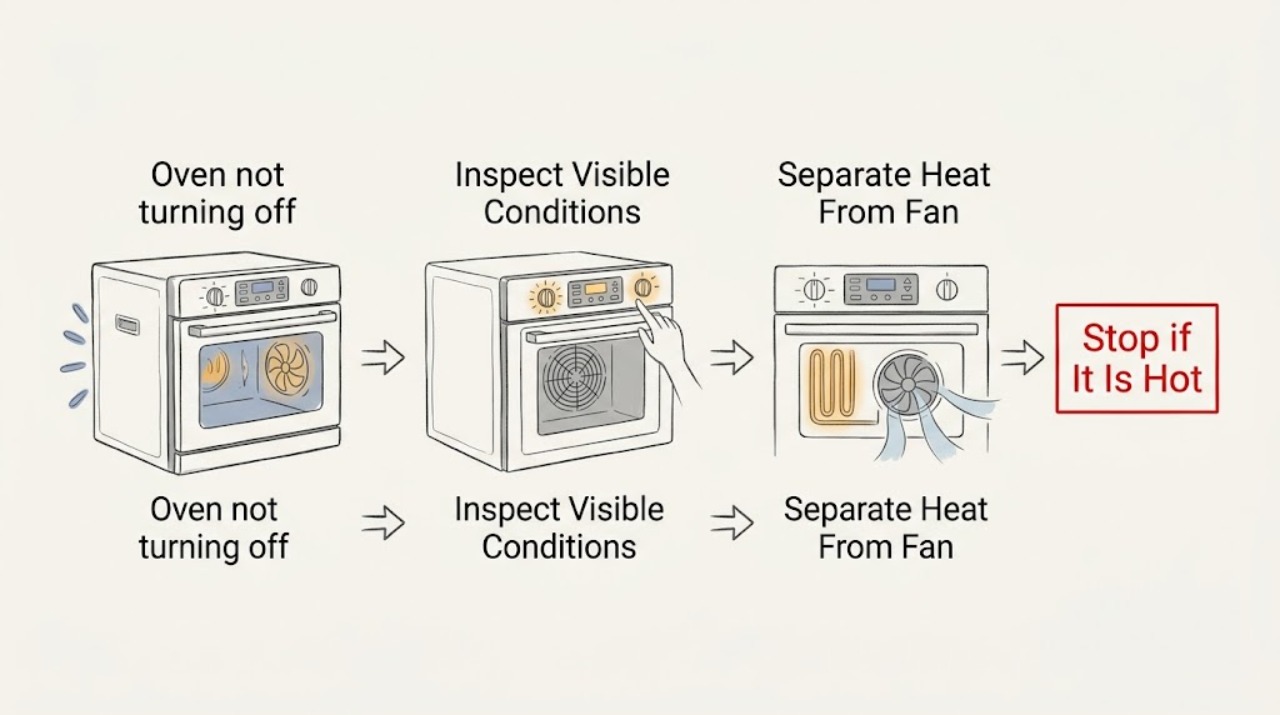
Work through in order
Diagnostic checks
Use only checks that match the exact appliance or system and its official guide.
-
Check 1
From outside the oven, press the normal OFF control once and observe the display, heating indicator, residual-heat indicator, cavity warmth, and fan sound without opening panels or touching the door glass if it is hot.
Expected result: The heating indicator and temperature demand stop while the fan continues; the oven is still visibly heating; the display remains in a cooking function; or the controls do not respond.
Next step: Record which indicator remains active and whether the fan is the only moving part; follow the cooling-fan branch if there is no continuing heat, otherwise stop use and arrange service.
Stop if: Stop immediately for smoke, burning odor, arcing, a cracked door or glass, exposed wiring, or heat that continues after the normal OFF command.
Why this matters
Why: A fan running after the heating function stops can be normal cooling. Continued heating, a stuck function, or an unresponsive display indicates a control, sensor, relay, or other fault that cannot be identified safely from outside.
-
Check 2
With the oven cool enough to view safely, check the visible heating function, temperature, duration, end-time, time-delay, light, cleaning, and lock indicators against the AEG model manual; do not start a new heating cycle to test the controls.
Expected result: A duration or end-time is active; a cleaning or special function is selected; only the light or fan is active; a lock symbol appears; or no unexpected setting is visible.
Next step: Cancel only the visible function using the exact model instructions, then confirm that heating stops. If the setting cannot be cancelled or the oven heats after cancellation, stop use and request authorised service.
Stop if: Do not enter service menus, force the control knob, bypass a lock, or remove the control fascia.
Why this matters
Why: A programmed function can explain why the display or fan remains active, while a light-only or cooling-fan state may not mean the oven is heating. A normal-looking display with continuing heat points to a fault rather than a timer explanation.
-
Check 3
After confirming that the heating function is off, leave the oven closed and observe whether the cooling fan gradually stops as the cavity cools; keep combustible items away from the appliance and do not obstruct ventilation.
Expected result: The fan stops as the oven cools; it continues for longer than AEG's stated post-cooking period; it changes speed or makes rubbing noises; or the oven becomes hotter instead of cooling.
Next step: If the fan stops normally, no repair is indicated by the fan alone. If it does not, record the duration and sound and arrange authorised service; follow the model-specific support procedure only if AEG explicitly provides one.
Stop if: Do not block the vents, place a fan against the oven, pour water on the appliance, or touch the fan blades or heating elements.
Why this matters
Why: A fan that runs during cooldown can be protective and expected. A fan running beyond the stated period, abnormal noise, or rising heat can indicate a fan, sensor, or control fault and should not be forced to stop by reaching inside.
-
Check 4
Inspect the display for a clock reset, error message, demo indication, lock symbol, or an active duration/end-time state, and compare the visible controls with the exact AEG manual without removing the oven from its housing.
Expected result: The clock is flashing or unset; an error or demo message is present; a lock is active; a timer remains; or the display is blank or frozen.
Next step: Use only the model manual's visible clock, lock, or timer procedure. If an error returns, the display stays frozen, or the oven will not stop, keep it out of use and arrange service.
Stop if: Do not remove the display, bridge controls, or use a generic reset sequence that is not specified for the model.
Why this matters
Why: AEG support identifies clock, demo, child-lock, timer, and power-supply states as possible reasons an oven may not behave as expected. A blank or frozen display can also indicate a fault and cannot be safely repaired from the front panel.
-
Check 5
From a safe position, note whether the oven has tripped a fuse or protective device, whether other kitchen appliances lost power, and whether the oven stopped after a spill or storm; do not open the consumer unit or appliance connection.
Expected result: A fuse or protective device trips repeatedly; only the oven is affected; multiple appliances lose power; or no power symptom is present.
Next step: Leave the affected appliance or circuit safely off when a protective device trips again and arrange qualified appliance or electrical service; provide the timing and other affected appliances.
Stop if: Do not increase protective-device ratings, open the electrical connection, reset repeatedly, or perform live tests.
Why this matters
Why: AEG identifies repeated protective-device trips as a possible electrical or component fault and directs power-supply issues to trained service. The pattern does not identify a heater, relay, fan, or wiring failure.
-
Check 6
Record whether the symptom occurs after every cooking cycle, only after high-temperature or cleaning operation, after a recent installation or repair, or only with a particular function; photograph the display and rating-plate information without moving the oven.
Expected result: The fan-only symptom is repeatable after heat; actual heating continues after OFF; the issue began after service or installation; or the behavior is intermittent and unexplained.
Next step: Give the service technician the model identity, display photo, function and timer settings, cooling duration, heat/odor/noise observations, and any prior work.
Stop if: Do not order a heater, relay, fan motor, sensor, or control board solely from the symptom history.
Why this matters
Why: A repeatable fan cooldown pattern can be normal for that model, while continuing heat, a new fault after installation, or intermittent control behavior supports a service diagnosis. History alone cannot identify a replacement component.
Use your observations
Decision map
Find the observation that best matches what you see, then follow the next safe action.
-
PATH 01Safety boundary
What you see
The heating function and temperature demand stop, only the cooling fan runs, and the oven is cooling without smoke, odor, or damage.
Do this next
Leave the oven closed and allow the fan to complete its cooling cycle. Arrange service only if it continues beyond the AEG guidance or becomes noisy or abnormal.
Why this path and its safety boundary
Safety stop: Do not obstruct ventilation or touch the fan.
-
PATH 02Safety boundary
What you see
A duration, end-time, time-delay, cleaning, grill, light, lock, or other visible model function remains active.
Do this next
Cancel it only with the exact AEG model instructions, then confirm the heating function has stopped; escalate if it cannot be cancelled.
Why this path and its safety boundary
Safety stop: Do not force knobs or enter an undocumented service menu.
-
PATH 03Safety boundary
What you see
The oven continues producing heat after the normal OFF command or after a visible cooking function has been cancelled.
Do this next
Stop using the oven and arrange urgent authorised appliance service to assess controls, sensors, relays, and heating circuits.
Why this path and its safety boundary
Safety stop: Do not reach inside, touch elements, remove panels, or restore operation as a test.
-
PATH 04Safety boundary
What you see
Only the fan remains active beyond AEG's stated post-cooking period, or it rubs, rattles, stalls, or changes abnormally.
Do this next
Keep the oven out of use and arrange an authorised service visit; provide the cooling duration and sound description.
Why this path and its safety boundary
Safety stop: Do not block vents, reach through openings, or replace a fan motor yourself.
-
PATH 05Safety boundary
What you see
A fuse or protective device trips repeatedly, the display is blank after a power event, or other appliances lose power with the oven.
Do this next
Leave the affected equipment or circuit safely off and arrange qualified appliance or electrical assessment.
Why this path and its safety boundary
Safety stop: Do not change ratings, open the consumer unit, or repeatedly reset.
-
PATH 06Safety boundary
What you see
There is smoke, burning odor, arcing, a cracked glass or door, liquid intrusion, exposed wiring, or dangerous heat at the controls or cabinet.
Do this next
Stop using the oven, keep people clear, and contact appropriate emergency or qualified professional help for the property.
Why this path and its safety boundary
Safety stop: Do not touch the damaged appliance or attempt to cool it with water.
Helpful context
Understand the symptom
A running fan is not the same as an oven still heating
AEG ovens use a cooling fan to help keep the front glass and handle cool. The fan can remain on after cooking while the cavity is warm, even after the heating function has been switched off. Check for actual heat production and the control display rather than treating fan noise alone as a stuck heating element. If the oven continues to heat, or the controls cannot stop the selected function, the safety decision is different.
Timers and functions can make the oven appear to stay on
A duration, end-time, time-delay, light, cleaning, grill, or other model-specific function may change what remains active after a cooking command. AEG support guidance for ovens that do not behave as expected recommends checking the selected function, time settings, display, and model manual. Do not guess at a hidden menu or use a generic button sequence across AEG models.
Persistent heat or a fan fault needs service
If the fan continues abnormally, the oven heats after OFF, a fuse or protective device trips, or there is a burning smell, damaged glass, smoke, or unusual noise, keep the oven out of use and arrange authorised service. Internal controls, thermal sensors, relays, fan motors, and supply wiring are not safe homeowner diagnostic targets.
Only after diagnosis
Potential parts
- cooling fan motor
Consider this only if authorised service confirms a fan motor or fan assembly fault after separating normal cooldown from persistent or noisy operation.
Confirm the complete AEG model and approved assembly through AEG documentation or qualified service before selecting a part. - temperature sensor
Consider this only when qualified diagnosis links continuing heat, abnormal cooldown, or a recurring error to the sensor; the symptom alone cannot identify it.
Verify the exact model, sensor specification, placement, and installation method through qualified service. - control relay or control board
Consider this only after trained testing confirms that a control or relay is keeping a heating circuit active or failing to stop it.
Internal electrical components require qualified diagnosis and exact model confirmation; do not open the appliance.
When checks do not resolve it
Need a professional?
Arrange AEG-authorised appliance service when heating continues after OFF, the cooling fan runs beyond the stated post-cooking period, the display or timer cannot be cancelled, an error returns, a protective device trips, or the symptom remains unexplained. Treat smoke, burning odor, arcing, cracked glass, liquid intrusion, exposed wiring, or dangerous heat as an immediate stop condition and keep the oven out of use.
Safety scope: This article covers visible controls and safe observation only. Qualified appliance or electrical professionals determine and repair fan motors, thermal sensors, relays, control boards, heating circuits, supply connections, and any fault requiring panel access.
Have this ready
- Whether actual heating stopped and whether only the cooling fan remained active
- Exact display, timer, lock, cleaning, duration, end-time, and function indicators
- Cooling duration, fan noise, unusual heat, odor, smoke, water, and glass or door condition
- Fuse or protective-device behavior and whether other appliances were affected
- AEG model identity, rating-plate information, installation or repair history, and photos
Common questions
FAQ
Why does my AEG oven keep running after I turn it off?
Check whether it is only the cooling fan. AEG says the fan can continue after cooking while the cavity is warm. If heating continues, the controls do not respond, or the fan persists abnormally, stop using the oven and arrange authorised service.
How long should an AEG oven cooling fan run after cooking?
The duration depends on the heat retained by the appliance and model. AEG states that a fan continuing for more than about an hour could indicate an issue. Record the duration and arrange service if it persists or sounds abnormal.
Can a timer make an AEG oven seem impossible to turn off?
Yes. Duration, end-time, time-delay, cleaning, light, lock, and other model functions can change what remains active. Check the visible display and exact manual, cancel only the documented function, and escalate if heating remains on.
Should I switch off the breaker to stop an AEG oven?
Do not use repeated breaker cycling as a diagnosis. If the oven is heating after OFF, has smoke or a burning odor, trips protection, or has damaged wiring, stop using it and arrange qualified appliance or electrical service.
Is an AEG oven fan running after cooking dangerous?
A cooling fan during normal cooldown can be a protective function. It becomes a service concern when it persists beyond the model guidance, makes abnormal noise, the oven continues heating, or there is smoke, odor, damage, or a recurring electrical fault.
Read the exact guide
Official sources
- User ManualAEG · Supports checking duration/end functions, automatic switch-off, cooling-fan continuation after OFF, lock state, and service-data collection; controls vary by model.
- Oven does not heat upAEG · Supports checking visible settings, clock, duration/end function, demo mode, child lock, and escalation when the oven remains abnormal.
- Oven cooling fan runs all the timeAEG · Supports distinguishing normal post-cooking fan operation from a fan that persists abnormally and escalating a recurring fault.
- Oven Trips Fuses or Circuit Breaker – Causes & How to FixAEG · Supports treating repeated fuse or breaker trips as a possible electrical or component fault and leaving deeper diagnosis to trained service.
Community feedback
Share a repair observation
Share a plain-text repair observation. Accepted observations are published automatically; this page may take a moment to update.