
On this page
Start here
Quick answer
If a GE oven seems not to turn off, first determine whether only the cooling fan is running or whether the oven is still producing heat. A thermostat-controlled cooling fan may continue after the oven is off while the heating elements are off; that is normal. Press Cancel/Clear-Off or turn the oven function and temperature controls to Off using the model instructions. If a self-clean cycle is active, cancel it as the manual describes. If heat continues, the control will not respond, the oven restarts, or the fan is accompanied by smoke, scorching, arcing, repeated breaker trips, or overheating, stop using the oven. For an electric model, if there is no gas odor and it is safe to do so, switch off the oven's circuit breaker; do not keep resetting it. For a gas oven with gas odor, leave without operating electrical switches and contact the gas supplier or emergency help from outside. Do not remove panels or attempt to repair a thermostat, relay, element, burner, or gas valve.
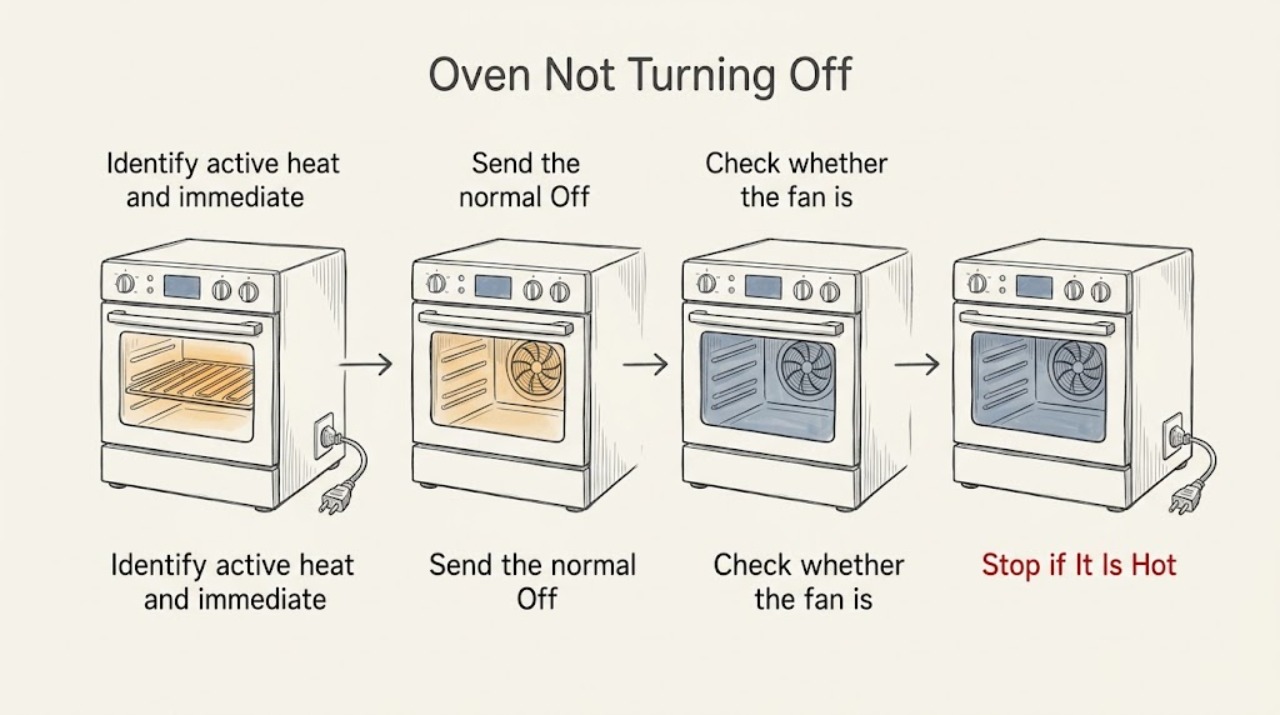
Work through in order
Diagnostic checks
Use only checks that match the exact appliance or system and its official guide.
-
Identify active heat and immediate hazards
From outside the hot cavity, note whether the oven is still heating, a bake or broil element is glowing, a gas burner flame is present, the display shows a cooking or clean function, or only a cooling fan is audible. Look for smoke, scorching, arcing, a damaged cord, repeated breaker trips, an unusual flame, or a gas odor. Do not open the door repeatedly, reach inside, or touch the element.
Expected result: Only a fan is running and heat is fading; the oven is still heating after Off; the control is unresponsive; smoke, fire, scorching, or arcing is present; a gas odor is present; or the oven has already cooled and only the display remains on.
Next step: For gas odor, leave immediately without operating switches or appliances and contact the gas supplier or emergency help from outside. For smoke, fire, arcing, severe overheating, or a damaged power path, leave if needed and use emergency assistance. If there is no hazard and only a fan runs, proceed to identify the selected function.
Stop if: Stop immediately for gas odor, hissing, smoke, fire, scorching, arcing, an unstable flame, severe overheating, exposed wiring, or a breaker that trips again.
Why this matters
Why: A fan with declining heat can be normal cooldown. Continued heat after an Off command, an unresponsive control, or an active burner is an abnormal stop condition. Gas odor and fire or electrical damage are emergencies rather than control troubleshooting.
-
Send the normal Off or Cancel command once
With no gas odor or visible hazard, press the model's Cancel or Clear/Off control once, or turn the oven function and temperature controls to Off on a mechanical-control model. Check that Bake, Broil, Time Bake, Delay Start, Sabbath, and any other active cooking mode is no longer shown. Do not keep pressing random controls or force a knob past its stop.
Expected result: The heat stops and only the fan continues; the display clears but heat continues; the control ignores the command; the oven starts again; or the selected function was a timed, delayed, Sabbath, or self-clean cycle.
Next step: If heat has stopped, leave the door closed while it cools and monitor the fan. If a named special mode is active, use only its model-specific cancel procedure. If heating remains after the correct Off command, stop repeated inputs and move to safe power isolation or service.
Stop if: Stop if the control is hot or damaged, the oven restarts, a knob binds, smoke or arcing appears, or any gas odor is detected.
Why this matters
Why: Heat stopping with a fan still running supports normal cooldown. Heat continuing after Off or a control that ignores the command points to a control or power-switching fault. A timed, delayed, Sabbath, or self-clean mode may have its own cancel procedure and must be handled by the exact manual.
-
Check whether the fan is cooling normally
After the Off command, observe without touching the appliance whether the cavity heat gradually falls while the cooling fan moves air around the controls or vent. Compare the symptom with the model manual rather than judging the fan alone. Do not block vents, remove trim, or open the control area to make the fan stop.
Expected result: The fan runs while heat falls; the fan runs but the cavity keeps heating; the fan stops and the oven is cool; or the fan runs with smoke, a burning smell, or excessive heat at the controls.
Next step: For ordinary cooldown, allow the fan to finish and consult the model manual for normal operation. For ongoing heat or an abnormal smell, stop using the oven and use the service boundary; for smoke, fire, arcing, or severe overheating, leave and obtain emergency assistance.
Stop if: Do not continue if the cavity heats after Off, the fan area smokes, the control panel becomes dangerously hot, or a burning odor, gas odor, or arcing occurs.
Why this matters
Why: A fan that runs during cooldown is expected on many GE ranges and wall ovens. A fan cannot safely explain ongoing heating, smoke, burning odor, or a control area that overheats. Those results indicate a fault or hazardous condition rather than a long fan cycle.
-
Cancel Self-Clean or a timed mode only as the model allows
If the display or controls show Self-Clean, Delay Start, Time Bake, Sabbath, or another special function, consult the exact GE manual and use its documented cancel or Off sequence. For Self-Clean with electronic controls, GE describes Cancel or Clear/Off; mechanical controls use the designated Stop, Oven Set, and temperature controls. Do not force a locked door, pour water into a hot oven, or defeat a latch.
Expected result: The special cycle cancels and heat stops; the cycle is still counting down; the door remains locked while the oven cools; or the cycle will not cancel and heat remains.
Next step: If the cycle is cooling normally, keep the door closed until the manual permits opening. If it will not stop, and there is no gas odor or visible hazard, turn off the range or wall oven's supplying breaker or fuse as GE directs, then leave power off pending service. Do not reset repeatedly.
Stop if: Stop for gas odor, smoke, fire, arcing, severe heat, a damaged latch, or any need to force the door or open the control assembly.
Why this matters
Why: A countdown or locked door can be part of a normal Self-Clean cooldown. If the cycle will not cancel after the documented command, persistent heat is abnormal and power isolation or service is required. Delay or Sabbath behavior is model-specific and should not be overridden by guesswork.
-
Isolate power only when safe and arrange service for continuing heat
If a GE oven still heats after the correct Off or Cancel command, and there is no gas odor, fire, smoke, or electrical danger, switch off the breaker or remove the fuse that supplies the range or wall oven, following the home's electrical safety rules. Confirm only that the oven stops heating; do not remove covers or measure energized circuits. Leave the breaker off if it trips again or the oven resumes heating when power returns.
Expected result: Heating stops when power is isolated; the breaker trips again; the oven heats again after power is restored; the oven is gas and a gas odor is present; or the oven is safe and remains off except for normal residual fan operation.
Next step: Keep the appliance out of service and arrange qualified GE appliance service for any continuing heat, repeat trip, unresponsive control, or suspected failed component. Give the model, mode, Off command result, fan-versus-heat observation, and breaker behavior; do not reproduce a dangerous symptom.
Stop if: Never operate a breaker or appliance switch while gas odor is present. Stop all owner checks for smoke, fire, arcing, exposed wiring, severe overheating, or a breaker that trips repeatedly.
Why this matters
Why: Power isolation can stop an electrical control or heating fault, but it does not identify or repair the failed relay, thermostat, element, sensor, or control. A repeated trip or resumed unwanted heat requires service. Gas odor changes the response to evacuation and outside assistance rather than electrical switching.
Use your observations
Decision map
Find the observation that best matches what you see, then follow the next safe action.
-
PATH 01Next step
What you see
Only the cooling fan is running and the cavity heat is falling after the Off command.
Do this next
Leave the oven undisturbed while it cools. A thermostat-controlled GE cooling fan may continue after the oven is off; consult the exact model manual if the fan never settles after cooling or the control area overheats.
-
PATH 02Safety boundary
What you see
The bake or broil element remains hot, a gas burner remains lit, or the cavity continues heating after Cancel/Clear-Off or the controls are set to Off.
Do this next
Stop using the oven. If there is no gas odor or visible hazard, isolate power at the supplying breaker or fuse and leave it off for qualified GE service. Do not open the control panel or gas path.
Why this path and its safety boundary
Safety stop: True
-
PATH 03Safety boundary
What you see
A Self-Clean cycle is counting down or the door is locked while the oven cools.
Do this next
Follow the model-specific Self-Clean cancel and cooldown instructions. If the cycle will not stop after the documented command, and there is no gas odor or visible danger, disconnect power at the supplying breaker or fuse and arrange service; do not force the door.
Why this path and its safety boundary
Safety stop: True
-
PATH 04Safety boundary
What you see
Gas odor, smoke, fire, scorching, arcing, severe overheating, an unstable flame, or repeated breaker trips is present.
Do this next
Leave the area immediately. For gas odor, do not operate electrical switches or appliances and contact the gas supplier or emergency help from outside. For fire, smoke, arcing, or severe overheating, obtain emergency assistance and do not return to test the oven.
Why this path and its safety boundary
Safety stop: True
-
PATH 05Next step
What you see
The Off command works, heating stops, and the oven later returns to a normal cool state.
Do this next
The issue may have been a selected special mode or normal fan cooldown. Record the model and mode if it recurs, then use the model manual; arrange service if the oven ignores Off again or heats after shutdown.
Helpful context
Understand the symptom
A fan can sound like an oven that is still on
GE describes a cooling fan for the electronic controls that can run during baking and continue after the oven is turned off. The fan should not be confused with active heating: the useful observation is whether the cavity is still heating, a heating element remains energized, a gas burner is still lit, or only air is moving. Use the exact model manual for fan behavior because the design varies.
Cancel the selected function before cutting power
An oven can remain in Bake, Broil, Time Bake, Delay Start, Sabbath, or Self-Clean depending on the model. Press the normal Cancel or Clear/Off control, or set the mechanical function and temperature controls to Off as the model instructions show. If a cycle will not cancel and heat remains, a breaker or fuse disconnect is an emergency stop for the appliance; use it only when there is no gas odor and you can do so safely.
Persistent heat is a service boundary
A fan that runs while the cavity cools can be normal. Heat that continues after Off, a control that ignores Cancel, a self-clean cycle that will not end, an element that arcs, or a gas burner that remains lit indicates a control, switching, heating, or fuel-path fault. Do not open the console or oven cavity to test live parts. Smoke, scorching, fire, arcing, repeated trips, overheating, or gas odor requires immediate safe shutdown and professional help.
Only after diagnosis
Potential parts
- electronic oven control or relay
Consider this category only after qualified diagnosis confirms that a control or relay is keeping an electric element or gas-heating command active after Off; a fan alone does not prove a control failure.
Confirm the complete GE model and manufacturer service information; do not open the console or substitute a control based on appearance. - oven thermostat or temperature sensor
Consider this category only when qualified testing links the continuing-heat symptom to the thermostat or sensor after the selected mode and control operation are verified.
Verify the exact model and approved fit information; sensor or thermostat replacement is not justified by a fan that runs during normal cooldown. - bake or broil heating element
Consider an element only after qualified diagnosis finds a damaged or shorted element, arcing, or another element fault; do not touch or inspect an energized element.
Confirm model-specific fitment and remove power through the approved procedure before any repair; a cracked or arcing element requires the oven to remain out of service. - gas oven burner or safety valve
Consider this category only for a gas model after qualified service confirms that the burner or valve is allowing heat after the control should be Off; never diagnose it by loosening a fitting.
Gas-path parts require exact model verification and qualified installation; do not manually light, adjust, or dismantle the gas system.
When checks do not resolve it
Need a professional?
Call qualified GE appliance service for continuing heat after Off, an unresponsive control, a failed Self-Clean cancel, a returning fault, repeated breaker trips, or an oven that restarts. For gas odor, leave first and contact the gas supplier or emergency help from outside.
Common questions
FAQ
Is it normal for a GE oven fan to run after I turn the oven off?
Often, yes. GE says the electronic-control cooling fan may continue after the oven is off while internal parts cool. Confirm that actual heating has stopped. A fan with continued cavity heat, smoke, burning odor, or an overheated control area is not a normal cooldown symptom and needs service.
What should I do if my GE oven is still heating after Cancel or Clear-Off?
Stop using it. If there is no gas odor, fire, smoke, or other visible danger, isolate power at the supplying breaker or fuse and leave it off for qualified service. Do not open the control panel or keep resetting the breaker. If gas odor or an electrical hazard is present, leave and get help from a safe location.
How do I stop a GE Self-Clean cycle that will not turn off?
Use the exact model instructions. GE describes Cancel or Clear/Off for electronic controls and specific Stop, Oven Set, and temperature controls for mechanical timers. If it still will not stop, and there is no gas odor or visible hazard, switch off the supplying breaker or fuse and arrange service. Do not force the door while the oven is hot.
Can Delay Start make a GE oven seem like it will not turn off?
Delay Start controls when cooking begins and does not automatically turn the oven off on every model. Check the model manual for Time Bake, Cook Time, or the correct cancel sequence. If heat continues after the documented Off command, stop using the oven and arrange service.
What if I smell gas while the GE oven will not turn off?
Do not operate the oven, lights, or other electrical switches. Leave the home immediately and contact the gas supplier or emergency help from outside or another safe location. Do not return to test the controls or move the appliance.
When should I stop troubleshooting a GE oven that stays on?
Stop for active heat after Off, an unresponsive or restarting control, a Self-Clean cycle that will not cancel, repeated breaker trips, smoke, scorching, arcing, severe overheating, an unstable flame, or gas odor. A fan that continues while heat falls can be normal; persistent heat is a service boundary.
Read the exact guide
Official sources
- Range & Wall Oven - Clicking and Other NoisesGE Appliances · GE explanation of normal temperature-control clicks and cooling or convection fan operation during and after cooking.
- Range & Wall Oven - Self-Clean Does Not Turn OffGE Appliances · GE instructions for cancelling electronic or mechanical Self-Clean cycles and disconnecting power if a cycle will not stop.
- Gas Range - Gas OdorsGE Appliances · GE safety guidance distinguishing normal start-up combustion odor from unburned gas and directing occupants to leave and contact the gas supplier from outside.
- Range and Wall Oven - Oven Cooling Fan is Running Too LongGE Appliances · GE guidance that the electronic-control cooling fan may run during baking and continue after the oven is off as normal operation.
- Range & Wall Oven - Oven Will Not Come OnGE Appliances · GE guidance for oven controls, power isolation and reset, special modes, and service when controls do not operate normally.
- Range & Wall Oven - Oven Error, Fault or Function CodesGE Appliances · GE guidance that some control faults can be reset at the breaker and that the appliance should remain off at the breaker until service when a control fault persists.
- Range & Wall Oven - Delay Start of CookingGE Appliances · GE explanation that Delay Start begins cooking at a selected time and requires the model's instructions or a timed-cook feature for automatic shutoff.
- Range & Wall Oven - Oven Heating Element FailureGE Appliances · GE guidance about an element short, sparks, a tripped breaker, burning odor, and not using the oven when an element fails.
Community feedback
Share a repair observation
Share a plain-text repair observation. Accepted observations are published automatically; this page may take a moment to update.