
On this page
Start here
Quick answer
First separate a cooling fan from continued heating. The official Hotpoint/GE record opened for the close base model RB526DPWW identifies a free-standing electric range, while GE Appliances' range guidance says a control cooling fan may continue after the oven is off; that fan alone is not the same as an energized bake or broil element. The assigned label is written RB526DP1WW, but the opened official model page is for RB526DPWW, so do not assume the base model's manual or wiring applies until the complete nameplate and revision are confirmed. Press the normal Off or Cancel control once, observe from a safe distance whether heat is falling or rising, and if the element remains energized or the oven ignores Off, isolate the range at its accessible dedicated breaker only when it is safe to do so. Do not open the control panel, repeatedly reset power, touch hot elements, or guess a relay, thermostat, or selector. Leave the appliance isolated and arrange qualified service for continued heating, an unresponsive control, a recurring breaker trip, smoke, burning odor, arcing, or any other fire or electrical warning.
Before you begin
Safety first
- Do not open the control panel or rear cover, test live voltage, touch hot elements or wiring, reset the breaker repeatedly, bypass a thermostat or relay, start Self-Clean to clear a fault, or re-energize a range that has smoked, arced, overheated, or continued heating unexpectedly.
Work through in order
Diagnostic checks
Use only checks that match the exact appliance or system and its official guide.
-
Check 1
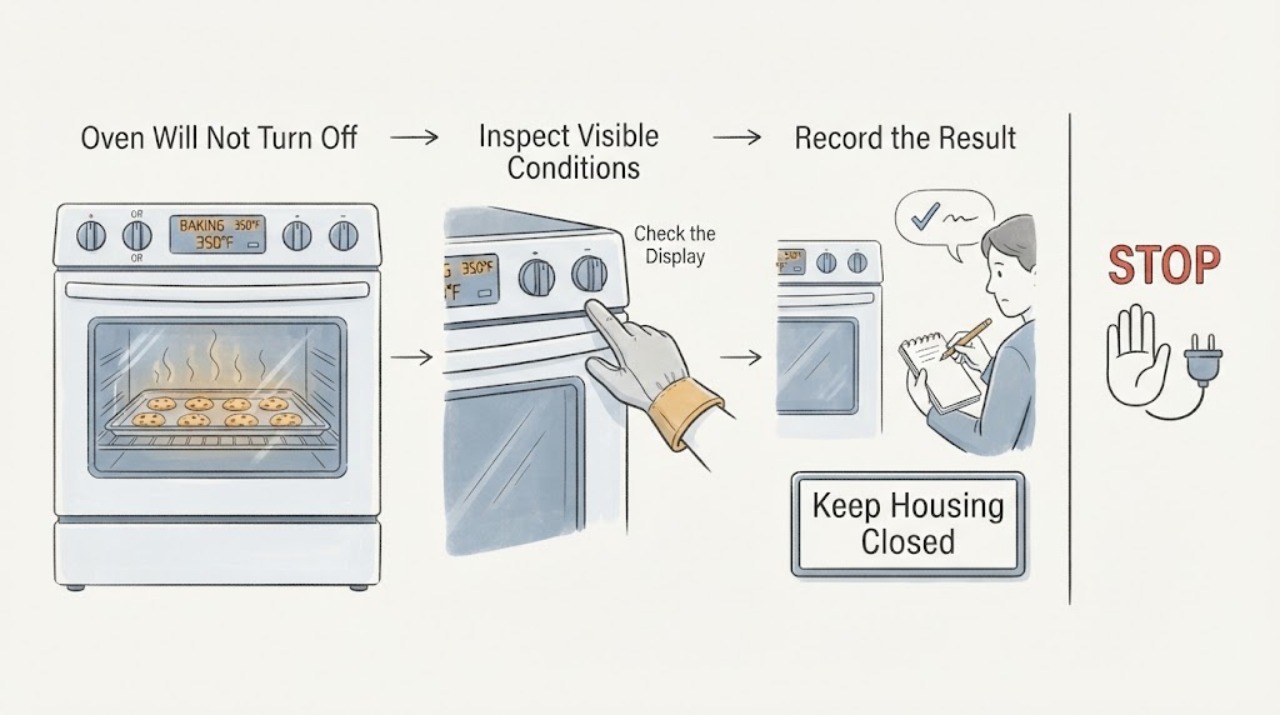
From a safe position, press the normal Off or Cancel control once if the control is responsive, then keep the oven door closed and observe without touching hot surfaces. Note whether only a fan is running, whether the cavity heat is falling, whether a bake/broil element remains visibly energized, and whether the control display or oven-on indicator changes.
Expected result: Air continues to move while heat falls and the element is not energized, the cavity keeps getting hotter or an element remains energized, the controls do not respond, or smoke, odor, arcing, or abnormal heat is present.
Next step: Leave a fan-only cooling state alone while it cools. If heating continues, the control is unresponsive, or any hazard is present, isolate power only from a safe accessible point and arrange qualified service; do not keep pressing buttons or start another mode.
Stop if: Do not open the door to touch the element, use a thermometer or flame as a test, reach behind the controls, or operate an oven with smoke, burning odor, arcing, or severe overheating.
Why this matters
Why: GE Appliances says a thermostat-controlled cooling fan may continue after the oven is off, but a heating element that remains on or rising heat after Off is not explained by a fan delay. The observation does not identify a relay, thermostat, selector, or control board.
-
Check 2
Read the complete rating label and compare it with the assigned RB526DP1WW string. Check the selector and any display for Bake, Broil, Timer, Delay, Keep Warm, Self-Clean, Sabbath, Lock, or another documented mode; use only the exact model's documented Off or Cancel action once.
Expected result: The nameplate exactly confirms RB526DP1WW, it instead reads RB526DPWW or another variant, a documented mode is still active, or no mode explains the continuing heat.
Next step: If the identity or mode is uncertain, keep the oven off and retrieve the exact literature. Cancel only a clearly documented mode once; if the range still heats or ignores Off, isolate it safely and request qualified service.
Stop if: Do not enter service mode, force a lock, start Self-Clean to clear a fault, remove knobs or panels, or substitute the RB526DPWW manual for an unconfirmed RB526DP1WW unit.
Why this matters
Why: GE Appliances directs owners to model-specific manuals, and the opened owner-center page identifies only RB526DPWW. A missing suffix or an unwanted mode changes the next step; a near-model manual cannot certify the assigned range's control behavior.
-
Check 3
From a safe distance, compare the oven-on or cycling indicator and visible element behavior after the Off command. Do not open the control panel or touch the element; if the model has no visible element, use only the trend of heat and the control response rather than trying to inspect energized wiring.
Expected result: The indicator goes off and heat falls, an indicator or element continues cycling as if Bake/Broil remains selected, the cavity heat rises, or the indicator behavior cannot be matched to the exact manual.
Next step: If heat is falling and only the cooling fan remains, allow cooling. If heating continues or the behavior is unexplained, stop using the oven and arrange qualified service with the exact model and observations.
Stop if: Do not remove the rear panel, test voltage, probe the element, bridge a thermostat, or repeatedly turn the selector to force the light off.
Why this matters
Why: GE Appliances explains that on some mechanically controlled models a cycling light shows the bake element is energized while the selector and thermostat call for heat. Persistent heat or an unmatched indicator after Off is a control or thermal fault possibility, not a user-confirmed relay or thermostat failure.
-
Check 4
If the oven continues heating after Off or Cancel, keep people away from the hot cavity and use only the accessible dedicated range breaker or isolator from a dry, safe location, without opening the electrical panel or touching the range cord. Do not re-energize it merely to see whether the fault returns.
Expected result: Power isolation stops the heating and the fan continues cooling, the breaker trips again, the oven remains hot or energized, or smoke, flame, gas odor, arcing, or damaged electrical parts are present.
Next step: Leave the range isolated, allow it to cool without opening panels, and arrange qualified appliance or electrical service. For smoke, flame, gas odor, arcing, or immediate danger, leave the area and contact emergency help from a safe location.
Stop if: Do not reset the breaker as a test, remove fuses, open the service panel, touch wiring or elements, or use a flame to locate a gas leak.
Why this matters
Why: Heating that stops only after power isolation is consistent with an appliance control or power-switching fault that needs service. A repeat trip or an active fire/electrical hazard is a higher-risk condition; it cannot be safely narrowed to a relay or thermostat by the owner.
-
Check 5
Record the baking context and the exact symptom for service: selected function and temperature, whether the element stayed on, whether the fan was the only sound, how long heat continued, the full model/serial label, and any breaker or indicator change. Keep the range in the safe state that preserves the symptom; do not run another bake or Self-Clean cycle.
Expected result: The issue was only a normal cooling fan, the oven repeatedly heats after Off, the control is erratic, or the symptom is accompanied by a damaged cord, hot outlet, smoke, odor, arcing, or repeated breaker trips.
Next step: Monitor only a clearly normal cooling fan. For recurrent or unresolved heating/control behavior, give the record to qualified Hotpoint service. For electrical or fire signs, keep the range isolated and obtain appropriate emergency or qualified help.
Stop if: Do not continue cooking, repeatedly cycle power, remove knobs or covers, or order a relay, thermostat, selector, or control assembly from the symptom alone.
Why this matters
Why: The distinction between cooling airflow and continuing heat is the key service decision. GE Appliances states that exact manuals control model-specific operation and that service is required when normal troubleshooting does not resolve the problem; the visible symptom cannot select a replacement component.
Use your observations
Decision map
Find the observation that best matches what you see, then follow the next safe action.
-
PATH 01Next step
What you see
After Off or Cancel, only the cooling fan runs, the cavity and control area are cooling, no heating element remains energized, and no smoke, odor, arcing, or electrical warning is present.
Do this next
Leave vents clear and allow the range to cool according to the exact manual. Escalate if heat rises, the fan scrapes, controls stay active, or the fan continues with another safety symptom.
Why this path and its safety boundary
Why it matters: This matches GE Appliances' description of a thermostat-controlled cooling fan that can continue after an oven is off. It does not mean the fan has a fixed run time on the assigned RB526DP1WW.
-
PATH 02Next step
What you see
The cavity keeps getting hotter, a bake or broil element remains energized, the oven ignores Off, or the same unwanted heating returns after a safe power restoration.
Do this next
Stop using the oven, isolate power at the accessible dedicated breaker or isolator when safe, and arrange qualified Hotpoint/electrical service. Do not re-energize to test or replace a component by guesswork.
Why this path and its safety boundary
Why it matters: This is not explained by a cooling fan. A selector, thermostat, relay, sensor, control, or wiring fault is possible, but the symptom does not distinguish among them.
-
PATH 03Next step
What you see
The label lacks the P1 suffix, reads RB526DPWW or another variant, or the exact manual cannot be matched to RB526DP1WW.
Do this next
Photograph the complete nameplate and retrieve the exact literature. Keep the oven off if it is still heating or the control behavior is abnormal; do not transfer the base-model manual or order a part until the match is confirmed.
Why this path and its safety boundary
Why it matters: The opened official owner-center page is for RB526DPWW, not the full assigned RB526DP1WW string. Model-specific control, wiring, and part conclusions are therefore unresolved.
-
PATH 04Next step
What you see
The breaker trips again, the cord or outlet is hot or damaged, smoke, flame, gas odor, burning electrical smell, arcing, or severe overheating is present.
Do this next
Stop using the range and keep clear. Isolate power only from a dry safe position when possible; for smoke, flame, gas odor, arcing, or immediate danger, leave the area and contact emergency services or qualified electrical help from a safe location.
Why this path and its safety boundary
Why it matters: This is an immediate fire, burn, gas, or electric-shock boundary. Normal cooling-fan guidance cannot make continued operation safe.
Helpful context
Understand the symptom
After baking cookies, a fan may continue while the control area cools. That is different from the bake or broil element remaining visibly energized, the cavity getting hotter, or the oven ignoring the Off command. Do not use the sound of air movement as proof that the heating has stopped. Observe only from outside, keep clear of the hot cavity, and make the power-isolation decision based on actual heat and electrical safety signs.
Model identity needs special care here. The task label is RB526DP1WW, while the opened official Hotpoint owner-center page is for RB526DPWW and describes that base model as a free-standing electric range. The official model lookup guidance says to use the complete model number to retrieve the right literature. Treat a missing P1 suffix or any other nameplate mismatch as unresolved; do not transfer control behavior, wiring, or component fit from the base model.
Only after diagnosis
Potential parts
- oven selector, thermostat, relay, or control assembly
This class is conditional only if qualified diagnosis confirms that the exact model remains electrically heating after Off and identifies the failed control path; continued heat alone cannot distinguish these components.
Confirm the complete RB526DP1WW nameplate, revision, electrical configuration, and manufacturer fitment before ordering. Do not use RB526DPWW compatibility as proof for the P1 variant. - control cooling fan assembly
Consider this only if a qualified provider confirms that the observed symptom is a failed or abnormal cooling fan rather than continued heating; a fan running after Off can be normal.
Verify the exact model and manual. Do not replace a cooling fan solely because it runs after baking.
When checks do not resolve it
Need a professional?
Request qualified Hotpoint appliance service for continued heating after Off, an unresponsive or erratic control, a recurring unwanted mode, an unmatched model suffix, or a fan/thermal issue that is not clearly normal. Use qualified electrical or emergency help for damaged power equipment, smoke, flame, gas odor, arcing, severe overheating, or fire.
Safety scope: Do not open the control panel or rear cover, test live voltage, touch hot elements or wiring, reset the breaker repeatedly, bypass a thermostat or relay, start Self-Clean to clear a fault, or re-energize a range that has smoked, arced, overheated, or continued heating unexpectedly.
Have this ready
- Provide the complete model and serial label exactly as printed, market, selected bake/broil function and temperature, whether the element remained energized, fan and indicator behavior, time after Off, power-isolation result, breaker behavior, and any smoke, odor, heat, or arcing observations.
Common questions
FAQ
Is it normal for the Hotpoint oven fan to run after baking?
It can be. GE Appliances says a thermostat-controlled control-cooling fan may run through baking and continue after the oven is off. That explanation applies only when heat is falling and no bake or broil element remains energized; rising heat or continued heating needs service.
Does RB526DP1WW use the same manual as RB526DPWW?
The opened official owner-center page identifies RB526DPWW, while the assigned label includes P1. Do not assume the suffix is interchangeable. Confirm the complete nameplate and retrieve the exact literature before applying model-specific control or wiring information.
Can I replace the relay or thermostat because the oven will not turn off?
No. Continued heat can involve a selector, thermostat, relay, sensor, control, or wiring path, and the symptom does not identify one. Isolate power safely when heating continues and have the exact model diagnosed by a qualified provider.
Should I reset the breaker to see if the oven starts working again?
Do not use repeated breaker resets as a test. If the oven continues heating after Off, isolate it once from a safe accessible point and leave it isolated for service. A repeat trip, hot or damaged cord, smoke, arcing, or burning odor is an electrical stop condition.
Read the exact guide
Official sources
- Range & Wall Oven - Oven Cycling Light OperationGE Appliances · Official family-level indicator context used only to interpret visible heating behavior; exact RB526DP1WW controls remain model-specific.
- Range & Wall Oven - Explanation of Self-Clean Oven Cool DownGE Appliances · Official high-heat safety context used to distinguish a documented cool-down from an uncommanded continuing heat condition; not proof that RB526DP1WW has self-clean.
- Range & Wall Oven - Fan Noise and Normal OperationGE Appliances · Official family-level fan guidance used to separate post-bake cooling airflow from continued heating; not a model-specific RB526DP1WW control map.
- GE Appliance - Download a Copy of Your Owner's Manual or Installation InstructionsGE Appliances · Official lookup guidance used to resolve the assigned R B526D P1WW model and its suffix before model-specific operation or part decisions.
- Range & Wall Oven - Oven Will Not Come OnGE Appliances · Official family-level power and control guidance used for safe external triage of the assigned Hotpoint RB526DP1WW issue; it does not select a relay, thermostat, or P1WW part.
- Range and Wall Oven - Oven Cooling Fan is Running Too LongGE Appliances · Official family-level cooling-fan context for the assigned Hotpoint range; it does not establish an expected run time for RB526DP1WW.
- User Manual & Care for RB526DPWWGE Appliances · Official base-model record used to expose the identity mismatch with the assigned RB526DP1WW label; it does not prove P1WW equivalence or provide exact P1WW wiring.
Community feedback
Share a repair observation
Share a plain-text repair observation. Accepted observations are published automatically; this page may take a moment to update.