
On this page
Start here
Quick answer
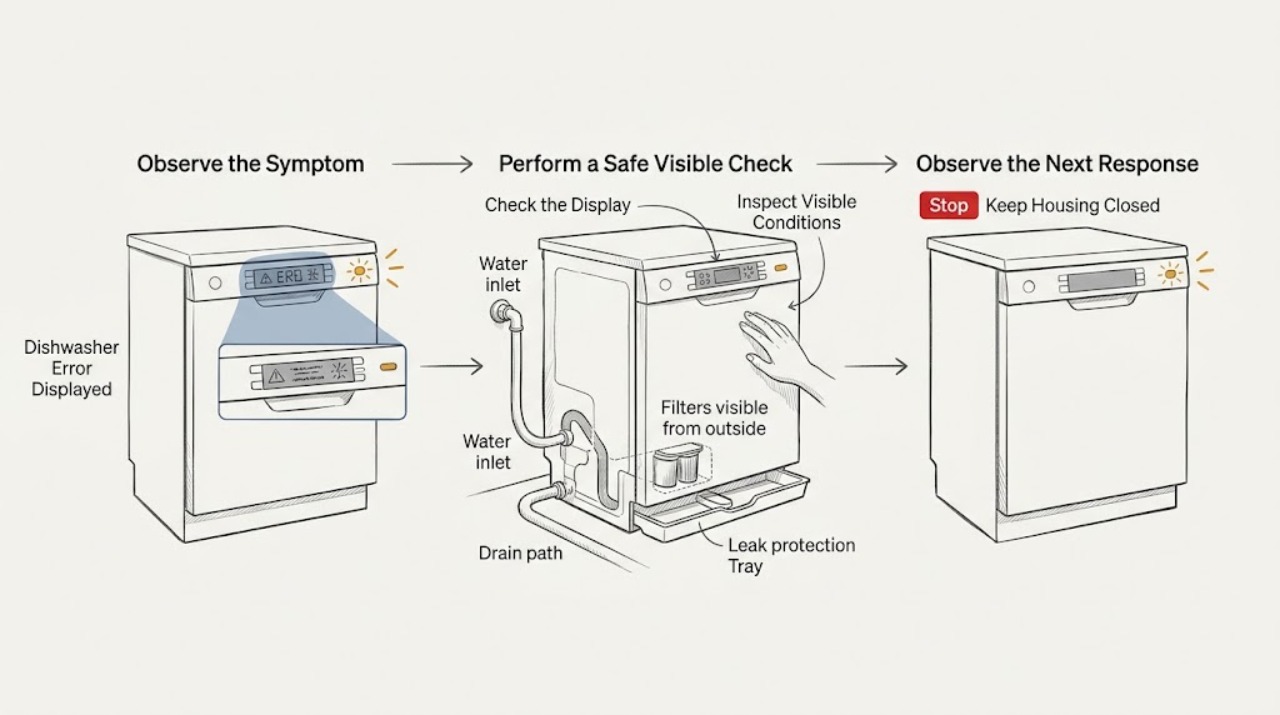
Record the exact code or symbol, the model number, what the dishwasher was doing, and whether there is standing water, a leak, a continuously running pump, or no water entering. Asko error meanings and reset steps vary by model, so use the manual for that exact appliance instead of treating every code as interchangeable. As a safe first pass, make sure the door closes, delayed start or Child Lock is not preventing operation, the water shutoff is open, and the visible filters and drain area are free of debris; keep water and power connections dry. Asko's cleaning guide gives F4 as one model-family example for a no-water condition: document it, use the stated Start/Stop reset once, and contact service if it returns. Do not guess at a code, open electrical covers, test water pressure or wiring yourself, bypass a door or leak-safety device, or repeatedly reset a fault. Turn off water and power and arrange authorized service for a persistent code, a leak, pump running continuously, smoke, burning odor, a hot plug, repeated breaker trips, or a damaged cord.
Work through in order
Diagnostic checks
Use only checks that match the exact appliance or system and its official guide.
-
Check 1
Photograph or write down the exact display code or symbol, whether it is flashing, the selected program, and the point in the cycle when it appeared; also record whether the dishwasher is full of water, dry, leaking, or beeping.
Expected result: The code is clearly legible and repeatable, only a status light is flashing, the message appears once after an interruption, or the display cannot be read reliably.
Next step: Keep the record for service and look up the code in the exact Asko manual. Do not substitute a similar-looking code or continue cycles when a leak, smoke, odor, or continuously running pump is present.
Why this matters
Why: The exact code and timing are more useful than a guessed translation. A status indication may describe progress or a general fault, while an unreadable or intermittent message requires model-specific documentation rather than a generic reset.
-
Check 2
Find the dishwasher model and serial information on its safe visible label or paperwork and use it to open the matching Asko use-and-care or error-code documentation; do not remove panels or slide out an integrated unit to find the label.
Expected result: The model is known and the manual lists the displayed code, the model is known but the code is absent from the manual, or the model cannot be identified without moving the appliance.
Next step: If the code is unlisted or the model cannot be safely identified, leave the dishwasher in its current safe state and contact Asko or authorized service with the display description. Do not guess at a component or reset sequence.
Why this matters
Why: Asko manuals and controls vary across product families, and the cleaning guide directs users to the product use-and-care guide for further information. An unlisted code should not be assigned a meaning from a different model.
-
Check 3
If the exact manual identifies the code as a resettable user condition, follow that manual once; for the U.S. cleaning-guide F4 example only, document the code and hold Start/Stop for the stated five-second reset, then observe whether the code returns.
Expected result: The code clears and the dishwasher resumes normally, the code returns, or the exact manual does not authorize a reset for that code.
Next step: If the code returns or the manual gives no reset, stop repeating the sequence and arrange authorized service. Do not reset through a leak, smoke, electrical odor, continuous pump, or other safety warning.
Why this matters
Why: A one-time cleared code may have followed a transient condition, but a returning or unlisted code is evidence that the underlying condition remains. The F4 reset is an example for the guide's no-water path, not a universal Asko command.
-
Check 4
For a code associated by the exact manual with no start or a door condition, close the door fully, press Start/Stop as the manual describes, and check that delayed start and Child Lock are not active; do not force the latch.
Expected result: The cycle starts, the door does not close or latch, controls remain locked or unresponsive, delayed start was active, or the error persists with a properly closed door.
Next step: Remove only an obvious dish or rack obstruction and retry once if the door is undamaged. If the latch, control, or code remains abnormal, leave the unit off and use authorized service; do not bypass the door safety device.
Why this matters
Why: Asko's cleaning guide lists pressing Start/Stop and closing the door within four seconds, checking delayed start, and checking Child Lock among no-start or unresponsive-control checks. A damaged latch or persistent code is not a user adjustment.
-
Check 5
For a water-inlet or no-water indication, check the accessible shutoff valve is open and look for a visible kink or leak at the supply connection without disconnecting the hose or measuring pressure yourself.
Expected result: The valve is closed, the supply connection is visibly leaking or damaged, no water enters despite an open valve, or the error clears after the model-approved reset.
Next step: Open only a normally accessible shutoff if the connection is dry and intact. If there is a leak, damaged hose, no water, or a returning code, turn off the water and power as appropriate and arrange qualified service; do not detach the hose or test pressure.
Why this matters
Why: A closed valve can explain a no-water condition; a leak or no water with an open valve points to installation, inlet, pressure, or internal control issues that the display alone cannot distinguish. Asko's guide directs pressure verification to a plumber and service when a code returns.
-
Check 6
For a drain, water-level, or cycle-stop indication, inspect the visible filter area and drain opening for removable debris after turning the dishwasher off; use a manual-drain command only if the exact manual authorizes it and keep clear of hot water.
Expected result: Filters are dirty, standing water or debris is visible, the dishwasher drains after the model-approved command, or the pump runs continuously or will not drain.
Next step: Clean only accessible filters according to the manual and reinstall them correctly. If water remains, a drain line is inaccessible, the pump runs continuously, or a leak appears, turn power and water off and contact authorized service; do not pull out the machine or dismantle the pump.
Why this matters
Why: Asko's guide connects no-drain symptoms with filters and a blocked drain line and provides a model-family manual-drain command. Continuous pump operation is treated separately as a condition requiring power and water shutoff and service, not repeated cycling.
-
Check 7
If controls are unresponsive or the dishwasher beeps, turn the controls off and wipe the panel with a damp cloth, then close and reopen the door and check the exact manual's Child Lock instruction; do not spray cleaner directly on the panel.
Expected result: Controls respond after the panel and door check, Child Lock was active, beeping continues, or the display remains frozen with an error.
Next step: If the exact manual permits a power reset, use it once with the dishwasher dry and safe. If beeping or the error persists, leave the unit off and arrange service; do not access the control board or bypass a lock.
Why this matters
Why: Asko lists a clean control panel, deliberate key-pad contact, a complete door close/open, and Child Lock verification for unresponsive controls. Continuing beeps or a frozen error after those checks suggests a control or safety fault rather than a key-press technique issue.
-
Check 8
Stop and inspect only from a safe position for water on the floor, a continuously running pump, smoke, burning odor, hot plug, damaged cord, repeated breaker trips, or a dishwasher that cannot be safely left installed and dry.
Expected result: No safety warning is present, or a leak, continuous pump, electrical odor, heat, smoke, damaged cord, breaker event, or exposed connection is present.
Next step: For a leak or continuous pump, turn water and power off as appropriate; for smoke or fire, leave the area and use emergency help. Contact an authorized Asko service company or qualified electrician, and do not run another cycle or remove installation connections yourself.
Why this matters
Why: A persistent display code without a hazard can follow the model-specific troubleshooting path. A water or electrical warning changes the task from code interpretation to hazard control and qualified service.
Use your observations
Decision map
Find the observation that best matches what you see, then follow the next safe action.
-
PATH 01Next step
What you see
Do this next
Follow the exact manual once, record the result, and monitor the next safe operation. If the code returns, stop resetting and arrange authorized service.
-
PATH 02Next step
What you see
Do this next
Document the code and use the guide's stated Start/Stop reset once. If it returns or water still does not enter, turn supplies off as needed and arrange qualified service; do not measure pressure or detach the hose yourself.
-
PATH 03Next step
What you see
Do this next
Remove only an obvious loading obstruction, follow the model's start and lock instructions, and retry once. If the latch or controls remain abnormal, use authorized service and do not bypass safety devices.
-
PATH 04Next step
What you see
Do this next
Turn the unit off, clean and reinstall accessible filters as instructed, and use only the model-approved drain command. If water remains or the pump runs continuously, turn water and power off and call service.
-
PATH 05Next step
What you see
Do this next
Leave the dishwasher off; turn water and power off as appropriate, and arrange authorized Asko service or qualified electrical help. Do not open panels, pull out the appliance, bypass a safety device, or order a part from the code alone.
Helpful context
Understand the symptom
The code is the clue, not a universal diagnosis
An Asko dishwasher can show a code, warning symbol, or flashing status indication for different conditions. The display itself does not identify a replacement part. Write the code exactly as shown, including letters, numbers, punctuation, and whether it is flashing, then match it to the model's use-and-care guide. The general Asko cleaning guide is useful for safe triage, but it explicitly points back to the product guide for further information.
Use only model-matched reset instructions
Asko's U.S. cleaning guide gives an F4 example for a no-water condition and describes a specific Start/Stop reset, while other symptoms use different controls or require service. That does not make the same reset valid for every Asko dishwasher or every displayed code. Perform a reset only when the exact manual identifies it, and stop if the code returns.
Separate an operating error from a water or electrical hazard
A door, delayed-start, Child Lock, blocked filter, or closed water valve may be externally checkable. A leak, continuously running drain pump, damaged cord, repeated breaker trip, or unknown electrical smell changes the safety boundary. Asko's installation instructions reserve electricity, water, and drainage connections for qualified professionals and direct service through an authorized company.
Keep the dishwasher installed while you diagnose
Do not pull out an integrated dishwasher or reach behind it to chase a code. Keep checks at the display, door, controls, accessible water shutoff, visible filter and drain area, and obvious leaks. If installation work or a hidden hose, outlet, or connection is implicated, shut off the appropriate supplies and use qualified service.
When checks do not resolve it
Need a professional?
Use the exact Asko manual for the displayed code and arrange authorized service if it returns, is not listed, or is paired with no water, no drain, a failed latch, or unresponsive controls. Turn water and power off and seek urgent qualified help for leaks, a continuously running pump, smoke, burning odor, a hot plug, damaged cord, exposed connection, or repeated breaker trips. Do not keep resetting a fault or open the dishwasher's electrical or plumbing connections.
Common questions
FAQ
What should I do first when my Asko dishwasher displays an error?
Record the exact code or symbol, model, selected program, cycle point, and any water or leak symptom. Then use the manual for that exact model. Asko's general cleaning guide is a safe triage reference, but it directs users to the product use-and-care guide for further information.
Can I reset an Asko dishwasher error code?
Only when the exact model manual authorizes that reset. Asko's U.S. cleaning guide gives F4 as a no-water example and describes holding Start/Stop for five seconds, followed by service if the code returns. Do not apply that sequence to every code or keep resetting a persistent fault.
What does F4 mean on an Asko dishwasher?
In the Asko U.S. cleaning guide, F4 is presented in the no-water troubleshooting path. The guide says to document the code, use its stated Start/Stop reset, and contact service if it reappears. Confirm the code and model before applying that guidance because codes and controls can vary.
Why does my Asko dishwasher show an error and not start?
Asko's guide lists the start sequence, door closure, delayed start, water supply, and Child Lock among checks for a unit that does not start or whose controls are unresponsive. Clear only an obvious loading obstruction and follow the exact manual. A persistent code or damaged latch needs service.
What if the Asko dishwasher error appears with a leak or a pump that will not stop?
Treat it as a safety condition, not a reset problem. Asko's cleaning guide says to turn power and water off for a continuously running drain pump and contact Customer Care. Do not run another cycle, pull out the dishwasher, or dismantle the pump; arrange authorized service.
Read the exact guide
Official sources
- Dishwasher CleaningASKO · Official ASKO U.S. cleaning guide used for model-family triage only; it explicitly directs readers to the product use-and-care guide for further information and does not make every code universal.
- Installation instructionsASKO · Official ASKO installation guidance used for water, drainage, electrical, leak, power-off, and qualified-professional boundaries; it is not a homeowner error-code repair manual.
- Fully Integrated Dishwasher - StyleASKO · Official ASKO product sheet used to establish that display/status, lockable controls, leak protection, and model-specific features vary by product; it is not a universal error-code table.
Community feedback
Share a repair observation
Share a plain-text repair observation. Accepted observations are published automatically; this page may take a moment to update.