
On this page
Start here
Quick answer
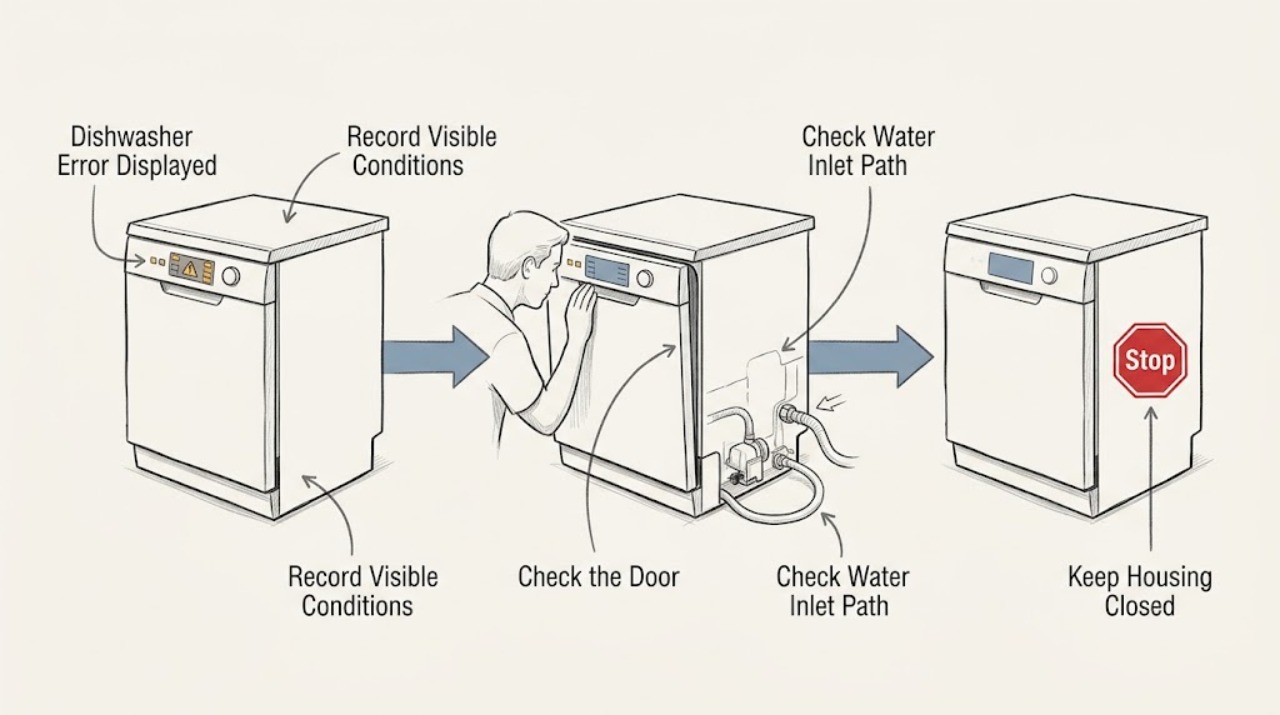
When a Blomberg dishwasher displays an error, first record the exact code or flashing-light pattern, whether the tub contains water, and whether the door, water supply, and drain path are normal. Do not apply a code list from another model: Blomberg provides model-specific manuals, and its support pages require the appliance model or serial information to find the right instructions. As an example only, the official LDV42244 manual describes an E:02 water-cutoff warning and an E:01 overflow warning; it says a persistent E:01 is a permanent fault requiring authorized service. Check only accessible power, door, tap, hoses, and removable filters as the manual permits. Stop for an overflow, leak, damaged cord, standing water that cannot be controlled, or any internal electrical or pump work.
Before you begin
Safety first
- This article covers recording the code, checking external power and door closure, inspecting visible taps and hoses, and cleaning removable filters only as the model manual permits. Qualified service must handle energized wiring, internal valves, pumps, sensors, controls, fixed panels, and pressurized connections.
Work through in order
Diagnostic checks
Use only checks that match the exact appliance or system and its official guide.
-
Check 1
Before clearing or resetting anything, photograph the complete error display or flashing-light sequence and note whether it appears at power-on, during filling, during draining, or after the door is opened. Find the model or serial information on the appliance as shown by Blomberg's model-finder guidance.
Expected result: The code or light pattern is complete and repeatable, only a partial indicator is visible, the display changes after a restart, or the model information cannot be found.
Next step: Use Blomberg's manual search with the exact model or serial information and follow that guide. If the code cannot be identified or the model information is missing, arrange support rather than guessing from a different manual.
Stop if: Do not erase the only record of a code, remove the control panel, or apply a generic reset sequence that is not in the model guide.
Why this matters
Why: A complete repeatable code can be matched to the correct manual. A partial or changing pattern is not enough to infer a fault, and an unknown model prevents safe use of model-specific reset and access instructions.
-
Check 2
Check the external plug and household power without opening the dishwasher, then close the door firmly and look for a rack, dish, or seal preventing closure. Do not open the door during a running hot cycle unless the model manual gives a safe procedure.
Expected result: The display is dark, household power is also absent, the display works but the door does not latch, or power and door closure are normal.
Next step: Restore only an obviously loose plug or external power condition. Arrange service for a damaged cord, failed outlet, cracked door, defective latch, or persistent error after normal closure.
Stop if: Do not bypass the door interlock, use a damaged cord, remove electrical covers, or operate with a cracked or leaking door.
Why this matters
Why: A dark display with wider power loss points to supply conditions. A working display with a door that cannot latch can block the cycle and generate a start or door-related indication; normal power and closure shift attention to water, drain, or the code-specific path.
-
Check 3
Confirm that household water is available and the dishwasher's inlet tap is open. Inspect only the visible inlet hose for a kink, crushing, leak, or damage; do not disconnect the connection or move a built-in appliance to reach it.
Expected result: The tap is closed, water is unavailable, the inlet hose is bent or leaking, the visible supply path is normal, or the machine still reports a water-related error.
Next step: Restore only an obviously closed tap and relieve an accessible bend without stressing the hose. Arrange service for leaks, damaged hoses, blocked inlet components, or a persistent code after the supply check.
Stop if: Do not disconnect pressurized plumbing, force the tap, reach behind a fixed unit, or continue if water is on the floor.
Why this matters
Why: Blomberg says a closed tap, restricted or damaged inlet hose, or water-supply problem can prevent filling. A normal visible supply path with a repeated error makes an inlet valve, sensor, wiring, or control fault more likely.
-
Check 4
If water remains in the tub or the error appears during draining, switch the appliance off normally and unplug it before inspecting the removable filters and accessible drain hose. Clean or reseat the filters only as the exact manual shows, and look for an external kink or blockage.
Expected result: The filter is clogged, the drain hose is kinked, the tub is empty and the path looks clear, or water remains after the accessible checks.
Next step: Rinse only removable filters and correct an obvious external hose bend according to the model manual. Arrange service for an internal blockage, pump problem, leak, or recurring drain error.
Stop if: Do not reach into standing water while energized, remove fixed pump protection, use chemical drain products, or restart an overflowing machine.
Why this matters
Why: Blomberg identifies debris in filters and restrictions in the drain hose or drainage route as causes of poor draining. A clear visible path with persistent standing water points toward a pump, sensor, or control fault that needs service.
-
Check 5
Compare the recorded code with the exact Blomberg manual and note whether the appliance is leaking, overflowing, unable to clear water, or returning the same code after the documented check. Treat examples from another model, including the LDV42244 guide, as examples rather than a universal code table.
Expected result: The manual maps the code to a correctable external condition, the code returns after that condition is corrected, the machine shows an overflow or leak indication, or the code cannot be matched.
Next step: Follow the exact manual once and record the result. Contact Blomberg or authorized service for a persistent, unmatched, overflow, leak, electrical, pump, valve, or control fault.
Stop if: Do not substitute another model's code meaning, repeatedly reset a safety indication, open the base, or continue with uncontrolled water.
Why this matters
Why: A code that clears with its documented external condition supports a user-level correction. A returning, unmatched, or overflow-related code makes a persistent technical or safety fault more likely and should not be forced through another cycle.
Use your observations
Decision map
Find the observation that best matches what you see, then follow the next safe action.
-
PATH 01Safety boundary
What you see
The exact manual maps the displayed code to a visible condition such as a closed water tap, a kinked hose, a door that is not latched, or a removable filter restriction.
Do this next
Correct only the documented external condition, run the manual's permitted verification, and arrange service if the same code returns.
Why this path and its safety boundary
Why it matters: The code is reporting a start, inlet, or drain condition that may be corrected without opening the appliance.
Safety stop: Do not rely on a code list from another Blomberg model or disconnect plumbing to test the condition.
-
PATH 02Safety boundary
What you see
The dishwasher shows a water-related error, the tap is closed or supply is absent, the inlet hose is kinked, or the machine does not fill after a normal door closure.
Do this next
Check the tap and visible hose as the manual permits. Arrange service for a leak, blocked inlet, normal visible supply with repeated error, or any connection requiring removal.
Why this path and its safety boundary
Why it matters: A water-supply or inlet restriction is more likely; the LDV42244 manual's E:02 example is model-specific and describes this type of condition.
Safety stop: Do not force the tap, disconnect pressurized hose connections, or continue with water on the floor.
-
PATH 03Safety boundary
What you see
The tub is overflowing, water cannot be controlled, a leak is visible, or an overflow indication persists; the LDV42244 manual gives E:01 as a model-specific example.
Do this next
Stop the appliance, close the water tap if it can be done safely, and arrange authorized service. Record the code and whether water was left in the tub.
Why this path and its safety boundary
Why it matters: A safety or drainage fault is more likely than a harmless display issue, and repeated operation can worsen water or property damage.
Safety stop: Do not keep restarting, reach into energized standing water, remove pump protection, or open the appliance base.
-
PATH 04Safety boundary
What you see
The code cannot be matched to the exact manual, returns after the documented external check, or appears with a dark display, damaged door, electrical symptom, or abnormal control behavior.
Do this next
Stop at the safe observations and contact Blomberg or authorized service with the model information, complete code, timing, water state, and checks already performed.
Why this path and its safety boundary
Why it matters: A model-specific control, sensor, valve, pump, wiring, or other technical fault is more likely than a simple user adjustment.
Safety stop: Do not guess the code meaning, bypass a safety system, remove electrical covers, or continue operating through smoke, burning odor, or a damaged cord.
Helpful context
Understand the symptom
An error display is a symptom, not a universal diagnosis
Blomberg dishwasher controls and indicators vary by model. Start by photographing or writing down the complete display, letter-number combination, or flashing sequence and note when it appears: immediately, during filling, while draining, or after a leak. Use the exact manual rather than assuming that a code from another Blomberg dishwasher has the same meaning.
Water-inlet and drain errors can look alike
A dishwasher may stop at filling when the tap is closed, an inlet hose is kinked, or the drain path has not emptied. Blomberg's support guidance separately asks owners to check the water tap, inlet hose, drainage, filters, and drain hose. The displayed code and the water left in the tub together are more useful than either observation alone.
Overflow and electrical symptoms need a firm stop boundary
The LDV42244 manual describes a safety response for overflow and directs owners to authorized service when the overflow indication persists. Do not keep restarting a leaking or overflowing appliance, remove electrical covers, disconnect pressurized plumbing, or reach into standing water while the dishwasher is energized. Record the code and arrange service with the model information.
Safety boundary
Stop conditions
- Stop using the dishwasher for overflow, uncontrolled water, a damaged cord, exposed wiring, smoke, burning odor, or water reaching electrical parts.
- Do not use a code table from another model, bypass the door or overflow safety system, or repeatedly reset a persistent error.
- Do not disconnect pressurized plumbing, open electrical covers, remove fixed pump protection, or reach into energized standing water.
- If the fault prevents reliable operation, protect dishes and the surrounding area from further water damage and arrange authorized service.
When checks do not resolve it
Need a professional?
Safety scope: This article covers recording the code, checking external power and door closure, inspecting visible taps and hoses, and cleaning removable filters only as the model manual permits. Qualified service must handle energized wiring, internal valves, pumps, sensors, controls, fixed panels, and pressurized connections.
Common questions
FAQ
How do I identify a Blomberg dishwasher error code?
Record the complete display or flashing-light pattern and find the exact model or serial information. Use Blomberg's manual portal for that model; do not assume that a code from another dishwasher has the same meaning.
What does E:02 mean on a Blomberg dishwasher?
In the official LDV42244 manual, E:02 is a water cut-off warning associated with unavailable mains water or an inlet tap that is turned off. This meaning is model-specific, so compare the display with your own manual before acting.
What does E:01 mean on a Blomberg dishwasher?
In the official LDV42244 manual, E:01 is an overflow warning. If it does not disappear, the manual describes a permanent fault and directs the owner to authorized service. Do not generalize that code meaning to another model.
Can a blocked filter cause a Blomberg dishwasher error?
It can contribute to a drain problem. Blomberg advises unplugging before checks, inspecting removable filters, and checking the drain hose for bends or blockages. A persistent error or standing water after those checks needs service.
When should I call service for a Blomberg dishwasher error?
Call when the code is unmatched or returns after the exact model procedure, the dishwasher leaks or overflows, water will not fill or drain, the door or cord is damaged, or internal electrical, pump, valve, sensor, or control access is needed. Stop using the appliance for uncontrolled water or electrical hazards.
Read the exact guide
Official sources
- Dishwasher User manual LDV42244Blomberg · Official Blomberg model manual; E:01 and E:02 meanings and procedures are examples for LDV42244 and must not be generalized to other models.
- Why is my Blomberg dishwasher not filling with water, and how can I fix it?Blomberg · Official Blomberg dishwasher FAQ; unplug and follow the exact model instructions before checks.
- Product ManualsBlomberg · Official Blomberg support manual portal; enter the exact appliance model before applying a procedure or code meaning.
- Contact UsBlomberg · Official Blomberg support contact page; model and serial information is required for product-specific assistance.
- What should I do if water is not draining from my Blomberg dishwasher?Blomberg · Official Blomberg dishwasher FAQ; filter locations and access depend on the exact instruction manual.
- Find Your Model & Serial NumberBlomberg · Official Blomberg support page; use the appliance's actual identification information for model-specific help.
Community feedback
Share a repair observation
Share a plain-text repair observation. Accepted observations are published automatically; this page may take a moment to update.