
On this page
Start here
Quick answer
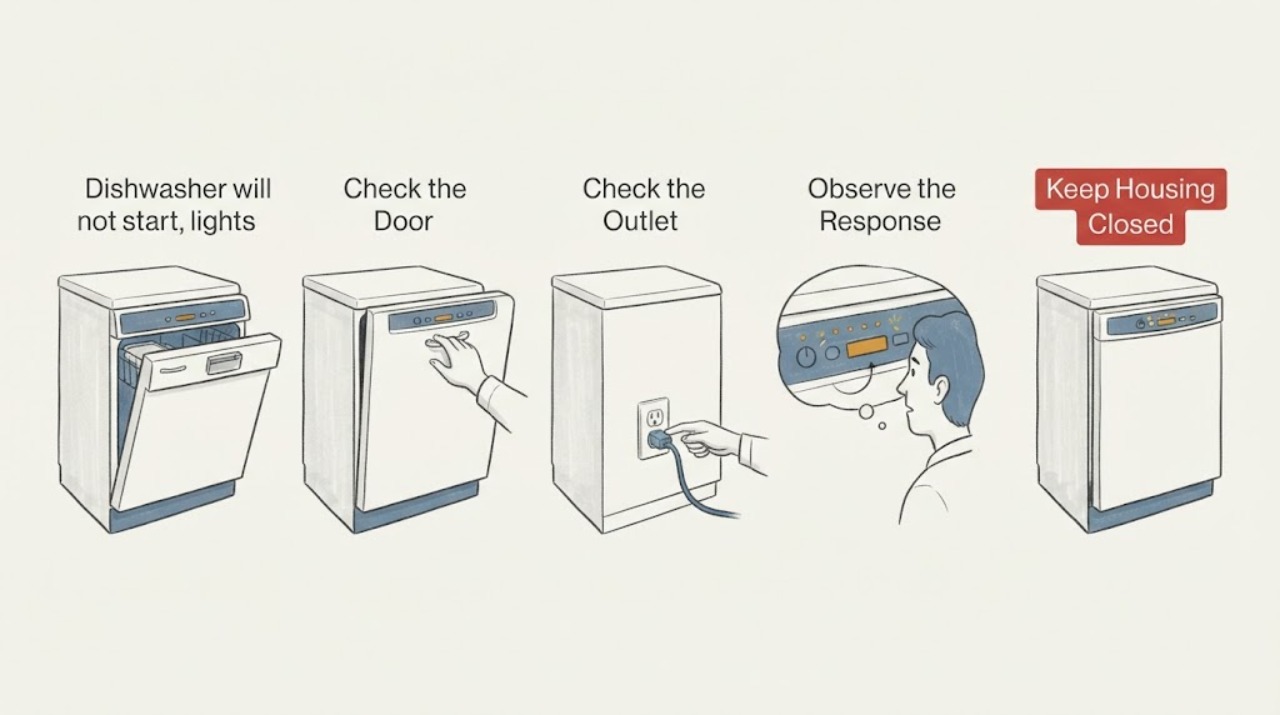
Start with the controls and door sequence before assuming an ASKO dishwasher has a failed control board. ASKO's US dishwasher guide says to press Start/Stop and close the door within 4 seconds, verify delayed start is not active, and clean or hold each keypad deliberately if the controls are unresponsive. For a detergent dispenser complaint, add detergent immediately before the wash program, do not add it for Rinse and Hold, and make sure a pan handle or utensil is not blocking the dispenser door. Record any text or code associated with flashing lights and use the exact model manual; the guide gives an F4 reset only when F4 is actually shown and directs service if it returns. Stop and arrange service for a leak, continuous drain-pump operation, smoke, burning smell, or a symptom that remains after these external checks.
Before you begin
Safety first
- Limit owner checks to the control panel, door closure, documented cycle settings, accessible loading, visible plug/breaker and water-shutoff conditions, and the exact manual. Do not open electrical covers, perform live tests, reach into a running dishwasher, force a dispenser or latch, alter water/drain connections, or use an extension cord.
Work through in order
Diagnostic checks
Use only checks that match the exact appliance or system and its official guide.
-
Check 1
Check the start sequence without opening panels: press Start/Stop, close the dishwasher door within four seconds, and confirm that delayed start is not active.
Expected result: The cycle starts after the button-and-door sequence, or the panel remains inactive or the cycle does not begin.
Next step: Let the selected program begin and observe whether the dispenser and lights behave normally in that cycle.
Stop if: Continue with the power, door, and control checks in the exact use-and-care guide, then arrange service if the dishwasher remains inactive.
Why this matters
Why: ASKO identifies the Start/Stop plus prompt door closure and delayed-start setting as first checks for a unit that does not start; failure after those checks does not identify a control-board fault.
-
Check 2
Verify the dishwasher has its normal external power and water conditions: check that the plug is seated in its intended outlet, the breaker has not tripped, and the accessible water shutoff is open, without removing covers or changing wiring.
Expected result: The plug, outlet/breaker, or water shutoff is visibly out of its normal state, or these external conditions are normal.
Next step: Restore only the documented external condition and retry the normal start sequence once; do not use an extension cord or modify wiring.
Stop if: If the external conditions are normal but the panel stays dark or the unit will not start, stop troubleshooting at the cabinet and request service.
Why this matters
Why: ASKO's troubleshooting guide includes proper plugging and water-supply checks, while its installation instructions require a suitable dedicated connection and an accessible water valve. These checks do not prove an internal electrical or inlet-valve failure.
-
Check 3
If the controls do not respond, touch each keypad deliberately for about one second, wipe the panel with a damp cloth, close the door completely and reopen it, and check whether Child Lock is enabled in the exact model guide.
Expected result: The panel responds after a deliberate key press, cleaning, door-state change, or documented Child Lock change, or it remains unresponsive.
Next step: Use the exact manual's documented control sequence and run one normal cycle while recording any new display text or flashing pattern.
Stop if: Do not tap repeatedly, pry the panel, or open the control area; record the model and symptom for ASKO service.
Why this matters
Why: ASKO lists keypad timing, a clean control surface, door state, and Child Lock as accessible explanations for unresponsive controls. Continued failure does not establish a particular switch or control-board fault.
-
Check 4
Record any flashing light pattern, display text, or code exactly as it appears and compare it with the exact ASKO manual instead of assigning a meaning from the number of flashes alone.
Expected result: A documented F4 appears, another documented code appears, or only an unspecified flashing pattern is present.
Next step: If and only if F4 is displayed, document it and follow the guide's five-second Start/Stop reset once; if it returns, contact service. For any other code or pattern, follow the model manual.
Stop if: Do not reset or replace a part based on a flashing pattern that has not been identified; request model-specific support if it persists.
Why this matters
Why: ASKO's US guide gives a reset sequence only for a displayed F4 and says to contact service if F4 returns. The guide does not establish that an unspecified flashing pattern means F4 or any particular component failure.
-
Check 5
With the dishwasher stopped, inspect the detergent dispenser opening and loading arrangement: add detergent immediately before the wash program, do not use detergent for Rinse and Hold, and check that a pan handle or utensil is not blocking the dispenser door.
Expected result: The dispenser door is blocked, the wrong cycle was selected, detergent was added too early or remains in the cup, or the dispenser path is clear and the correct cycle is selected.
Next step: Correct the accessible loading or cycle condition and run one suitable program; stop if the door needs force or the dispenser still fails.
Stop if: If the dispenser remains closed or empty after the documented user checks, use the exact model service path rather than opening the door mechanism.
Why this matters
Why: ASKO directly identifies dispenser blockage, Rinse and Hold, and detergent timing as user-level explanations for detergent not being dispensed. A clear dispenser does not prove that its actuator or control has failed.
Use your observations
Decision map
Find the observation that best matches what you see, then follow the next safe action.
-
PATH 01Next step
What you see
The dishwasher starts after Start/Stop is pressed and the door is closed within four seconds, with delayed start off.
Do this next
Observe one normal cycle and record any remaining light pattern, code, or dispenser symptom.
Why this path and its safety boundary
Why it matters: The original no-start symptom was consistent with the documented start sequence or a delayed-start setting, not proof of a failed control board.
-
PATH 02Next step
What you see
The panel remains unresponsive after deliberate key presses, a clean dry control surface, a complete door closure, and a model-appropriate Child Lock check.
Do this next
Stop at the external checks and arrange ASKO service with the model number and exact light/display behavior.
Why this path and its safety boundary
Why it matters: ASKO's accessible control checks did not resolve the symptom; the result does not identify a keypad, lock, wiring, or control-board part.
-
PATH 03Next step
What you see
The dispenser is blocked by a pan handle or utensil, or detergent was used with Rinse and Hold.
Do this next
Clear only the accessible loading obstruction, select a wash program that uses detergent, and compare one cycle; do not force the dispenser door.
Why this path and its safety boundary
Why it matters: ASKO identifies those conditions as reasons detergent may not be dispensed during the selected program.
-
PATH 04Next step
What you see
F4 is displayed and returns after the documented five-second Start/Stop reset, or the drain pump runs continuously.
Do this next
Stop using the dishwasher, isolate power and water safely, and contact ASKO Customer Care or an authorized service company.
Why this path and its safety boundary
Why it matters: ASKO directs owners to service when F4 returns and to turn power and water off for a continuously running drain pump.
-
PATH 05Next step
What you see
Only an unspecified flashing-light pattern remains, with no model manual or displayed code to identify it.
Do this next
Record the exact model and pattern and use the matching manual/service route; do not repeat resets or replace a dispenser, latch, inlet valve, or control board by guesswork.
Why this path and its safety boundary
Why it matters: The light pattern cannot be safely translated into a universal ASKO fault or component diagnosis from the available evidence.
Helpful context
Understand the symptom
Several ASKO symptoms can appear together without proving one failed part. A dark or apparently dead panel, flashing lights, and an unopened detergent dispenser can result from the start sequence, door timing, delayed start, a child lock, or a blocked dispenser door. Start with the exact model's use-and-care guide and the external checks below rather than guessing a control board or dispenser assembly.
Flashing lights are not a universal ASKO code. Record any text, letter, number, or pattern exactly as shown and match it to the manual for the model and market. ASKO's general US guide gives a five-second Start/Stop reset only for a displayed F4 code; that instruction should not be applied to an unspecified flashing pattern.
Keep the dishwasher checks external and dry. Do not remove the electrical cover, reach into a running dishwasher, force the dispenser door, alter water or drain connections, or perform live electrical tests. If the unit leaks, the drain pump runs continuously, there is smoke or a burning smell, or the same fault returns after the documented user checks, stop using it and arrange ASKO service.
When checks do not resolve it
Need a professional?
Use ASKO Customer Care or an authorized service company for persistent no-start, unresolved flashing patterns, recurring F4, dispenser failure after documented user checks, leaks, or any internal electrical, water, drain, latch, or dispenser work.
Safety scope: Limit owner checks to the control panel, door closure, documented cycle settings, accessible loading, visible plug/breaker and water-shutoff conditions, and the exact manual. Do not open electrical covers, perform live tests, reach into a running dishwasher, force a dispenser or latch, alter water/drain connections, or use an extension cord.
Common questions
FAQ
Why does my ASKO dishwasher have flashing lights and not start?
Flashing lights alone do not identify one universal ASKO fault. First follow the guide's Start/Stop and door-timing check, verify delayed start, and check the exact model manual for the displayed pattern or code. If F4 is actually displayed, ASKO gives a specific reset and service path; do not apply it to an unidentified pattern.
Why is the ASKO detergent dispenser not opening?
ASKO says to add detergent just before starting, not to use detergent for Rinse and Hold, and to check that a pot handle or utensil is not blocking the dispenser door. If the accessible path is clear and the dispenser still fails, use the exact model's service path rather than forcing or opening the dispenser mechanism.
Should I reset an ASKO dishwasher whenever lights flash?
No. ASKO's opened US guide gives a five-second Start/Stop reset only when the display shows F4 and says to contact service if F4 returns. Record an unspecified light pattern and match it to the exact model manual instead of repeating resets.
Read the exact guide
Official sources
- ASKO Dishwasher CleaningASKO Distribution North America / ASKO · Opened the ASKO-hosted US PDF directly. It is a general US dishwasher guide, so the article uses its documented user checks and safety boundaries while directing model-specific differences to the exact use-and-care guide.
- ASKO Dishwasher Installation InstructionsASKO Distribution North America · Opened an ASKO-hosted US installation PDF directly. The exact model is DOD651PHXXLS, so the article uses it only for general safety language and explicitly avoids transferring its model-specific dimensions, pressure limits, or installation layout to the unidentified task model.
- ASKO User manualsASKO · Opened the official ASKO manuals portal directly. It asks for a product code or model name and directs users to their market's local website; it supports the article's model-specific manual boundary rather than a universal flashing-light meaning.
Community feedback
Share a repair observation
Share a plain-text repair observation. Accepted observations are published automatically; this page may take a moment to update.