
On this page
Start here
Quick answer
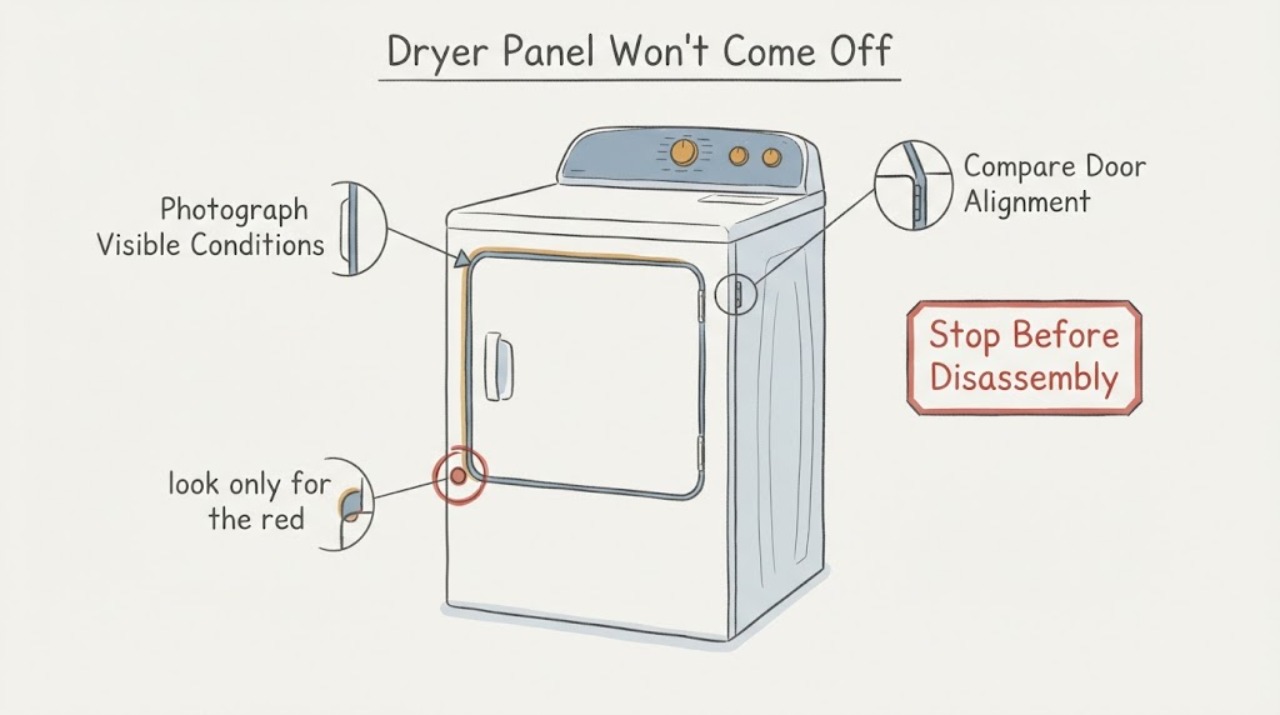
Do not pry or force a Beko dryer panel until you identify which panel you mean. A lower condenser or kick panel may have model-dependent red locking clips; a door outer cover is part of a model-specific door assembly; and a side, top, or rear cabinet panel is not a routine user access point. Beko's official guidance says panel and condenser arrangements vary by model and directs owners to the matching manual. Find the model number on the rating plate inside the door rim, inspect only the visible release or clip from outside, and stop for qualified service if the panel does not release with the documented method or if the dryer has a door, power, heat, or electrical fault.
Work through in order
Diagnostic checks
Use only checks that match the exact appliance or system and its official guide.
-
Check 1
Stand in front of the dryer and identify the panel by location without inserting a tool: lower front panel near the condenser, outer door cover, control fascia, or side/top/rear cabinet panel. Take a photo of the panel edges and any visible release, clip, or screw; do not pry, twist, or pull harder.
Expected result: The panel is the lower condenser area; it is part of the loading door; it is a control or cabinet panel; or the location is unclear.
Next step: Use the exact model manual for the identified panel. If the panel cannot be identified from outside, stop and give the photo and model information to Beko service rather than testing several release points.
Why this matters
Why: Each location belongs to a different assembly. A lower panel may have a model-specific condenser latch, while a door cover or cabinet panel may require a model-specific procedure or professional access.
-
Check 2
If the panel is the lower front condenser area, look only for the red locking clips described by Beko and compare their position with the matching manual. Do not lever the panel, reach into the condenser opening, or rotate an unidentified clip with a tool.
Expected result: The dryer has the documented red clips and they visibly appear unlocked; the panel has no such clips; or the clips/panel are damaged or stuck.
Next step: Follow only the matching manual's external release instruction. If clips are absent, stuck, damaged, or require force, close the panel and arrange service; do not substitute a screwdriver or remove the cabinet.
Why this matters
Why: Beko says some condenser dryers have red locking clips behind the lower panel, and a separate Beko page identifies those clips as condenser locks. Their presence does not establish the same arrangement on every model.
-
Check 3
If the panel is part of the loading door, compare the door shape and hinge side with the exact Beko model information before attempting any change. Do not separate the door glass, outer cover, hinge, catch, or supports just because a general Beko door guide appears similar.
Expected result: The exact model manual explicitly supports the requested door-panel operation; the model is different or unknown; or the door is misaligned, cracked, loose, or difficult to close.
Next step: Use the matching manual or qualified service for any door-panel work. If the door will not close normally or appears damaged, stop using the dryer and arrange repair instead of forcing the panel.
Why this matters
Why: Beko's door-reversal guide is a model-dependent operation and expressly says that not all Beko dryers can be reversed. A resistant or damaged door assembly can affect the door interlock and safe operation.
-
Check 4
Open the loading door only when the dryer is stopped and cool, and record the model and serial number from the rating plate on the inside rim. Compare the complete model, including suffixes, with Beko's manual for the panel you identified; do not use a manual for a visually similar dryer.
Expected result: The rating plate is readable and the manual matches; the manual is for another model or region; or the label cannot be read.
Next step: Use the matching Beko manual when available. If the identity remains unresolved, stop at external inspection and give Beko or a qualified technician the model photo and panel photos.
Why this matters
Why: A matching model is needed to know whether the panel is intended for user access and which release arrangement applies. A similar appearance is not proof of shared clips, covers, or door construction.
-
Check 5
Before arranging service, note whether the panel problem is accompanied by a dryer that will not start, a door that does not click closed, a drum that does not rotate, visible heat or scorching, or a power-supply concern. Do not run repeated cycles to test a panel that is loose, open, or obstructing the door.
Expected result: The door does not close, the dryer will not respond, the drum will not rotate, the panel or power connection is damaged, or the dryer otherwise operates normally.
Next step: Stop use for a door, heat, scorch, power, or damaged-panel condition and arrange repair. If the dryer otherwise works and the panel is simply resistant, leave it closed and provide the exact model to service rather than forcing it.
Why this matters
Why: Beko connects proper door closure and, on some condenser models, locked lower-panel clips with normal operation. A damaged panel plus a door or power symptom is a service issue, not a removable-panel adjustment.
Use your observations
Decision map
Find the observation that best matches what you see, then follow the next safe action.
-
PATH 01Next step
What you see
The panel is the lower front condenser panel and the exact model manual identifies visible red locking clips that are intact.
Do this next
Use only the matching manual's external release and refit guidance. If the panel does not release without force, stop and arrange service.
Why this path and its safety boundary
Why it matters: This is the limited user-access case described by Beko for some condenser dryers; the clips are part of the condenser access arrangement, not a universal latch for every Beko dryer.
-
PATH 02Next step
What you see
The panel is an outer door cover, hinge-side assembly, control fascia, or side/top/rear cabinet panel, or the model cannot be confirmed.
Do this next
Do not pry, remove trim, or open the cabinet. Use the exact model manual or arrange qualified Beko service with photos of the panel and its fasteners.
Why this path and its safety boundary
Why it matters: The part is outside the verified lower-panel guidance. Beko's door procedure is model-dependent, and cabinet access is not established as a user operation by the opened sources.
-
PATH 03Next step
What you see
The panel is stuck and the door will not click closed, the dryer will not start, the panel is damaged, or the power connection shows heat or damage.
Do this next
Stop using the dryer and arrange qualified repair. Beko directs unresolved door or power faults to repair rather than continued user testing.
Why this path and its safety boundary
Why it matters: The resistant panel is now associated with a door, interlock, power, or physical-safety concern; continued operation could worsen the fault.
-
PATH 04Next step
What you see
The exact manual identifies the panel as a removable maintenance part and the panel opens using the documented external release without force.
Do this next
Follow the matching manual only, keep the dryer stopped and cool, and refit every documented cover or clip before operation. Stop if anything binds or does not align.
Why this path and its safety boundary
Why it matters: The panel may be a permitted user-maintenance access point for that model, but the manual's model scope still controls the action and refit.
Helpful context
Understand the symptom
The word panel can refer to a lower condenser/kick panel, the outer door cover, a control area, or a cabinet panel. Those parts are not interchangeable. Beko's support material identifies red clips behind the lower panel on some condenser dryers, while its door guide says door reversal is not available on every model. A panel that resists the documented release should be treated as a model or service boundary, not as proof that more force is needed.
The safe objective is to identify the panel and preserve the appliance while obtaining the exact instructions. Beko places the model and serial label on the inside rim of the loading door, so record that information before looking for a manual or booking service.
When checks do not resolve it
Need a professional?
Arrange qualified Beko dryer service when the panel is not the documented lower condenser access, the model cannot be confirmed, a clip or panel is stuck or damaged, the door will not latch, or the dryer has a power, heat, or drum-operation problem. Supply the complete rating-label model and serial information and photos of the panel edges.
Common questions
FAQ
Is the lower panel on a Beko condenser dryer supposed to come off?
Some Beko condenser dryers have red locking clips behind the lower panel for the condenser. The arrangement is model-dependent, so identify the exact dryer and follow its manual; do not pry a panel when the clips are absent or stuck.
Can I remove the outer door panel on any Beko dryer?
No. Beko's opened door guide applies to certain dryers and says door reversal is not available on all models. Treat an outer door cover, hinge, catch, or glass assembly as model-specific and use qualified service when the manual does not clearly match.
Where do I find the Beko dryer model before looking for panel instructions?
Open the loading door only when the dryer is stopped and cool, then read the rating plate on the inside rim. Record the complete model and serial information, including suffixes, before selecting a manual or requesting service.
Read the exact guide
Official sources
- My Beko tumble dryer will not workBeko UK · Beko tumble-dryer door closure, model-dependent lower-panel clips, and repair boundary for unresolved door or power faults.
- How to clean the 2-part combined filters of your tumble dryerBeko UK · Beko model-dependent dryer filter access and matching-manual boundary for user maintenance.
- How to reverse your tumble dryer doorBeko UK · Beko model-dependent dryer door assembly and door-reversal availability.
- Where can I find the serial number for my Beko tumble dryer?Beko UK · Beko tumble-dryer rating-plate location for model and serial identification.
- What are the red clips at the bottom of my tumble dryer for?Beko UK · Beko dryer red lower-panel clips used for the condenser and model-manual boundary.
Community feedback
Share a repair observation
Share a plain-text repair observation. Accepted observations are published automatically; this page may take a moment to update.