
On this page
Start here
Quick answer
A blender cycle that stops before completion is often responding to an overload, jam, heat protection, jar/lid safety lock, or a model’s automatic time limit. Note the exact stop point and display, then turn it off, unplug it, and clear/reduce the load only after the blades stop. Use the model’s documented cool-down period and never put hands into the jar; persistent stopping, burning odor, smoke, or damaged coupling needs service.
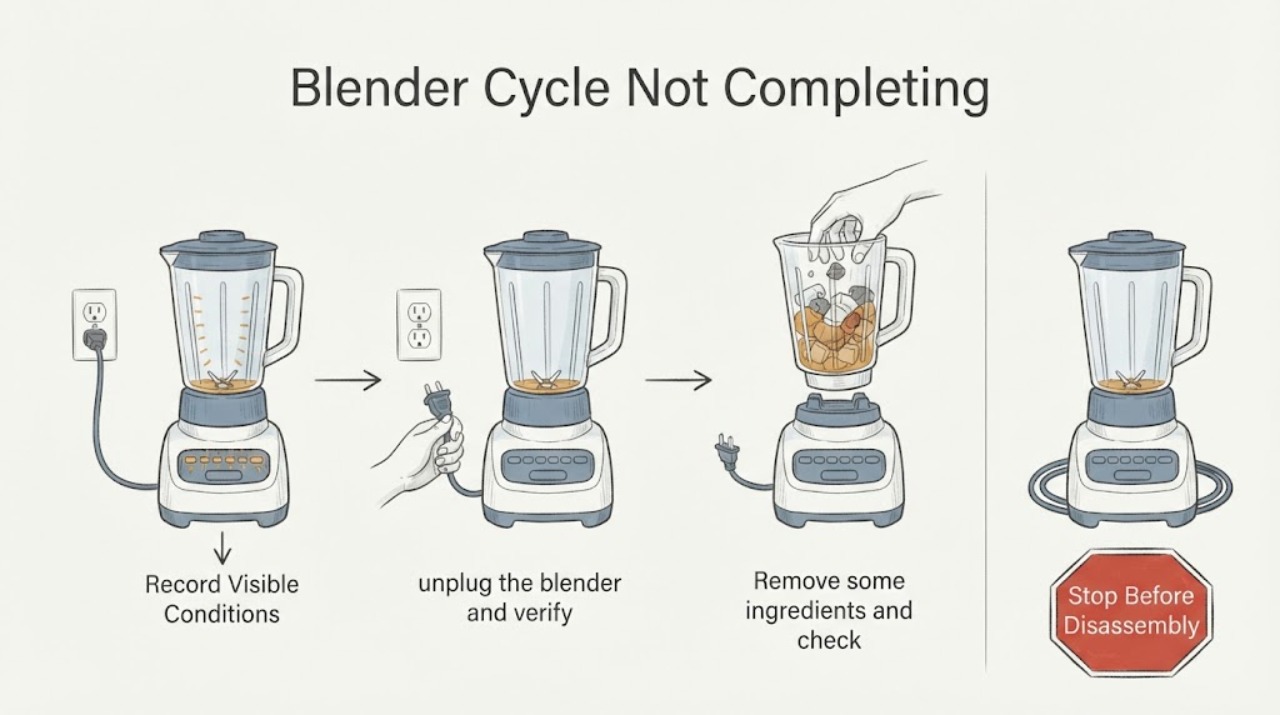
Work through in order
Diagnostic checks
Use only checks that match the exact appliance or system and its official guide.
-
Check 1
Record when the cycle stops: immediately, at a particular timer point, only with thick/large loads, after several cycles, or with a display code. Note whether the motor hums, stalls, smells hot, or stops silently.
Expected result: Immediate stop suggests lock/supply; load-dependent stop suggests jam/overload; repeated-cycle stop suggests heat protection; fixed timed stop may be automatic shutoff.
Next step: Turn controls to Off/zero and unplug before opening the lid or touching the jar. Do not continue a hot or stalled motor.
Why this matters
Why: This observation narrows the likely cause but does not identify an internal part by itself.
-
Check 2
After the blades have fully stopped, unplug the blender and verify the jar, lid, and safety interlock are seated exactly as the model manual shows. Do not bypass the lock or reach into the blade assembly.
Expected result: A mis-seated jar/lid can prevent or interrupt a cycle; correct seating with repeated stopping leaves load, heat, or motor causes possible.
Next step: Reseat once and continue only if the appliance is cool and undamaged; otherwise arrange service.
Why this matters
Why: This observation narrows the likely cause but does not identify an internal part by itself.
-
Check 3
Remove some ingredients and check for a jam or prohibited hard item without using fingers near blades. Rearrange the load or add the model-approved amount of liquid; never exceed the jar’s marked capacity.
Expected result: A jammed or overfilled jar supports overload/torque protection; a clear, reduced load that still stops suggests another fault or protection state.
Next step: Clean the obstruction with a utensil only while unplugged and blades are stopped, then make one reduced-load test.
Why this matters
Why: This observation narrows the likely cause but does not identify an internal part by itself.
-
Check 4
Allow the motor to cool for the exact period in the model instructions before one restart. The opened examples document model-specific rest/cycle limits, including a 15-minute protection rest or longer multi-cycle cooling in some products.
Expected result: Recovery after cool-down supports thermal/overload protection; immediate recurrence with a light load is not explained by heat alone.
Next step: Do not impose another brand’s exact time on this blender. If it stops again, leave it unplugged and arrange service.
Why this matters
Why: This observation narrows the likely cause but does not identify an internal part by itself.
-
Check 5
Record the model, jar/lid state, ingredient type and amount, liquid level, cycle duration, cool-down result, noise, odor, and any code.
Expected result: This record helps service separate protection behavior, lock, coupling, motor, and control faults without unsafe disassembly.
Next step: Call qualified service for repeated stopping, a grinding coupling, smoke, burning odor, or a damaged jar/base.
Why this matters
Why: This observation narrows the likely cause but does not identify an internal part by itself.
Use your observations
Decision map
Find the observation that best matches what you see, then follow the next safe action.
-
PATH 01Next step
What you see
The blender stops only with a thick, frozen, hard, or overfilled load and runs after reducing/rearranging it.
Do this next
Use smaller batches and model-approved liquid/ingredients; stop if the motor remains hot or the symptom returns with a light load.
Why this path and its safety boundary
Why it matters: Overload or jam protection is more likely than a confirmed motor failure.
-
PATH 02Next step
What you see
The jar/lid is not seated or the safety indicator does not confirm lock.
Do this next
Unplug, reseat exactly as the model guide shows, and never bypass the interlock.
Why this path and its safety boundary
Why it matters: A safety-lock condition is more likely than a cycle fault.
-
PATH 03Next step
What you see
The blender stops after repeated cycles and works again only after the documented cool-down.
Do this next
Respect the model’s cycle/rest limits and arrange service if cool-down becomes unusually frequent or ineffective.
Why this path and its safety boundary
Why it matters: Thermal protection or an automatic time limit is more likely.
-
PATH 04Next step
What you see
It stops with a light load, correct seating, and normal cool temperature, or there is grinding, smoke, or burning odor.
Do this next
Keep it unplugged and arrange qualified appliance service; do not open the base.
Why this path and its safety boundary
Why it matters: A mechanical, motor, control, or electrical fault is more likely and cannot be safely isolated by more tests.
Helpful context
Understand the symptom
The stop timing changes the diagnosis: immediate refusal can be lid/jar lock or supply, a stop under thick load suggests jam/overload, and a repeat stop after several cycles suggests thermal protection. A cycle that always stops at the same programmed time may be normal automatic shutoff.
Blades, couplings, motor, and control limits vary by model. Never infer a part or transfer another brand’s exact rest time to an unidentified blender.
When checks do not resolve it
Need a professional?
Call qualified blender service for repeated stops with a light load, failed safety lock, grinding or coupling noise, smoke, burning odor, damaged jar/base, or a unit that will not restart after the documented cool-down. Provide model and load/timing details.
Common questions
FAQ
Why does a blender stop halfway through a cycle?
Overload, a jam, heat protection, safety lock, or automatic shutoff can all stop a cycle. Note timing, unplug, reduce the load, verify seating, and cool according to the model guide.
Can I restart a blender immediately after it stops?
No. Turn it off, unplug it, wait for the blades to stop, clear/reduce the load, and follow the model’s cool-down instructions before one retry.
Should I add more liquid?
Only add the amount and type allowed by the model instructions after unplugging and confirming the blades have stopped. Do not use liquid to hide a jam or exceed capacity.
Read the exact guide
Official sources
- 8020006556 IFUGroupe SEB · Groupe SEB blender cycle timing, overload protection, cooling/rest periods, and stop/reconnect guidance.
- Food Processor Stops During OperationPanasonic · Panasonic motor-protection and safety-lock guidance: stop at zero, unplug, remove bowl, reduce ingredients/check prohibited ingredients, and rest before retrying.
- Blender Turns Off or Stops BlendingKitchenAid · KitchenAid blender auto-shutoff, jam/overload, unplugging, jar seating, rearranging/reducing load, and adding liquid.
Community feedback
Share a repair observation
Share a plain-text repair observation. Accepted observations are published automatically; this page may take a moment to update.