
On this page
Start here
Quick answer
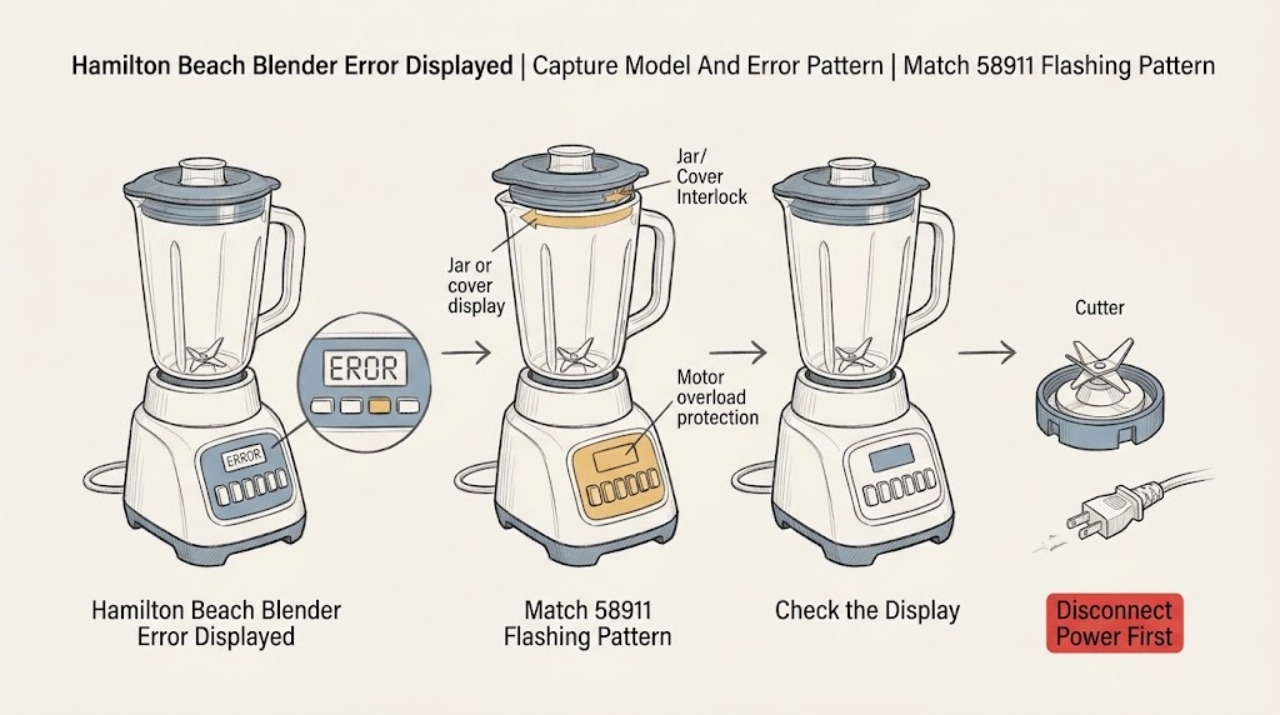
Do not apply a generic Hamilton Beach error-code list. Read the model, type, and series from the rating label on the bottom or rear of the motor housing, then photograph or write down the exact text, button names, and flashing sequence before pressing anything else. On the Pro Style 58911-CN, all program buttons flashing means the motor overheated; the SMOOTHIE and ICE CRUSH buttons flashing is a separate condition, and the HOT SOUP and WHOLE JUICE buttons flashing is another model-specific condition. On the commercial HBH755-CE, a message can mean the jar is not seated or the Quiet Shield is open, while a motor-overload message calls for the model's cool-down procedure; Hamilton Beach says a persistent error after the documented power reset needs service. Turn the unit off and unplug it before removing a jar, lid, cutter assembly, or stuck ingredients; blades are sharp and the base contains electrical parts. Do not put hands or utensils into a jar, open the motor housing, or perform live testing. A 58911-CN overheating indication has a 15-minute cool-down instruction, but that time is not a universal Hamilton Beach reset. If the error returns, the unit smells or smokes, the blade or clutch binds, a jar or blade is cracked, or the display remains active after the model-specific step, leave it unplugged and contact Hamilton Beach or qualified service with the exact model and pattern.
Before you begin
Safety first
- The user may identify the model, read the display, check visible seating, operate documented controls, and inspect a cold unplugged jar or removable component only as the exact manual permits. Qualified service must handle the motor housing, clutch, internal switch, interlock wiring, sensors, control board, and live testing.
Work through in order
Diagnostic checks
Use only checks that match the exact appliance or system and its official guide.
-
Check 1
With the blender off, record the model, type, series, and wattage from the rating label on the bottom or rear of the motor housing. Record the exact display text, which buttons or lights flash, whether they flash together or in sequence, whether the motor stopped, and what was being blended.
Expected result: The identity is Pro Style 58911-CN, commercial HBH755-CE, another identifiable model, or unknown; the alert is text, all buttons flashing, a named pair flashing, a blank panel, or a single unverified light.
Next step: Use only the branch matching the confirmed model and pattern. If the model cannot be read, stop after documenting the symptom and obtain the correct Use & Care guide or contact Hamilton Beach.
Stop if: Do not keep pressing buttons or deliberately recreate the alert before the model and safety state are known.
Why this matters
Why: Hamilton Beach error behavior is platform-specific. The 58911-CN and HBH755-CE have different documented patterns, while an unknown model cannot safely inherit either interpretation.
-
Check 2
Only if the rating label confirms Pro Style 58911-CN, compare the exact flashing pattern with its Error Messages table. All program buttons flashing is treated as overheating; SMOOTHIE plus ICE CRUSH and HOT SOUP plus WHOLE JUICE are separate patterns with different manual instructions.
Expected result: All program buttons flash, SMOOTHIE and ICE CRUSH flash, HOT SOUP and WHOLE JUICE flash, the panel is merely dark after inactivity, or the observed pattern matches none of these.
Next step: For all-button overheat, turn the power switch off and let the unit cool for the manual's 15 minutes before the model's reset position. For the two paired patterns, follow the exact manual and unplug/contact customer service where it directs. For an unmatched pattern, stop and obtain model-specific support.
Stop if: Do not substitute a 58911-CN pattern or reset time for another Hamilton Beach model.
Why this matters
Why: The 58911-CN manual assigns different causes and actions to each pattern. A dark panel can be standby rather than an error, while an unmatched sequence is not evidence for one of the documented faults.
-
Check 3
Only if the unit is the commercial HBH755-CE, turn the power switch off before checking that the jar is securely seated and the Quiet Shield is completely closed. If the display requests a cool-down cycle after thermal overload, follow the on-screen model procedure rather than guessing at a code.
Expected result: The jar was not seated, the Quiet Shield was open, the display is blank, a cool-down message appears, or the jar and shield are correct but the error remains.
Next step: Correct only a visible seating or cover condition, or follow the display's cool-down instructions. If the error remains after turning power off and back on as the manual directs, leave the unit off and arrange service.
Stop if: Do not open the commercial control enclosure, bypass the Quiet Shield or jar interlock, or live-test the power circuit.
Why this matters
Why: The HBH755-CE will not operate with its jar improperly seated or Quiet Shield open. A blank display can involve power, fuse, switch, or overload; a persistent message after the documented reset points to service rather than a user-adjustable setting.
-
Check 4
After switching off and unplugging, allow a unit that stopped under load to cool. When the exact manual permits, remove the jar and inspect only the visible cutter assembly, jar, lid, or container seating for a large stuck piece, crack, loose blade, or obvious overload. Do not reach into a blade assembly or use tools to force it.
Expected result: The motor was hot, the mixture was unusually heavy, the blade does not move freely when checked as the model permits, the jar or blade is damaged, or the visible mechanical state is normal.
Next step: Remove only loose ingredients or a visible obstruction as the model manual allows. Replace a confirmed model-compatible cutting assembly only when the manual and diagnosis support it; otherwise contact service. Do not restart a damaged or binding unit.
Stop if: Stop for smoke, a persistent burning smell, a cracked jar, loose/damaged blade, seized cutting assembly, or any need to open the motor base.
Why this matters
Why: Overload, overheating, binding, or an interlock state can produce an alert or stop. Hamilton Beach says a smoking motor may involve binding at the clutch/cutting assembly and that a non-free blade needs the cutting unit replaced; a damaged jar or blade is unsafe to use.
-
Check 5
From a dry accessible position, inspect the plug, cord, outlet, and model power switch without opening electrical parts. Only after the blender is cool and no damage, smoke, odor, or binding is present, perform the exact model's single power reset: the 58911-CN RESET position or the HBH755-CE documented power off/on reset.
Expected result: The switch is not in the correct state, the outlet or breaker is unavailable, the reset clears the display, the same error returns, or the cord, plug, outlet, or base is hot or damaged.
Next step: Correct only an obvious switch or accessible supply state once. If the error returns or power protection trips, unplug the blender and contact Hamilton Beach or qualified electrical service.
Stop if: Do not repeatedly reset a breaker, change its rating, use a damaged cord, or probe the outlet or base while energized.
Why this matters
Why: A switch or supply state can make a panel appear dead, and the HBH755-CE manual allows a power reset for controls. A returning error after that step is a service condition; heat or damage is an immediate stop-use condition.
-
Check 6
Stop owner diagnosis when the pattern is not documented for the exact model, the display returns after the model-specific step, the motor stops repeatedly, or an internal part, wiring, or control would need inspection. Give support the model/type/series, exact pattern, load, temperature, timing, and any odor or visible damage.
Expected result: One documented external correction clears the alert and the blender remains safe, or the error recurs despite normal seating, cover, cooling, and accessible power checks.
Next step: Leave the blender unplugged and contact Hamilton Beach customer service or qualified service. Do not purchase an internal part from a code alone or recreate a smoke/overheat event.
Stop if: No motor-housing disassembly, live testing, safety bypass, or symptom-based internal repair.
Why this matters
Why: A recurring or unmatched error can involve the motor, clutch, cutter assembly, interlock, sensor, switch, control board, or wiring. Hamilton Beach's manuals route a persistent HBH755-CE error to service and its FAQ limits internal-part work for safety.
Use your observations
Decision map
Find the observation that best matches what you see, then follow the next safe action.
-
PATH 01Safety boundary
What you see
The model/type/series is missing or the display/light sequence does not match the exact model's manual.
Do this next
Read the rating label on the bottom or rear of the motor housing, obtain the matching Use & Care guide, and contact Hamilton Beach if the pattern remains undocumented. Keep the unit unplugged if the motor stopped, became hot, or smells abnormal.
Why this path and its safety boundary
Why it matters: Hamilton Beach does not provide one universal blender error table; a pattern from one platform may have a different meaning on another.
Safety stop: Do not guess the code or borrow a reset sequence from another model.
-
PATH 02Safety boundary
What you see
The confirmed model is Pro Style 58911-CN and all program buttons flash, or the motor stops with the START/STOP light flashing during a heavy blend.
Do this next
Turn the 58911-CN off and unplug it for the documented cool-down; after 15 minutes, use its RESET position only if there is no smoke, burning smell, binding, or damage. For a heavy load, reduce the mixture only when the manual permits and use its stated lower-speed restart. Service a returning alert.
Why this path and its safety boundary
Why it matters: The manual identifies all-button flashing as motor overheating and a flashing START/STOP light as an overly heavy motor load that triggers protection. These are not the same as the two named paired-button errors.
Safety stop: Do not restart a smoking, binding, cracked, or blade-damaged blender.
-
PATH 03Safety boundary
What you see
The confirmed model is Pro Style 58911-CN and either SMOOTHIE plus ICE CRUSH or HOT SOUP plus WHOLE JUICE is flashing.
Do this next
Follow only the 58911-CN Error Messages instructions. For the HOT SOUP/WHOLE JUICE pattern, turn off, unplug, and contact the customer service center as the manual directs; for the SMOOTHIE/ICE CRUSH pattern, stop and unplug if the manual's prescribed intervention does not clear it.
Why this path and its safety boundary
Why it matters: The first pattern has a model-specific content/operation response, while the second means speed ramped up too quickly and the manual directs unplugging and customer service. Neither proves a universal motor or control failure.
Safety stop: Do not use another model's flashing-button interpretation or repeatedly run the blender to reproduce the pattern.
-
PATH 04Safety boundary
What you see
The confirmed model is commercial HBH755-CE and a message appears, the jar was not seated, the Quiet Shield is open, or the display is blank after a stop.
Do this next
With power off, correct only visible jar seating or Quiet Shield closure and follow the model's cool-down or power-reset instructions. If the message remains, leave the unit off and arrange service.
Why this path and its safety boundary
Why it matters: The HBH755-CE interlocks the jar and Quiet Shield, and its manual separates blank-display power/overload checks from a displayed-message jar/cover check.
Safety stop: Do not bypass the interlock, open the control enclosure, or perform live tests.
-
PATH 05Safety boundary
What you see
The blender smokes, has a persistent burning odor, shows a cracked jar or loose blade, binds when the model-approved cold inspection is made, trips power protection, or returns the error after the safe external checks.
Do this next
Leave the blender unplugged, keep hands away from blades, and contact Hamilton Beach or qualified service with the exact identity and recorded pattern. Use qualified electrical service for a circuit or outlet problem.
Why this path and its safety boundary
Why it matters: A motor/clutch, cutter assembly, interlock, control, wiring, or other internal fault is possible. The visible symptom does not identify a safe part, and Hamilton Beach directs persistent or unsafe conditions to service.
Safety stop: Do not power the unit again, open the base, replace a fuse with a larger one, bypass protection, or test under load.
Helpful context
Understand the symptom
There is no universal Hamilton Beach blender error code
Hamilton Beach sells ordinary countertop blenders, programmed consumer models, immersion blenders, and commercial machines with different controls and interlocks. The Pro Style 58911-CN manual documents flashing button combinations; the commercial HBH755-CE documents display messages, a Quiet Shield, and a jar-seating requirement. Those patterns are not interchangeable. Capture the rating-label identity and the exact display or light sequence before using any reset or cool-down instruction.
Read the whole pattern, not only one blinking light
On the 58911-CN, all program buttons flashing is the documented overheat pattern, SMOOTHIE plus ICE CRUSH flashing has a different prescribed response, and HOT SOUP plus WHOLE JUICE flashing is tied to a rapid speed ramp. On the HBH755-CE, a display message can be associated with jar seating or the closed Quiet Shield, while a blank display with a stopped motor follows power, cover, and overload checks. A code or light pattern from another model cannot safely be mapped to one of these diagnoses.
Keep blade and electrical boundaries explicit
Switch off and unplug before removing the container, lid, cutter assembly, or stuck food. Never reach into a jar or an ice hopper while a motor or blade could move. Do not open the motor housing, change a fuse or breaker rating, immerse the base, or perform live measurements. Smoke, a burning smell that persists, a cracked jar, a loose or damaged blade, or a cord and plug fault is a stop-use event, not a reason to repeat the error test.
Safety boundary
Stop conditions
- Stop and unplug immediately for smoke, persistent burning odor, visible arcing, a cracked jar, loose or damaged blades, a hot/damaged cord, or repeated breaker or fuse operation.
- Do not put hands, spoons, or tools into a jar, ice hopper, cutter assembly, or other moving area. Remove a container or stuck ingredient only with power disconnected and only as the exact manual permits.
- Do not open the motor housing, bypass a jar or cover interlock, immerse the base, alter a fuse or breaker rating, or perform live electrical tests.
- Interpret flashing buttons or display messages only for the confirmed model. Persistent, recurring, or undocumented errors require Hamilton Beach or qualified service.
Only after diagnosis
Potential parts
- model-specific cutting assembly or blade unit
Consider only when the exact manual and a cold, unplugged inspection identify a non-free, worn, or damaged cutting assembly and no jar or motor-base hazard is present.
Blade and cutter assemblies differ by model, jar, and series; Hamilton Beach says internal motor-clutch parts are not owner-replaceable. - model-specific jar, lid, or Quiet Shield/interlock component
Consider only when the exact model has a cracked or damaged jar, lid, cover, or a technician confirms an interlock fault after visible seating checks.
The HBH755-CE Quiet Shield and commercial jar interlocks do not establish fit for consumer blenders; confirm the complete model before ordering. - model-specific motor clutch, switch, sensor, or control assembly
Consider only after qualified service identifies an internal motor, clutch, switch, sensor, or control fault from a recurring or unmatched display error.
Hamilton Beach limits internal parts for safety and an error pattern alone cannot prove which assembly failed; do not open the motor housing.
When checks do not resolve it
Need a professional?
Contact Hamilton Beach customer service or qualified appliance service when the model-specific error returns after the documented reset or cool-down, the pattern is not covered by the exact manual, the panel remains unresponsive, the motor or cutter binds, or an interlock, control, wiring, or internal part needs inspection. Use qualified electrical service for a damaged outlet, cord, plug, breaker, or fuse condition. Treat smoke, persistent burning odor, visible blade or jar damage, and repeated power trips as immediate stop-use conditions.
Safety scope: The user may identify the model, read the display, check visible seating, operate documented controls, and inspect a cold unplugged jar or removable component only as the exact manual permits. Qualified service must handle the motor housing, clutch, internal switch, interlock wiring, sensors, control board, and live testing.
Common questions
FAQ
Does Hamilton Beach have one universal blender error-code list?
No. Hamilton Beach blender models use different displays, flashing buttons, interlocks, and protection behavior. Record the model, type, and series from the rating label and use that model's Use & Care guide. The Pro Style 58911-CN and commercial HBH755-CE manuals document different alert systems.
What does it mean when all buttons flash on a Hamilton Beach 58911-CN blender?
On the Pro Style 58911-CN, all program buttons flashing is the manual's motor-overheating pattern. Turn the power switch off and allow the unit to cool for 15 minutes before the documented reset, but do not restart if there is smoke, persistent burning odor, binding, or visible damage.
What do the SMOOTHIE and ICE CRUSH lights flashing mean on a 58911-CN?
That named pair is a separate 58911-CN error pattern. Follow that model's Error Messages instructions; the manual directs an intervention involving the jar contents and says to turn off, unplug, and contact customer service if the problem persists. Do not apply this interpretation to another Hamilton Beach model.
Why does the commercial Hamilton Beach HBH755-CE show an error message?
The HBH755-CE manual says a displayed message can occur when the jar is not seated correctly or the Quiet Shield is not closed. With power off, check only visible seating and cover closure. A recurring message after the model's power reset or cool-down procedure requires service.
Can I reset a Hamilton Beach blender error by unplugging it?
Only follow the reset stated in the exact model's manual. The HBH755-CE documents turning the power off and back on to reset controls, while the 58911-CN has its own RESET/OFF switch and a model-specific 15-minute overheat cool-down. If the error returns, unplug the unit and arrange service rather than repeating resets.
Is it safe to inspect the blades after an error?
Only after switching off and unplugging, and only as the exact manual permits. Hamilton Beach warns that blades are sharp and says internal motor-clutch work is not for owner replacement. Never reach into a powered jar, force a stuck blade, open the motor base, or restart a blender with a cracked jar or damaged blade.
Read the exact guide
Official sources
- Hamilton Beach FAQsHamilton Beach · Hamilton Beach's brand FAQ; model-specific Use & Care instructions control when they differ.
- OperationHamilton Beach Commercial · Specific commercial Ice Shaver/Blender manual; use only as a conditional commercial safety example, not as a consumer-model code table.
- Hamilton Beach Pro Style Blender (58911-CN) - Use & CareHamilton Beach · Specific to the Pro Style 58911-CN; do not generalize its button patterns or 15-minute cool-down to another model.
- Hamilton Beach Commercial Next Generation Blender (HBH755-CE) - Use & careHamilton Beach Commercial · Specific to the HBH755-CE commercial blender; controls and messages differ from consumer Hamilton Beach models.
Community feedback
Share a repair observation
Share a plain-text repair observation. Accepted observations are published automatically; this page may take a moment to update.