
On this page
Start here
Quick answer
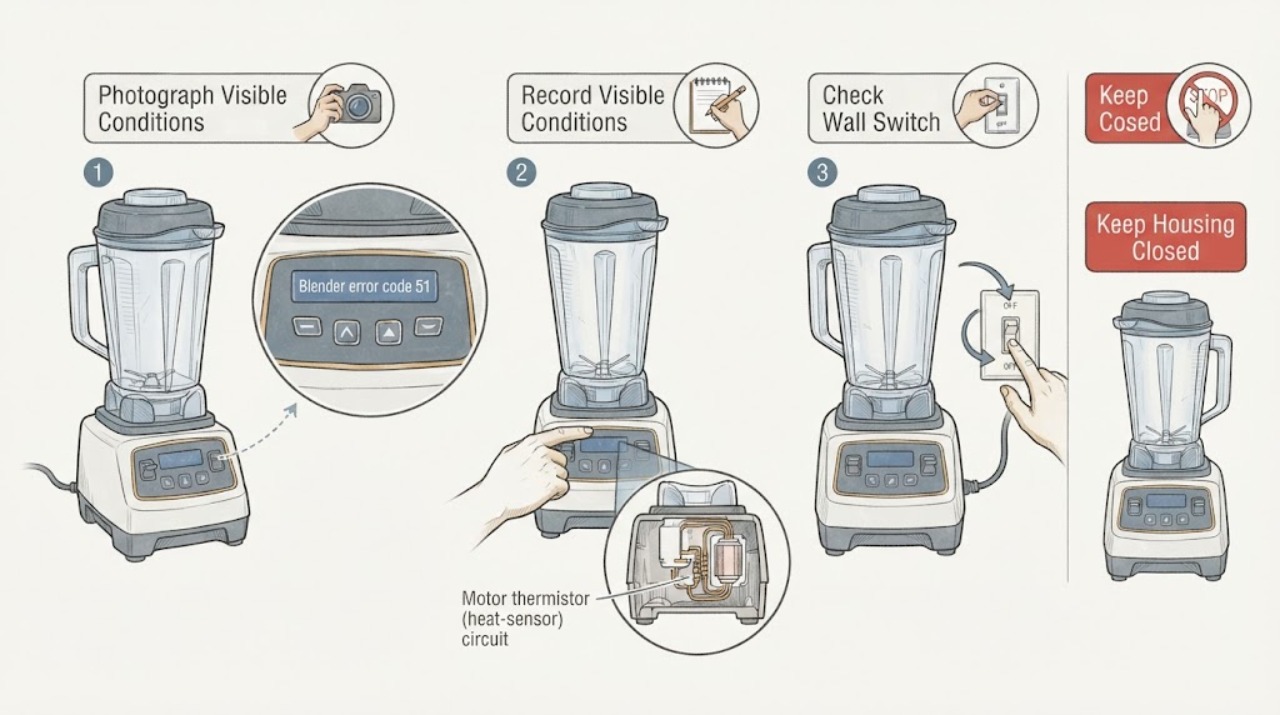
Hamilton Beach's opened technical document identifies error #51 on the HBH850-230V Blender Technical Information Series A-N as a motor thermistor, or heat-sensor, connection that has been lost or is not working. That document is not a universal code table for every Hamilton Beach blender: verify the rating label, including HBH850 and the 230V variant, before applying it. Unplug the blender, keep hands away from the blades, and do not open the base or perform a continuity test as a household check. If the exact model is HBH850-230V and #51 returns, arrange Hamilton Beach Commercial or qualified appliance service and provide the code, model, serial number, and sequence; if the model is different or the display is not exactly #51, use its matching manual instead.
Work through in order
Diagnostic checks
Use only checks that match the exact appliance or system and its official guide.
-
Check 1
Stop the blender and photograph the complete display exactly as shown. Record whether it reads #51, 51, or another message, whether the motor stopped during a cycle, and whether the jar, lid, or Quiet Shield was in place. Keep hands away from the blade assembly.
Expected result: The display is exactly #51, the code has extra characters, the panel is blank, or the blender stopped with no readable code.
Next step: Continue only if the full code and model can be matched. If the display is different or unreadable, use the exact model's Use & Care guide or service route rather than guessing.
Stop if: Do not repeatedly run the blender to reproduce the message, press hidden button combinations, or reach into the jar or cutter assembly while connected.
Why this matters
Why: The opened Hamilton Beach source uses the exact phrase error #51 within an HBH850-230V technical document. A different display format or symptom cannot safely inherit that meaning.
-
Check 2
With the blender unplugged, read the rating label on the motor housing and record the complete Hamilton Beach model, suffix, voltage, serial number, and commercial or household designation. Compare it with HBH850-230V before using the #51 interpretation.
Expected result: The label identifies HBH850-CE, HBH850-UK, HBH850-CCC, or another HBH850 230V variant; it identifies a 120V HBH850 or another model; or the label cannot be confirmed.
Next step: Use the #51 motor-thermistor branch only when the exact HBH850 230V identity matches the technical document. For any other model or uncertain label, stop at unplugged containment and obtain its matching guide or service support.
Stop if: Do not remove the housing, jar pad, or motor cover to find a label, and do not use a 230V repair instruction on a 120V or non-HBH850 blender.
Why this matters
Why: The opened source is scoped to HBH850-230V Series A-N. The Hamilton Beach blender catalogue shows multiple unrelated household models, so brand-level code transfer would be unsafe.
-
Check 3
If the exact model is HBH850 230V, leave the power switch off and keep the machine unplugged. From outside the appliance, note whether #51 appeared after a normal cycle, after the motor stopped, after an overheat or cool-down event, or immediately on startup; do not perform the technical document's plug continuity test.
Expected result: Error #51 returns immediately, appeared after a stop or heat event, clears while disconnected but returns on the next safe start, or the unit has smoke, burning odor, unusual heat, or a damaged cord.
Next step: Keep the blender disconnected and give the service provider the code and timing. For smoke, burning odor, damaged wiring, or a hot plug/outlet, obtain qualified electrical or appliance help and do not reconnect.
Stop if: Do not open the base, test continuity, probe the main board, bypass a thermal protector, or restart a smoking, binding, or damaged blender.
Why this matters
Why: On the matching platform, #51 points to the motor heat-sensor circuit, but the opened source does not make the visible timing sufficient to identify whether the sensor, connection, motor, or board is defective. Hazard signs override diagnosis.
-
Check 4
Before arranging service, document the jar and lid or Quiet Shield state, any unusual motor noise, whether the breaker or protective device tripped, and whether the error occurred with or without a load. Keep the container installed only as the exact manual requires and never touch the blade assembly to test it.
Expected result: The code appears with a correctly seated container, the motor makes an unusual sound, the circuit trips, the display is blank, or #51 appears only after a heavy blend.
Next step: Leave the blender unplugged if the code returns or any protection event occurred. Send the model, voltage, code photo, load, timing, and safety observations to Hamilton Beach Commercial or qualified appliance service.
Stop if: Do not change a breaker rating, use a damaged cord or outlet, open the motor housing, or order a motor, thermistor, board, or sensor solely from #51.
Why this matters
Why: These observations help a technician separate the documented motor heat-sensor branch from jar/interlock, power, overload, clutch, or control symptoms; they do not select a replacement part by themselves.
Use your observations
Decision map
Find the observation that best matches what you see, then follow the next safe action.
-
PATH 01Next step
What you see
The rating label matches the HBH850 230V platform and the complete display is error #51.
Do this next
Keep the blender unplugged and arrange qualified Hamilton Beach Commercial or appliance service; provide the model, voltage, code photo, and event history. Do not perform the document's internal continuity or board checks yourself.
Why this path and its safety boundary
Why it matters: The opened Hamilton Beach technical document supports a motor thermistor/heat-sensor connection or sensor fault for this specific platform.
-
PATH 02Next step
What you see
The blender is a different Hamilton Beach model, the voltage/suffix is unknown, or the display is not exactly error #51.
Do this next
Stop code-specific troubleshooting, obtain the exact Use & Care guide or contact Hamilton Beach with the rating-label information, and keep the unit unplugged if it stopped, overheated, or smells abnormal.
Why this path and its safety boundary
Why it matters: The opened #51 diagnosis is outside its documented model scope. Another model may have a different code meaning, control system, or safety procedure.
-
PATH 03Next step
What you see
#51 is accompanied by smoke, persistent burning odor, a hot or damaged cord/plug, a damaged jar or blade, binding, an unexpected motor speed, or repeated power trips.
Do this next
Leave the blender unplugged, keep away from the cutter assembly, and obtain qualified appliance or electrical service. Do not reconnect to reproduce the code.
Why this path and its safety boundary
Why it matters: This is an immediate electrical, fire, mechanical, or uncontrolled-motor safety boundary; the display cannot make continued testing safe.
Helpful context
Understand the symptom
What error 51 means when the model matches
The opened Hamilton Beach technical document is specifically titled HBH850-230V Blender Technical Information Series A-N. In its troubleshooting section, display error #51 is attributed to the thermistor (heat sensor) in the motor having lost connection or not working. The same document describes checking a plug on the main PC board and testing sensor continuity, which are service-level electrical checks rather than safe user steps. A model label that says only Hamilton Beach or another blender family is not enough to transfer this diagnosis.
Why model and voltage matter
Hamilton Beach publishes many blender models and directs owners to the Use & Care material for the specific product. The opened blender catalogue lists different household models, while the #51 technical document covers the commercial HBH850 230V platform. Confirm the complete model suffix and voltage from the rating label before treating #51 as a motor heat-sensor fault; a different model may use a different message or protection system.
The safe owner boundary
The document's suggested plug inspection, continuity test, and motor replacement belong to a repair guide. For an owner, the useful distinction is whether the blender is safe to leave disconnected and whether the exact model matches. Do not remove the housing, probe live circuits, reach into the cutter assembly, or replace a motor based on code 51 alone. A returning code, overheating, burning odor, smoke, a damaged cord, or a tripped protective device needs qualified diagnosis.
When checks do not resolve it
Need a professional?
Arrange qualified Hamilton Beach Commercial or appliance service when error #51 returns on a confirmed HBH850 230V unit, the code is unmatched to the model, or the blender stopped, overheated, or needs internal testing. Stop immediately for smoke, burning odor, a hot or damaged cord or plug, damaged jar or blade, binding, unexpected speed, or repeated protective-device trips.
Have this ready
- Exact display photo, complete model and suffix, voltage, serial number, commercial/household designation, onset and load, whether the motor stopped or overheated, jar/lid or Quiet Shield state, noise or power-trip history, and whether the code returns at startup.
Common questions
FAQ
What does error 51 mean on a Hamilton Beach blender?
Hamilton Beach's opened technical document defines error #51 for the HBH850-230V Blender Technical Information Series A-N as a motor thermistor (heat sensor) that has lost connection or is not working. It is not a universal Hamilton Beach household-blender code.
Can I test or replace the thermistor myself?
No owner-level continuity or board test is recommended here. The opened document's thermistor plug, continuity, and motor-replacement instructions are internal repair steps. Unplug the blender and arrange qualified service instead.
Does error 51 apply to every Hamilton Beach blender?
No. The source is explicitly for the HBH850 230V series, while Hamilton Beach publishes many other blender models. Verify the complete rating-label model, suffix, and voltage before applying the diagnosis.
Read the exact guide
Official sources
- HBH850-230V Blender Technical Information Series A-NHamilton Beach Brands, Inc. · Exact official HBH850-230V technical document; error #51 and internal thermistor checks are limited to this documented platform and series.
- Use & Care Guides for Hamilton Beach Small Kitchen AppliancesHamilton Beach · Opened official documentation index; it requires a model number to retrieve the applicable guide, supporting the model-identity gate rather than a universal code transfer.
- BlendersHamilton Beach Canada · Opened official Hamilton Beach blender catalogue used to establish that multiple household blender models exist and model-specific manuals matter; it does not define error 51.
Community feedback
Share a repair observation
Share a plain-text repair observation. Accepted observations are published automatically; this page may take a moment to update.