
On this page
Start here
Quick answer
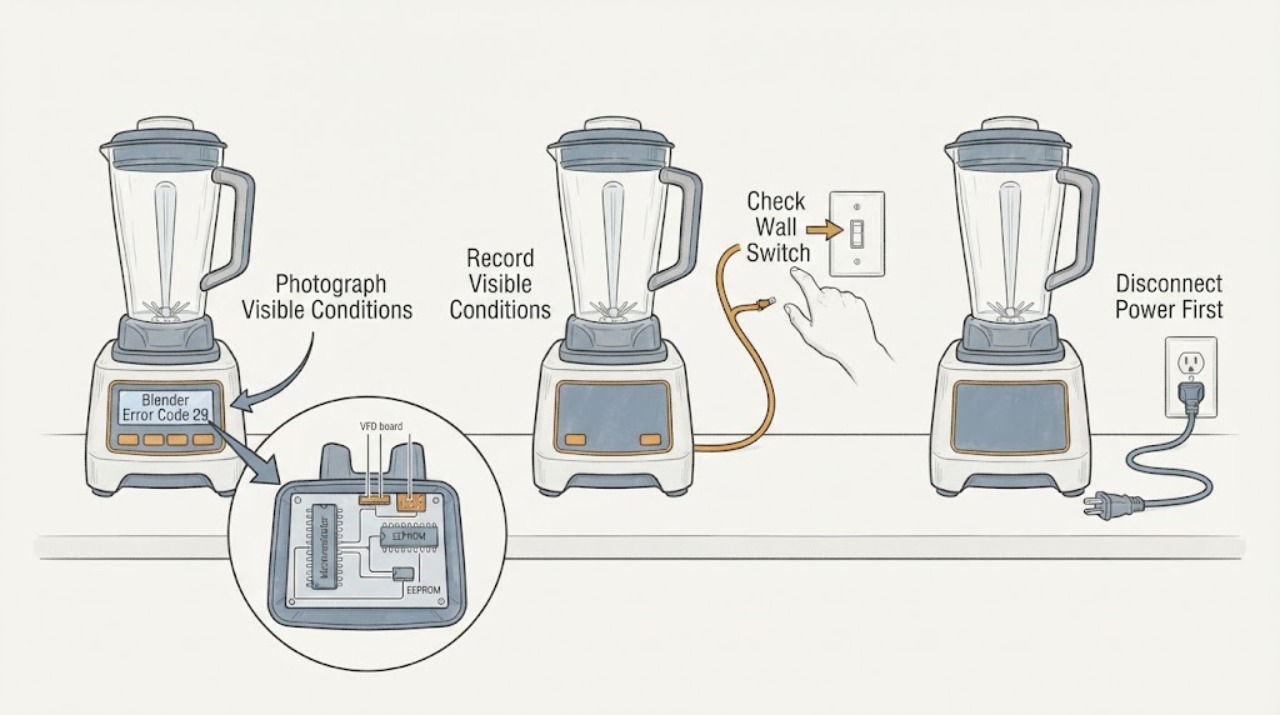
Do not treat 29 as a universal Hamilton Beach blender code. The opened Hamilton Beach technical document is specifically for the HBH850-230V Blender, Series A-N, and lists error #29 with #30, #42, #100, and #103 as a communication malfunction between the microcontroller and EEPROM; it directs replacement of the VFD board and display. That is an internal service diagnosis, not a user repair. First photograph the complete display and record the model, series, voltage, and whether the blender stopped or the panel is blank. If the label does not confirm HBH850-230V, use the exact model guide instead. Keep the unit unplugged for a returning code, abnormal heat, burning odor, damaged cord, unexpected speed, or a power trip.
Work through in order
Diagnostic checks
Use only checks that match the exact appliance or system and its official guide.
-
Check 1
Switch the blender off without trying to reproduce the alert. Photograph the complete display and record whether it reads 29, #29, or a different message; note whether the motor stopped, the panel is blank or garbled, and whether the code appeared during a cycle or at startup.
Expected result: The display exactly matches 29 or #29, contains extra characters, is blank, or cannot be read.
Next step: Continue only after the exact message and model identity can be matched. Otherwise obtain the exact model guide or contact Hamilton Beach rather than cycling the blender again.
Stop if: Stop immediately for smoke, persistent burning odor, a hot or damaged cord, plug, outlet, or base, unexpected speed, or repeated power trips.
Why this matters
Why: The opened source uses error #29 within the HBH850-230V technical document. A different display or an unreadable panel cannot safely inherit that mapping.
-
Check 2
Read the rating label on the motor housing and record the complete model, series, voltage, and any commercial designation before using the HBH850-230V interpretation.
Expected result: The label confirms HBH850-230V Series A-N, confirms another model or voltage, or is missing or unreadable.
Next step: Use the HBH850-specific service branch only when the label matches. For another or unknown model, retrieve its own Use & Care guide or provide the label details to Hamilton Beach support.
Stop if: Do not remove covers or move a hard-to-access commercial unit just to find the label; have service identify it if necessary.
Why this matters
Why: The #29 communication diagnosis is scoped to the HBH850-230V document. A brand name alone does not prove the same control architecture or code table.
-
Check 3
From a dry accessible position, inspect the plug, cord, outlet, and power switch for scorching, melting, looseness, moisture, or other visible damage; do not open the blender or test energized circuitry.
Expected result: The supply path looks normal, or visible heat, moisture, damage, or a tripped protective device is present.
Next step: If there is no hazard, leave the blender off and proceed to model-specific service. If there is damage or a trip, keep it unplugged and use qualified electrical or appliance service.
Stop if: Do not reset a breaker repeatedly, use a damaged cord or outlet, change a fuse rating, or touch terminals.
Why this matters
Why: A normal external supply check does not clear a recurring #29 because the documented issue is inside the communication and display path. Damage or a trip is an independent electrical safety condition.
-
Check 4
For a confirmed HBH850-230V unit showing 29, give service the display photo, complete model and series, voltage, cycle timing, motor behavior, and any panel, heat, odor, noise, or power-trip observations. Do not attempt the VFD-board or display replacement yourself.
Expected result: The exact #29 returns, the panel remains blank or garbled, or the alert clears but returns on a later start.
Next step: Arrange Hamilton Beach Commercial or qualified appliance service for internal diagnosis and repair. Provide the exact identity so the technician can use the correct technical documentation.
Stop if: Keep the unit unplugged if the code returns, the motor behaves unexpectedly, or any heat, odor, smoke, or power-protection symptom is present.
Why this matters
Why: The official technical document places #29 in a microcontroller-to-EEPROM communication fault group and names the VFD board and display as the repair path; recurrence is not evidence that a user reset fixed the fault.
-
Check 5
Keep hands and tools away from the cutter assembly and do not remove the motor housing, jar pad, display, or control boards while investigating error 29.
Expected result: Clearing the code would require internal access, board inspection, continuity or voltage testing, or bypassing an interlock.
Next step: Stop owner diagnosis and use Hamilton Beach support or qualified service. Do not order a VFD board, display, or other internal part solely from error 29.
Stop if: No base disassembly, live testing, safety bypass, forced jar release, or under-load reproduction of the fault.
Why this matters
Why: The documented repair involves internal control/display hardware and wiring. Those are not safe code-only user checks, and the blender has sharp moving parts and electrical hazards.
Use your observations
Decision map
Find the observation that best matches what you see, then follow the next safe action.
-
PATH 01Next step
What you see
The rating label confirms HBH850-230V Series A-N and the display is exactly 29 or #29, with no smoke, heat, odor, damaged supply, or repeated power trip.
Do this next
Leave the unit off and arrange Hamilton Beach Commercial or qualified appliance service; provide the model, series, voltage, and display photo.
Why this path and its safety boundary
Why it matters: The opened Hamilton Beach technical document supports a model-specific communication malfunction between the microcontroller and EEPROM, with the VFD board and display in the internal repair path.
-
PATH 02Next step
What you see
The blender is another Hamilton Beach model, the voltage or series is unknown, or the display is not exactly 29.
Do this next
Stop code-specific troubleshooting, obtain the exact Use & Care guide, or contact Hamilton Beach with the rating-label details; do not borrow the HBH850 board diagnosis.
Why this path and its safety boundary
Why it matters: The HBH850-230V code mapping is outside its documented scope. Another model may use a different display architecture and error table.
-
PATH 03Next step
What you see
The code returns after a start, the panel remains blank or garbled, the motor stops repeatedly, or the blender requires board, display, wiring, or live electrical inspection.
Do this next
Keep the blender unplugged and arrange qualified service. Do not purchase or replace a VFD board or display without model confirmation and technician diagnosis.
Why this path and its safety boundary
Why it matters: The symptom remains consistent with an internal control/display or related electrical fault, but the code alone does not identify a user-replaceable part or prove which board failed.
-
PATH 04Next step
What you see
Error 29 is accompanied by smoke, persistent burning odor, a hot or damaged cord, plug, outlet, or base, unexpected speed, moisture in electrical parts, or a repeated breaker trip.
Do this next
Do not reconnect the blender. Move away from the appliance and obtain qualified appliance or electrical help; keep hands away from the blades.
Why this path and its safety boundary
Why it matters: This crosses an electrical, fire, moisture, or uncontrolled-mechanical safety boundary; code identification does not make further testing safe.
Helpful context
Understand the symptom
What error 29 means when the model matches
The opened Hamilton Beach Brands technical document is titled for the HBH850-230V Blender, Series A-N. In its troubleshooting table, display error #29 is grouped with #30, #42, #100, and #103 and described as a communication malfunction between the microcontroller and EEPROM. The listed repair path is replacement of the VFD board and display. Because those parts are inside the control and display system, the finding should be used to describe the service path, not to authorize opening the base or ordering a board from the code alone.
The safe checks before service
A code photo and complete identity are more useful than repeatedly restarting the blender. Record whether the display shows 29, #29, or another message, the series and voltage on the rating label, whether the motor stopped during a cycle, whether the panel is blank or garbled, and whether there was heat, odor, noise, or a breaker trip. From a dry, accessible position, look only at the plug, cord, outlet, and power switch for visible damage. Do not remove the jar pad or housing, probe the boards, perform live tests, or reach toward the cutter assembly.
Why other Hamilton Beach models need their own guide
Hamilton Beach provides separate product documentation and asks customers to provide the model number and series code. The HBH850-230V document does not establish what 29 means on a household blender, another commercial series, or a different voltage variant. If the label, series, voltage, display format, or model does not match HBH850-230V Series A-N, stop using this code mapping and obtain the matching manual or support response.
When checks do not resolve it
Need a professional?
Arrange Hamilton Beach Commercial or qualified appliance service for a confirmed HBH850-230V error 29, any returning or unmatched code, a blank or garbled panel, repeated motor stops, or any need for internal board, display, wiring, or electrical testing. Stop immediately for smoke, burning odor, heat damage, unexpected speed, moisture in electrical parts, or repeated power trips.
Have this ready
- A clear display photo, complete model and series, voltage, product type, cycle timing, whether the motor stopped, panel behavior, and any heat, odor, noise, moisture, cord, outlet, or breaker observations. Hamilton Beach asks customers to have the model number and series code available for support.
Common questions
FAQ
What does error 29 mean on a Hamilton Beach blender?
The opened Hamilton Beach technical document assigns error #29 to a communication malfunction between the microcontroller and EEPROM on the HBH850-230V Blender, Series A-N, and lists the VFD board and display as the service repair path. It is not a universal Hamilton Beach blender meaning.
Can I reset Hamilton Beach error 29?
Do not assume a generic reset will repair error 29. First confirm the complete model and series, record the display, and leave the unit off. A returning code or blank or garbled panel needs model-specific qualified service rather than repeated restarts.
Does error 29 apply to every Hamilton Beach blender?
No. The evidence is limited to the HBH850-230V technical document, Series A-N. Another Hamilton Beach model, series, voltage, or display format may use a different code definition and must be checked against its own guide.
Should I replace the VFD board or display for error 29?
Not from the code alone. The official HBH850 document lists those parts in the internal repair path, but board diagnosis and replacement require the exact model and qualified service. Do not open the blender or perform live tests.
Read the exact guide
Official sources
- Customer ServiceHamilton Beach · General official support route for Hamilton Beach products; used to require the complete model and series when requesting assistance, not to define error 29.
- HBH850-230V Blender Technical Information Series A-NHamilton Beach Brands, Inc. · Exact official technical document for HBH850-230V Series A-N; page 3 groups error #29 with #30, #42, #100, and #103 as a microcontroller-to-EEPROM communication malfunction and lists VFD board and display replacement. It must not be generalized to other Hamilton Beach models or voltages.
Community feedback
Share a repair observation
Share a plain-text repair observation. Accepted observations are published automatically; this page may take a moment to update.