
On this page
Start here
Quick answer
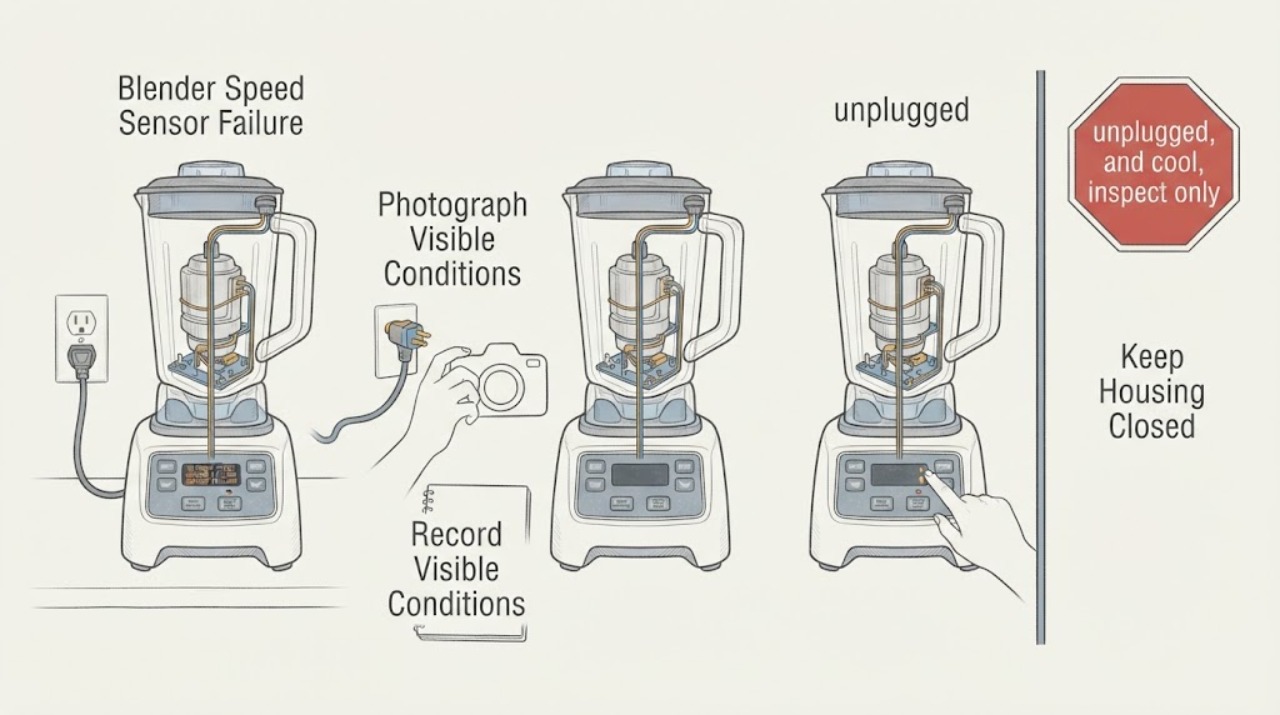
On the Hamilton Beach commercial blender platforms covered by the opened guides, SPEED SENSOR FAILURE or Speed Sensor Error means the control is not detecting expected blender-motor rotation. It is not a universal code for every Hamilton Beach blender: the official sources cover the Revolution Series Ice Shaver/Blender and an HBH850-230V technical platform, so first photograph the complete message and confirm the exact model, series, and voltage. Record whether the motor never moves, runs briefly and stops, or the start command produces an audible relay click, but do not remove covers or perform live electrical tests. Keep the unit unplugged for a returning message, abnormal heat, burning odor, damaged cord, unexpected speed, or a breaker trip, and arrange Hamilton Beach Commercial or qualified appliance service with the observations.
Before you begin
Safety first
- Do not remove the blender base or rear cover, probe live wiring, bypass jar or lid interlocks, apply power directly to the motor, reach near blades or exposed drive parts, or select a sensor, motor, belt, or board solely from SPEED SENSOR FAILURE. Stop immediately for smoke, burning odor, abnormal speed, a hot or damaged cord/plug, liquid ingress, exposed wiring, missing guards, or repeated breaker operation.
Work through in order
Diagnostic checks
Use only checks that match the exact appliance or system and its official guide.
-
Check 1
Stop the blender and photograph the complete display before changing settings. From the rating label, record the full Hamilton Beach model, series or revision, voltage, and whether the appliance is a commercial ice-shaver/blender platform. Record whether the message is exactly SPEED SENSOR FAILURE, Speed Sensor Error, a number, or another status message.
Expected result: The label and display match a covered commercial platform and the speed-sensor wording, or the model, voltage, appliance class, or display text is different or uncertain.
Next step: For a confirmed match, continue by recording the motor response and arranging service if the message returns. For an uncertain or different identity, use that exact model's guide and do not transfer the commercial speed-sensor diagnosis.
Stop if: Do not keep starting the blender to make the message appear, and stop immediately for smoke, burning odor, a hot or damaged cord/plug, unexpected speed, exposed wiring, or a breaker trip.
Why this matters
Why: The opened Hamilton Beach guides support the speed-sensor interpretation only within their named commercial platforms. A different or unreadable identity may use a different control system and error table.
-
Check 2
Using only a normal, guarded start that does not require opening the machine—and only if there is no hazard—record what happened immediately before the message: the start command produced an audible relay click, the motor never moved, the motor ran for a few seconds and stopped, or the unit tripped power. Do not run with the jar, lid, splash shield, or other required guard missing.
Expected result: A click is heard but the blender motor does not rotate, the motor runs briefly then stops, there is no click, or a household or integrated breaker opens.
Next step: Stop after recording one safe observation. Keep the unit unplugged and give the click/no-click result, run duration, message, model, series, and voltage to qualified Hamilton Beach Commercial or appliance service. Do not open the housing or repeat a breaker trip.
Stop if: Never defeat the jar, lid, or splash-shield safety arrangement; do not operate with hands or utensils near the blades or with an exposed drive system.
Why this matters
Why: On the HBH850-230V guide, a click indicates the relay applied power and shifts the service investigation toward motor leads, the Hall-effect switch/plug, sensor magnet, motor field coils, or brushes. No click shifts it toward the TRIAC/transfer/diode-bridge power path. A brief run-and-stop pattern is consistent with a speed-sensing or magnet issue on the covered commercial material, while a trip is an electrical stop condition—not a part diagnosis.
-
Check 3
With the blender switched off, unplugged, and cool, inspect only accessible external items: the cord and plug, the jar or container seating, the cover and splash shield, and visible base damage or liquid ingress. Do not remove the housing or touch sensor, belt, motor, board, or drive wiring.
Expected result: The cord, plug, jar seating, cover, and splash shield appear intact, or any item is cracked, loose, wet, scorched, damaged, missing, or unable to seat normally.
Next step: If any external item is damaged, wet, missing, or cannot seat correctly, leave the unit unplugged and arrange service. If the exterior is normal but the speed-sensor message returns, retain the model and behavior record for internal service diagnosis.
Stop if: Do not immerse or spray the base, reconnect a wet unit, run without the required cover or splash shield, or reach into the jar or drive area.
Why this matters
Why: A missing or improperly seated container or safety guard can prevent normal operation on these commercial units, while damage, moisture, or exposed wiring creates a shock, cut, or mechanical hazard. Neither external result proves that the speed sensor itself needs replacement.
-
Check 4
Record whether the speed-sensor message appeared during startup, after a normal blend, after an unusually heavy or thick load, or together with overheating, smoke, odor, abnormal speed, or repeated electrical interruption. Do not use a load or repeated cycle as a stress test.
Expected result: The message returns immediately at startup, follows a brief motor run, appears after a heavy load or hot motor, or is accompanied by smoke, burning odor, abnormal speed, or a power trip.
Next step: For any recurring message or abnormal timing, keep the blender unplugged and arrange qualified service. Treat smoke, burning, unexpected speed, damaged electrical parts, or a repeat trip as an immediate stop-use condition and do not restore power.
Stop if: Do not reset a breaker repeatedly, continue blending after a speed-sensor failure, or substitute a motor, sensor, belt, or board based on the display alone.
Why this matters
Why: Timing helps the technician distinguish a rotation-detection event from an overheating or power fault, but it cannot identify the failing sensor, magnet, belt, motor, board, or wiring without the model-specific service procedure. The Revolution manual treats the motor-overheat message separately from SPEED SENSOR FAILURE.
Use your observations
Decision map
Find the observation that best matches what you see, then follow the next safe action.
-
PATH 01Next step
What you see
The exact display is SPEED SENSOR FAILURE or Speed Sensor Error, the rating label matches a covered Hamilton Beach commercial blender platform, and the motor does not rotate or runs briefly then stops.
Do this next
Keep the blender unplugged and arrange Hamilton Beach Commercial or qualified appliance service. Provide the exact model, series, voltage, display photo, whether a relay click was heard, and how long the motor ran.
Why this path and its safety boundary
Why it matters: The opened Hamilton Beach documents describe this as failure to detect expected blender-motor rotation; a broken sensor magnet, Hall-effect sensor path, belt, motor lead, motor, or related control path remains possible, but the display does not choose one part.
-
PATH 02Next step
What you see
The speed-sensor wording is confirmed and a relay click is heard at Start, but the motor does not rotate.
Do this next
Do not perform those internal checks as an owner. Leave the unit isolated and give the click/no-rotation observation to a qualified technician.
Why this path and its safety boundary
Why it matters: For the HBH850-230V technical scope, a click means the relay applied power; the documented service path then examines motor lead connections, the Hall-effect switch and plug, the sensor magnet, motor field coils, and brushes.
-
PATH 03Next step
What you see
The speed-sensor wording is confirmed but there is no audible click, or a breaker opens when Start is pressed.
Do this next
Stop testing, unplug only from a safe dry position, and arrange qualified commercial-appliance or electrical service. Do not open the base, probe live circuits, or reset the breaker repeatedly.
Why this path and its safety boundary
Why it matters: The HBH850-230V guide points toward a different relay/transfer/TRIAC or diode-bridge power path when no click is heard; a breaker opening is an electrical protection event and does not prove that a board is the failed part.
-
PATH 04Next step
What you see
The appliance is a different Hamilton Beach model, the label or voltage cannot be matched, or the display is a numeric code or another message rather than the supported speed-sensor wording.
Do this next
Use the exact model manual or Hamilton Beach support channel. Do not carry over the commercial speed-sensor branch or order a part from the brand name alone.
Why this path and its safety boundary
Why it matters: The opened documents are not a universal Hamilton Beach code table. A different model or message may use a different sensor, interlock, drive, or control definition.
-
PATH 05Next step
What you see
The message is accompanied by smoke, burning odor, a hot or damaged cord or plug, unexpected speed, exposed wiring, liquid ingress, a missing guard, or repeated breaker operation.
Do this next
Keep people away, isolate power only if safe, and leave the blender unplugged for qualified service; use emergency help for an active fire. Do not reproduce the fault or remove the housing.
Why this path and its safety boundary
Why it matters: This is a fire, shock, cut, or mechanical-injury boundary in addition to the display message.
Helpful context
Understand the symptom
What the message establishes—and what it does not
The opened Hamilton Beach Revolution Series Ice Shaver/Blender manual lists SPEED SENSOR FAILURE and explains that the speed sensor on the blender motor is not functioning correctly. Hamilton Beach's HBH850-230V technical information uses the related wording Speed Sensor Error and separates the service path by whether the start button produces a relay click. These documents establish a motor-rotation sensing problem on named commercial platforms; they do not prove that the same message has the same meaning on every Hamilton Beach household blender, nor do they identify a user-replaceable part from the message alone.
Keep the owner check outside the housing
The useful owner evidence is the exact display, rating label, timing, motor response, and any visible safety problem. The technical documents describe Hall-effect sensors, motor leads, relay/rectifier or TRIAC/transfer boards, diode bridges, brushes, belts, and internal tests; those are service-level paths. Do not remove the base or rear cover, probe wiring, bypass an interlock, apply power directly, or order a sensor, motor, board, or belt solely from the speed-sensor wording.
When checks do not resolve it
Need a professional?
Arrange Hamilton Beach Commercial or qualified appliance service when the speed-sensor message returns, the motor does not rotate or runs briefly then stops, the model cannot be matched to the opened guide, or any electrical or mechanical hazard is present. Electrical service may also be needed when a breaker opens or there is visible power-path damage.
Safety scope: Do not remove the blender base or rear cover, probe live wiring, bypass jar or lid interlocks, apply power directly to the motor, reach near blades or exposed drive parts, or select a sensor, motor, belt, or board solely from SPEED SENSOR FAILURE. Stop immediately for smoke, burning odor, abnormal speed, a hot or damaged cord/plug, liquid ingress, exposed wiring, missing guards, or repeated breaker operation.
Have this ready
- Provide the complete model and series or revision, voltage, serial information if available, exact display wording, a photo, whether a relay click was heard, whether the motor never moved or ran briefly, when the message appeared, load and temperature context, and any smoke, odor, damage, or breaker observations.
Common questions
FAQ
What does SPEED SENSOR FAILURE mean on a Hamilton Beach blender?
On the opened Hamilton Beach Revolution Series Ice Shaver/Blender manual, it means the speed sensor on the blender motor is not functioning correctly. Related Hamilton Beach commercial technical material describes failure to detect blender-motor rotation. Confirm the exact commercial model and voltage before applying that meaning to another Hamilton Beach blender.
Can I replace the speed sensor or belt when this message appears?
Not from the message alone. Hamilton Beach's technical documents list several possible service paths, including the sensor magnet or Hall-effect path, motor leads, belt, motor, and control or power boards depending on the platform and start response. Keep the unit unplugged and have the exact model assessed before choosing a part.
What should I do if the blender clicks but does not turn?
Record the click and no-rotation result once, stop testing, and arrange qualified service. On the HBH850-230V technical scope, the click means the relay applied power and directs service toward motor leads, the Hall-effect switch and plug, the sensor magnet, motor field coils, and brushes; those are internal checks, not a user repair.
Read the exact guide
Official sources
- HBH850 – 230V Blender Technical InformationHamilton Beach Brands, Inc. · Directly supports the named HBH850-230V platform's Speed Sensor Error branches. It is not a universal Hamilton Beach blender guide.
- Revolution Series Ice Shaver/Blender Operation ManualHamilton Beach Commercial · Directly supports the exact SPEED SENSOR FAILURE wording, its blender-motor speed-sensor meaning, the commercial Revolution product scope, and external electrical/cut/blade safety boundaries.
- Technical Data SheetHamilton Beach Brands, Inc. · Supports the related commercial platform's Speed Sensor Failure meaning and the conditional sensor-magnet/belt possibility; it does not establish applicability to unlisted household models.
Community feedback
Share a repair observation
Share a plain-text repair observation. Accepted observations are published automatically; this page may take a moment to update.