
On this page
Start here
Quick answer
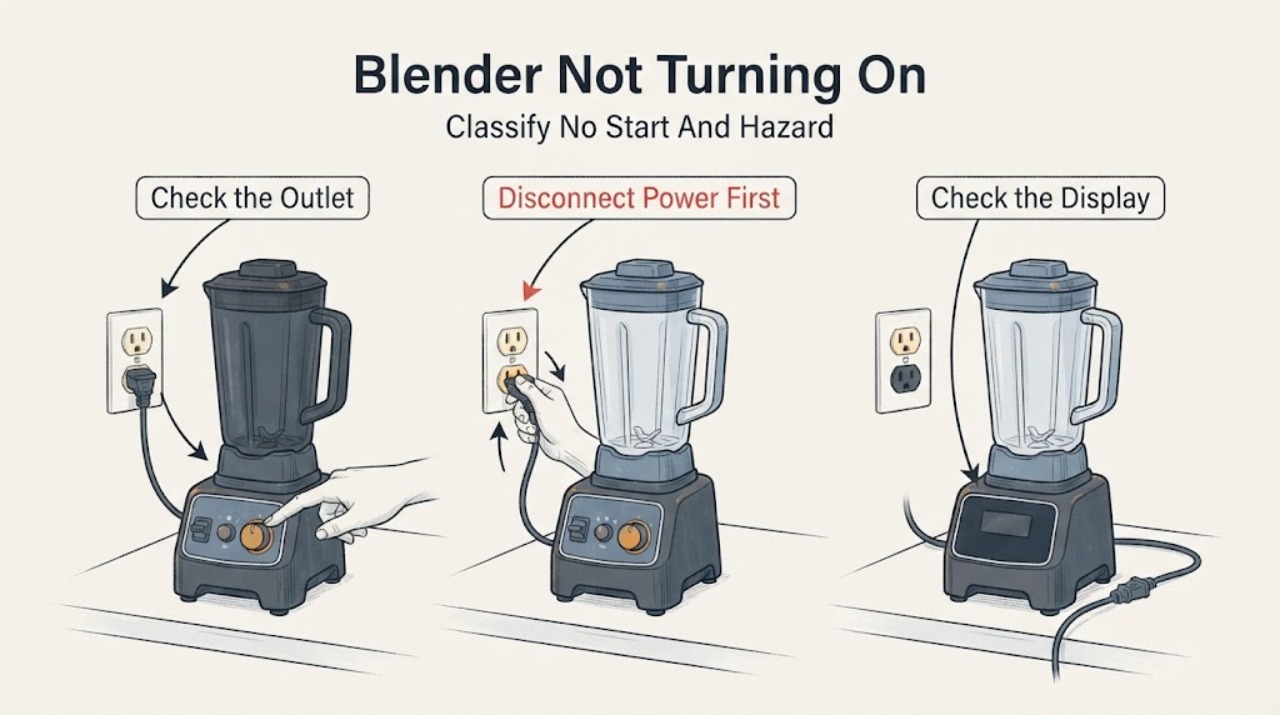
Unplug the blender before handling the jar, blades, or base. First check the plug, grounded outlet, and any user-accessible power switch; Hamilton Beach manuals say a blender that fails to start should be checked for a secure plug, a tripped outlet breaker or fuse, and an OFF power switch. If the unit stopped after blending, the motor's thermal overload may have opened; an applicable Hamilton Beach manual says to unplug it and allow about 15 minutes to cool before trying again. Make sure the jar and lid are installed as the exact manual requires, but never bypass a safety feature or put hands or utensils near the blades. If the outlet and model controls are normal but the blender remains dead, trips again, smells burnt, has a damaged cord, or has a loose/damaged cutter, stop using it and arrange qualified service.
Before you begin
Safety first
- The owner may perform visual and unplugged external checks, consult the exact manual, install an undamaged jar and lid as directed, and allow documented overload cooldown. Internal switches, thermal devices, wiring, motor, drive, and base repairs require qualified service.
Work through in order
Diagnostic checks
Use only checks that match the exact appliance or system and its official guide.
-
Check 1
Do not press the controls again while investigating. Note whether any indicator, display, fan sound, hum, or motor movement occurs, whether the blender stopped during a previous blend, and whether there is smoke, a burning or melted-plastic odor, a hot plug or cord, liquid in the base, sparking, a cracked jar, or loose blades.
Expected result: The blender is completely silent and dark; it has an indicator but no motor; it stopped after use; or a heat, liquid, odor, spark, cord, jar, or blade hazard is visible.
Next step: For smoke, burning odor, sparking, a hot or damaged cord or plug, liquid in the base, a cracked jar, or loose blades, unplug only from a dry, safe position and stop for qualified service. Otherwise continue with the unplugged external checks.
Stop if: Do not run the blender without the required jar and cover, put a hand or utensil in the jar, or touch a wet or damaged plug or base.
Why this matters
Why: A dark, silent unit follows the external power and switch branch. A recent stop can fit overload protection. A motor sound without blade movement points to a mechanical or cutter issue rather than no power. Any electrical, liquid, or damaged cutting-part hazard makes further operation unsafe.
-
Check 2
With the blender switched off, confirm the plug is fully inserted in a normal grounded outlet and visually inspect the cord and plug for cuts, crushed insulation, bent contacts, discoloration, or heat damage. Check the home's breaker or GFCI only at its ordinary user control. Do not open the outlet or perform a live voltage test.
Expected result: The plug was loose, the outlet or circuit is off, the cord or plug is damaged or hot, the circuit trips again, or the external supply appears normal.
Next step: Correct only a normal breaker/GFCI state that can be safely restored at the user control. If the outlet, cord, or plug is damaged, hot, wet, or trips again, stop and call a qualified electrician or appliance service. If the supply is normal, keep the blender unplugged and check its model controls.
Stop if: Do not use an adapter or extension cord, remove the grounding pin, open the plug or outlet, or test exposed electrical contacts.
Why this matters
Why: A loose plug, dead outlet, or tripped household circuit can produce a no-turn-on symptom. Damage, heat, or repeated trips indicates an electrical fault and is not a reason to keep resetting or to open the blender. A normal supply makes the model switch, control, overload, or internal fault more likely.
-
Check 3
Read the exact Hamilton Beach model's Use & Care guide and confirm its power switch is in ON, its control is not in STOP or OFF, and the intended speed, pulse, or program control is being used. If the manual identifies a user-accessible RESET/OFF switch or circuit breaker, follow that model's unplugged reset instruction once; do not search under the base or bypass a control, lid, or jar requirement.
Expected result: The power switch was OFF, the selected control was STOP or not the model's start control, the exact manual identifies a reset that restores operation, the control responds but the motor does not, or the model's control arrangement is unclear.
Next step: Set only the documented control state and make one normal start attempt with the jar and cover installed as the manual requires. If a documented reset trips again or the controls remain unresponsive, unplug and arrange service; retrieve the exact manual if the model is unclear.
Stop if: Never bypass a jar, lid, cover, or other safety feature; do not enter service mode, short a switch, remove the base, or hold a control in an undocumented way.
Why this matters
Why: A switch or control left in its stop state can mimic a dead blender. A model-specific reset may clear a tripped overload or circuit breaker, but a reset that trips immediately or repeatedly indicates a fault. An unclear control layout cannot be safely solved by borrowing another model's button sequence.
-
Check 4
Unplug the blender before removing the jar or any attachment. Check the jar for cracks or chips, confirm the cutter assembly is not visibly loose or damaged, and remove only accessible ingredients or an obstruction using the manual's safe procedure. Make sure the jar, collar, and lid are seated as the exact model requires; never turn a blade by hand while it is installed on the base.
Expected result: The jar or cutter is cracked, chipped, loose, or damaged; the jar was not seated as required; ingredients are overfilled or unusually dense; or the assembly appears intact and correctly seated.
Next step: Do not use a cracked jar or loose/damaged cutter; replace it with the exact model-approved part or arrange service. For a sound, correctly seated assembly, continue to the overload/recovery branch rather than dismantling the base.
Stop if: Do not tighten or repair loose blades, insert utensils into the jar, remove a jam while connected, or operate with a missing lid or damaged container.
Why this matters
Why: A damaged cutting assembly or jar is a safety issue, not a reason to force the motor. A heavy or obstructed load can contribute to an overload stop, but an intact, correctly assembled blender that remains silent after power checks points toward control or internal service diagnosis.
-
Check 5
If the blender stopped during a prior blend or became hot, leave it unplugged and allow the cooling interval stated in the exact manual. Hamilton Beach gives approximately 15 minutes for thermal overload on applicable household and commercial-style manuals; do not treat that time as a universal reset for every model. Afterward, make one normal attempt only if there is no damage, odor, liquid, or repeated circuit problem.
Expected result: The blender restarts after the documented cooldown; it remains dead; it trips the outlet or model reset again; or a burning odor or abnormal heat returns.
Next step: Stop using the blender and arrange qualified service for a failed restart, repeat trip, abnormal heat, or recurring odor. Provide the model, load, run time, cooldown interval, and exactly what happened before it stopped.
Stop if: Do not repeatedly reset, run shorter tests with a damaged unit, spray or immerse the base, or open the motor housing.
Why this matters
Why: A restart after cooling is consistent with overload protection, often associated with a heavy load or extended use. No restart, a repeat trip, or recurring odor means the cause is not safely resolved by more cooldown cycles and may involve the motor, control, wiring, or drive.
Use your observations
Decision map
Find the observation that best matches what you see, then follow the next safe action.
-
PATH 01Safety boundary
What you see
The outlet is dead or the plug, cord, or receptacle is hot, damaged, wet, sparking, or repeatedly trips the circuit.
Do this next
Stop using the blender. Use a qualified electrician for the household supply and qualified appliance service for a damaged blender cord or plug.
Why this path and its safety boundary
Why it matters: The immediate risk is an electrical supply or cord fault, not a blender control setting.
Safety stop: Do not keep resetting the breaker, use an adapter or extension cord, or open the outlet or plug.
-
PATH 02Safety boundary
What you see
The outlet and cord are normal, but the power switch is OFF, the selected control is STOP, or the exact model's documented reset has not been set or used.
Do this next
Follow the exact Use & Care guide, install the jar and cover as directed, and make one normal start attempt. Escalate if the control remains unresponsive or the reset trips again.
Why this path and its safety boundary
Why it matters: A user control state can prevent a start without proving an internal failure; reset arrangements are not shared across all Hamilton Beach blenders.
Safety stop: Do not borrow a reset sequence from another model or bypass a lid, jar, or other safety feature.
-
PATH 03Safety boundary
What you see
The blender ran or stalled under a dense, frozen, overfilled, or extended load and then stopped, with no electrical hazard.
Do this next
Unplug and allow the exact manual's cooling interval, approximately 15 minutes where the applicable manual specifies it. Reduce the load or cycle only as the model's instructions permit; service a repeat failure.
Why this path and its safety boundary
Why it matters: Thermal overload protection is plausible on applicable Hamilton Beach models; a restart after the specified cooldown is different from a blender that is dead from first use.
Safety stop: Do not keep cycling a hot motor, force the cutter, or use a damaged jar or blade.
-
PATH 04Safety boundary
What you see
The jar is cracked or chipped, the cutter has a loose or broken blade, or the blade area is obstructed while the blender is unplugged.
Do this next
Stop using the blender and obtain the exact model-approved replacement or qualified service. Keep hands away from blades even when unplugged.
Why this path and its safety boundary
Why it matters: The container or cutting assembly is unsafe or mechanically suspect; it should not be used to test whether the motor starts.
Safety stop: Do not repair or tighten loose blades, insert tools into the jar, or run the base with a damaged or missing required container.
-
PATH 05Safety boundary
What you see
The grounded outlet and cord are normal, the exact model's switch and controls are correct, the jar and cutter are safe and correctly seated, and the blender still gives no motor response or trips again.
Do this next
Stop owner troubleshooting and arrange qualified Hamilton Beach appliance service. Provide the exact model, outlet result, control state, prior use, sounds or indicators, and any reset or trip behavior.
Why this path and its safety boundary
Why it matters: The remaining possibilities include an internal control, thermal device, motor, wiring, or drive fault that cannot be identified safely by external observation.
Safety stop: Do not open the base, bypass a thermal device or switch, perform energized tests, or replace an internal part from the symptom alone.
Helpful context
Understand the symptom
Define “not turning on”
Pressing a speed or pulse control and getting no motor response is different from a motor that starts and then stops, a display or indicator that is dark, or a motor that runs while the blade does not move. Note which of those occurred. The assigned topic has no model number, so a reset location, button sequence, jar-sensing arrangement, and indicator behavior must come from the exact Hamilton Beach manual rather than from another blender family.
Power checks are external and non-invasive
Use a normal grounded household outlet and inspect the plug and cord visually. Do not open the plug or outlet, test energized terminals, use an adapter or extension cord, or immerse the base. Some Hamilton Beach commercial-style models have a power/reset switch that also acts as a circuit breaker, but that arrangement must not be assumed for a household or personal model.
Cooling after an overload is not an electrical repair
A blender that stopped during a dense, frozen, or extended blend may have activated thermal overload protection. Unplug it, clear the counter around it, and use only the cooling interval stated in the exact manual; one Hamilton Beach household manual specifies approximately 15 minutes. If it will not restart after cooling, repeatedly trips, or smells of burning, stop rather than repeatedly cycling it.
Safety boundary
Stop conditions
- Stop immediately for smoke, burning or melted-plastic odor, sparking, a hot or damaged plug or cord, liquid in the base, a cracked jar, or loose or broken blades.
- Disconnect power before cleaning, removing the jar or cutter, or inspecting an obstruction; never put hands or utensils near moving blades.
- Do not bypass a jar, lid, cover, switch, thermal protector, or other safety feature, and do not perform live electrical tests or open the motor base.
- If a breaker or model reset trips again, or the blender stays dead after the exact manual's external checks and cooldown, stop and arrange qualified service.
Only after diagnosis
Potential parts
- jar or cutter assembly
Consider only when the unplugged inspection finds a cracked or chipped jar, loose or damaged blades, or a cutter that the exact manual identifies as replaceable.
Jar and cutter assemblies are model-specific. Do not tighten or repair loose blades, and do not order from the no-start symptom alone. - power switch, thermal protector, control, or motor assembly
Consider only after qualified diagnosis confirms the outlet, cord, documented control state, jar, and model cooldown are not the cause.
Internal electrical and motor parts vary by model and require qualified diagnosis; do not open the base or bypass protection.
When checks do not resolve it
Need a professional?
Call a qualified electrician for a hot, damaged, wet, sparking, or repeatedly tripping household outlet. Arrange qualified Hamilton Beach appliance service when a normal outlet and cord do not restore operation, when a documented reset trips again, when the unit remains dead after the model's cooldown, or when there is abnormal heat, odor, damaged wiring, a damaged jar, or loose blades. Give the technician the exact model, the observed indicators or sounds, prior load and run time, and all external checks performed.
Safety scope: The owner may perform visual and unplugged external checks, consult the exact manual, install an undamaged jar and lid as directed, and allow documented overload cooldown. Internal switches, thermal devices, wiring, motor, drive, and base repairs require qualified service.
Common questions
FAQ
Why is my Hamilton Beach blender completely silent when I press Start?
Check the grounded outlet, secure plug, visible cord condition, and the exact model's power switch or control state while keeping the jar and lid installed as directed. If it stopped after heavy use, allow the manual's overload cooldown. If those checks are normal and it stays silent, arrange service rather than opening the base.
How long should I let a Hamilton Beach blender cool before trying again?
An applicable Hamilton Beach household and commercial-style manual specifies approximately 15 minutes after thermal overload, but the exact model's instructions control. Unplug it during the wait and do not retry if there is a burning odor, abnormal heat, damage, or a repeat circuit trip.
Can I reset the circuit breaker on my Hamilton Beach blender?
Only if the exact model manual identifies a user-accessible power/reset switch or circuit breaker and gives a reset procedure. Some commercial-style Hamilton Beach manuals describe such a switch, but it is not a universal feature. A reset that trips immediately or repeatedly requires service; never bypass it or open the base.
Is it safe to test the blender with the jar removed?
Do not improvise a jar-removed test. Hamilton Beach manuals require the jar and cover to be installed as directed for operation, and the blades are sharp. Keep the blender unplugged while inspecting or removing parts and follow the exact model guide.
Read the exact guide
Official sources
- Hamilton Beach Blender SafetyHamilton Beach · Official Hamilton Beach safety manual used for general safety boundaries; exact operating requirements remain model-specific.
- Hamilton Beach Commercial Blender - Use & CareHamilton Beach · Applies to the commercial-style manual's model family; used only to keep reset, standby, and 15-minute cooldown claims conditional rather than universal.
- Hamilton Beach Smoothie Blender with 56oz Plastic Jar - 50190Hamilton Beach · Official product page used only to reinforce model-specific documentation; the article does not claim that the 50190 controls apply to all Hamilton Beach blenders.
- Hamilton Beach Food Blender (HBF500/HBF500S) - Use & CareHamilton Beach · Applies to the HBF500/HBF500S food-blender manual; used conditionally to show that some commercial-style models have an integrated circuit breaker and overload guidance.
- Hamilton Beach Personal Blender with Leak-Proof Travel Lid, Ice Blue - 51192GHamilton Beach · Applies to the listed 51192G personal blender only; used to demonstrate that personal models differ from countertop and commercial-style controls while including overload protection.
- Hamilton Beach Wave Action Quiet Blender (53530) - Use & CareHamilton Beach · Directly supports the household Wave Action 53530 manual's troubleshooting and safety instructions; switch and jar details are not generalized to every Hamilton Beach model.
Community feedback
Share a repair observation
Share a plain-text repair observation. Accepted observations are published automatically; this page may take a moment to update.