
On this page
Start here
Quick answer
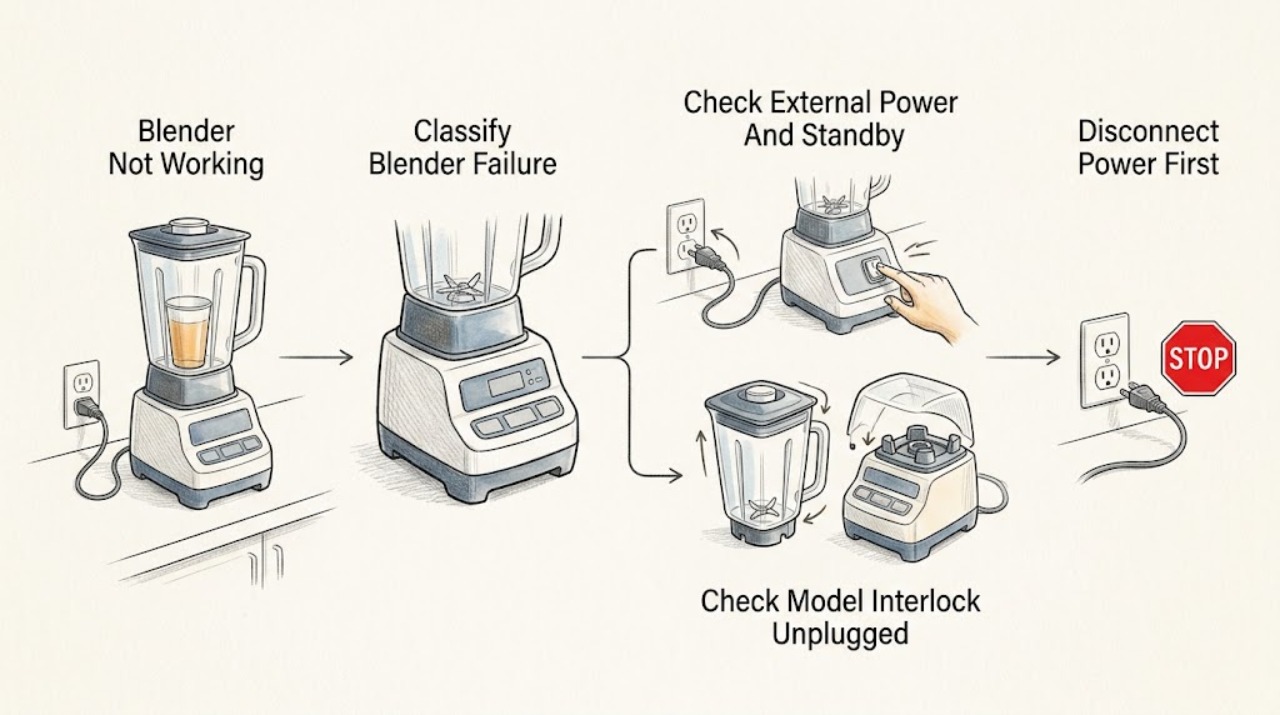
First classify what “not working” means: a completely dark unit, a powered unit that will not start, a blender that stops while running, a jar that will not turn, or a panel that flashes or remains unresponsive. Record the exact model, type, and series before applying a procedure. From a dry, safe position, verify the plug and outlet, confirm the model's main switch or reset position and standby control, and check the labeled household breaker only once if it is clearly tripped and the area is safe. If the model uses a jar, lid, or sound-shield interlock, unplug the blender before reseating the jar or cover; do not defeat an interlock. A blender that stopped after a heavy mixture may have motor-overload protection: unplug it and allow the exact manual's cool-down period, often about 15 minutes in Hamilton Beach manuals, before trying a smaller, more fluid load. Inspect only unplugged, removable parts for a cracked jar, loose or damaged cutter assembly, or a blade that is locked; do not touch exposed blades unnecessarily and do not use damaged parts. A Professional model may enter standby or show model-specific flashing buttons, while a consumer model may use different controls. If the outlet and controls are correct but the motor still will not run, a protection event repeats, the panel stays dead, or there is smoke, a strong persistent burning odor, sparking, a hot plug, or a breaker that trips again, stop using the blender and arrange Hamilton Beach or qualified appliance service. Do not open the base, probe live wiring, bypass a safety interlock, or continue running a seized blade.
Before you begin
Safety first
- This article covers model identification, ordinary external power and standby checks, unplugged jar or cover reseating, the exact manual's cool-down and load guidance, and visual inspection of removable parts. Do not open the base, bypass jar, lid, or shield interlocks, touch sharp or locked blades, test live circuits, or repair internal motor and control parts.
Work through in order
Diagnostic checks
Use only checks that match the exact appliance or system and its official guide.
-
Check 1
Record the complete Hamilton Beach model, type, and series information and classify the symptom: no panel lights, panel lights but no start, starts then stops, blades do not spin, buttons flash or show a message, or a strong odor or other hazard appears.
Expected result: The unit is completely dark, a control is lit, the failure occurs only with the jar installed, the motor stops under load, a panel indication appears, or smoke, heat, odor, or sparking is present.
Next step: Follow the matching branch below and the exact Use & Care manual; do not apply a Professional, commercial, personal, or countertop sequence to another architecture.
Stop if: Stop immediately for visible smoke, a strong persistent burning odor, sparking, a hot plug or outlet, a damaged cord, a repeated breaker trip, or a locked blade.
Why this matters
Why: These patterns separate external power and standby checks from interlock, overload, blade, control, or safety faults. Exact Hamilton Beach controls and messages vary by model and product family.
-
Check 2
From a dry, safe position, verify that the blender plug is fully inserted into a working outlet and that the model's main power or RESET/OFF switch is in its normal ON or RESET position. If the model has a standby button or a documented inactivity mode, press the normal control once to wake it. Check a clearly tripped household breaker only once if there is no heat, water, damage, or other hazard.
Expected result: The outlet is dead, the switch is off, the panel wakes from standby, the breaker is tripped, the breaker trips again, or the outlet and controls appear normal but the blender remains dark or unresponsive.
Next step: Restore only an obvious switch, standby, outlet, or single breaker condition when safe. If the outlet is dead, use an electrician; if the blender remains unresponsive or the breaker trips again, unplug it and arrange service.
Stop if: Do not reset a repeatedly tripping breaker, replace a fuse with a different rating, use a damaged cord or outlet, open the base, or perform a live-voltage test.
Why this matters
Why: Hamilton Beach identifies outlet power, switch position, and fuse or breaker status as first checks; some Professional models intentionally dim their controls in standby. A repeat trip or dead unit with confirmed power is not a safe internal repair diagnosis.
-
Check 3
If the panel is powered but the motor will not start, unplug the blender and remove only the removable jar, lid, or sound shield as the manual permits. Reseat the jar squarely on its base and return the lid or shield to its normal closed position; do not hold down a switch or bypass any interlock.
Expected result: The jar was not fully seated, a commercial Quiet Shield was open, the lid or shield was mispositioned, the model has no such interlock, or the correct assembly still will not start the motor.
Next step: Reconnect only after the jar and cover are stable and closed, then make one normal start attempt with an appropriate load. If it still will not start, unplug it and arrange service.
Stop if: Never tape, wedge, hold, or otherwise defeat a jar, lid, or shield interlock; do not reach into the jar or remove the base housing.
Why this matters
Why: Hamilton Beach commercial guidance says the jar and Quiet Shield position can be required for operation. A correct assembly that still fails shifts suspicion toward the model-specific sensor, control, switch, or motor rather than an assembly mistake.
-
Check 4
If the blender stopped during blending or the motor is hot, turn it off, unplug it, and allow the cool-down period stated in the exact manual. Once cool, remove some ingredients and use an appropriate, more fluid load; do not restart while a blade is locked or while the container is overfilled.
Expected result: The motor restarts after cooling and a smaller load, the same load causes another stop, the motor stops with no mixture, or the model displays a thermal or overload indication.
Next step: Use only the load, fill limit, speed, and liquid guidance for the exact model. If the protection event repeats, the motor will not restart, or a fault indication remains, unplug the unit and arrange service.
Stop if: Do not repeatedly cycle a hot motor, force the blade, run an overfilled jar, or continue after smoke, burning odor, or unusual heat.
Why this matters
Why: Hamilton Beach describes thermal or motor-overload protection that can stop the blender under heat or a heavy load. Recovery with a lighter load supports a protection event; repeat stopping with a suitable load needs service.
-
Check 5
With the blender unplugged and the jar empty, inspect the removable jar and cutter assembly from a safe angle for cracks, chips, loose or broken blades, a loose base, or a cutter that is locked. Do not reach into the jar or attempt to dismantle or free the blade assembly.
Expected result: The jar or blade is damaged, the cutter is locked, the assembly is loose, or removable parts look intact and move only as the manual allows.
Next step: Do not operate with damage or a locked cutter; obtain model-confirmed service or replacement guidance. If parts are intact but the blender remains inoperative, proceed to qualified service rather than opening the base.
Stop if: Keep hands away from sharp blades, do not use a cracked container, do not tighten or rebuild the cutter assembly as a generic repair, and do not test with the cover removed.
Why this matters
Why: Hamilton Beach says not to use a damaged jar or cutting blades; a locked cutter can damage the motor. Intact removable parts do not rule out an internal motor or control fault, but unsafe parts end the test.
-
Check 6
After the external power, standby, interlock, cool-down, load, and unplugged removable-part checks, document whether the blender is still dark, still will not start, stops with a suitable load, shows a model-specific message or flashing pattern, or has any hazard.
Expected result: A correct outlet and control state produce no response, the motor repeatedly overloads, the panel remains abnormal, a blade or jar is damaged, or heat, odor, smoke, sparking, or breaker activity is present.
Next step: Unplug the blender and arrange Hamilton Beach or qualified small-appliance service. Provide the model, type, series, failure pattern, load used, cool-down result, and any exact display or flashing indication; use an electrician for a supply or outlet problem.
Stop if: Do not open the base, bypass a safety device, test live wiring, keep using a hot or smoking unit, or continue after a repeated breaker trip.
Why this matters
Why: The remaining possibilities include an interlock sensor, switch, control, motor, thermal device, wiring, or damaged assembly. Those parts are model-specific and are not safe to diagnose by opening the base or probing a powered unit.
Use your observations
Decision map
Find the observation that best matches what you see, then follow the next safe action.
-
PATH 01Safety boundary
What you see
The blender has no visible response, or a Professional model's panel goes dark after inactivity but wakes with a normal button or switch action.
Do this next
Wake the documented standby state, confirm the plug and working outlet, and check one clearly tripped breaker only when safe. If the panel remains dark with confirmed power, arrange service.
Why this path and its safety boundary
Why it matters: A Hamilton Beach Professional manual documents standby after inactivity, while consumer manuals direct the owner to check the plug, switch, outlet, fuse, or breaker. A reliable wake-up is different from a dead unit.
Safety stop: Do not open the base, reset a breaker repeatedly, or use a damaged cord or outlet.
-
PATH 02Safety boundary
What you see
The panel is lit but the motor will not start, and the jar, lid, or model-specific Quiet Shield is not fully seated or closed; reseating does not restore operation.
Do this next
Unplug, reseat the removable parts normally, and make one safe start attempt. If it still fails, unplug and arrange service without bypassing the interlock.
Why this path and its safety boundary
Why it matters: On applicable Hamilton Beach commercial models, jar and shield position are required for operation. Persistent failure with correct assembly makes a sensor, control, switch, or motor problem more likely than a simple setting.
Safety stop: Do not tape, wedge, hold, or electrically bypass a safety interlock or run with a cover removed.
-
PATH 03Safety boundary
What you see
The blender stopped while processing a thick or heavy load, the motor is hot, or a model-specific overload indication appears, then it restarts after a power-off cool-down or reduced load.
Do this next
Use the exact manual's cool-down, fill, speed, and liquid guidance. Arrange service if the motor stops again with a suitable load or will not recover after cooling.
Why this path and its safety boundary
Why it matters: This pattern is consistent with the documented motor-overload or thermal protection rather than a completely dead unit. Repeated protection with an appropriate load is not normal troubleshooting success.
Safety stop: Do not run an overfilled or seized jar, repeatedly restart a hot motor, or continue after smoke or persistent burning odor.
-
PATH 04Safety boundary
What you see
The unplugged inspection finds a cracked or chipped jar, loose or broken blade, damaged cutter assembly, or a blade that is locked and will not move as the manual permits.
Do this next
Keep the blender unplugged and arrange service or model-confirmed replacement guidance. Do not run another test with the damaged or locked assembly.
Why this path and its safety boundary
Why it matters: Hamilton Beach instructs owners not to use damaged jars or blades, and a locked cutter can damage the motor. The safe path is model-confirmed parts or service, not a hand repair.
Safety stop: Do not touch sharp blades unnecessarily, reach into a filled container, dismantle the cutter, or operate a cracked jar.
-
PATH 05Safety boundary
What you see
A strong odor persists beyond initial use, visible smoke or sparking appears, the plug or outlet is hot, the cord is damaged, or the breaker trips again.
Do this next
Stop using the blender and arrange qualified appliance service; use an electrician for a hot, damaged, or repeatedly tripping supply. Disconnect only from a safe accessible point.
Why this path and its safety boundary
Why it matters: Hamilton Beach directs immediate unplugging for strong odor or visible smoke. These symptoms override recipe, jar, and reset checks and may indicate an electrical or motor hazard.
Safety stop: Do not keep testing, reset the breaker repeatedly, open the base, touch smoke- or water-affected parts, or substitute a fuse.
Helpful context
Understand the symptom
“Not working” is several different blender symptoms
A dark panel with no motor sound points first to power, switch, or standby state. A lit panel that does not start points more toward a jar, lid, sound-shield, or other model-specific interlock, a control condition, or an overload state. A blender that starts and then stops has a different decision path from one that never starts. Record the behavior and any displayed or flashing indication rather than treating every Hamilton Beach model as if it had the same controls.
Power and standby checks are external only
Hamilton Beach manuals begin with a secure plug, a working outlet, the power switch, and the household fuse or breaker. Some Professional models turn their panel lights off after inactivity and wake when a button or switch is used. Check those visible controls from a dry position, but do not remove the base or test voltage inside it. A breaker that trips again is a stop signal, not an invitation to use a larger fuse or repeatedly reset the circuit.
Jar, lid, and shield interlocks are model-dependent
Some Hamilton Beach commercial blenders will not run unless the jar is seated and a Quiet Shield door is correctly closed. A consumer blender may instead use a base or jar seating arrangement. Unplug before reseating removable parts, make sure the jar is stable and the lid or shield is in its normal position, and never tape down or bypass a safety interlock. If the correct assembly still produces a start failure, the sensing or control system needs service.
Stopping under load is not the same as a dead blender
Hamilton Beach documents motor-overload or thermal protection on several blender families. A thick, oversized, or otherwise heavy mixture can stop the motor to protect it, and a hot motor may need a power-off cool-down before another attempt. Remove some ingredients and follow the exact manual's mixing and liquid guidance only after the unit is cool. If the motor stops again with a modest, appropriate load, stop treating it as a recipe issue and arrange service.
Blade and jar damage ends the user troubleshooting path
With the plug disconnected, look at the removable jar and cutter assembly for cracks, chips, loose or broken blades, or a blade that is locked in place. Hamilton Beach instructs owners not to use damaged jar or blade parts. Do not reach into a filled jar, attempt to free a seized cutter by hand, dismantle the cutter assembly, or run the motor with a damaged container. Parts compatibility is model-specific and cannot be inferred from the brand alone.
When checks do not resolve it
Need a professional?
Arrange Hamilton Beach or qualified small-appliance service when a working outlet, correct switch or standby state, normal jar or cover assembly, model-approved cool-down, suitable load, and unplugged removable-part inspection do not restore operation. Service is also required for a damaged jar or cutter, a repeated overload, a persistent model-specific display or flashing indication, or an internal switch, interlock, motor, thermal device, control, or wiring concern. Use an electrician for a hot or damaged outlet, cord, circuit, or repeated breaker trip. Stop immediately for smoke, persistent burning odor, sparking, or abnormal heat. Do not open the base, bypass safety interlocks, probe live wiring, or run a blender with a locked blade or damaged container.
Safety scope: This article covers model identification, ordinary external power and standby checks, unplugged jar or cover reseating, the exact manual's cool-down and load guidance, and visual inspection of removable parts. Do not open the base, bypass jar, lid, or shield interlocks, touch sharp or locked blades, test live circuits, or repair internal motor and control parts.
Common questions
FAQ
Why does my Hamilton Beach blender stop while blending?
A heavy mixture or an overheated motor can activate motor-overload or thermal protection on applicable models. Turn it off, unplug it, allow the exact manual's cool-down period, and retry only with a smaller, appropriate load. Repeated stopping with a suitable load needs service.
Why is my Hamilton Beach blender plugged in but not starting?
Confirm the model's switch or standby state and the outlet first. If the panel is lit, unplug and reseat the jar, lid, or Quiet Shield only as the exact manual requires; some commercial models will not run unless those parts are correctly positioned. Do not bypass an interlock.
Can I use a Hamilton Beach blender with a cracked jar or damaged blade?
No. Hamilton Beach's care guidance says to inspect the jar and cutting blades and not use damaged parts. Keep the unit unplugged and obtain model-confirmed service or replacement guidance.
Is a smell from a Hamilton Beach blender normal?
A mild odor can occur during initial use as motor materials finish curing, but Hamilton Beach says to discontinue use and unplug immediately if a strong odor persists or visible smoke appears. Arrange service for that condition.
Read the exact guide
Official sources
- Hamilton Beach Professional Blender (58911-TW) - Use & CareHamilton Beach · Professional 58911-TW architecture; control lights, standby timing, and messages vary by model.
- Hamilton Beach Commercial Summit Blender (HBH855) - Use & CareHamilton Beach Commercial · Commercial Summit HBH855 architecture; Quiet Shield and jar requirements must not be generalized to consumer models.
- Hamilton Beach Blend & Store System (58700) - Use & CareHamilton Beach · The 58700 Blend & Store consumer model; use as an example of consumer controls and apply only model-confirmed details to other blenders.
- Hamilton Beach Frequently Asked QuestionsHamilton Beach · Hamilton Beach product FAQ guidance; odor behavior depends on product age and exact model.
- Hamilton Beach Warranty InformationHamilton Beach · Hamilton Beach products; warranty and service eligibility depend on the exact product and region.
- Hamilton Beach Blender Assistance and Service InformationHamilton Beach · The standard blender family covered by the Use & Care booklet; exact controls and parts vary by model.
Community feedback
Share a repair observation
Share a plain-text repair observation. Accepted observations are published automatically; this page may take a moment to update.