
On this page
Start here
Quick answer
A blender motor that will not start or that stopped running is not enough evidence to identify a failed motor. With no brand or model, first record whether the unit has any power, verify the plug and outlet from a dry position, and follow only the exact manual's control or jar-seating instructions. Manufacturer guidance shows several different external possibilities: KitchenAid directs owners to check a grounded outlet and closed breaker, and says an overloaded or jammed blender may shut off to protect the motor; Hamilton Beach describes overload protection that can stop an overheated motor and says to unplug and allow its blender to cool. Those are model-specific examples, not a universal reset time. Do not put fingers or tools near the blades, bypass a jar or lid interlock, open the motor base, probe live wiring, or keep retrying a unit with smoke, burning odor, damaged cord, sparking, or a tripped breaker. If safe external checks do not restore operation, use the model-specific service path.
Work through in order
Diagnostic checks
Use only checks that match the exact appliance or system and its official guide.
-
Check 1
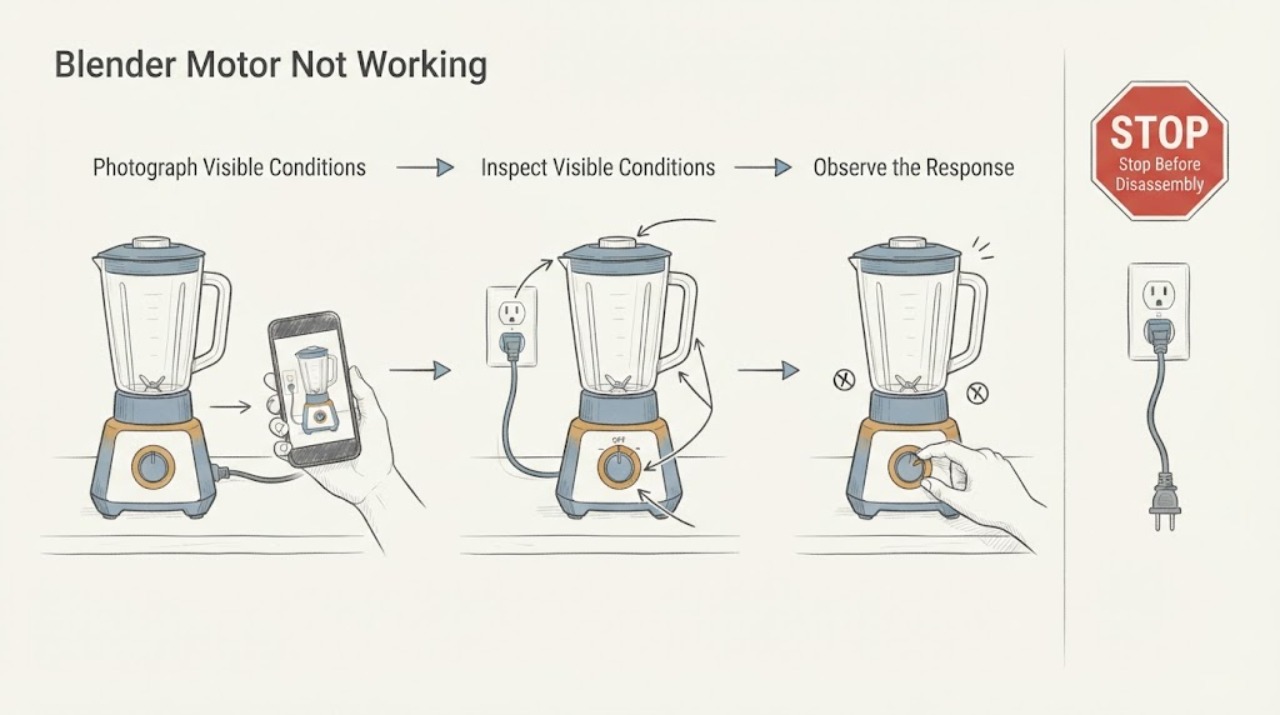
Record the blender's brand, full model number, serial number if available, and exactly what happened: never started, stopped while blending, runs with no blade movement, has lights but no motor, or has no lights at all. Photograph the rating label and any displayed code or flashing pattern without opening the base.
Expected result: The model is identifiable and the symptom is specific, or the unit remains an unknown model with only a general no-motor report.
Next step: Use the exact model manual or manufacturer support page for the remaining checks. If the model cannot be identified, limit troubleshooting to the external checks below and plan for qualified service if the problem persists.
Why this matters
Why: The manual determines whether a jar, lid, control state, overload protector, or indicator pattern applies. Without that identity, a component diagnosis or exact reset instruction would be speculation.
-
Check 2
Turn the control to Off and unplug the blender before handling the plug or base. From a dry position, check that the plug is fully seated in a grounded outlet, look for visible cord or plug damage, and check whether the outlet's breaker or fuse has operated. Do not use an adapter or extension cord for a test unless the exact manual expressly permits it; the opened KitchenAid guide specifically warns against both.
Expected result: The outlet is dead, the breaker trips again, the cord or plug is damaged, or the outlet and cord appear normal.
Next step: Leave the blender unplugged if the breaker trips, the cord or plug is damaged, or the outlet is unsafe, and arrange an electrician or qualified appliance service. If power is normal, continue only with the model's documented control and setup checks.
Why this matters
Why: An external power fault can look like a dead motor. A breaker that trips, damaged power parts, or a wet area is an electrical safety issue rather than evidence of a failed motor.
-
Check 3
With the blender still unplugged, check only the user-accessible setup items named by the exact manual: Off or Reset position, a jar or lid seated in its required position, and any documented standby or lock state. Do not force the jar, defeat a safety switch, or insert a utensil into the container. Reconnect power only if the cord, base, and work area are dry and undamaged, then use the manual's normal start control once.
Expected result: The model's manual identifies a required jar or lid position or a control state, the indicator changes normally, or the unit remains unresponsive.
Next step: If the exact manual's setup correction restores operation, stop and monitor for recurrence. If the unit remains unresponsive or requires bypassing a safety feature, unplug it and request model-specific service.
Why this matters
Why: Some blender designs will not run until their container or control state is correct, while others use different interlocks and controls. A no-start after a correctly documented setup still does not prove which internal component failed.
-
Check 4
If the blender stopped while processing, turn it Off and unplug it. Remove the jar only as the manual permits, and check externally whether the load was unusually heavy, the blades were jammed by contents, or the unit became hot. Do not reach into the blade area. Allow the exact model's stated cool-down period; do not assume another manufacturer's 15-minute or 45-minute interval applies.
Expected result: The stop followed a heavy or jammed load, the motor or base became hot, an overload indicator appeared, or the unit stopped with no overload signs.
Next step: After the model's documented cool-down and reset, make at most the manual-permitted restart attempt with a reduced load. If it stops again, will not restart, smells hot, or shows an error, unplug it and arrange service rather than repeating the test.
Why this matters
Why: KitchenAid and Hamilton Beach describe overload or overheating protection that can stop a motor to prevent damage. That explains a possible protective shutdown but does not confirm that the motor itself is defective.
-
Check 5
If the motor can be heard but the blade does not turn, unplug the unit and remove the container only as the model manual directs. Inspect only visible, user-accessible coupling or drive parts for obvious cracking, looseness, or an item that has fallen out; do not disassemble the base or touch the blades. Vitamix describes this kind of external drive-socket check for its machines, but another blender may use a different design.
Expected result: The visible coupling is damaged or loose, the blade assembly is visibly damaged, or the motor is silent and the drive area looks normal.
Next step: Stop using the blender and provide photographs, model information, and the symptom to the manufacturer or qualified service provider. Do not order a coupling, blade assembly, motor, or switch based only on appearance or a generic part listing.
Why this matters
Why: A visible drive issue can prevent blade movement even when a motor sound is present, but the result cannot identify compatibility or establish an internal motor fault on an unknown model.
Use your observations
Decision map
Find the observation that best matches what you see, then follow the next safe action.
-
PATH 01Next step
What you see
The outlet or breaker fails, the breaker trips when the blender is connected, or the cord, plug, base, or work area is wet or visibly damaged.
Do this next
Leave the blender unplugged, do not keep resetting the breaker, and arrange qualified electrical or appliance service. Do not immerse the base or cord.
Why this path and its safety boundary
Why it matters: This is an external electrical or moisture hazard, not a confirmed motor diagnosis.
-
PATH 02Next step
What you see
The blender stopped during a heavy or jammed blend, became hot, or displayed the model's overload indication, and the cord and outlet are normal.
Do this next
Use the exact manual's unplug, clear-load, cool-down, and restart instructions once. If it stops again or will not restart, keep it unplugged and contact service.
Why this path and its safety boundary
Why it matters: A protective overload or thermal shutdown is plausible, but the public examples are manufacturer-specific and do not prove a failed motor.
-
PATH 03Next step
What you see
Power is available and the model manual identifies a jar, lid, Off/Reset, standby, or lock condition that has not been satisfied.
Do this next
Correct the setup with the unit unplugged, then make the manual-permitted normal start attempt. Stop and request service if the unit remains unresponsive or requires defeating an interlock.
Why this path and its safety boundary
Why it matters: The control or safety setup may be preventing a start; the model-specific requirement must be followed rather than bypassed.
-
PATH 04Next step
What you see
The blender remains silent after the documented external checks, repeatedly stops, gives a persistent error, smells of burning, smokes, or has a damaged visible drive component.
Do this next
Unplug the blender and contact the manufacturer or a qualified repair provider with the model, serial, symptom timeline, outlet result, indicator behavior, and any visible damage. Do not open the motor base or perform live electrical tests.
Why this path and its safety boundary
Why it matters: The available symptom does not distinguish a motor, control, thermal protector, coupling, wiring, or other internal fault, and continued testing can create additional risk.
Helpful context
Understand the symptom
“The motor is not working” describes a symptom, not a confirmed motor failure. A no-start condition can be caused by a dead outlet, a control state, a jar or lid that the model requires to be seated, overload or jam protection, or an internal fault. Because the brand and model are missing, the exact controls, indicator meanings, and cool-down behavior must come from the appliance's own manual.
Use the result of each safe external check to decide whether the appliance should remain out of service. A breaker trip, damaged cord, smoke, burning smell, liquid at the base, or persistent failure after the model's permitted checks is a service condition. Do not turn a generic symptom into a motor, switch, thermal fuse, or board diagnosis without model-specific evidence and qualified testing.
When checks do not resolve it
Need a professional?
Request manufacturer or qualified appliance service when the blender remains unresponsive after the exact manual's external checks, repeatedly trips protection, stops again after a permitted cool-down, has a persistent error, burning odor or smoke, a damaged cord or plug, liquid intrusion, or a visible drive fault. Provide the full model and serial, symptom timing, outlet/breaker result, indicator behavior, load or jam context, and photographs. Do not open the motor base, bypass a jar or lid interlock, probe live wiring, or select a replacement motor, thermal fuse, control, coupling, or blade assembly without model-specific evidence.
Common questions
FAQ
Does a blender that will not start necessarily have a bad motor?
No. External power, a control state, a required jar or lid position, overload or jam protection, or another internal fault can produce the same symptom. Without the brand and model, use only the exact manual's permitted checks and do not diagnose the motor from silence alone.
Can I keep trying the blender after it stopped while mixing?
Only if the exact manual describes a safe cool-down or overload procedure and the unit has no smoke, burning smell, damaged cord, liquid intrusion, or breaker problem. KitchenAid and Hamilton Beach both describe protective responses for overload or overheating, but their controls and cool-down instructions are model-specific. Repeated failure means unplug it and arrange service.
Should I replace the motor or thermal fuse first?
No. A generic symptom does not establish which component failed or whether a replacement fits. Record the model and external observations, then use the manufacturer's service path or a qualified repair provider; do not open the base or perform live tests.
Read the exact guide
Official sources
- Hamilton Beach Blender Use and Care ManualHamilton Beach · The exact Hamilton Beach model covered by the opened manual; used for conditional overload and safety examples, not to assign a reset interval to an unknown blender.
- Service, Returns & TroubleshootingVitamix · Vitamix machines only; included as a model-family example of a safe unplugged visual check, not as evidence that an unknown blender uses the same coupling.
- Won't Start - Won't Blend - Blender - Product HelpKitchenAid · Exact K150-series guidance only; used here to show the kind of model-specific external check required when the assigned blender has no brand or model.
- KitchenAid KSB4027 Blender Troubleshooting GuideKitchenAid · KSB4027/KSB40-series manual only; its overload, controls, and no-extension-cord directions must not be treated as universal settings for an unknown blender.
Community feedback
Share a repair observation
Share a plain-text repair observation. Accepted observations are published automatically; this page may take a moment to update.