
On this page
Start here
Quick answer
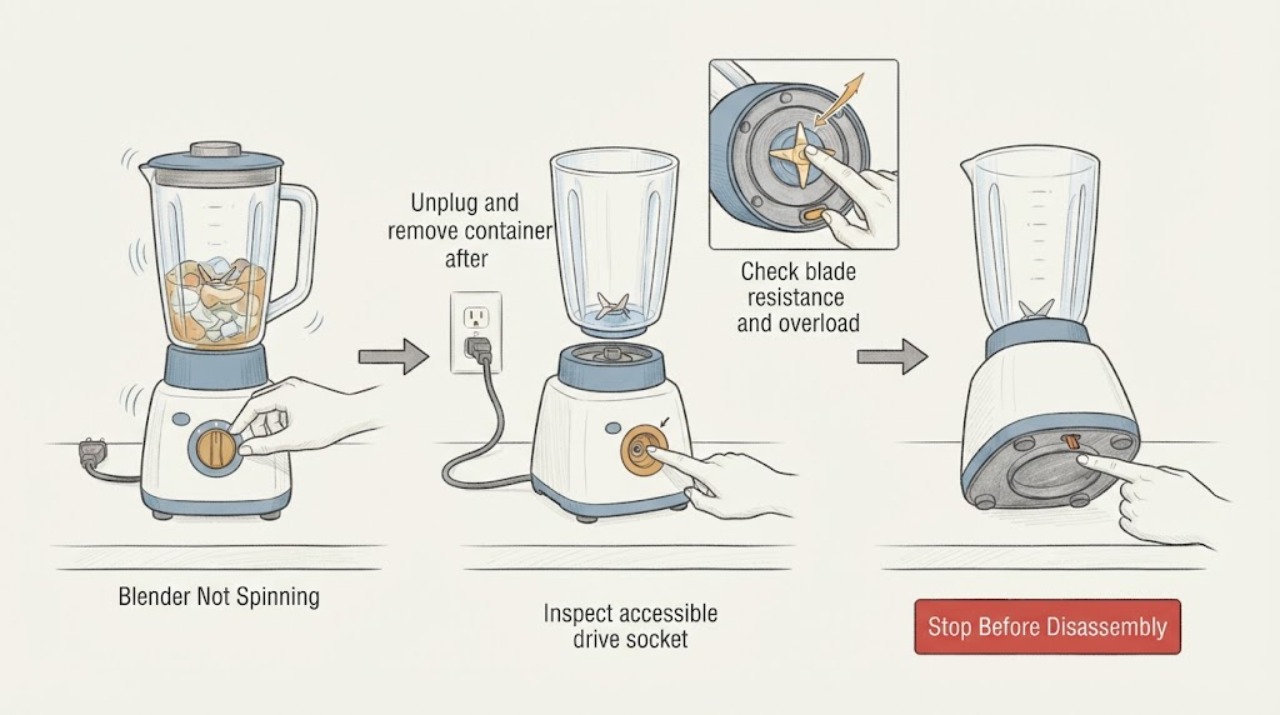
A blender that is not spinning may have a jammed/worn blade, failed drive socket, or motor overload. Unplug, remove the container, inspect the accessible coupling and blade condition, and stop for damage or repeat overheating.
Work through in order
Diagnostic checks
Use only checks that match the exact appliance or system and its official guide.
-
Check 1
Unplug and remove container after motion stops.
Expected result: Motor behavior without the container separates motor/power from coupling/blade issues.
Next step: Never remove a container while socket spins.
Why this matters
Why: Never remove a container while socket spins.
-
Check 2
Inspect accessible drive socket.
Expected result: Cracked, stuck or loose socket cannot reliably couple motor to blades.
Next step: Do not substitute an unapproved coupling.
Why this matters
Why: Do not substitute an unapproved coupling.
-
Check 3
Check blade resistance and overload history.
Expected result: Difficult/noisy blade suggests wear; heavy blending can trigger thermal overload.
Next step: Let motor cool fully; service if shutdown repeats.
Why this matters
Why: Let motor cool fully; service if shutdown repeats.
Use your observations
Decision map
Find the observation that best matches what you see, then follow the next safe action.
-
PATH 01Next step
What you see
Motor runs but blades do not and socket is cracked/stuck/loose.
Do this next
Stop and obtain exact socket/service.
Why this path and its safety boundary
Why it matters: Coupling is the leading suspect.
-
PATH 02Next step
What you see
Blade is hard to turn, noisy or has play.
Do this next
Do not run it; use manufacturer service.
Why this path and its safety boundary
Why it matters: Blade assembly wear/damage is more likely.
-
PATH 03Next step
What you see
Motor stopped after heavy blend and repeats after cooling.
Do this next
Follow load guidance and contact service if recurrent.
Why this path and its safety boundary
Why it matters: Thermal overload or underlying load/motor issue is possible.
Helpful context
Understand the symptom
Follow the first check
Unplug and remove container after motion stops.
Check the related path
Inspect accessible drive socket.
Test once and interpret
Check blade resistance and overload history.
Only after diagnosis
Potential parts
- blender drive socket or blade assembly
Only after safe inspection and manufacturer diagnosis identify the failed coupling or blade.
Match exact blender model/container.
When checks do not resolve it
Need a professional?
Stop for cracked container/blades, burning smell, smoke, liquid in base, or any energized internal work.
Common questions
FAQ
Why does the motor run while blades do not?
A damaged drive socket can stop transferring motor motion; unplug and inspect it as the manufacturer describes.
How long can overload protection take to reset?
Vitamix says it may take an hour or more depending on how hot the motor became; repeated shutdowns need service.
Read the exact guide
Official sources
- Service, Returns & TroubleshootingVitamix · Blender blade/drive socket diagnosis
- FAQ - Care & MaintenanceVitamix · Blender wear and overload
Community feedback
Share a repair observation
Share a plain-text repair observation. Accepted observations are published automatically; this page may take a moment to update.