
On this page
Start here
Quick answer
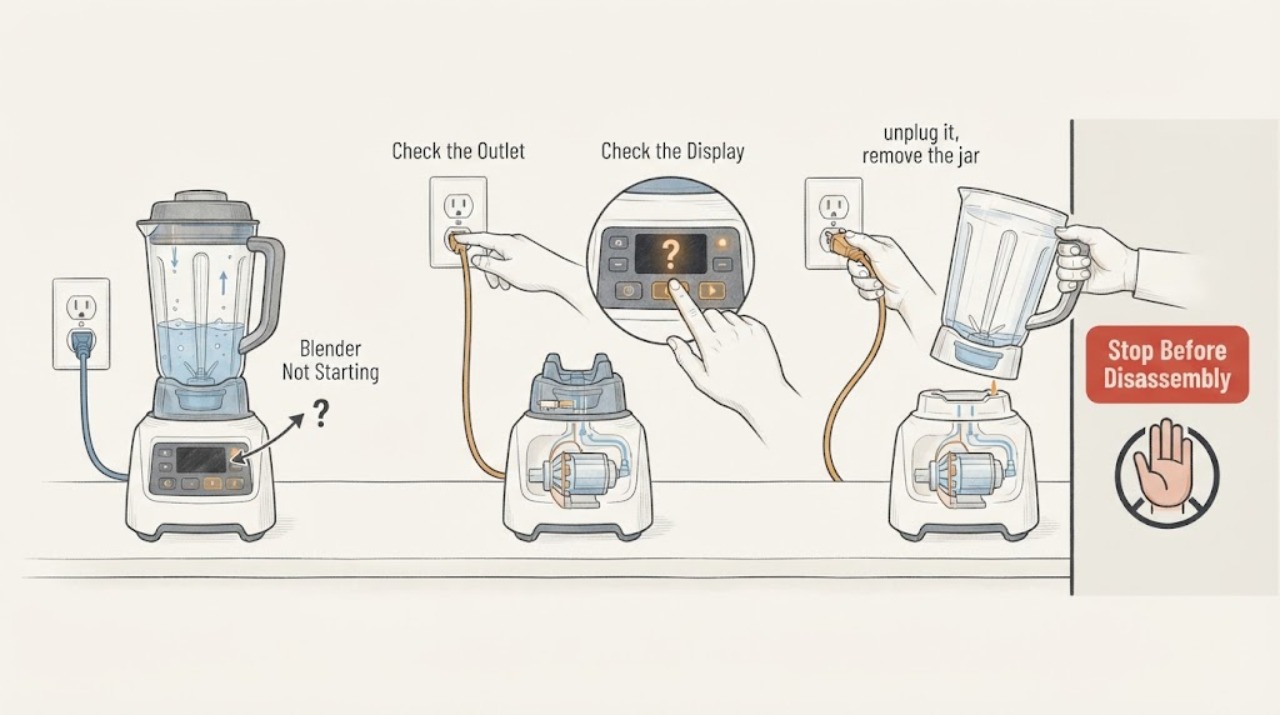
For a blender that will not start, first separate no power from a control state or a motor protection stop. Check the grounded outlet and breaker, make sure the control is awake, and if it stopped under load unplug it before checking for a jam or overfilled jar. Do not use an adapter or extension cord, and arrange service if the outlet is good but the blender remains unresponsive.
Work through in order
Diagnostic checks
Use only checks that match the exact appliance or system and its official guide.
-
Check 1
Check whether the blender has any light or display, then confirm the plug is fully seated in a grounded three-prong outlet and the circuit breaker is closed.
Expected result: The outlet is dead, the breaker is open, or the blender has power indicators.
Next step: Restore only a safe household supply condition or test a known-good grounded outlet without an extension cord.
Stop if: Do not use an adapter, extension cord, wet outlet, or damaged cord.
Why this matters
Why: No supply power points to the outlet or circuit; power with no start points to a control, interlock, or internal fault.
-
Check 2
If the unit has been idle, press the normal control or start button once and check whether the indicator wakes from sleep; do not hold controls in an unfamiliar sequence.
Expected result: The light wakes and the motor starts, or the panel stays dark/unresponsive.
Next step: If it stays unresponsive, unplug it and arrange KitchenAid or qualified service.
Stop if: Do not open the motor base or probe the controls.
Why this matters
Why: KitchenAid notes that inactivity can place the blender in sleep mode; persistent no response after a powered outlet check is not explained by sleep.
-
Check 3
If the blender stopped while blending, unplug it, remove the jar, and inspect only for a visibly overloaded or jammed mixture; use a spatula only with the jar removed and blades still.
Expected result: The jar is overloaded or ingredients are visibly stuck, or the jar is clear but the blender still will not start.
Next step: Reduce the batch or rearrange ingredients as the guide directs, reinstall safely, and try one brief test.
Stop if: Never put a hand near the blade or reconnect power while the jar is removed.
Why this matters
Why: KitchenAid describes automatic shutoff under overload or a jam as motor protection; a clear jar with no restart suggests another fault.
-
Check 4
Check the model and serial information and note whether the indicator flashes rapidly, the motor hums, or the unit is completely silent after the safe outlet and jam checks.
Expected result: A rapid error indication or persistent silence remains.
Next step: Keep the blender unplugged and contact authorized service with the observed indicator and batch conditions.
Stop if: Stop for smoke, burning odor, hot wiring, sparks, or cracked jar/base.
Why this matters
Why: KitchenAid directs service for an error indication or a failure not covered by the basic checks.
Use your observations
Decision map
Find the observation that best matches what you see, then follow the next safe action.
-
PATH 01Next step
What you see
There are no lights and the grounded outlet or breaker is not supplying power.
Do this next
Correct the safe power connection or use a known-good grounded outlet without adapters or extensions.
Why this path and its safety boundary
Why it matters: The immediate issue is household power or connection, not a confirmed blender motor failure.
-
PATH 02Next step
What you see
The blender has power but stopped with a jam or overload and the jar contents are visibly stuck.
Do this next
Unplug, remove the jar, reduce or rearrange the contents, and perform one brief restart test.
Why this path and its safety boundary
Why it matters: The guide’s overload protection may have shut the motor down to prevent damage.
-
PATH 03Next step
What you see
The outlet is good, the jar is clear, and the blender remains silent or shows a rapid error indication.
Do this next
Leave it unplugged and arrange authorized service; do not dismantle the base.
Why this path and its safety boundary
Why it matters: An internal control or motor fault needs service.
Helpful context
Understand the symptom
What the symptom tells you
For a blender that will not start, first separate no power from a control state or a motor protection stop. Check the grounded outlet and breaker, make sure the control is awake, and if it stopped under load unplug it before checking for a jam or overfilled jar. Do not use an adapter or extension cord, and arrange service if the outlet is good but the blender remains unresponsive.
Use the exact model information
Controls, code meanings, safe access, and replacement parts vary by model. Record the model and the exact symptom before requesting service.
When checks do not resolve it
Need a professional?
Give the manufacturer or a qualified appliance technician the exact model, serial information, symptom timing, and all observations. Do not open sealed, refrigerant, gas, high-voltage, or energized assemblies.
Common questions
FAQ
Why did the blender stop and then refuse to start?
KitchenAid says an overload or jam can trigger automatic shutoff to protect the motor. Unplug it, remove the jar, reduce or rearrange the mixture, and test once after safe reassembly.
Can I use an extension cord to test it?
No. The KitchenAid guide calls for a grounded three-prong outlet and warns against adapters and extension cords.
Read the exact guide
Official sources
- KSB4027 Blender Troubleshooting GuideKitchenAid · Blender startup power, overload/jam behavior, sleep mode, and electrical safety
Community feedback
Share a repair observation
Share a plain-text repair observation. Accepted observations are published automatically; this page may take a moment to update.