
On this page
Start here
Quick answer
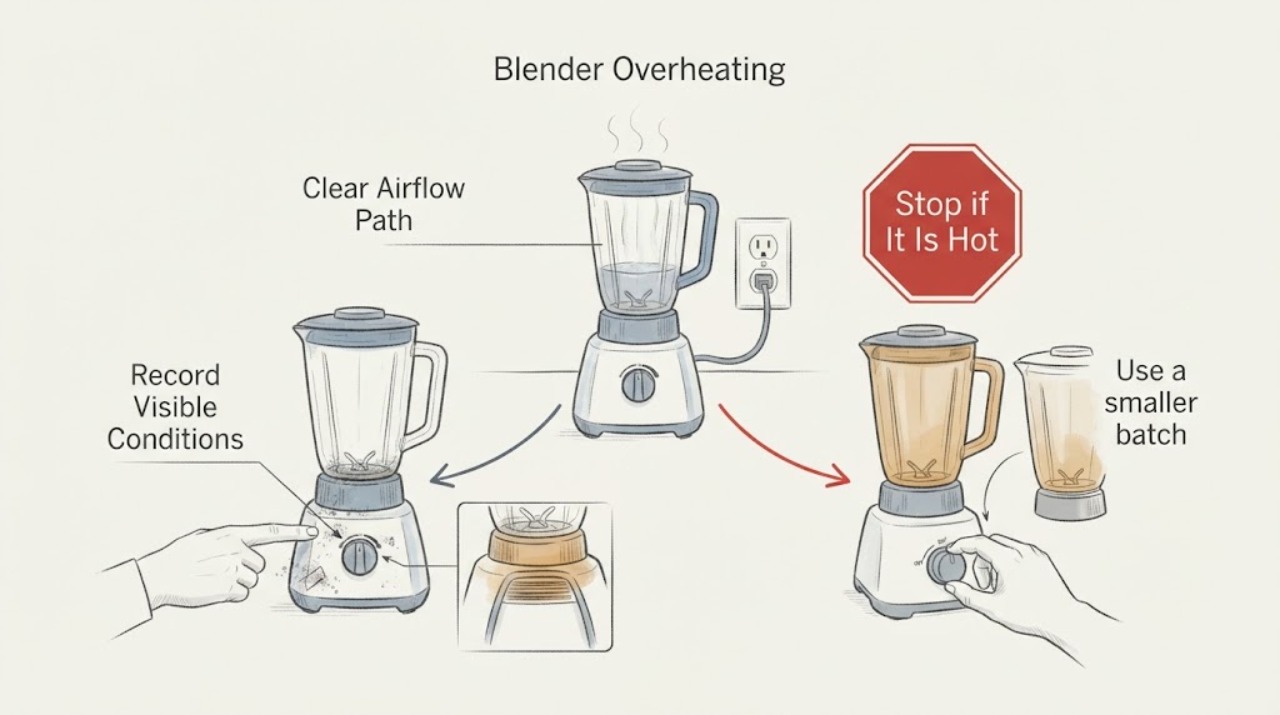
If a blender overheats, stop blending, switch it off, and let the motor cool according to its manual. Then reduce load or blending time, use the recommended speed and enough liquid for the recipe, and keep the motor base vents clear. A repeated thermal shutdown, burning smell, smoke, or hot electrical cord needs service.
Work through in order
Diagnostic checks
Use only checks that match the exact appliance or system and its official guide.
-
Check 1
Switch the blender off and unplug it when safe; record the recipe, quantity, speed, processing time, room temperature, and whether the container contents stopped circulating.
Expected result: The motor is hot but there is no burning smell, or smoke, sparks, or damaged wiring is present.
Next step: Allow the manual-specified cool-down and do not use a hair dryer on heat or touch the blade assembly.
Why this matters
Why: Heat without a hazard can fit overload protection; smoke, odor, or electrical damage is a stop condition.
-
Check 2
After cooling, check the motor-base vents and surrounding space for dust or objects blocking airflow.
Expected result: The vents or base area are blocked, or airflow is clear.
Next step: Clear only the exterior and keep the base dry before one test.
Why this matters
Why: Restricted ventilation can make thermal protection operate sooner; clear airflow with repeated shutdown points toward load or component diagnosis.
-
Check 3
Use a smaller batch and the recipe’s recommended speed and liquid balance; do not force dense ingredients with prolonged low-speed blending.
Expected result: The smaller, correctly loaded blend completes, or the motor overheats again.
Next step: Stop repeated testing after one controlled attempt.
Why this matters
Why: Recovery with a suitable load supports an overload condition; recurrence under a light load makes a motor, drive, or control fault more likely.
-
Check 4
If the motor stops again, record whether the overload indicator or other display appears and whether the container, blade, or drive is unusually hot or obstructed; do not reach into blades.
Expected result: The unit resets and runs normally, or it repeatedly shuts down or remains inactive after cooling.
Next step: Contact Vitamix service with the model, recipe load, timing, and reset result.
Why this matters
Why: A one-time overload can be normal protection; repeated shutdown or no restart is not identified by the symptom alone.
Use your observations
Decision map
Find the observation that best matches what you see, then follow the next safe action.
-
PATH 01Next step
What you see
The blender cools, the vents are clear, and a smaller correctly loaded blend completes.
Do this next
Use the manual’s loading and speed guidance for future blends.
Why this path and its safety boundary
Why it matters: The original load, speed, time, or airflow was the leading cause of the overload.
-
PATH 02Next step
What you see
The blender repeatedly overheats with a light load and clear vents, or will not restart after cooling.
Do this next
Stop use and arrange Vitamix service.
Why this path and its safety boundary
Why it matters: A motor, drive, sensor, or control fault is more likely than recipe loading.
-
PATH 03Next step
What you see
Smoke, burning odor, sparks, damaged cord, liquid in the base, or severe blade obstruction is present.
Do this next
Disconnect power only when safe and obtain qualified service; do not disassemble the base.
Why this path and its safety boundary
Why it matters: This is a safety stop.
Helpful context
Understand the symptom
Vitamix explains that overload protection can shut the motor off to prevent overheating. Dense mixtures, excessive quantity, unsuitable speed, long processing, and blocked base airflow can raise motor load.
An overheated motor is not a reason to keep restarting it. Separate a single overload that resets after cooling from a repeat fault under a light, correctly loaded blend.
Only after diagnosis
Potential parts
- model-specific motor base, drive coupling, or thermal-control component
Consider a part only after correct load, speed, cooling, and ventilation checks and a service diagnosis.
Overheating protection and drive assemblies vary by blender model.
When checks do not resolve it
Need a professional?
Contact the manufacturer or qualified small-appliance service when the blender repeatedly overheats after a cool-down and correct load, or will not restart.
Common questions
FAQ
How long should a blender cool after overheating?
Use the exact owner manual. Vitamix support describes turning the power off for up to 45 minutes for an overload reset, with longer cooling possible in a hot room.
Can adding more liquid prevent blender overheating?
For dense mixtures, Vitamix advises following loading instructions, using the recommended speed, and considering more liquid or a smaller volume when ingredients do not circulate.
Read the exact guide
Official sources
- Frequently Asked QuestionsVitamix · Opened official Vitamix owner support; it explains overload protection, cool-down/reset behavior, loading, speed, liquid, and ventilation considerations.
Community feedback
Share a repair observation
Share a plain-text repair observation. Accepted observations are published automatically; this page may take a moment to update.