
On this page
Start here
Quick answer
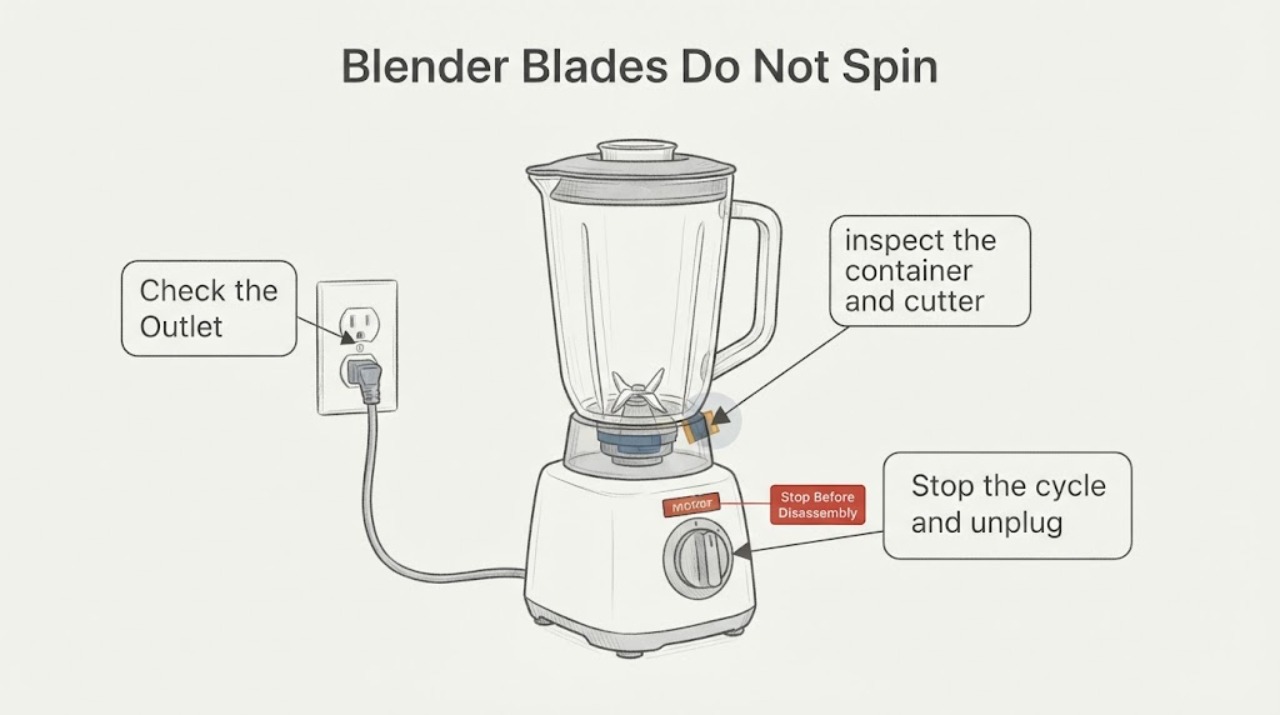
Unplug the blender before touching the jar, cutter assembly, or any ingredient. First separate a silent appliance from a motor that hums or stops: check the outlet, plug, model-specific power/RESET control, and any jar or lid seating rule from the exact manual. If it hums, stalls, or stops, do not keep restarting it; an overloaded mixture or thermal protection may be involved. With power disconnected and the container removed, inspect only the accessible jar, cutter assembly, cord, and drive end if the exact manual permits it. Hamilton Beach’s official commercial-blender manuals use these checks and say a cutter that will not turn smoothly or has loose/broken blades requires discontinuing use, not tightening the assembly. Do not put a hand or utensil in a powered jar, run a damaged blender, or choose a motor/coupler from sound alone. Repeated breaker trips, burning smell, smoke, damaged cord, a cracked jar, or a bound or loose blade is a stop-and-service condition.
Work through in order
Diagnostic checks
Use only checks that match the exact appliance or system and its official guide.
-
Check 1
From outside the blender, note whether the controls respond, whether the motor is silent or hums, whether it stops after starting, and whether an outlet breaker or the appliance’s documented reset has tripped. Keep the lid in place and do not put a hand or utensil into the jar.
Expected result: The controls are completely dead; the motor hums or stops; the unit starts and then stops; or a breaker/reset trips again.
Next step: Check the plug, outlet and exact manual’s start/reset sequence only from outside. If the breaker or reset trips again, or the motor repeatedly stalls, leave the blender unplugged and arrange qualified service.
Why this matters
Why: A dead control response points first to power, control position, or a model-specific interlock. A hum or stall can be consistent with a load or overload-protection condition. A repeated trip is not a normal test result and does not identify a particular part.
-
Check 2
Stop the cycle and unplug the blender before removing the container. If the exact manual gives a cool-down instruction after overload or overheating, follow that instruction; otherwise do not guess a time or keep restarting it.
Expected result: The batch is unusually thick, over the fill mark, contains large solids, or the motor housing is hot; or the load is normal and the same stall/noise returns.
Next step: Use the exact model’s recipe/load limits and allow its documented cool-down before one supervised retest. If the load is normal or the symptom returns, stop use and request model-specific diagnosis.
Why this matters
Why: Official Hamilton Beach troubleshooting connects insufficient liquid, oversized solids, overfilling, motor overheating and thermal overload with a blender that stops or fails to mix. These observations do not prove that another brand has the same protection or a failed motor.
-
Check 3
With the blender unplugged and the container removed, inspect the container and cutter assembly in good light for cracks, chips, loose or broken blades, leaks, or obvious obstruction. Only if the exact manual permits it, check the removed drive end or cutter for smooth movement without force.
Expected result: The cutter is loose, chipped, broken, cracked, leaking, or will not turn smoothly; or the removed assembly looks intact and moves normally.
Next step: Do not operate a blender with a damaged, loose, cracked or bound cutter. Photograph the label and assembly and contact the manufacturer or qualified service for exact replacement/repair identification; do not reach into the base or install a guessed part.
Why this matters
Why: A damaged or bound cutter can prevent blade rotation and can injure the user. Hamilton Beach’s opened manuals direct users to discontinue use for loose or broken blades and to replace the relevant container/cutter rather than tighten or repair the assembly. A normal hand check does not clear the motor, coupling, control or interlock.
-
Check 4
After power is disconnected, inspect only the visible cord, plug, base exterior, jar seat and surrounding work surface for liquid, burn marks, damaged insulation or anything pressing against the controls. Do not open the base or perform electrical measurements.
Expected result: There is a burning smell, smoke, sparking, damaged cord/plug, liquid in the base, a cracked jar, or no visible external hazard.
Next step: Keep the blender unplugged. For smoke, sparking or an electrical burning smell, move away and use the appropriate household electrical/emergency response; otherwise arrange qualified appliance service. A clear exterior still does not authorize internal testing.
Why this matters
Why: These are safety symptoms or unresolved faults rather than a reason to try another cycle. The official manuals prohibit operation with a damaged cord or plug and direct examination or electrical/mechanical adjustment to technical service.
Use your observations
Decision map
Find the observation that best matches what you see, then follow the next safe action.
-
PATH 01Next step
What you see
The blender has no lights or response, and the outlet is unconfirmed or the exact start/reset/interlock sequence has not been checked.
Do this next
Verify the outlet and plug externally and consult the exact manual for the control and jar/lid seating sequence. Do not bypass an interlock or open the base.
Why this path and its safety boundary
Why it matters: The symptom is still an external power, control-position, or model-specific seating question; it is not evidence of a bad motor.
-
PATH 02Next step
What you see
The motor hums or stops with a thick, overfilled, or oversized-solid mixture, or the housing is hot.
Do this next
Unplug, follow the exact manual’s load and cool-down guidance, and make at most the documented supervised retest. Repeated stalls need service.
Why this path and its safety boundary
Why it matters: The load or thermal protection is a plausible explanation, but the exact model determines its limits and cool-down procedure.
-
PATH 03Next step
What you see
With power removed and the container off, a cutter is loose, damaged, cracked, leaking, or does not turn smoothly when the exact manual allows that check.
Do this next
Discontinue use and contact the manufacturer or qualified service for the exact container/cutter path. Keep hands out of the base and do not run the blender without a properly fitted, manual-approved container.
Why this path and its safety boundary
Why it matters: The container/cutter assembly is unsafe or mechanically obstructed; the observation does not justify tightening it or naming a compatible replacement without the model.
-
PATH 04Next step
What you see
A breaker or reset trips repeatedly, or there is smoke, sparking, burning smell, damaged cord, liquid in the base, or a persistent unexplained grinding/clicking noise.
Do this next
Leave the appliance unplugged and arrange qualified appliance or manufacturer service. Provide the full model label, symptom timing, load, and any visible damage; do not perform live tests or bypass safety controls.
Why this path and its safety boundary
Why it matters: This is a safety or unresolved electrical/mechanical service boundary, not a safe user-level parts diagnosis.
Helpful context
Understand the symptom
Start with silence versus a hum
“No noise” and “a noise without blade movement” point to different checks. Observe only from outside with the lid in place: does the control light or display respond, is there a hum, does it stop after starting, and does a breaker trip? Record the full brand and model from the rating label before using any manual. The two Hamilton Beach manuals opened for this research are official commercial-blender examples, not proof that another blender has the same switches, interlock, jar, or fault code.
Use the exact manual for power and seating rules
A silent blender can have no outlet power, an off or tripped appliance reset, a control that is not in its start position, or a model-specific jar/lid seating requirement. Check the outlet and plug externally and follow the exact manual’s start sequence. Do not bypass an interlock, remove a cover, or test exposed wiring. The Hamilton Beach manuals ask the user to check the proper outlet and a tripped fuse or breaker, but they do not authorize turning an unidentified blender into a generic electrical repair.
Treat a hum, stall, or unusual noise as a stop signal
If the motor hums, stops, or makes a new grinding or clicking noise, stop the cycle and unplug it. A thick or overfilled mixture, large solids, a dull or damaged cutter, a jam, or thermal overload can produce similar symptoms. Allow only the cool-down or load guidance stated in the exact manual; do not repeatedly restart an overheating or stalled motor. Do not infer a failed motor, coupling, bearing, or board from the sound alone.
Inspect the removed container without repairing the cutter
After power is disconnected and the container is removed, look for a cracked or leaking jar, loose or chipped blades, visible damage, and a cord or plug with damaged insulation. If the exact manual permits a hand check of the removed cutter or drive end, it should turn smoothly without force; stop if it binds. The opened Hamilton Beach manuals say not to use loose or broken blades and not to attempt to tighten or repair the cutter assembly. Do not reach into the base, remove panels, or substitute a part without the exact model.
When checks do not resolve it
Need a professional?
Request manufacturer or qualified appliance service when the exact model’s external checks do not restore operation, when a cutter is loose or bound, or when the blender has repeated trips, overheating, smoke, burning smell, liquid in the base, damaged cord, or persistent abnormal noise. The model label and container/cutter design are required before selecting a part; the symptom alone does not establish motor, coupling, switch or control failure.
Common questions
FAQ
Can I put a spoon in the blender to free the blades?
No. Do not insert a spoon, scraper or hand while the blender is powered or the blades can move. Unplug first; only remove the container and inspect it in the way the exact manual permits.
Does a humming blender always need a new motor?
No. A thick or overfilled mixture, oversized solids, thermal overload, a bound cutter, power issue or control/interlock problem can look similar. Let the exact manual and a qualified inspection establish the cause.
Should I tighten a loose blender blade?
No. The opened Hamilton Beach manuals direct users to discontinue use for loose or broken blades and not to tighten or repair the cutter assembly. Other brands may specify a different replaceable assembly, so use the exact model’s parts and service instructions.
Read the exact guide
Official sources
- Hamilton Beach Commercial Food Blender Operation ManualHamilton Beach Commercial · Opened official manual used only for model-bounded examples of load, thermal-overload, cutter and service guidance. It is not evidence that an unidentified blender shares these model details.
- Hamilton Beach Commercial Blender Model HBH550 Operation ManualHamilton Beach Commercial · Opened official manual used as a representative model-specific source for safe external checks, overload behavior, container/cutter inspection and service boundaries. It does not establish the controls, limits, parts or fault meaning of an unidentified blender.
Community feedback
Share a repair observation
Share a plain-text repair observation. Accepted observations are published automatically; this page may take a moment to update.