
On this page
Start here
Quick answer
Unplug the blender before touching the jar, blade assembly or ingredients. A blade that will not turn can result from an unseated jar or blade assembly, an overloaded or air-locked mixture, a jam, damaged blade parts, or a drive/motor fault; the symptom alone does not identify which one. With power disconnected, remove the jar, visually check for a jam, cracked jar, loose or damaged blade assembly, and confirm the jar and lid/interlock are seated according to the exact manual. Do not put fingers or utensils into the blade area, turn the motor on with the jar removed, or keep using a locked, damaged or burning-smelling blender. If the safe external checks do not resolve it, use the manufacturer or authorized service route.
Before you begin
Safety first
- Do not insert fingers or utensils into the blade area, test the blade by hand, run the motor without the jar, bypass a lid/interlock, open the motor base, or replace a blade/coupling without exact model confirmation. Keep a locked, cracked, loose or burning-smelling blender unplugged.
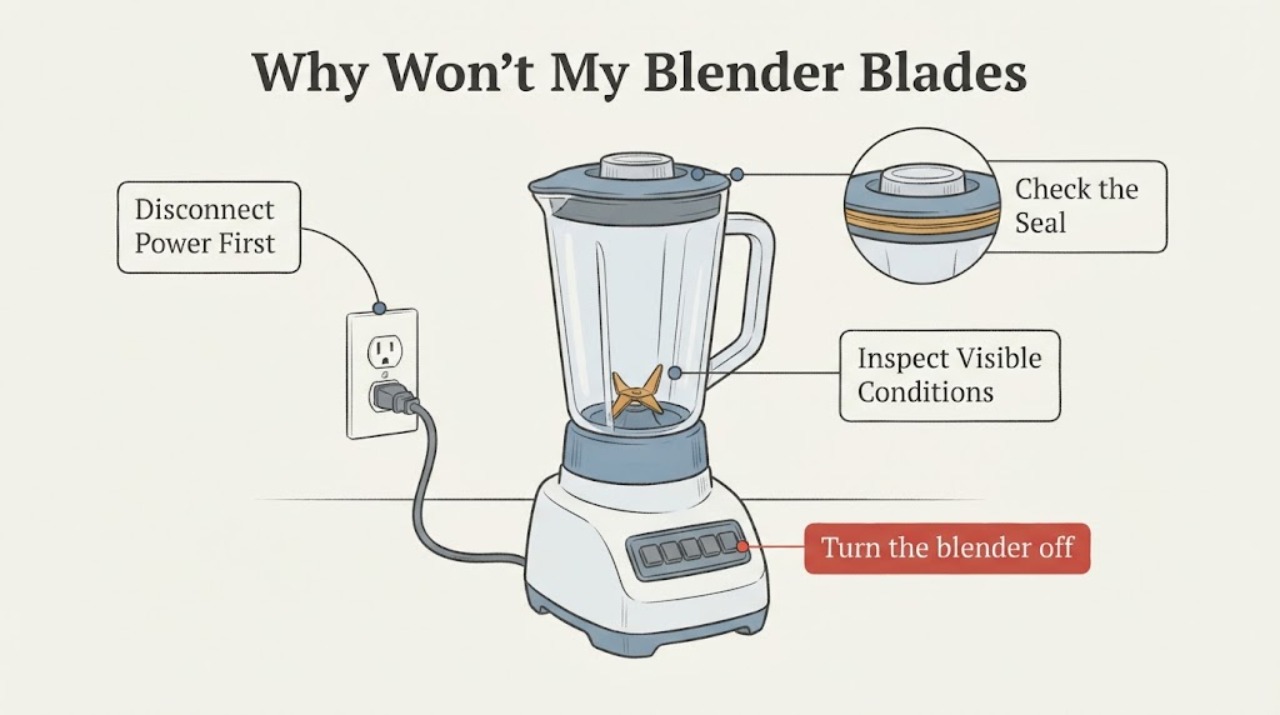
Work through in order
Diagnostic checks
Use only checks that match the exact appliance or system and its official guide.
-
Check 1
Turn the blender off and unplug it before moving the jar, clearing ingredients or inspecting any blade assembly. Do not reach into the jar, insert a utensil near the blades, or restart the motor while the jar is removed.
Expected result: The blender is disconnected from power and the jar can be removed without forcing it, or the jar/blade assembly remains stuck or damaged.
Next step: Continue only with a visual external inspection. If the assembly is cracked, loose, jammed in place or cannot be removed safely, keep the blender out of service and contact the manufacturer or an authorized service provider.
Why this matters
Why: Power isolation removes the immediate start hazard. A stuck or damaged assembly is not a safe opportunity for a hand test, and Hamilton Beach warns that a locked blade assembly can damage the motor.
-
Check 2
With power disconnected, remove the jar and look at the mixture from above without touching the blades. Check whether the container is overfilled, packed with hard or frozen pieces, or has an air pocket leaving ingredients stuck to the sides; use a spatula only to rearrange contents away from the blade area.
Expected result: The batch is heavy, overfilled, tightly packed or has an air pocket, or the mixture is not obstructing the blade area.
Next step: For a clearly overloaded batch, divide it and follow the exact recipe/manual for liquid and fill limits. If the blade remains locked or the mixture was not the cause, stop troubleshooting and arrange service.
Why this matters
Why: KitchenAid identifies overload/jam and air-pocket conditions as reasons blending can stop or ingredients can miss the blade. If the mixture is clear and the blade still does not turn, the problem may be assembly, drive or motor related and cannot be confirmed externally.
-
Check 3
Visually inspect the jar, collar/seal and blade assembly for a crack, chip, loose blade, bent part, missing seal or residue around the drive interface. Do not spin the blade by hand or probe underneath it.
Expected result: Any jar or blade part is cracked, broken, loose, bent or missing its seal, or all visible parts appear intact.
Next step: If damage is present, keep the blender out of use and use the exact model support route for fitment. If no damage is visible but the blade will not turn, do not substitute a generic blade or coupling; request service.
Why this matters
Why: Hamilton Beach says damaged jars or cutting-blade assemblies should not be used. An intact-looking assembly still does not prove that the internal drive or motor is healthy.
-
Check 4
Confirm the exact manual's jar, lid and base-seating requirements and read the model number from the appliance label. For a model that has a documented interlock, check only that the jar and lid are seated and locked as the manual shows; do not defeat the interlock or operate with missing parts.
Expected result: The exact model confirms a seating/interlock requirement and the jar can be locked normally, or the model and assembly remain uncertain.
Next step: If the exact manual's seating check does not restore operation, use the manufacturer's support or authorized service route. Do not order a blade, jar, coupling or motor by appearance.
Why this matters
Why: KitchenAid says its personal blender will not operate when the jar and blade assembly are not properly attached. Other blender designs may differ, so a family-level instruction cannot prove compatibility or a fault.
Use your observations
Decision map
Find the observation that best matches what you see, then follow the next safe action.
-
PATH 01Next step
What you see
After power is disconnected, the mixture is visibly overfilled, tightly packed, frozen into a block or separated from the blade by an air pocket, and the jar/blade assembly is intact.
Do this next
Rearrange contents with a spatula away from the blades, divide the batch and follow the exact manual's liquid/fill guidance. Keep the blender unplugged while clearing it.
Why this path and its safety boundary
Why it matters: The opened KitchenAid manual describes overload, jam and air-pocket conditions that can stop blending or leave ingredients missing the blade.
-
PATH 02Next step
What you see
The motor does not start, the jar does not lock as the exact manual shows, or the blade assembly/seal is not tightened or seated correctly.
Do this next
Use only the exact manual to reseat the clean, undamaged jar and blade assembly after power is disconnected. If it still will not operate, stop and contact authorized service; do not bypass the interlock.
Why this path and its safety boundary
Why it matters: KitchenAid says an improperly attached jar and blade assembly prevents operation, but the exact interlock design depends on the model.
-
PATH 03Next step
What you see
The blade assembly is locked, the jar or blade is cracked/broken/loose, the motor smells hot or burning, or the blade will not turn after a safe external clear.
Do this next
Do not use or load-test the blender. Keep it unplugged and obtain exact-model manufacturer or authorized service guidance.
Why this path and its safety boundary
Why it matters: A locked or damaged assembly can damage the motor and can create a laceration or electrical risk. The symptom does not prove which internal component failed.
-
PATH 04Next step
What you see
The blender is a Cuisinart Compact Blender & Juicer Extractor Combo model CBJ-450 and the blade assembly nut or assembly is loose.
Do this next
Stop using the blender part and follow Cuisinart's recall-registration/replacement route. If the model is different, do not assume this recall applies; identify the exact model first.
Why this path and its safety boundary
Why it matters: Cuisinart's opened recall notice says the blender part of CBJ-450 can present a laceration hazard when the blade assembly nut loosens.
Helpful context
Understand the symptom
First separate a setup problem from a mechanical stop
A blender may appear not to turn because the motor does not start, because the jar is not seated in an interlock, because the motor runs but the blade assembly is not being driven, or because ingredients have jammed or formed an air pocket around the blade. KitchenAid says an improperly attached jar and blade assembly can prevent operation, while its troubleshooting manual describes overload, jam and air-pocket conditions. These possibilities look similar from the outside, so do not label the motor, coupling or blade as failed without model-specific evidence.
Only clear the jar after disconnecting power
If the motor stopped or the blades are locked, turn the control off and unplug the blender before removing the jar. KitchenAid's manual directs the user to unplug, remove the jar and rearrange heavy or air-locked contents with a spatula. Keep fingers and utensils out of the blade area, and do not turn the blender on with the jar removed to see whether the drive moves. If the jar, blade assembly or collar is cracked, loose or visibly damaged, stop using it rather than trying to load-test it.
The exact model controls the next step
Blender jars, blade assemblies, seals, collars and base interlocks vary by model. KitchenAid's personal-blender page requires a tightened blade assembly and a locked jar, while its manual routes an unresolved malfunction to an authorized service center. The assigned topic has no brand or model, so a replacement blade, coupling, jar or motor cannot be selected from the symptom alone. Record the data plate and use the exact owner manual or manufacturer support route before ordering parts.
When checks do not resolve it
Need a professional?
Safety scope: Do not insert fingers or utensils into the blade area, test the blade by hand, run the motor without the jar, bypass a lid/interlock, open the motor base, or replace a blade/coupling without exact model confirmation. Keep a locked, cracked, loose or burning-smelling blender unplugged.
Have this ready
- Provide the complete brand/model number, jar and blade assembly type, whether the motor hums or is silent, when the symptom began, what was being blended, whether the batch was overloaded, visible damage, burning odor and any prior service history.
Common questions
FAQ
Why does the motor run but the blender blades do not turn?
An overload, jam, air pocket, improperly seated blade assembly or jar, damaged blade parts, or an internal drive fault can look similar. Unplug first, inspect externally and follow the exact manual; do not assume the motor or coupling is bad from sound alone.
Can I reach in and free the blades while the blender is unplugged?
Do not put fingers into the blade area. With power disconnected, remove the jar if it can be removed safely and rearrange contents from above with a spatula kept away from the blades, as the model manual directs. A locked or damaged assembly should go to service.
Should I run the blender without the jar to test the base?
No. The assigned model is unknown and the article does not recommend an unloaded motor test. Use the exact manual's seating/interlock guidance and authorized service route instead.
Can I buy a generic replacement blade or coupling?
Not safely from this symptom alone. Jar, blade, seal, collar and drive interfaces vary by model. Record the complete model number and obtain fitment from the manufacturer or authorized service provider.
Read the exact guide
Official sources
- Hamilton Beach Blender Owner's Manual — Safety and TroubleshootingHamilton Beach · The opened manual warns that a locked cutting-blade assembly can damage the motor and says not to use cracked jars, broken blades or loose blades. Its exact model is not assigned, so only the external damage and stop-use principle is carried into this generic article; its model-specific operation steps are not generalized.
- How to Use the Personal Cordless Blender - Product HelpKitchenAid Product Help · The opened KitchenAid instructions require a tightened blade assembly, a present seal and a jar locked onto the base; they state that an improperly attached jar/blade assembly will not operate. These are model-family instructions and are presented conditionally for an unknown blender.
- KitchenAid Blender Owner's Manual — TroubleshootingKitchenAid · The opened manual says overload/jam can stop blending, an air pocket can make ingredients miss the blade, and the user should unplug, remove the jar and rearrange contents with a spatula; it then routes unresolved faults to an authorized service center. It is used as an example of model-specific guidance, not as proof of a universal blender design.
- Blender Juicer Recall InformationCuisinart / Conair · The opened recall notice is used only for the explicitly conditioned CBJ-450 branch. It says the blender blade-assembly nut can loosen and create a laceration hazard, and directs owners to stop using the blender part and contact Cuisinart for replacement instructions. It does not apply to an unidentified blender.
Community feedback
Share a repair observation
Share a plain-text repair observation. Accepted observations are published automatically; this page may take a moment to update.