
On this page
Start here
Quick answer
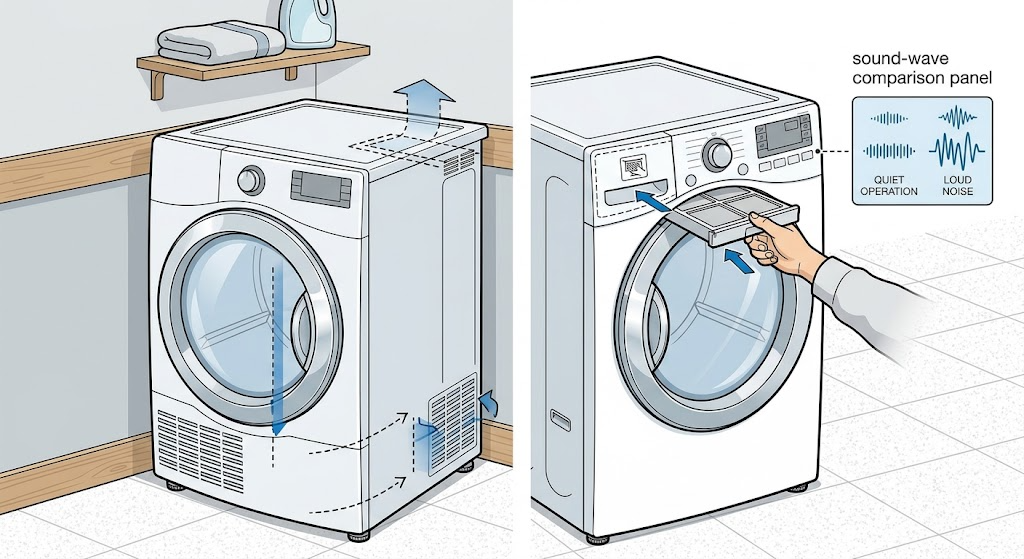
First identify the sound instead of treating every noise as the same fault. Blomberg’s dryer manual says an occasional metallic compressor sound and the sound of water being pumped to the tank can be normal, while a dryer that is not level can vibrate and become noisier. Stop the cycle if the sound is scraping, grinding, repeated hard impact, or accompanied by smoke, burning odor, sparking, or a hot or damaged cord. With the dryer cool and unplugged, check for coins or metal objects, leftover transport material, a loose or overloaded load, blocked lint or ventilation areas, a drain hose that is touching the cabinet, and a machine that rocks on its feet. Correct only visible, manual-approved issues; if the noise remains, the drum does not turn freely, or an internal part appears to be failing, arrange authorized appliance service rather than opening the cabinet.
Work through in order
Diagnostic checks
Use only checks that match the exact appliance or system and its official guide.
-
Check 1
From a safe position, listen briefly to the dryer and note whether the sound is a steady hum, an occasional metallic sound, a short pumping sound, a vibration or rattle, a rhythmic scrape, or a hard impact; do not put hands near the moving drum.
Expected result: Record whether the sound starts with the drum, changes with drum speed, appears during water movement, occurs only at startup or shutdown, or is continuous and worsening.
Next step: Stop and unplug after the brief observation, allow hot surfaces to cool, and continue only with the visible checks for the recorded sound pattern.
Stop if: Stop immediately for scraping that rapidly worsens, grinding, hard impacts, smoke, burning odor, sparking, or a hot or damaged plug or cord.
Why this matters
Why: An occasional metallic compressor sound or water-pumping sound can be normal on the applicable model. A sound that follows drum rotation, repeats as the drum turns, or is accompanied by cabinet movement is more consistent with load, installation, a foreign object, or a mechanical issue and needs the matching check below.
-
Check 2
With the dryer off, unplugged, and cool, remove the laundry and inspect the visible drum, door area, and pockets of the load for coins, metal parts, loose fasteners, or packaging and transport material; turn the drum only as far as it moves freely by ordinary hand pressure.
Expected result: The sound source is a loose object or remaining packaging, the load contains a hard or metal item, the empty drum is quiet and free, or the drum rubs, catches, or makes the same noise when empty.
Next step: Remove only a loose object that is plainly accessible, remove all transport material before first use, and run no further cycle if the empty drum still rubs, catches, or makes a mechanical noise.
Stop if: Do not reach behind baffles, remove the drum, pry a stuck object, or operate the dryer with a damaged drum or exposed sharp edge.
Why this matters
Why: A foreign object or packaging can strike the drum and may explain a load-dependent rattle. Noise or resistance with an empty drum points away from the laundry and toward a drum, support, fan, or drive fault that should not be forced.
-
Check 3
Check from outside that the dryer stands firmly on a stable, level surface, does not rock, its adjustable feet remain installed, and the rear or sides are not striking a socket, pipe, furniture edge, or another appliance during operation.
Expected result: The cabinet rocks, a foot is not carrying weight, the floor is soft or uneven, the rear contacts something, or the cabinet remains stable and clear.
Next step: Adjust the feet only as the manual permits until the dryer is level and firm, remove visible contact, and retest only after the machine is stable; do not unscrew the feet from their housings.
Stop if: Do not move a heavy dryer alone, place material under it as an improvised spacer, or alter a stacking arrangement without the approved installation hardware.
Why this matters
Why: An unbalanced cabinet or contact with a nearby object can amplify normal drum or motor movement into a rattle or vibration. A stable, clear installation makes an internal or load-related source more plausible if the noise persists.
-
Check 4
Inspect the visible lint filter, filter housing or drawer, front ventilation grilles, and surrounding area for heavy lint or an object that is blocking airflow; clean only the user-accessible parts using the manual’s procedure after the dryer is cool.
Expected result: Lint or a blocked grille is present, the filter is clean and correctly installed, or cleaning would require reaching sharp evaporator fins or removing a cover.
Next step: Restore the clean filter and clear ventilation area, then monitor whether the sound changes. Ask a qualified technician to inspect an internal fan or evaporator when it cannot be reached by the normal care instructions.
Stop if: Do not operate without the lint filter installed, put bare hands on evaporator fins, spray or pour water into the dryer, or remove internal covers.
Why this matters
Why: Lint buildup and blocked ventilation can increase operating strain and may accompany unusual sounds or long cycles. A clean visible path does not rule out an internal fan or airflow fault, and sharp internal fins are not an ordinary touch point.
-
Check 5
If the model uses a water tank or drain hose, observe whether the noise occurs only when water is being pumped and check from outside that the hose is not kinked, stepped on, loose, or tapping the cabinet; do not disconnect a wet connection while powered.
Expected result: The sound is a brief pump noise with normal drainage, a hose or connection vibrates against the cabinet, water is not draining normally, or the sound continues when no water movement is expected.
Next step: Correct only a plainly visible hose position or cabinet contact according to the manual, then observe one cycle. Escalate for leakage, blocked internal drainage, or an abnormal pump sound.
Stop if: Do not use tools to force a hose connection, open a pump, remove a filter housing cover while powered, or continue if water reaches electrical parts.
Why this matters
Why: A brief pump sound can be a normal part of collecting condensate, while a loose or kinked hose can add vibration or water problems. Continuous noise, abnormal grinding, leakage, or a pump that cannot move water needs service rather than repeated cycling.
-
Check 6
After a visible object, load, level, contact, filter, or hose issue is corrected, run a short supervised cycle with the dryer empty or with a small normal load and stand nearby without opening the cabinet.
Expected result: The sound disappears, becomes the documented brief compressor or pump sound, returns only with a particular load, remains with the drum empty, or is accompanied by heat, smell, electrical symptoms, or poor drum movement.
Next step: Stop further testing and arrange authorized appliance service; provide the model and serial information, sound recording if safe, cycle stage, load condition, and checks already completed.
Stop if: Do not keep running the dryer to reproduce a hazardous sound, and do not attempt to repair a nonfunctional or visibly damaged dryer yourself.
Why this matters
Why: A sound that disappears after a safe correction supports that external condition as the contributor. A persistent empty-drum noise, worsening impact, abnormal heat, or an electrical or mechanical symptom requires internal diagnosis rather than more owner tests.
Use your observations
Decision map
Find the observation that best matches what you see, then follow the next safe action.
-
PATH 01Safety boundary
What you see
The sound is an occasional metallic compressor sound or a brief water-pumping sound, with normal drying, no damage, and no worsening vibration.
Do this next
Monitor the pattern and confirm that the dryer remains level, stable, and free of cabinet contact; arrange service if the sound changes or drying performance declines.
Why this path and its safety boundary
Why it matters: The manual identifies these sounds as potentially normal for applicable models.
Safety stop: Do not dismiss the sound if it becomes continuous, grinding, impact-like, or paired with smoke, burning odor, or electrical symptoms.
-
PATH 02Safety boundary
What you see
The noise follows one load or drum rotation and a coin, metal item, loose object, or transport material is visible.
Do this next
Remove the plainly accessible item after cooling and unplugging, inspect the empty drum, and stop if rubbing or damage remains.
Why this path and its safety boundary
Why it matters: The item can strike or rub the drum and may be the immediate source of the noise.
Safety stop: Do not pry into hidden drum spaces or operate with a dented, sharp, or catching drum.
-
PATH 03Safety boundary
What you see
The dryer rocks, is not level, a foot is loose, or the cabinet touches nearby furniture or installation connections.
Do this next
Level and balance the dryer using its installed adjustable feet and clear visible contact, then perform one supervised retest.
Why this path and its safety boundary
Why it matters: Installation movement can amplify otherwise ordinary drum or motor vibration.
Safety stop: Do not move the heavy dryer alone or remove the adjustable feet from their housings.
-
PATH 04Safety boundary
What you see
The lint filter, filter drawer, or visible ventilation grille is blocked, or the dryer is installed in a poorly ventilated space.
Do this next
Clean the user-accessible filter as directed and clear the grille; use professional service for an internal fan or evaporator issue.
Why this path and its safety boundary
Why it matters: Restricted airflow can increase heat and operating strain and can coexist with unusual sound.
Safety stop: Do not touch sharp internal fins, operate without the filter, or remove an internal cover to reach a blockage.
-
PATH 05Safety boundary
What you see
The noise occurs during condensate pumping, the hose taps the cabinet, drainage is abnormal, or water is leaking.
Do this next
Check only the visible hose position and connection as the manual allows; arrange service for an abnormal pump, internal blockage, or leak.
Why this path and its safety boundary
Why it matters: Brief pump noise can be normal, but abnormal drainage, hose vibration, or leakage needs more than a sound comparison.
Safety stop: Stop if water approaches electrical parts or if a connection requires force or tools.
-
PATH 06Safety boundary
What you see
The noise remains with an empty drum after safe external checks, or the drum catches, scrapes, grinds, or will not turn normally.
Do this next
Stop using the dryer and arrange authorized appliance service with the sound pattern and test history.
Why this path and its safety boundary
Why it matters: An internal drum support, drive, fan, motor, or other mechanical fault is possible and cannot be confirmed safely from outside.
Safety stop: Do not open the cabinet, remove the drum, bypass a safety device, or replace internal parts as a trial.
-
PATH 07Safety boundary
What you see
The noise is accompanied by smoke, burning odor, sparking, melted insulation, a hot plug, repeated trips, or a damaged cord.
Do this next
Stop the cycle, isolate power only if it can be done safely, keep clear of the hazard, and obtain qualified electrical or appliance service.
Why this path and its safety boundary
Why it matters: The dryer may present an electrical or fire hazard beyond routine troubleshooting.
Safety stop: Do not touch damaged wiring, use an extension cord, repeatedly reset a protective device, or run another cycle to test the sound.
Helpful context
Understand the symptom
Classify the noise before touching the dryer
A steady hum or occasional metallic sound that follows compressor operation is different from a rhythmic scrape that follows drum rotation. A short pump sound can occur on condenser models as collected water is moved to the tank. A new rattle, thump, or grinding sound that changes with drum speed is more useful as a fault clue, especially if drying stops, the drum stalls, or the cabinet moves across the floor.
Remove only visible causes of vibration or impact
Blomberg’s manuals connect quieter operation with a stable, level installation and warn that the adjustable feet must not be removed from their housings. Loose objects in pockets, packaging left inside the drum, an unbalanced or excessive load, a blocked ventilation grille, or the rear of the dryer touching another object can create noise. Inspect from safe access after the drum and hot surfaces have cooled; do not dismantle the cabinet to chase a sound.
A persistent mechanical noise belongs with service
If the sound continues with an empty drum after visible checks, or comes with a burning smell, scraping, seized movement, electrical symptoms, or damage, the cause may be inside the drive, drum support, fan, pump, motor, or electrical system. Blomberg instructs owners not to attempt repairs themselves and to consult authorized service when the troubleshooting steps do not eliminate a problem. Keep the model and serial information and record when the sound occurs in the cycle.
Safety boundary
Stop conditions
- Stop for smoke, burning odor, sparking, melted insulation, a hot or damaged plug or cord, water near electrical parts, or repeated protective trips.
- Do not run repeated cycles to reproduce a hazardous sound or repeatedly reset a protective device.
- Do not reach into a moving or hot drum, remove hidden objects by force, or operate with a damaged drum or exposed sharp edge.
- Do not remove the adjustable feet from their housings, move the heavy dryer alone, or dismantle a stacking arrangement without approved installation hardware.
- Do not remove the cabinet, drum, fan, pump, motor, or electrical covers as an owner check; arrange qualified service for persistent internal noise.
Only after diagnosis
Potential parts
- drum support or roller
Consider this only if a qualified technician confirms that a noise follows drum rotation and remains with an empty drum after load, object, and leveling checks.
Confirm the exact model and manufacturer fit information before ordering; internal drum work should be handled by a qualified technician. - drive belt or motor component
Consider this only after a qualified diagnosis identifies a drive-related squeal, slippage, or abnormal motor sound rather than a normal compressor or pump sound.
Use the exact model information and service procedure; do not select a belt or motor from appearance alone. - condensate pump
Consider this only when the noise is tied to water movement and a qualified technician confirms abnormal pumping, drainage, or pump operation.
Confirm the exact model and pump arrangement before any replacement; water and electrical work should be performed by qualified service.
When checks do not resolve it
Need a professional?
Arrange authorized appliance service when a noise persists with an empty drum after safe external checks, the drum catches or scrapes, a pump or fan appears abnormal, or the dryer is visibly damaged. Use qualified electrical service for cord, plug, outlet, protective-device, or wiring concerns. Stop immediately for smoke, burning odor, sparking, melted insulation, a hot plug, water near electrical parts, or repeated protective trips.
Common questions
FAQ
Is a metallic sound from a Blomberg dryer normal?
The Blomberg manual says an occasional metallic sound from the compressor can be normal during operation. It should not be dismissed when it becomes continuous, impact-like, grinding, or paired with poor operation, smell, heat, or electrical symptoms.
Why does my Blomberg dryer vibrate or rattle?
Check that it stands level and firmly on its feet, that the feet remain installed, and that the cabinet does not strike nearby furniture or connections. A loose object or unsuitable load can also create a load-dependent rattle.
Why does my Blomberg dryer make a pumping sound?
On applicable condenser models, water collected during operation is pumped to the water tank and the manual identifies pumping noise as normal. A grinding pump sound, leak, abnormal drainage, or noise that continues outside water movement needs service.
Can a coin or metal item make a dryer sound?
Yes. Blomberg warns that coins and metal parts left in pockets can damage the drum set or cause functional problems. Unplug and cool the dryer, remove only plainly accessible items, and stop if the empty drum still rubs or catches.
Can a dirty lint filter cause unusual dryer noise?
A blocked lint filter, filter drawer, or ventilation grille can restrict airflow and increase operating strain. Clean only the user-accessible filter parts as directed; an internal fan or evaporator should be inspected by qualified service.
When should I stop using a noisy Blomberg dryer?
Stop for grinding, hard impacts, smoke, burning odor, sparking, a hot or damaged cord, repeated trips, water near electrical parts, a drum that catches, or a noise that persists with an empty drum. Blomberg says not to attempt self-repair when the fault remains.
Read the exact guide
Official sources
- Dryer User Manual LTS2832WBlomberg · Blomberg tumble dryers with the LTS2832W user-manual family
- Dryer User Manual LTK2802Blomberg · Blomberg tumble dryers with the LTK2802 user-manual family
- FAQBlomberg Appliances · Blomberg dryer basic start, door, filter, and service checks
Community feedback
Share a repair observation
Share a plain-text repair observation. Accepted observations are published automatically; this page may take a moment to update.