
On this page
Start here
Quick answer
A Blomberg refrigerator error display is model-dependent, so do not treat an E number, symbol, or flashing temperature as a universal Blomberg code. Photograph or transcribe the complete display, note which compartment is affected, and find the exact model and serial number so you can open the matching Blomberg manual. In the opened KND9920 manual, an error indicator can accompany inadequate cooling or a sensor failure and the display's E-plus-number information is intended for service personnel; another opened Blomberg manual uses a high-temperature/fault indicator for power failure, high temperature, and error warnings. Check for an obvious power interruption, an open door, a display or keypad lock, and the actual temperature/food condition without removing covers. If the refrigerator is not cooling, the alarm returns, a cord or control is damaged, there is a burning smell, water near electrical parts, or diagnosis requires panels or sealed-system work, stop using it as appropriate and arrange qualified appliance service. Do not clear an alarm blindly, invent a code meaning from another model, or replace a sensor, control, or filter without model-specific evidence.
Before you begin
Safety first
- This article covers model identification, display recording, door/power observations, food/cooling observations, and documented user modes only. A qualified technician must handle electrical covers, internal controls and sensors, fans, compressors, refrigerant, and live testing.
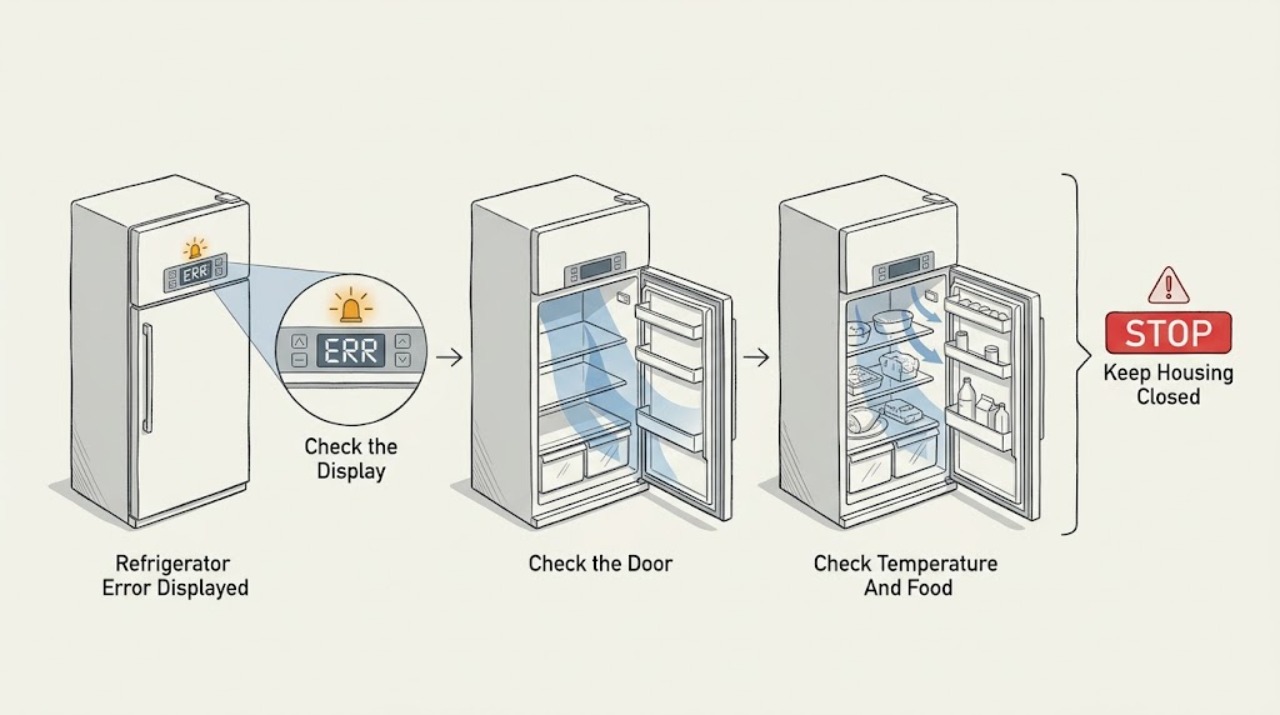
Work through in order
Diagnostic checks
Use only checks that match the exact appliance or system and its official guide.
-
Check 1
Photograph or transcribe every visible letter, number, symbol, and flashing pattern, and record whether it appears on the fridge or freezer side. Find the complete model and serial number from the appliance label without moving or dismantling the refrigerator.
Expected result: The display shows an E with numbers, a high-temperature/fault symbol, a flashing temperature, an alarm-only condition, or a symbol that does not match the available manual.
Next step: Use the exact model number to download the matching Blomberg manual and quote the complete display when requesting support. Do not use a code list from another model as a diagnosis.
Stop if: Stop if the label cannot be read without pulling out a built-in unit, or if the display is accompanied by smoke, burning odor, arcing, damaged wiring, or water near electrical parts.
Why this matters
Why: The display pattern narrows the correct manual but does not prove a part failure. The KND9920 E-plus-number example is model-specific and intended to give service personnel error information; another model may use the same-looking symbol for a different condition.
-
Check 2
Inspect the accessible plug and cord for damage, confirm the refrigerator has its normal power connection, and close the doors fully. Observe whether the interior light, display, or compressor sound returns after a door is opened or a documented display button is pressed.
Expected result: The display is dark but the appliance has an energy-saving display-off state, the door was open, power was interrupted, the cord/plug is damaged, or the display and light remain abnormal with power present.
Next step: Apply only the exact manual's external wake, door-close, or alarm acknowledgement procedure. If the supply, cord, display, or control remains abnormal, stop and arrange qualified service.
Stop if: Do not remove electrical covers, bypass a fuse or interlock, repeatedly reset a tripping circuit, or use a damaged cord or outlet.
Why this matters
Why: A display-off mode, open door, or recent power interruption can explain an alert or dark panel on models that document those behaviors. A damaged cord or persistent abnormal display is an electrical or control concern, not evidence for a particular replacement part.
-
Check 3
Without disabling the alarm blindly, check whether the freezer and refrigerator compartments are actually cold, whether a door was left open, and whether food is warming. Keep doors closed while observing and follow the exact manual for any alarm acknowledgement.
Expected result: The compartment is warm, food is softening, the door was open for a long time, cooling appears normal, or the alert returns after acknowledgement.
Next step: Protect perishable food and record the temperature/alert pattern. If cooling is not recovering, the alarm returns, or the exact manual directs service, leave the refrigerator for qualified diagnosis.
Stop if: Do not keep opening the door to test it, consume food whose safety is uncertain, or continue operation through smoke, burning odor, arcing, or a damaged cord.
Why this matters
Why: The KFD4952XD manual associates its warning indicator with power failure, high temperature, and error warnings, while the KND9920 manual links its error indicator to inadequate cooling or a sensor failure. A warm compartment is therefore a condition requiring attention, not proof of one failed component.
-
Check 4
Compare the visible symbol with the exact model manual's sections for energy-saving display-off, keypad lock, vacation, high-temperature, filter, or alarm functions. Press or hold a control only when that manual explicitly documents the action and the appliance is otherwise safe.
Expected result: The manual identifies the symbol as a user-selectable mode, the keypad is locked, an alarm can be acknowledged after checking food, or the symbol/code is not documented for that model.
Next step: Follow the matching manual's documented exit or acknowledgement step once. If the display remains abnormal or the code returns, save the photo and model number and arrange service.
Stop if: Do not repeatedly press combinations, force buttons, defeat a keypad lock with tools, or remove the control panel.
Why this matters
Why: A documented mode may explain an apparently inactive display or unresponsive buttons. An undocumented or recurring code cannot safely be assigned a meaning from a different Blomberg panel; a service diagnosis is more likely needed.
-
Check 5
If the exact manual does not resolve the display or the error returns after the documented external step, prepare a service request with the model/serial number, complete display, compartment temperatures, recent power interruption, door history, and whether cooling is normal.
Expected result: The code is reserved for service personnel, cooling is inadequate, the alert recurs, the display is dead or erratic, or further diagnosis would require a panel or internal test.
Next step: Keep the refrigerator closed and arrange qualified Blomberg or appliance service. Provide the exact model and the captured display rather than ordering an unverified sensor, control, or filter.
Stop if: Do not open the electrical compartment, test energized components, handle refrigerant, or continue using the appliance when there is an electrical or burning hazard.
Why this matters
Why: A persistent or service-only display can involve a sensor, control, fan, power, or cooling fault, but the display alone does not identify which part. Internal testing is model-specific and outside these external checks.
Use your observations
Decision map
Find the observation that best matches what you see, then follow the next safe action.
-
PATH 01Safety boundary
What you see
The exact manual identifies the symbol as energy-saving display-off, keypad lock, vacation, or another user-selectable state, and the refrigerator is cooling normally without a safety hazard.
Do this next
Use only the manual's documented button or door action once, then monitor normal cooling. Escalate if the symbol returns unexpectedly or cooling changes.
Why this path and its safety boundary
Why it matters: A documented operating mode is more likely than a failed sensor or control.
Safety stop: Do not force buttons or dismantle the display panel.
-
PATH 02Safety boundary
What you see
The warning appears after a power interruption, a long-open door, or an observed warm freezer, as described by the exact manual.
Do this next
Check food safety, close the doors, record whether cooling recovers, and acknowledge the alarm only as the manual directs. Arrange service if the warning persists or cooling is inadequate.
Why this path and its safety boundary
Why it matters: A power or high-temperature event is plausible, but the alert does not distinguish a temporary event from an ongoing cooling or sensor fault.
Safety stop: Do not clear the warning without checking the food and actual cooling condition.
-
PATH 03Safety boundary
What you see
The exact manual shows an E-plus-number or other error status and says the information is for service personnel, or the code is not documented for the appliance's own model.
Do this next
Save the complete display and model/serial number and arrange qualified appliance service. Do not attempt a code-specific part replacement.
Why this path and its safety boundary
Why it matters: A sensor, cooling, control, or related fault may be present, but assigning a specific part or code meaning from another model would be unsafe.
Safety stop: Do not open panels, test live wiring, or handle the sealed cooling system.
-
PATH 04Safety boundary
What you see
The display or refrigerator is accompanied by smoke, burning odor, arcing, a hot or damaged cord, water near electrical parts, or repeated circuit trips.
Do this next
Stop using the refrigerator and isolate it from power only if that can be done without contact with damage or water; arrange urgent qualified service.
Why this path and its safety boundary
Why it matters: This is an electrical or physical safety issue, not a display-code troubleshooting exercise.
Safety stop: Do not restore power repeatedly, remove covers, or touch exposed wiring.
Helpful context
Understand the symptom
Why the same-looking display cannot be decoded universally
Blomberg refrigerator panels and alert meanings differ across products. In the opened KND9920 manual, an error status indicator is associated with inadequate cooling or a sensor failure and can show an E with numbers that are information for service personnel. In the opened KFD4952XD manual, a different indicator covers power failure, high temperature, and error warnings. These are examples tied to named manuals, not a cross-model code table. Keep the complete display and model identity together when asking for help.
Make only external checks
Do not remove an electrical cover, probe wiring, open the sealed cooling circuit, or reach behind a fixed panel to chase a display code. Inspect the plug, cord, door closure, and visible display only. If the cabinet is warm, protect perishable food according to local food-safety guidance; if there is smoke, burning odor, arcing, damaged insulation, or water near electrical parts, stop using the refrigerator and arrange urgent qualified help.
A warning can be a condition to investigate, not a part diagnosis
A power interruption, high-temperature event, open door, locked keypad, or an actual cooling or sensor fault can produce different visible behavior depending on the model. For example, the KFD4952XD manual describes an energy-saving display-off state that returns when a button is pressed or the door is opened, while its fault indicator also covers power failure and high temperature. Check what the exact manual says before pressing alarm-off or changing settings. A recurring alert, inadequate cooling, or a code reserved for service personnel needs diagnosis rather than a guessed sensor or control replacement.
Safety boundary
Stop conditions
- Stop using the refrigerator for smoke, burning odor, arcing, a hot or damaged cord, exposed wiring, repeated circuit trips, or water near electrical parts.
- Do not treat an E number, symbol, or flashing temperature as a universal Blomberg code; use the exact model manual and preserve the complete display for service.
- Do not remove electrical or evaporator covers, test energized components, handle refrigerant, or replace a sensor/control/filter based only on a display symptom.
- If cooling is unreliable, keep the doors closed, protect perishable food, and follow local food-safety guidance rather than repeatedly clearing the alert.
When checks do not resolve it
Need a professional?
Safety scope: This article covers model identification, display recording, door/power observations, food/cooling observations, and documented user modes only. A qualified technician must handle electrical covers, internal controls and sensors, fans, compressors, refrigerant, and live testing.
Common questions
FAQ
What does an E1, E2, or other E number mean on a Blomberg refrigerator?
There is no safe universal answer without the exact model. The opened KND9920 and KFD9952PXD manuals use E-plus-number displays to provide error information to service personnel, but the display panel and meaning are model-dependent. Save the complete display and model number and use the matching manual or qualified service.
Why is the high-temperature or fault light on my Blomberg refrigerator?
On the opened KFD4952XD model, that indicator can cover power failure, high temperature, and error warnings. Check the freezer food and actual cooling condition, then follow that model's troubleshooting and alarm instructions. Do not assume the same symbol has the same meaning on another model.
Can a Blomberg refrigerator display be off without a fault?
Some models document an energy-saving display-off state that returns when a button is pressed or a door is opened. Confirm the exact model manual first. If the display stays off with abnormal cooling, a damaged cord, or other warning signs, stop and arrange service.
Should I clear a Blomberg refrigerator error alarm?
Only after checking what the exact manual says and checking the food and cooling condition. The KFD4952XD manual directs the owner to check freezer food before clearing a power-failure/high-temperature warning. A recurring or undocumented alert needs service rather than repeated acknowledgement.
What information should I give a technician for a Blomberg error display?
Provide the complete model and serial number, a photo or exact transcription of every character and symbol, which compartment is warm, any recent power interruption or long-open door, whether the alert returns, and any odor, heat, sound, or cord damage. Blomberg says model and serial information is needed for many support services.
Read the exact guide
Official sources
- Refrigerator / User Manual (KFD9952PXD)Blomberg · Official manual for the KFD9952PXD model; use only to illustrate that an E-plus-number display is model-specific.
- Refrigerator (KND9920 instruction manual)Blomberg · Official manual for the KND9920 model; its display layout and E-plus-number behavior must not be generalized to other Blomberg refrigerators.
- Product SupportBlomberg · Official Blomberg support hub for selecting manuals, troubleshooting resources, repair support, and safety notices.
- Product ManualsBlomberg · Official Blomberg manual portal; the exact refrigerator model must be selected before applying display or error instructions.
- Find Your Model & Serial NumberBlomberg · Official Blomberg support guidance for identifying the appliance information needed for manuals, repairs, accessories, and parts.
- Refrigerator / User Manual (KFD4952XD)Blomberg · Official manual for the KFD4952XD model; its warning indicator and display-off behavior are model-specific examples.
Community feedback
Share a repair observation
Share a plain-text repair observation. Accepted observations are published automatically; this page may take a moment to update.