
On this page
Start here
Quick answer
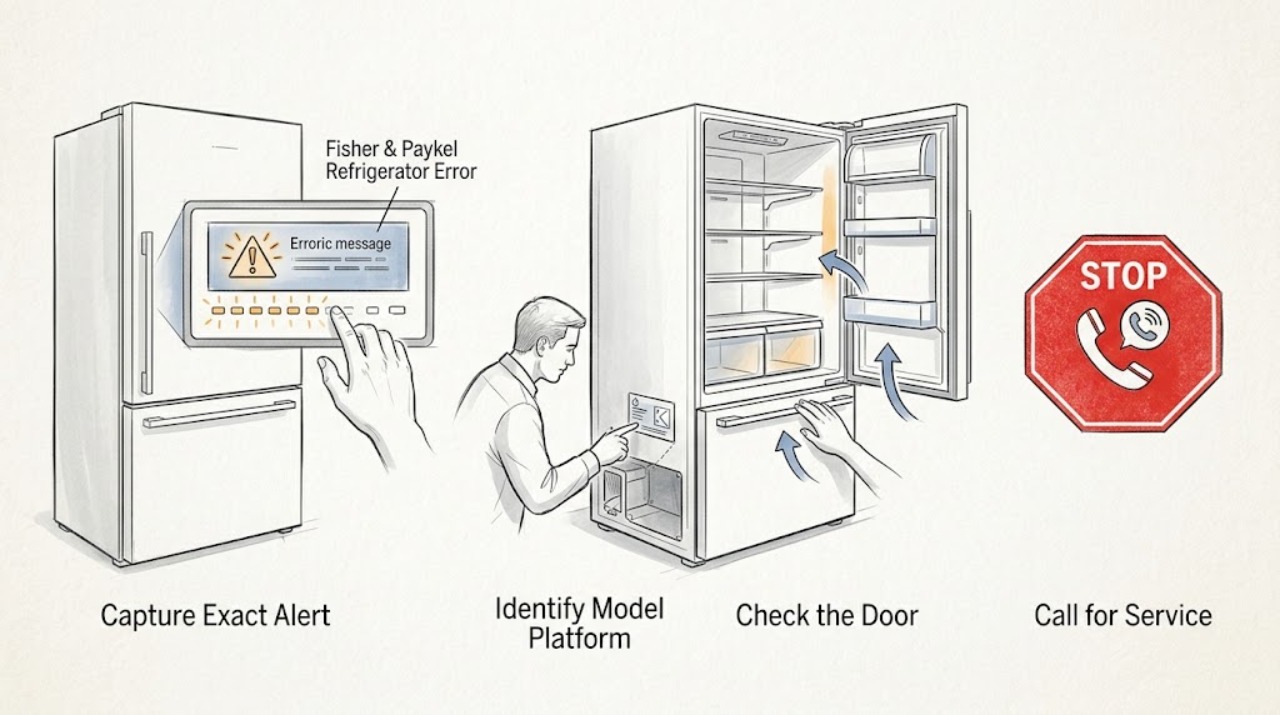
Do not decode a Fisher & Paykel refrigerator alert by combining codes from different models. First photograph or write down the exact display text or icon, count the beeps and note their sequence, record which temperature lights flash and in what order, and identify whether the alarm occurs when a refrigerator door or drawer is opened. Fisher & Paykel manuals for several refrigerator platforms use this information to identify a fault and direct the owner to trained service, but they do not make one universal code table. A door-open or key-lock indication may clear after the documented closure or unlock check; a fault icon or recurring alarm should be handled with the exact model guide and service support. Silence an alarm only as the model guide allows, keep doors closed while protecting food, and stop immediately for smoke, burning odor, sparking, a hot or damaged cord, water near electrical parts, abnormal heat, or a refrigerator that is not maintaining safe temperatures.
Before you begin
Safety first
- The user may identify the model, record the alert, check visible door or drawer closure, observe cooling and external hazards, and follow a reset or alarm-silence step explicitly documented for the exact model. Qualified personnel must handle internal electrical, control, sensor, fan, compressor, sealed-system, refrigerant, ice-maker, water, and live-testing work.
Work through in order
Diagnostic checks
Use only checks that match the exact appliance or system and its official guide.
-
Check 1
Without opening panels or repeatedly pressing controls, photograph the display and write down the exact alert text, icon, letters or numbers, number and rhythm of beeps, and number and sequence of flashing temperature lights. Record whether the sound occurs when a particular door or drawer is opened and what cooling or dispensing changed.
Expected result: The alert is fully captured; only a generic warning is visible; the display clears after a button press; or the pattern cannot be seen again.
Next step: Keep the record and move to the model-identification check. If the alert returns, capture it again before silencing it.
Stop if: Stop using the refrigerator for smoke, sparking, burning odor, a hot or damaged cord, water near electrical parts, or abnormal heat; isolate power only from a safe dry position.
Why this matters
Why: The exact pattern is the useful diagnostic handoff. A silenced alarm is not proof that the fault is fixed, and a generic description such as “it beeps” cannot safely identify a model-specific component.
-
Check 2
Find the complete Fisher & Paykel model code from the appliance label or the manufacturer's model-code guidance, and identify the platform as an integrated column, built-in, freestanding, French-door or quad-door refrigerator-freezer, or drawer-style appliance. Use that exact identity to open Product Help and its user guide.
Expected result: A complete model code and matching manual are available; only a family name is known; or the code belongs to a different appliance category.
Next step: Use the matching manual's warning and troubleshooting section. If the model cannot be confirmed, limit the diagnosis to recording the alert, checking for an obvious open door, and arranging manufacturer-supported help.
Stop if: Do not use a code table or button sequence from another model, country variant, appliance category, or online discussion as a substitute for the matching guide.
Why this matters
Why: A family name alone cannot map a beep count or icon to a fault. A code from a wine cabinet, dishwasher, washer, or another refrigerator platform must not be substituted.
-
Check 3
With the refrigerator operating normally and hands dry, inspect the visible door or drawer opening for a container, shelf, bin, or load that prevents full closure. Close it without force and check for an obvious seal gap or misalignment from the outside; do not remove hinges, panels, or switches.
Expected result: The door or drawer was visibly open or obstructed and the alert stops after normal closure; it closes normally but the alert returns; or the seal, alignment, or switch area looks damaged.
Next step: If the alert stops and cooling is normal, monitor it without changing unrelated settings. If it returns, stays active, or the door/seal is damaged, use the exact model support path and provide the captured pattern.
Stop if: Do not force a warped door or drawer, bypass a door sensor, adjust internal wiring, or keep operating if the door cannot close and food temperatures are rising.
Why this matters
Why: A one-time open-door warning is different from a recurring fault alarm. A recurring alert after closure may involve a door sensor, control, temperature condition, or another fault that an external check cannot identify.
-
Check 4
Only if the exact user guide provides a reset or power-cycle instruction, follow it once while the refrigerator is dry, stable, and free of heat, smoke, water, or cord damage. If the guide says to silence the alarm with a button, do that after documenting the pattern; do not treat silence as repair.
Expected result: The alert clears and stays absent; it clears but returns; it cannot be cleared; or the refrigerator shows a separate cooling or power symptom.
Next step: If the alert returns or cooling is abnormal, leave the captured pattern with the model code and arrange trained service. Keep doors closed and protect perishable food while the appliance is evaluated.
Stop if: Do not repeat resets indefinitely, unplug through water, remove covers, or energize an appliance with a suspected electrical or refrigerant fault.
Why this matters
Why: A one-time clear may be a recoverable control event, but a returning or persistent fault requires the model-specific diagnostic path. A reset cannot prove that a sensor, fan, compressor, wiring, or control is healthy.
-
Check 5
While waiting for model-specific help, note whether the refrigerator and freezer are still cooling, whether interior lights and fans behave normally, and whether there is water, frost, unusual heat, smoke, odor, or a damaged power cord. Keep doors closed as much as practical and move vulnerable food only if it can be done safely.
Expected result: Cooling is normal with an alert only; cooling is failing or temperatures are rising; food is warming; or an electrical, water, heat, or refrigerant-related hazard is visible.
Next step: For any hazard, stop and isolate the appliance safely, then arrange qualified service. For warming food, minimize door openings and follow applicable local food-safety guidance while service is arranged.
Stop if: Do not scrape sealed-system frost, handle refrigerant, open the rear or control area, or continue running a hot, smoking, sparking, wet, or damaged appliance.
Why this matters
Why: An alert with normal cooling still needs the exact code interpretation, while an alert plus loss of cooling raises urgency and may involve sensors, fans, controls, or the sealed system. A visible hazard is a stop-use event, not a DIY code lookup.
Use your observations
Decision map
Find the observation that best matches what you see, then follow the next safe action.
-
PATH 01Safety boundary
What you see
The alert occurs only with a door or drawer open, a visible obstruction is removed, and the warning stops after the opening is closed normally.
Do this next
Monitor the refrigerator and verify normal cooling. If the warning returns with the door fully closed, record the pattern and use the exact model support route.
Why this path and its safety boundary
Why it matters: A door or drawer-open warning is more likely than a confirmed internal fault, but the exact timing and closure behavior remain model-specific.
Safety stop: Do not bypass the door switch or continue if the door cannot close or the appliance is warming.
-
PATH 02Safety boundary
What you see
A fault icon or recurring alarm remains after a normal closure check, with a measurable beep count or temperature-light sequence.
Do this next
Photograph the indicator, record the model code and cooling symptoms, silence the alarm only as the guide allows, and arrange Fisher & Paykel trained or authorized service.
Why this path and its safety boundary
Why it matters: Across the cited Fisher & Paykel refrigerator platforms, the stable user-level action is to preserve the diagnostic pattern and provide it to trained service; the specific failed component is not safely inferable without the model manual.
Safety stop: Do not merge codes, beep counts, or reset sequences from different platforms and do not open internal electrical or cooling components.
-
PATH 03Safety boundary
What you see
The refrigerator model code is unavailable or the display pattern is incomplete, and the only information is a generic error message, a single beep, or an unfamiliar icon.
Do this next
Record what is visible, locate the model label, and use Fisher & Paykel Product Help or manufacturer-supported service. Limit user checks to visible door closure and hazard observation.
Why this path and its safety boundary
Why it matters: There is not enough identity information to map the alert safely. Guessing from another Fisher & Paykel refrigerator could send the user to the wrong reset or repair path.
Safety stop: Do not publish or follow a specific code interpretation, replace a sensor or control, or dismantle the appliance from a generic alert alone.
-
PATH 04Safety boundary
What you see
The alert or fault icon returns and the refrigerator or freezer is warming, fans or lighting behave abnormally, or ice/water functions change at the same time.
Do this next
Keep doors closed, protect food, record the alert and temperatures if safe, and arrange prompt qualified service. Do not open the rear or sealed system to investigate.
Why this path and its safety boundary
Why it matters: The alert is accompanied by an operating symptom and may involve a sensor, fan, control, compressor, sealed system, or water/ice subsystem; the displayed pattern alone does not identify which one.
Safety stop: Stop immediately for smoke, burning odor, sparking, a hot cord, water near electricity, abnormal heat, or a damaged cabinet or cord.
Helpful context
Understand the symptom
An alert is not automatically a universal error code
Fisher & Paykel sells integrated columns, built-in units, contemporary freestanding refrigerators, French-door and quad-door models, and drawer-style refrigeration. Their manuals use different control layouts and can describe a fault as a wrench or service icon, a sequence of temperature lights, or an alarm heard when a door is opened. Treat the exact model code and its own manual as the identity of the alert. Do not copy an E-number, beep count, or reset sequence from a different platform.
Record the diagnostic pattern before silencing it
Before pressing a button, photograph the display and write down the exact symbols, any letters or numbers, the number and rhythm of beeps, and the number and sequence of temperature lights. Note whether the sound occurs only when the fresh-food door, freezer door, or drawer is opened, whether a wrench or service icon stays lit, and whether cooling, lighting, dispensing, or ice making changed. A single button press may silence the sound without correcting the underlying fault, so preserve the pattern for the model-specific support path.
Separate a door warning from a fault alarm
A door or drawer left open can produce a warning that stops when the opening is properly closed, while a fault alarm is associated with a fault icon or a repeating diagnostic pattern. Check only for a visible obstruction, a door or drawer that is not fully closed, or an obvious seal problem. If the indicator or alarm returns after closure, do not assume the door switch, temperature sensor, or cooling system is the failed part; use the exact guide and record the pattern.
A reset is a controlled observation, not a code repair
Some Fisher & Paykel guides tell the owner to turn the appliance off at the wall, wait, and turn it back on before calling service if the fault returns. Use such a reset only when the exact model guide says to do so and only when there is no electrical, water, heat, or food-safety hazard. If the alert returns, preserve the same display and beep information rather than repeating resets or opening the cabinet. Electrical repairs and internal cooling faults belong to trained service personnel.
Safety boundary
Stop conditions
- Stop using the refrigerator for smoke, sparking, burning odor, a hot or damaged cord, water near electrical parts, abnormal heat, a damaged cabinet, or a repeated electrical trip; isolate power only from a safe dry location.
- Do not combine Fisher & Paykel alert codes, beep counts, temperature-light sequences, or reset instructions from different models or refrigerator platforms.
- Do not open the control panel, rear cover, sealed cooling system, wiring, compressor, fan, sensor, ice-maker, or water system, and do not perform live electrical or refrigerant testing.
- Do not keep resetting a recurring alert or continue operating when the refrigerator is warming; keep doors closed and protect food while qualified service is arranged.
When checks do not resolve it
Need a professional?
Arrange Fisher & Paykel trained or authorized service when a fault icon or recurring alarm remains after the exact model's documented closure or reset check, when the model or alert cannot be identified, when the refrigerator is warming, or whenever an electrical, water, heat, cord, or sealed-system hazard is suspected.
Safety scope: The user may identify the model, record the alert, check visible door or drawer closure, observe cooling and external hazards, and follow a reset or alarm-silence step explicitly documented for the exact model. Qualified personnel must handle internal electrical, control, sensor, fan, compressor, sealed-system, refrigerant, ice-maker, water, and live-testing work.
Common questions
FAQ
Does Fisher & Paykel have one universal refrigerator error-code chart?
No universal chart is established by the cited official documentation. Integrated, freestanding, quad-door, and drawer-style guides use platform-specific displays and procedures. Use the complete model code and its matching guide; do not combine codes or reset sequences between models.
What should I record when a Fisher & Paykel refrigerator shows an error?
Photograph the display, record the exact icon or text, count the beeps and their sequence, and write down the number and sequence of flashing temperature lights. Note which door or drawer triggers the alarm and whether cooling, lighting, ice, or water functions changed.
Can I silence the Fisher & Paykel refrigerator alarm?
Several Fisher & Paykel guides say a control-panel button can silence the audible fault alarm, but the fault indication may remain. Record the pattern first and use only the exact model's documented button or reset procedure; silence is not proof that the fault is repaired.
How can I tell a door-open warning from a refrigerator fault alarm?
A door or drawer warning is tied to an opening that is not fully closed and may stop after a visible obstruction is removed and the opening is closed normally. A recurring alarm, wrench or service icon, or flashing diagnostic-light sequence after closure should be treated as a model-specific fault and referred with its recorded pattern.
When should I stop using a Fisher & Paykel refrigerator with an alert?
Stop for smoke, sparking, burning odor, a hot or damaged cord, water near electrical parts, abnormal heat, or a refrigerator that is warming and cannot maintain safe food temperatures. Do not open the cabinet or sealed system; isolate power safely and arrange qualified service.
Read the exact guide
Official sources
- General operating instructionsFisher & Paykel · Supports the distinction between a drawer-open alarm, key lock or Sabbath mode, and a fault alarm on the cited CoolDrawer platform; it also documents the platform's limited power-cycle/service guidance. It is not a universal procedure for other refrigerator platforms.
- ACTIVESMART™ USER WARNINGS AND SOUNDSFisher & Paykel · Supports the cited model's wrench-icon and door-open fault-alert behavior, dedicated power-point and no-extension-cord safety guidance, and model-specific installation boundary; it does not provide a generic code map.
- Contact UsFisher & Paykel · Supports directing owners to Product Help and documentation for the specific model code and to Fisher & Paykel technicians or authorized service partners.
- Help & Support | Book A Service | Repair | TechnicianFisher & Paykel · Supports use of Product Help and Manuals for model-specific troubleshooting and manufacturer-supported service; it does not decode an unspecified refrigerator alert.
- USER WARNINGS AND SOUNDSFisher & Paykel · Confirms the alert-recording method on a quad-door platform: beep count and temperature-light sequence are handed to trained service; no cross-model code meanings are inferred.
- CoolingFisher & Paykel · Supports the existence of multiple Fisher & Paykel refrigerator formats and connected models, which is why alert interpretation must remain tied to the exact model and platform.
- USER WARNINGS AND SOUNDSFisher & Paykel · Supports the alert-recording method for the cited integrated platform: count beeps, record temperature-light sequence, and contact trained service. It does not provide a universal code table for all Fisher & Paykel refrigerators.
- ACTIVESMART™ REFRIGERATOR USER WARNINGS AND SOUNDSFisher & Paykel · Supports the same alert-recording pattern for the cited freestanding families and shows that the guide's troubleshooting is model-family-specific; it does not authorize applying its pattern to unrelated models.
Community feedback
Share a repair observation
Share a plain-text repair observation. Accepted observations are published automatically; this page may take a moment to update.