
On this page
Start here
Quick answer
Do not treat every displayed code as the same fault. Photograph or write the exact characters, capitalization, flashing pattern, beeps, and the refrigerator model before changing anything. GE says many refrigerators with electronic dispenser controls show fault, error, or function codes, and its common-code list is not exhaustive. Some displays are normal feature indicators: tC and tF identify Turbo Cool and Turbo Freeze on applicable models. Other common examples include PF for an interrupted power supply, FF for a freezer temperature rise, CI for an icemaker check, DE for demo mode, dE for a defrost-system issue, and CC for an incorrect refrigerator temperature; these meanings must be confirmed against the exact model manual. Check whether the refrigerator is cooling, whether food has thawed, whether the display is in demo or feature mode, and whether the code clears after one model-approved action. GE says a short power disconnect can sometimes reset the panel, but a code that returns, an unresponsive display, inadequate cooling, a failed defrost or icemaker, or any hot connection, smoke, burning odor, water near electricity, or repeated power interruption requires qualified service. Do not enter a diagnostic menu, bridge contacts, repeatedly reset the breaker, or replace a board from a code alone.
Before you begin
Safety first
- The user may record the code and model, check food and cooling symptoms, inspect normal user settings, and perform one exact-model documented recovery when the appliance is dry and hazard-free. Qualified personnel must handle control/display, defrost, icemaker, compressor, wiring, sealed-system, live electrical, and cabinet work.
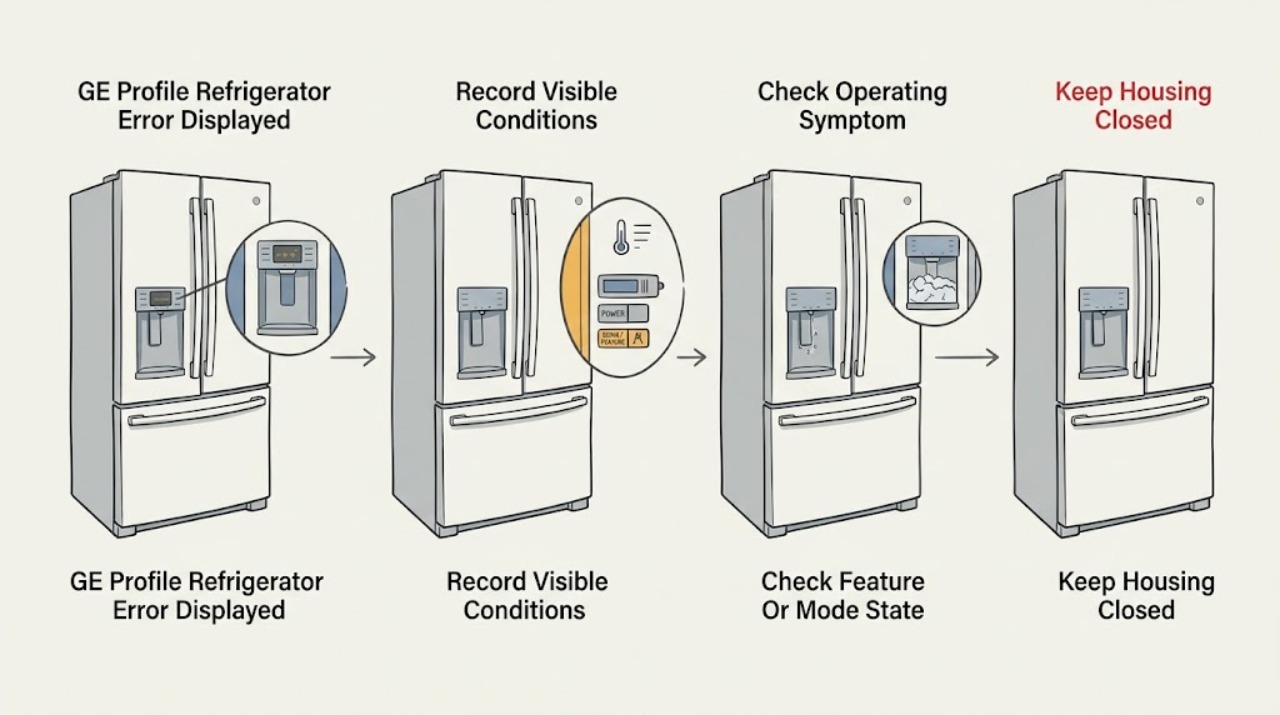
Work through in order
Diagnostic checks
Use only checks that match the exact appliance or system and its official guide.
-
Check 1
Photograph or write the exact displayed characters, capitalization, flashing or steady state, beeps, and any temperature or mode label. Record the complete GE Profile model and serial information from the model tag; do not press random keys to make the message disappear.
Expected result: The display shows tC or tF, PF, FF, CI, DE, dE, CC, another code, a code that alternates with a temperature, or a blank/unresponsive panel.
Next step: Match the exact code and model to the owner manual. Use the normal-feature, power/temperature, icemaker, demo/defrost, control, or unlisted-code branch; do not generalize a code from another GE Profile model.
Stop if: Stop immediately for smoke, burning odor, sparks, abnormal heat, a hot or damaged cord or receptacle, water near electricity, or repeated power loss; isolate power only from a safe dry location.
Why this matters
Why: The exact characters distinguish a normal feature indicator, power event, temperature, icemaker, demo, defrost, control, or unlisted condition. A blank or changing panel can be a power or electronics symptom rather than a code interpretation problem.
-
Check 2
Without opening panels, check whether the refrigerator and freezer are actually cooling, whether frozen food is thawing, whether the doors close, whether the icemaker is the only affected subsystem, and whether the code appeared after an outage or a recent control change. Limit door openings if food temperature is rising.
Expected result: Cooling is normal; freezer food is thawing; the icemaker is the only affected function; the code followed an outage; or cooling, lights, displays, and several functions are failing together.
Next step: Use the code-specific manual guidance and protect food when temperature is rising. Do not select a compressor, sensor, board, or icemaker part from the code without qualified diagnosis.
Stop if: Stop operation for unsafe food temperature combined with abnormal heat, odor, smoke, water, or electrical symptoms; keep doors closed and arrange service.
Why this matters
Why: Normal cooling with tC/tF or a recent power event is more consistent with a feature or status indication. Thawing, poor cooling, a defrost-related display, or several failing functions makes a real refrigeration, defrost, supply, or electronic fault more likely.
-
Check 3
If the display resembles tC, tF, or DE, open the exact model manual and check whether Turbo Cool, Turbo Freeze, or Demo mode is active. Change only a documented user setting on the normal interface; do not use a service or diagnostic menu and do not copy a button sequence from another control style.
Expected result: The code is a documented feature indicator; DE is shown and cooling is disabled while lights and controls operate; the mode is not active; or the code remains after the exact model's documented user action.
Next step: Return the documented mode to normal once if the manual permits it, then allow the refrigerator to stabilize. If the code remains or cooling does not return, arrange service.
Stop if: Do not enter diagnostic menus, repeatedly change modes, or continue storing perishable food in a refrigerator that is in demo mode or not cooling.
Why this matters
Why: A normal feature indicator or demo mode can look like an error while the control panel is functioning. A persistent display after the model-specific action makes a control or configuration fault more likely, but the code still does not identify a board.
-
Check 4
Only when the appliance is dry and there is no heat, odor, smoke, water, or damaged connection, follow the exact model's documented power-recovery instruction once. If the manual and code support it, disconnect the refrigerator for the specified short interval from a safe location, reconnect it, and observe the display without repeatedly cycling power.
Expected result: The code clears and normal cooling/control returns; the code clears temporarily and returns; the panel remains blank or unresponsive; or the breaker trips or the connection becomes hot.
Next step: For a recurring code or incomplete recovery, keep the refrigerator on the documented normal setting if safe and arrange qualified service. For a hot connection, trip, odor, smoke, or water, stop and isolate power safely before service.
Stop if: Do not repeatedly reset the breaker, use an extension or adapter, touch a wet or hot connection, or reconnect a visibly damaged appliance.
Why this matters
Why: A one-time cleared code can represent a transient power or control state, but recurrence indicates an unresolved condition. An unresponsive panel or electrical symptom crosses the owner reset boundary.
-
Check 5
If the code returns or the refrigerator still has poor cooling, failed defrost, icemaker trouble, control-panel failure, or repeated alarms, leave the cabinet and wiring intact. Record the code history, food-temperature concern, affected subsystem, and all safe checks attempted for the technician.
Expected result: The code is persistent, unlisted, alternates with another code, the refrigerator cannot maintain temperature, an icemaker or defrost function remains faulty, or the issue is accompanied by smoke, odor, heat, water, or a power trip.
Next step: Arrange qualified GE Profile refrigerator service; use a qualified electrician for a household receptacle, cord, breaker, or supply problem. Protect food using another safe cold source when cooling is inadequate.
Stop if: Do not remove the dispenser/control cover, force a defrost, bridge a door or fan switch, test live terminals, or keep operating after a safety symptom.
Why this matters
Why: A persistent or unlisted code needs model-specific diagnosis; GE's common list explicitly does not cover every code. A hazard requires immediate discontinuation regardless of what the display says.
Use your observations
Decision map
Find the observation that best matches what you see, then follow the next safe action.
-
PATH 01Safety boundary
What you see
The display is tC or tF on a model that offers the corresponding Turbo Cool or Turbo Freeze feature, cooling is normal, and no hazard is present.
Do this next
Use the exact model manual to confirm or end the feature; do not attempt a fault reset or replace a part from the display alone.
Why this path and its safety boundary
Why it matters: GE classifies these labels as normal function indicators rather than error codes on applicable models.
Safety stop: Escalate if cooling fails, food warms, another code appears, or the display is not behaving as documented.
-
PATH 02Safety boundary
What you see
PF follows an outage, FF accompanies rising freezer temperature or thawing, or CC accompanies an incorrect refrigerator temperature.
Do this next
Check the household supply and exact model temperature guidance without live testing, limit door openings, protect food, and arrange service if temperature does not recover or the code returns.
Why this path and its safety boundary
Why it matters: A power event or temperature-control condition is more likely than a purely cosmetic display fault, and food condition matters.
Safety stop: Stop for unsafe food temperature with abnormal heat, odor, smoke, water, or repeated electrical interruption.
-
PATH 03Safety boundary
What you see
CI appears or the icemaker is the only subsystem affected while the refrigerator otherwise cools normally.
Do this next
Use the exact refrigerator manual and visible icemaker checks. Arrange service if the code returns, the icemaker leaks, or the fault requires internal access.
Why this path and its safety boundary
Why it matters: GE uses CI as an icemaker check on applicable models; the display narrows the subsystem but does not identify an inlet valve, mold, motor, sensor, or control failure.
Safety stop: Do not reach into the icemaker, force an ejector, bypass a sensor, or work around water and electricity.
-
PATH 04Safety boundary
What you see
DE appears with lights and controls operating but no cooling, or dE appears and the refrigerator shows a defrost-system condition.
Do this next
For DE, follow only the exact model's documented demo-mode exit. For dE or a recurring message, protect food and arrange service rather than forcing a defrost.
Why this path and its safety boundary
Why it matters: DE can indicate demo mode, while dE indicates that the defrost system has not operated properly on applicable models; they are not interchangeable codes.
Safety stop: Do not store perishable food in demo mode or a warm refrigerator, remove evaporator covers, melt ice with a heat tool, or test the defrost circuit live.
-
PATH 05Safety boundary
What you see
A code is not in the common list, returns after one documented recovery, alternates with other messages, or the display and several refrigerator functions become unresponsive.
Do this next
Keep the appliance intact and arrange model-specific qualified service with the exact model, code, timing, cooling status, and recovery result.
Why this path and its safety boundary
Why it matters: GE states that not every possible code is listed because some require service expertise; recurrence makes an unresolved control, sensor, power, or subsystem fault more likely.
Safety stop: Stop for smoke, burning odor, sparks, abnormal heat, water near electricity, a hot connection, or repeated power trips; do not continue testing.
Helpful context
Understand the symptom
Record the code exactly
A refrigerator display can show a true fault, a power-event notice, or a normal feature indicator. Record the exact model and serial information from the model tag, the code as displayed, whether it is flashing, any beeps, and what the refrigerator is doing. GE's PSS26SGPSS Owner Center, for example, links its own manual and troubleshooting resources, while GE's general code article covers only common codes for many electronically controlled refrigerators. That is why a code that looks similar to another code, or a sequence borrowed from another GE Profile style, should not be treated as interchangeable.
Separate normal feature indicators from faults
On applicable GE refrigerators, tC and tF can be normal Turbo Cool or Turbo Freeze indicators rather than error codes. PF points to an interrupted power event; FF calls for checking freezer temperature and food; CI points to icemaker operation; DE identifies demo mode; dE points to a defrost-system issue; and CC points to refrigerator temperature controls. These labels narrow the next observation but do not prove a failed part. Check the exact manual and the actual symptom before resetting or ordering anything.
Use one safe recovery attempt, then escalate
If the refrigerator is dry, cool enough to protect food, and has no electrical warning sign, follow the exact model's documented recovery instruction once. GE says a one- to two-minute power disconnect can sometimes clear a displayed code, and its DE guidance gives that approach for applicable models. If the code returns, the panel will not respond, cooling or defrosting is poor, or the icemaker remains faulty, stop repeated resets and arrange qualified service. Internal control, defrost, compressor, wiring, and dispenser work is not an owner code-clearing procedure.
Safety boundary
Stop conditions
- Stop immediately for smoke, burning odor, sparks, abnormal heat, exposed wiring, water near electricity, a hot or damaged cord or receptacle, or repeated breaker trips; isolate power only from a safe dry location.
- Do not enter a diagnostic or service menu, bridge contacts, bypass an icemaker or door sensor, remove control or evaporator covers, or perform live electrical tests.
- Do not repeatedly reset the breaker or unplug/replug the refrigerator, use an extension or adapter, or continue operation after an electrical or water hazard.
- Do not force a defrost, use a heat tool to melt ice, or choose a replacement board, sensor, compressor, or valve from a code alone.
- If cooling is inadequate or food is thawing, limit door openings, protect the food, and arrange service rather than waiting on a recurring display.
When checks do not resolve it
Need a professional?
Arrange qualified GE Profile refrigerator service when a code returns after the exact model's one documented recovery, the code is unlisted or alternates, cooling or defrosting is poor, food is thawing, the icemaker remains faulty, the panel is unresponsive, or a demo-mode message will not clear. Stop immediately for smoke, burning odor, sparks, abnormal heat, water near electricity, a hot or damaged cord or receptacle, or repeated breaker trips; isolate power only from a safe dry location. Provide the full model and serial information, exact code and capitalization, flashing/beep pattern, affected functions, food-temperature concern, and safe checks attempted.
Safety scope: The user may record the code and model, check food and cooling symptoms, inspect normal user settings, and perform one exact-model documented recovery when the appliance is dry and hazard-free. Qualified personnel must handle control/display, defrost, icemaker, compressor, wiring, sealed-system, live electrical, and cabinet work.
Common questions
FAQ
Is every GE Profile refrigerator display code an error?
No. GE says tC and tF can be normal Turbo Cool and Turbo Freeze function indicators on applicable models. PF, FF, CI, DE, dE, and CC have different status or fault meanings, and the exact model manual governs.
What does PF mean on a GE Profile refrigerator?
GE's common-code guide defines PF as an interruption to refrigerator power. Check whether there was an outage and whether the refrigerator is cooling normally. If the code returns or cooling is poor, arrange model-specific service.
Can I clear a GE refrigerator error by unplugging it?
GE says a short power disconnect can sometimes reset the control panel, and its DE guidance gives a short disconnect for applicable models. Do this only once, only when the appliance is dry and hazard-free, and only as the exact manual permits. A returning code needs service.
What is the difference between DE and dE?
GE's common list distinguishes DE as demo mode, which can leave lights and controls working while cooling is disabled, from dE, which indicates the defrost system has not operated properly in the preceding period. Confirm capitalization and the exact model before acting.
When should I stop troubleshooting a GE Profile refrigerator code?
Stop for smoke, burning odor, sparks, abnormal heat, water near electricity, a hot or damaged connection, repeated power trips, inadequate cooling with thawing food, or a code that returns after the model-specific safe check. Do not open panels, test live parts, or choose a replacement component from a code alone.
Read the exact guide
Official sources
- Refrigerators, Freezers and Icemakers Troubleshooting and SupportGE Appliances · Applies to GE refrigerator support generally; exact model and appliance style determine which linked troubleshooting path is relevant.
- Refrigerator - Error, Fault or Function CodesGE Appliances · Applies to many GE refrigerators with electronic dispenser controls, including some GE Profile models; the article is not exhaustive and exact model documentation governs.
- Troubleshooting for PSS26SGPSSGE Appliances · Directly applies to PSS26SGPSS and demonstrates model-specific GE Profile support; do not transfer its controls to another model.
Community feedback
Share a repair observation
Share a plain-text repair observation. Accepted observations are published automatically; this page may take a moment to update.