
On this page
Start here
Quick answer
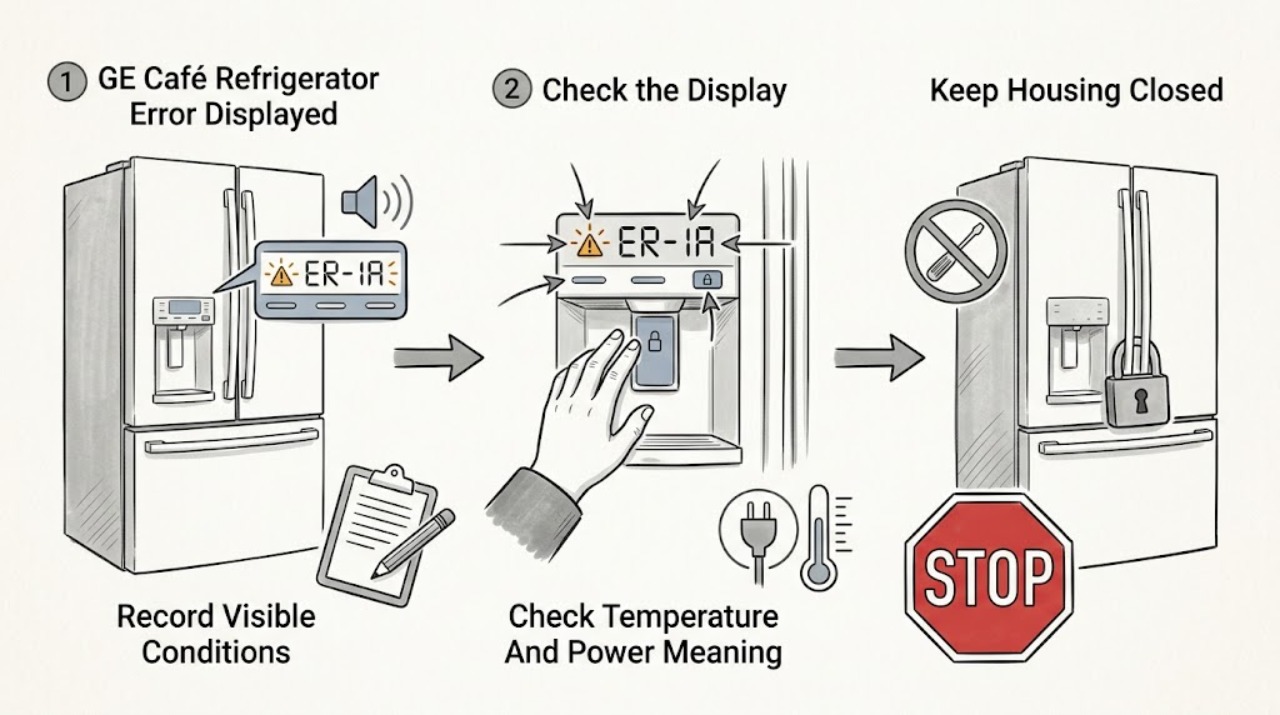
Photograph and write down the complete GE Café model number, exact display text including capitalization, flashing lights, beeps, and what the refrigerator is doing before attempting a reset. GE's general refrigerator list gives these limited examples: FF means check for rising freezer temperature or thawing food; PF means power was interrupted; CI means check icemaker operation; DE means Demo mode, which can disable cooling while lights and controls still work; dE means the defrost system has not operated properly in the last 24 hours; and CC means check the temperature controls. A lowercase-looking tC or tF can instead be a normal TurboCool or TurboFreeze indicator on models with those features. Treat an unknown or persistent code, warm food, repeated beeping, or a code that returns after a model-authorized power cycle as a service issue. Do not guess button combinations, enter a diagnostic mode, open panels, or bypass temperature, defrost, door, or icemaker safety systems.
Before you begin
Safety first
- The owner may record the display and model, compare the message with the exact manual, observe temperature and visible icemaker conditions, and perform only a single model-authorized external power-cycle step. Qualified appliance/electrical service must handle control panels, wiring, defrost systems, sensors, icemaker removal, sealed refrigeration, live testing, and diagnostic-mode repairs.
Work through in order
Diagnostic checks
Use only checks that match the exact appliance or system and its official guide.
-
Check 1
From a safe dry position, photograph the GE Café display and record the complete model/serial label, exact characters and capitalization, flashing lights, beeps, and the stage at which the message appeared. Note whether the refrigerator is cooling, whether the freezer food is soft or thawing, whether the icemaker or dispenser changed behavior, and whether there was an outage or recent setting change.
Expected result: The display is a clear code, a normal-looking function indicator, an unknown character/letter combination, or a code accompanied by warming, beeping, or a convenience-function failure.
Next step: Keep the record and use the exact Café model page/manual. Follow only the branch matching the observed code and refrigerator behavior; do not clear the display before documenting it.
Stop if: Do not guess a character, use another GE model's button sequence, enter diagnostic mode, or open the control panel.
Why this matters
Why: A full record prevents confusing tC/tF with a fault and lets GE's model support match the code. Warming food or repeated beeping raises the issue beyond a cosmetic display question.
-
Check 2
Compare the recorded display with the exact model manual and GE's limited common-code list. If the display resembles tC or tF, check whether the model has TurboCool or TurboFreeze and whether the corresponding feature is visibly active; do not treat a misread EC/EF-like character as confirmed error text.
Expected result: The model supports the displayed Turbo feature, the display does not match a known function indicator, or the string is accompanied by a cooling/temperature problem.
Next step: If the manual confirms a normal feature indicator and the refrigerator is cold, use the manual's control instructions. If the code is not confirmed as normal or cooling is affected, continue to the code-specific and service branches.
Stop if: Do not force a button combination, disable a feature blindly, or assume all Café displays use the same two-character codes.
Why this matters
Why: GE says tC and tF can be normal function indicators on models offering those features. A display that is not an applicable function indicator, or one paired with poor cooling, requires the model's fault interpretation rather than a cosmetic reset.
-
Check 3
For FF, PF, dE, or CC—or any code with warm food—observe whether the refrigerator is maintaining cold temperatures, whether a recent outage or unplugging occurred, and whether the display and interior lights still work. Do not change multiple temperature controls at once; use the exact manual and protect food if the freezer is warming.
Expected result: Freezer food is thawing or the cabinet is warm, power was interrupted, defrost has not operated correctly, temperature controls are incorrect, or the refrigerator is cold with no matching symptom.
Next step: For warming or thawing, keep doors closed, protect food, and arrange service. For PF after a confirmed outage, document the event and use the model manual. For dE/CC or any returning code, follow the model-specific support path rather than attempting internal defrost or control repair.
Stop if: Do not repeatedly unplug the refrigerator, enter service diagnostics, remove the rear cover, or handle defrost heaters, sensors, wiring, or controls.
Why this matters
Why: GE associates FF with rising freezer temperature, PF with interrupted power, dE with a defrost-system problem in the prior 24 hours, and CC with incorrect temperature controls. These meanings indicate different next steps and do not identify a replaceable part.
-
Check 4
For CI or a code appearing with no ice, inspect only the user-visible icemaker state, ice bin, and dispenser/temperature symptom described by the exact Café manual. Record whether the icemaker is visibly OFF, blocked by accessible clumped ice, empty, or making ice that simply will not dispense; do not remove the icemaker or touch its heater, fill tube, or wiring.
Expected result: The icemaker is OFF or visibly obstructed, ice is present but not dispensing, the mold is empty, or the code persists with no visible issue.
Next step: Use the model manual for a safe ON setting or accessible bin check. If CI persists, the mold is empty, or the mechanism is inaccessible, keep the refrigerator in normal safe operation only if cooling is maintained and arrange service.
Stop if: Do not force an ejector, pour water into the mold, remove the icemaker, bypass the feeler arm, or run live tests.
Why this matters
Why: GE defines CI only as a prompt to check icemaker operation; it does not identify a valve, motor, sensor, or control part. Ice present but not dispensing is a different symptom from no production, and an empty mold may require internal diagnosis.
-
Check 5
After documenting the display and checking the exact model manual, determine whether it authorizes a single brief power cycle for that code. If it does, disconnect power only from a dry, safe position, wait exactly as the manual states, reconnect once, and record whether the message clears or returns; do not repeat the cycle to hide a persistent fault.
Expected result: The code clears and the refrigerator remains cold, the code returns, the display remains unknown, or the unit is warm/beeping or shows a service-directed fault.
Next step: For a returning, unknown, or service-directed code, contact GE support with the model, exact display, timing, temperature symptom, and reset result. Escalate urgently if food is warming, the refrigerator is leaking, or electrical damage/odor is present.
Stop if: Do not use repeated resets, diagnostic mode, sensor bypass, panel removal, live measurements, or a guessed replacement part.
Why this matters
Why: GE says some codes may clear after a short power disconnect, but its list is not exhaustive and some cases require service. A returned or unknown code is evidence that the underlying condition remains; clearing the display is not a repair.
Use your observations
Decision map
Find the observation that best matches what you see, then follow the next safe action.
-
PATH 01Safety boundary
What you see
The display is tC or tF-like, the exact Café model offers TurboCool or TurboFreeze, and cooling and food temperature are normal.
Do this next
Use the exact manual to leave or change the Turbo feature and continue monitoring normal temperature. If the display does not match the manual or cooling worsens, treat it as an unresolved code.
Why this path and its safety boundary
Why it matters: GE identifies tC and tF as normal function indicators on models with those features, not necessarily faults.
Safety stop: Do not assume an EC/EF-like display is tC/tF without the model and feature match.
-
PATH 02Safety boundary
What you see
FF, PF, dE, or CC is recorded, especially with thawing food, a warm cabinet, an outage, or a temperature-control symptom.
Do this next
Protect food and use the model-specific manual/support path. A warm or repeatedly alarming refrigerator should remain under service attention rather than being repeatedly reset.
Why this path and its safety boundary
Why it matters: The common GE meanings point respectively toward rising freezer temperature, interrupted power, a defrost system that has not operated properly, or incorrect temperature controls. The code alone does not prove which component failed.
Safety stop: Do not open the rear panel, attempt defrost repair, or continue operation when food safety or electrical safety is compromised.
-
PATH 03Safety boundary
What you see
CI appears, or the display error occurs with no ice while the rest of the refrigerator remains cold.
Do this next
Check only the model-authorized ON state and accessible bin condition. If the mold is empty, the code returns, or internal access would be needed, arrange service.
Why this path and its safety boundary
Why it matters: GE defines CI as a prompt to check icemaker operation, not as a specific valve, motor, or sensor diagnosis. Visible OFF/obstruction and no-production/empty-mold patterns lead to different service decisions.
Safety stop: Do not remove or energize the icemaker, force the rake, or use another model's diagnostic procedure.
-
PATH 04Safety boundary
What you see
DE remains on the display while lights and controls appear normal but the refrigerator is not cooling, or the exact model manual identifies Demo mode.
Do this next
Record the code and food-temperature condition, then follow only the exact Café manual's Demo-mode exit instruction. If cooling is disabled or the code returns, arrange service and protect food.
Why this path and its safety boundary
Why it matters: GE says DE can be Demo mode, which disables cooling while leaving normal light and control functions available. A persistent DE after the listed model-authorized attempt requires GE contact with the model number.
Safety stop: Do not guess a hidden key sequence, open the control panel, or assume DE has the same meaning on every Café model.
-
PATH 05Safety boundary
What you see
The characters are unknown, the code is not listed for the exact model, it returns after one manual-authorized reset, or beeping/warming continues.
Do this next
Keep the refrigerator in a safe state, protect food if temperatures rise, and contact GE support or qualified service with the model, exact code, photos, timing, and symptom record.
Why this path and its safety boundary
Why it matters: GE explicitly says its common list is not exhaustive; the remaining code may require technician expertise. A returned display indicates that clearing it did not resolve the condition.
Safety stop: Do not keep resetting, enter diagnostics, replace a board/sensor, or operate through an electrical, refrigerant, or food-safety hazard.
Helpful context
Understand the symptom
An error display is evidence, not a diagnosis
GE Café refrigerators use different configurations and controls, and the same-looking characters can be read incorrectly on a display. Record the code exactly before clearing it. An error that appears with warm food, loss of cooling, an icemaker problem, or repeated beeping changes the urgency; a function indicator such as tC or tF may simply show a selected Turbo feature on an applicable model.
Use the Café model page before interpreting a code
GE's Café model pages provide a model number, owner's manual, and a link to the refrigerator error/fault/function-code support topic. CYE22UELDS is a Café counter-depth French-door refrigerator with a Keurig system; CSS25USWSS is a Café side-by-side refrigerator. Those examples show why a model-specific manual matters, but neither model proves that every Café refrigerator shares the same code behavior.
Protect food and avoid unsafe internal checks
If the freezer is warming or food is thawing, keep the doors closed and address food safety while arranging support. Only a model-authorized external control or single power-cycle step belongs to the owner. Do not remove covers, probe wiring, enter service diagnostics, bypass a sensor, work on the defrost system, or attempt internal icemaker or sealed-system repair.
Only after diagnosis
Potential parts
- model-matched control or display component
Consider only after GE or a qualified technician confirms that the persistent display fault originates in the control/display assembly rather than a temperature, defrost, power, or icemaker condition.
Café refrigerator configurations and control assemblies vary by model; verify the complete model number and official fit information. - model-matched temperature, defrost, or icemaker component
Consider only when the exact code and technician diagnosis identify a compatible component after safe external checks.
FF, dE, CC, and CI are symptom prompts or broad meanings, not part numbers; do not order a sensor, heater, valve, or icemaker from the code alone.
When checks do not resolve it
Need a professional?
Arrange qualified GE appliance service when a GE Café code is unknown, returns after one model-authorized reset, is accompanied by repeated beeping, warming, thawing food, a persistent icemaker/defrost symptom, or a code that the exact owner's manual sends to service. Use electrical service for a hot or damaged cord, outlet, smoke, sparks, or a protection event that persists with the refrigerator disconnected. Protect food and keep the refrigerator doors closed when the freezer temperature is rising. Do not keep resetting the display, enter diagnostics, bypass sensors, remove panels, or perform live tests.
Safety scope: The owner may record the display and model, compare the message with the exact manual, observe temperature and visible icemaker conditions, and perform only a single model-authorized external power-cycle step. Qualified appliance/electrical service must handle control panels, wiring, defrost systems, sensors, icemaker removal, sealed refrigeration, live testing, and diagnostic-mode repairs.
Common questions
FAQ
What should I do first when my GE Café refrigerator displays an error?
Photograph the display and record the complete model, exact characters/capitalization, lights, beeps, temperature symptom, and recent outage or setting change before resetting anything. Then use the exact Café model manual because GE's common code list is not exhaustive.
Are tC and tF errors on a GE Café refrigerator?
Not necessarily. GE says tC and tF can be normal TurboCool and TurboFreeze function indicators on models that offer those features. Confirm the exact model and feature in the owner's manual; do not assume a similar-looking character is the same code.
What does DE mean on a GE Café refrigerator?
GE's common list says DE can mean Demo mode, which leaves lights and controls working while disabling cooling. Record the code, protect food if the cabinet is warm, and follow only the exact model's Demo-mode instruction; if DE remains, contact GE with the model number.
What do FF, PF, CI, dE, and CC mean?
In GE's limited common list, FF points to rising freezer temperature, PF to interrupted power, CI to checking the icemaker, dE to a defrost system that has not operated properly in the last 24 hours, and CC to checking temperature controls. These meanings are not a substitute for the exact Café model manual or a diagnosis of a specific part.
Should I keep resetting a GE Café refrigerator error code?
No. GE says some codes may clear after a short power disconnect, but a code that returns, is not listed, or occurs with beeping or warming needs support. Perform at most the exact model-authorized reset once, then keep the record and arrange service.
Read the exact guide
Official sources
- Refrigerator - Error, Fault or Function CodesGE Appliances · GE refrigerator electronic-dispenser error, fault, and normal function code meanings
- Troubleshooting for CSS25USWSSGE Appliances · GE Café CSS25USWSS refrigerator identity, model manual, and linked error-code support
- Troubleshooting for CYE22UELDSGE Appliances · GE Café CYE22UELDS refrigerator identity, model manual, and linked error-code support
Community feedback
Share a repair observation
Share a plain-text repair observation. Accepted observations are published automatically; this page may take a moment to update.