
On this page
Start here
Quick answer
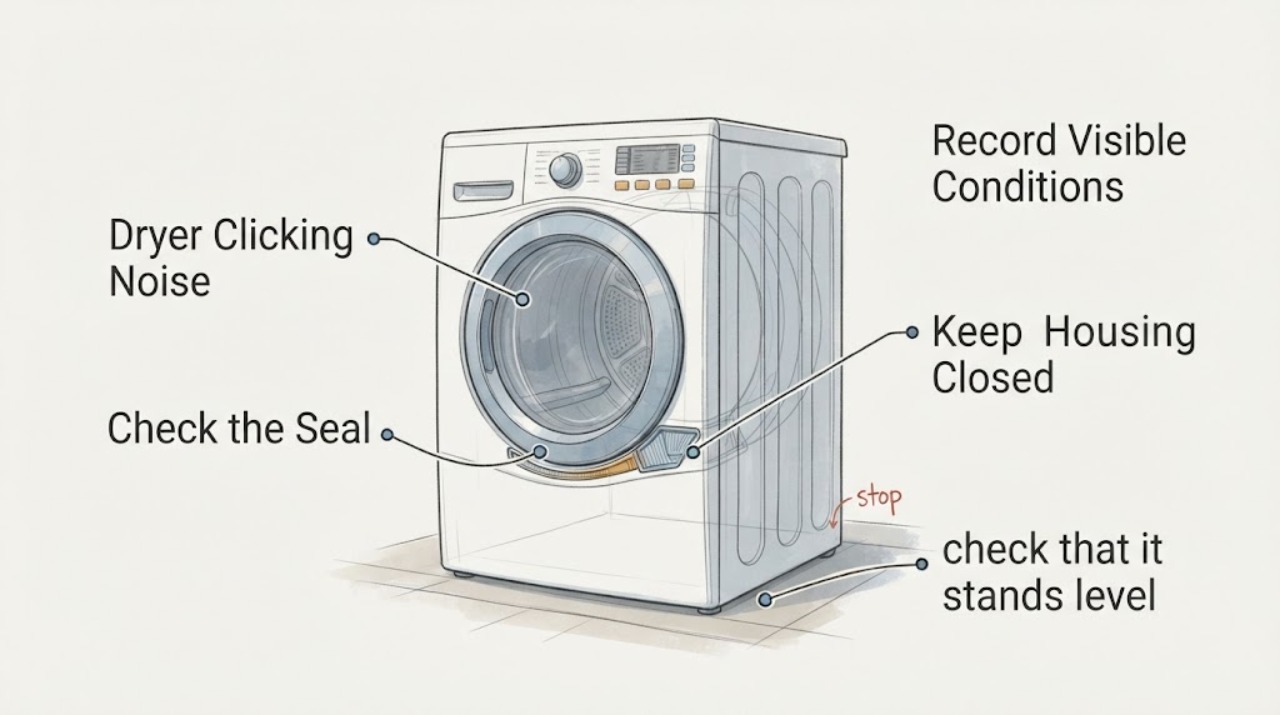
First note when the click occurs: while the drum turns, at start/stop, during heat-pump operation, during condensation handling, or only when the cycle changes. Bosch says foreign objects in the drum can rattle, and Bosch documentation for some dryer families identifies a clicking sound from automatic cleaning as normal. That does not make every clicking noise normal. Stop the dryer if the click is accompanied by scraping, a burning smell, smoke, overheating, a damaged cord, or a drum that binds. With the dryer off and unplugged, remove visible pocket objects, confirm the appliance is stable and level, and check the accessible lint/vent path. If the sound persists, worsens, or cannot be matched to the exact manual, use Bosch service rather than opening the cabinet or guessing a belt, roller, motor, compressor, or pump.
Before you begin
Safety first
- This no-model article covers sound timing, visible drum objects, stable installation, and accessible lint/vent checks only. Do not open panels, test live wiring, reach into a moving or hot drum, bypass a door/thermal safety, or replace internal parts based on the click.
Work through in order
Diagnostic checks
Use only checks that match the exact appliance or system and its official guide.
-
Check 1
From outside the appliance, record whether the click occurs once at start/stop, repeatedly with each drum rotation, during a reversal or program change, or while the dryer is otherwise stationary. Note whether clothes still dry normally and whether the sound is new or worsening.
Expected result: The click is tied to drum rotation, only to a phase change/automatic-cleaning interval, or accompanied by scraping, heat, odor, or poor drying.
Next step: Use the matching branch below. Do not keep running the appliance merely to reproduce a concerning sound.
Why this matters
Why: Timing helps separate a possible foreign-object or rotating-component issue from a model-documented operating sound, but it cannot identify an internal part without the exact model and manual.
-
Check 2
Stop the dryer, unplug it, wait for the drum and interior to cool, and inspect the visible drum, door seal, and accessible lint area for coins, fasteners, zippers, or other loose objects. Remove only an object that is plainly reachable without tools or panel removal.
Expected result: A loose object is visible, the drum is clean, or the drum binds/scrapes when moved only as the manual permits.
Next step: Remove a safely reachable object and monitor one normal cycle only if the dryer is otherwise safe. If the drum binds, scrapes, or the noise persists, stop use and arrange Bosch service.
Why this matters
Why: Bosch identifies coins and pocket objects as a common source of rattling noise. A clean drum or a binding drum shifts the issue toward model-specific service; it does not prove a bearing, belt, or motor fault.
-
Check 3
With the dryer off, check that it stands level and stable, does not rock against cabinetry, and has no loose external item touching the cabinet. Do not move a stacked dryer or adjust feet without following the exact installation instructions.
Expected result: The appliance rocks or contacts nearby surfaces, or the installation is stable and the click remains internal.
Next step: Correct only an obvious external contact or use the model installation instructions for leveling. If the click continues from inside the cabinet, use Bosch service rather than removing panels.
Why this matters
Why: Bosch says leveling helps prevent vibration and noise, but a stable installation does not diagnose an internal click.
-
Check 4
Clean the accessible lint filter as the exact manual directs and confirm the visible exhaust or ventilation path is not kinked, crushed, or blocked. Do not insert tools into the cabinet, heat exchanger, fan, or vent to chase a sound.
Expected result: Lint or a visible external airflow obstruction is present, or the accessible path is clear but clicking continues.
Next step: Correct the visible airflow issue and stop if heat, odor, or smoke is present. If the sound remains, identify the model and arrange service.
Why this matters
Why: Bosch links lint and ventilation conditions with dryer performance and overheating risk; clearing an accessible obstruction may improve operation but does not establish a mechanical clicking fault.
-
Check 5
Find the full Bosch E-Nr/model and compare the sound timing with the matching owner's manual's normal-noise and maintenance sections. Treat a manual statement about automatic cleaning, condensation pumping, or compressor operation as model-scoped only.
Expected result: The exact manual documents the sound during the observed phase, or it does not mention the sound and the noise persists.
Next step: If the manual clearly matches the timing and no safety symptom exists, monitor without unnecessary disassembly. Otherwise stop use if worsening and contact Bosch service with the model and recording.
Why this matters
Why: An opened Bosch manual example documents automatic-cleaning clicking, but Bosch dryer families and features vary. An unmatched sound cannot be safely normalized from a different manual.
-
Check 6
Stop the dryer and unplug it if clicking is accompanied by scraping, burning odor, smoke, overheating, a damaged cord, drum binding, or a sudden loss of drying performance. Provide Bosch support with the E-Nr/model, timing, location, load, and any safety symptom.
Expected result: A stop-use symptom is present, or the dryer is otherwise safe but clicking continues after visible checks.
Next step: Keep the dryer out of service for hazardous symptoms and arrange Bosch/authorized service. For a safe but unresolved click, avoid repeated test cycles and provide the recording and model information.
Why this matters
Why: A persistent or hazardous noise needs professional assessment; the public Bosch pages do not authorize a consumer to diagnose or replace internal moving, heating, or electrical parts.
Use your observations
Decision map
Find the observation that best matches what you see, then follow the next safe action.
-
PATH 01Next step
What you see
The click occurs only during a phase documented by the exact Bosch manual as automatic cleaning, condensation handling, or another normal operating process, with no scraping, odor, overheating, or drying loss.
Do this next
Monitor the timing and keep the exact manual available. Request service if the sound changes, becomes continuous, or is joined by a safety or performance symptom.
Why this path and its safety boundary
Why it matters: The sound may be normal for that model and phase; a manual from another Bosch family cannot establish this for the appliance.
-
PATH 02Next step
What you see
A coin, fastener, zipper, or other loose object is visible in the drum or door area.
Do this next
Unplug and remove only the safely reachable object, then monitor one normal cycle if the drum turns freely and there is no hazard. Escalate if noise persists.
Why this path and its safety boundary
Why it matters: Bosch identifies unwanted drum objects as a possible noise source, but the visible object may not explain every repeated click.
-
PATH 03Next step
What you see
The dryer rocks, touches nearby cabinetry, or has a visible external airflow obstruction.
Do this next
Correct only visible, manual-supported external conditions. Do not move a stacked unit or open the cabinet; arrange service if the click continues.
Why this path and its safety boundary
Why it matters: Installation stability or airflow may amplify noise or create overheating risk, but it does not prove an internal mechanical failure.
-
PATH 04Next step
What you see
Clicking is synchronized with drum rotation, becomes louder, is joined by scraping/burning odor/smoke/overheating, or the drum binds.
Do this next
Stop, unplug, and keep the dryer out of service. Contact Bosch or an authorized servicer; do not open panels or select a belt, roller, motor, compressor, or pump from the symptom.
Why this path and its safety boundary
Why it matters: This is not safely classifiable as a normal operating sound from the available evidence and may involve a moving, heating, or electrical fault.
Helpful context
Understand the symptom
A click is a timing clue, not a part number. A single click when the dryer starts, reverses, pauses, or changes a program is different from a repeated click synchronized with drum rotation. A heat-pump or condenser model can also make normal compressor, pump, or automatic-cleaning sounds, but the exact owner's manual controls whether that behavior applies to the appliance.
Bosch's US noise page starts with a simple drum inspection because coins or other pocket objects can rattle inside. Bosch also recommends a level dryer and clear ventilation in its general tips. These checks can remove external explanations without claiming that a belt, roller, motor, compressor, or pump has failed.
Treat a click together with a burning smell, smoke, overheating, scraping, a damaged power cord, or a drum that will not turn as a stop-use condition. Do not reproduce the sound repeatedly, open the cabinet, or bypass a door or thermal safety device.
When checks do not resolve it
Need a professional?
Contact Bosch or an authorized servicer when the click persists after visible drum and installation checks, is synchronized with rotation, cannot be matched to the exact manual, or is accompanied by scraping, burning odor, smoke, overheating, drum binding, damaged wiring, or poor drying.
Safety scope: This no-model article covers sound timing, visible drum objects, stable installation, and accessible lint/vent checks only. Do not open panels, test live wiring, reach into a moving or hot drum, bypass a door/thermal safety, or replace internal parts based on the click.
Common questions
FAQ
Can a Bosch dryer make a normal clicking sound?
Some Bosch dryer documentation describes clicking from an automatic-cleaning process, but that is model- and phase-specific. Confirm the exact manual and timing; a new rotation-synchronized click, scraping, odor, heat, or drying loss needs service.
What should I check first for a Bosch dryer click?
Stop and unplug the dryer, then inspect the visible drum and door area for coins or other pocket objects. Bosch's noise guide specifically starts with unwanted objects in the drum. Do not remove panels to search further.
Could an unlevel Bosch dryer cause noise?
Bosch's tips say leveling helps prevent vibration and noise. Check for rocking or external contact, but do not move a stacked dryer or infer an internal part fault from installation alone.
Should I keep running the dryer to identify the clicking part?
No if the click is worsening or accompanied by scraping, burning odor, smoke, overheating, drum binding, or poor drying. Unplug it and arrange service; do not open the cabinet or guess a belt, roller, motor, compressor, or pump.
Read the exact guide
Official sources
- Bosch Dryer Operating Manual — Normal noisesBosch Home Appliances · Opened the Bosch-hosted PDF and verified its normal-noise section. This documented manual example says compressor/pump sounds can be normal and that automatic cleaning causes a clicking noise. It is used conditionally as a model-specific example, not generalized to every Bosch dryer.
- Dryer Is Making Noises | Dryer Troubleshooting | Bosch Home AppliancesBSH Home Appliances Corporation / Bosch Home Appliances · Opened Bosch's US dryer-noise page. It directs the owner to check the drum for coins or other unwanted objects and to contact Bosch support if the noise persists.
- Bosch Dryer Tips & Tricks | Settings, First Use & MoreBSH Home Appliances Corporation / Bosch Home Appliances · Opened Bosch's dryer tips page. It says to level the dryer to prevent vibration/noise, keep lint and ventilation paths clear, and consult the model owner manual for feature-specific behavior.
- Bosch Dryer Troubleshooting & Repair GuideBSH Home Appliances Corporation / Bosch Home Appliances · Opened Bosch's dryer troubleshooting guide. It recognizes dryer noise as a separate troubleshooting category, mentions leveling/installation and unsuitable surfaces, and routes unresolved issues to Bosch support or authorized service.
Community feedback
Share a repair observation
Share a plain-text repair observation. Accepted observations are published automatically; this page may take a moment to update.