
On this page
Start here
Quick answer
A flashing Bosch dryer filter symbol is generally a maintenance prompt, but its exact meaning and the filter or base-unit location depend on the dryer family. Stop the dryer and let it cool, then read the symbol and locate the full model from the rating plate or manual. For the accessible lint filter, Bosch says to remove the lint, rinse the filter only as the applicable instructions allow, dry it completely, and reinstall it. Condenser and heat-pump models may also have a condensation unit or base-unit/heat-exchanger filter with different access rules. Do not use a generic reset, run the dryer with a wet or missing filter, open protected panels, or infer a failed heater or fan. If the correct model procedure is complete and the light still flashes, arrange Bosch service.
Before you begin
Safety first
- Do not run the dryer with a wet or missing filter, open protected panels, touch heat-exchanger fins with bare hands, perform live electrical tests, bypass a sensor, or repeatedly restart a dryer with smoke, burning odor, overheating, or damaged wiring.
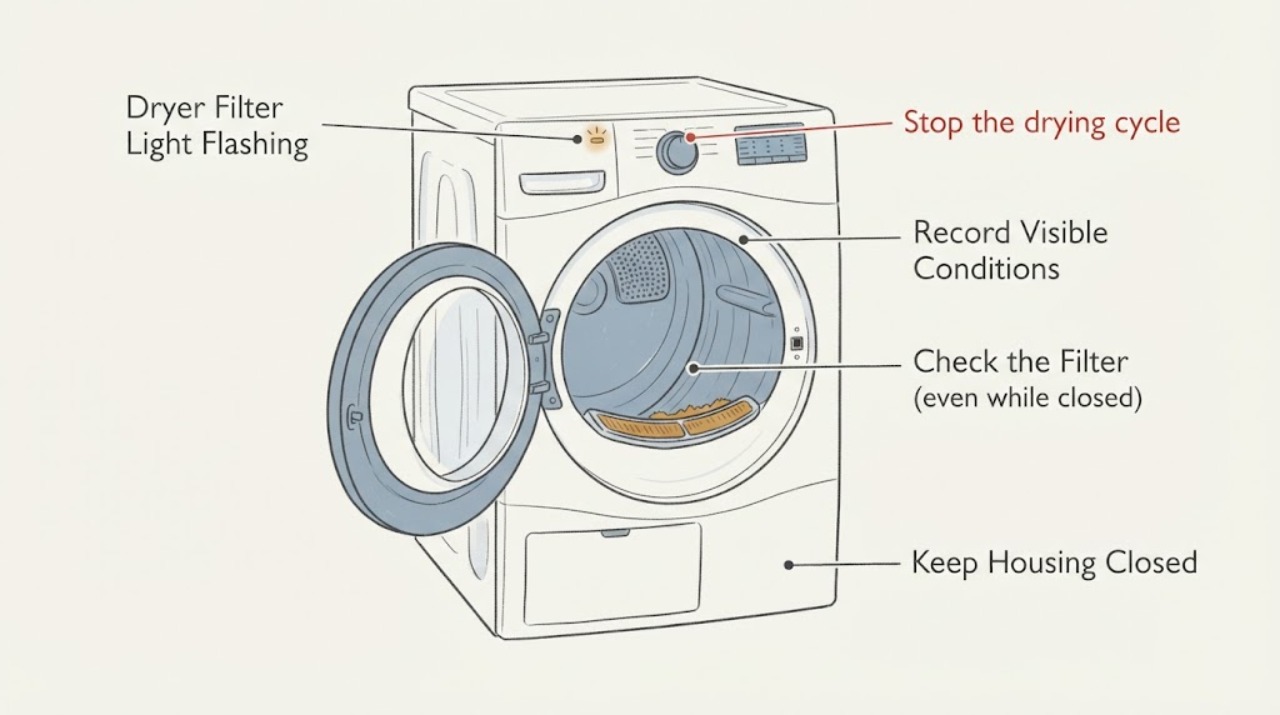
Work through in order
Diagnostic checks
Use only checks that match the exact appliance or system and its official guide.
-
Check 1
Stop the drying cycle and allow the appliance and laundry to cool. If there is smoke, a burning smell, overheating, damaged wiring, or a hot electrical connection, keep the dryer out of service and isolate power only from a dry, safe location; do not restart it to clear the light.
Expected result: The dryer is only showing the filter indication, or a heat, smoke, burning, or electrical hazard is also present.
Next step: For a hazard, obtain qualified appliance/electrical help. If there is no hazard, continue only after the dryer has cooled and the drum is safe to access.
Why this matters
Why: A maintenance indicator can be handled through the model's care instructions, but heat, smoke, burning, or electrical damage changes the situation to a stop-use and service matter.
-
Check 2
Read the complete symbol or light combination and record the dryer E-number/model from the rating plate or the manual. Check whether the indication is the clean-fluff-filter/base-unit symbol, a condensate-container symbol, an error code, or several lights together.
Expected result: The symbol matches the filter/base-unit indication, another maintenance symbol is present, or the display is an error code or an unknown combination.
Next step: Use the exact model manual for the matching indication. Do not apply a code definition, reset combination, or filter location from another Bosch dryer family.
Why this matters
Why: Bosch identifies the filter/base-unit symbol separately from the condensate-container symbol, and model-specific documents can assign different meanings to combined lights or codes.
-
Check 3
With the dryer cool, remove the accessible lint/fluff filter exactly as the matching instructions show. Remove visible lint, gently rinse remaining residue only when the model instructions permit, let the filter dry completely, and reinstall it so it is seated correctly.
Expected result: The filter is visibly blocked or damp, or it is clean, fully dry, intact, and correctly seated.
Next step: If the filter was blocked or damp, complete the drying and seating step before the model-authorized retest. If it was already clean and dry, do not force the filter or substitute a different filter.
Why this matters
Why: Bosch says lint buildup can impair operation and directs users to clean, dry, and reinsert the filter; a clean and correctly seated filter makes a simple surface blockage less likely but does not identify another failed part.
-
Check 4
If the exact manual identifies a condenser or heat-pump base unit, inspect only the user-accessible condensation container, EasyClean filter, or heat-exchanger area that it names. Empty or clean that part only according to the model instructions; do not pull a condensate container during an automatic heat-exchanger-rinse display and do not touch heat-exchanger fins with bare hands.
Expected result: The dryer is a condenser/heat-pump family with a matching accessible base-unit task, or the model and dryer type are still unknown.
Next step: Follow only the exact manual for the identified family. If the family or access path cannot be confirmed, stop at the lint-filter check and arrange model-specific support rather than opening a panel.
Why this matters
Why: Bosch documents different maintenance paths for condensation tanks, EasyClean filters, and heat exchangers. Unknown dryer type is not evidence that a base-unit part should be removed.
-
Check 5
After the matching filter/base-unit care is complete and all parts are dry, record whether the light returns, whether a cycle stops, drying time changes, airflow or heat is abnormal, and any other display code. Give the service provider the full model/E-number and the exact light combination.
Expected result: The light remains flashing, the cycle stops, drying is poor, another code appears, or the correct filter cannot be removed/reinstalled safely.
Next step: Keep the dryer out of service if it overheats, smells burnt, stops unexpectedly, or shows electrical damage; otherwise arrange Bosch service or use the exact model's support path. Do not open protected covers or perform live electrical tests.
Why this matters
Why: The remaining possibilities include a family-specific maintenance condition or an appliance fault, but the no-model evidence does not select a heater, fan, sensor, control, vent, or compatible replacement part.
Use your observations
Decision map
Find the observation that best matches what you see, then follow the next safe action.
-
PATH 01Next step
What you see
The displayed symbol is Bosch's clean-fluff-filter or base-unit indication, with no smoke, burning smell, overheating, or electrical damage.
Do this next
Clean and fully dry the accessible filter, then follow the exact model manual for any base-unit care or indication reset.
Why this path and its safety boundary
Why it matters: Bosch describes that symbol as a cleaning indication rather than proof of a failed heater or control board.
-
PATH 02Next step
What you see
The accessible filter is blocked, damp, damaged, or not seated correctly, and the dryer family instructions cover its removal.
Do this next
Remove lint, rinse only as instructed, dry completely, reinstall, and stop if the light or a fault returns after the model-authorized check.
Why this path and its safety boundary
Why it matters: The observed condition is consistent with the maintenance issue Bosch addresses through filter cleaning and correct reinsertion.
-
PATH 03Next step
What you see
The filter is clean, dry, intact, and correctly seated, but the flashing light persists or the dryer stops/does not dry normally.
Do this next
Use the E-number to consult the exact Bosch manual or arrange service. Do not use a generic reset or infer a blocked vent, failed fan, heater, sensor, or board without model evidence.
Why this path and its safety boundary
Why it matters: The simple accessible-filter explanation is not established; the exact model may require base-unit care or professional diagnosis.
-
PATH 04Next step
What you see
Smoke, burning odor, overheating, damaged wiring, or a hot electrical connection is present, or the correct filter/base-unit access cannot be performed safely.
Do this next
Stop use, isolate power only from a dry safe location when appropriate, keep the dryer out of service, and obtain qualified appliance/electrical help. Do not restart, bypass a sensor, or open the cabinet.
Why this path and its safety boundary
Why it matters: The priority is fire, shock, and appliance safety, not clearing the indicator.
Helpful context
Understand the symptom
Treat the flashing symbol as a maintenance prompt until the model says otherwise
Bosch's symbol guide describes the clean-fluff-filter or base-unit symbol as indicating that the filter or base unit needs cleaning. That does not identify one universal filter arrangement: Bosch documents differ between accessible two-part fluff filters, condensation tanks, EasyClean filters, and heat exchangers. Read the complete display and record the exact model before choosing a reset or a deeper cleaning route.
Clean only the accessible parts covered by the matching instructions
For the accessible lint filter, Bosch's maintenance guidance says to remove lint, gently rinse remaining lint when appropriate, let the filter dry completely, and reinstall it. Bosch's family guidance separately covers condensation units and base-unit or heat-exchanger filters. A filter light that remains on after correct, model-matched care does not prove that a heater, fan, sensor, or control board has failed.
When checks do not resolve it
Need a professional?
Arrange Bosch service when the filter indication persists after the exact model's filter/base-unit care, the dryer stops or dries poorly, another code appears, the filter or access door is damaged, or any smoke, burning odor, overheating, or electrical damage is present.
Safety scope: Do not run the dryer with a wet or missing filter, open protected panels, touch heat-exchanger fins with bare hands, perform live electrical tests, bypass a sensor, or repeatedly restart a dryer with smoke, burning odor, overheating, or damaged wiring.
Have this ready
- Full E-number/model, country or region, exact icon/light combination, whether the filter was cleaned and dried, dryer type if known, cycle behavior, drying result, other codes, and any heat, odor, smoke, or electrical observations.
Common questions
FAQ
Does a flashing Bosch dryer filter light always mean a failed part?
No. Bosch's symbol guide identifies the clean-fluff-filter or base-unit symbol as a cleaning indication. The model and full light combination still matter, so persistent flashing after correct model-specific care should go to Bosch support rather than being treated as a confirmed heater, fan, or control fault.
Can I rinse the Bosch dryer filter?
Bosch's general filter guidance says to remove lint, wash the filter gently under running water when needed, let it dry completely, and reinsert it. Follow the exact model instructions and do not run the dryer with a damp or missing filter.
What if the filter light stays on after cleaning?
Confirm the full model and whether the symbol refers to the lint filter or base unit, then follow the matching manual for any condensation or heat-exchanger maintenance. If the filter is clean, dry, correctly seated, and the indication persists or the dryer stops or overheats, arrange Bosch service instead of using a generic reset or opening the cabinet.
Read the exact guide
Official sources
- Cleaning your tumble dryerBosch Home Appliances Singapore · Opened Bosch official family-level maintenance guide used for the two-part filter and the distinction between condensation and EasyClean/heat-exchanger maintenance. It is not treated as a universal access procedure for every Bosch dryer.
- Tumble Dryer Symbols and SettingsBosch Home UK · Opened Bosch official symbol guide used to identify the clean-fluff-filter/base-unit indication and distinguish it from the condensate-container and automatic heat-exchanger-rinse indications. Exact model behavior remains manual-specific.
- Dryer Maintenance: Cleaning your dryer’s lint filterBosch Home Appliances · Opened Bosch official maintenance page supporting the accessible filter cleaning, complete drying, and reinsertion steps. It does not identify an unspecified dryer's model-specific reset or internal fault.
Community feedback
Share a repair observation
Share a plain-text repair observation. Accepted observations are published automatically; this page may take a moment to update.