
On this page
Start here
Quick answer
First determine whether the flashing is the oven cavity light, a panel indicator, or a clock/display message; Bosch family guidance treats these as different observations. With the oven cool and not running a heating or self-clean cycle, make sure all functions are off, wipe the front control panel dry, and record any E-code or flashing clock text. Bosch says an E11 touch-key condition may be related to condensation and supports a dry-panel check followed by a brief power disconnect; a flashing 00:00 after a power interruption means the clock must be set before the oven works on the Bosch page that documents that symptom. If the panel remains unresponsive, the light stays on/flashes with all controls off, or an error returns, stop using the oven and arrange model-specific service. Do not open the control panel, probe live wiring, or replace the light or board from this symptom alone.
Before you begin
Safety first
- Do not open the front panel, perform live electrical measurements, replace a lamp or board, bypass controls, or reset a hot/self-cleaning oven repeatedly.
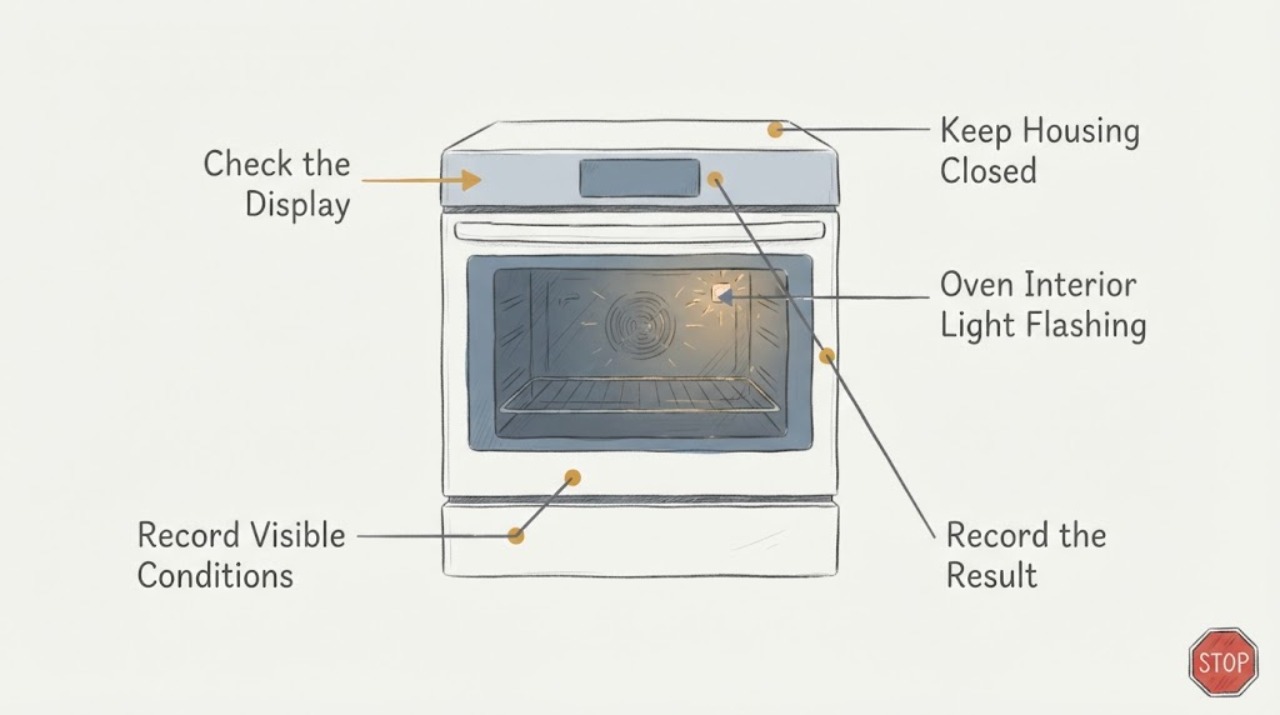
Work through in order
Diagnostic checks
Use only checks that match the exact appliance or system and its official guide.
-
Check 1
With the oven cool and inactive, identify whether the flashing comes from the cavity lamp, a front-panel indicator, or the clock/display; record any E-code, “00:00,” beeps, and whether the oven is otherwise running.
Expected result: The cavity lamp flashes, a panel indicator stays on, the clock flashes, an E-code appears, or no text appears.
Next step: Use the exact model manual for the recorded display state and continue only with the matching external branch below.
Why this matters
Why: Bosch uses different guidance for an indicator that does not go out, a clock reset after power loss, and E-code/touch-key faults; the symptom wording alone does not choose a part.
-
Check 2
After active cooking functions are off and surfaces are cool, wipe the front control panel with a dry cloth and press the center of a key with the flat part of a fingertip.
Expected result: The panel begins responding, remains unresponsive, or appears wet/soiled again.
Next step: If it remains unresponsive, do not remove the panel; record the model/display state and use Bosch service.
Why this matters
Why: Bosch identifies condensation as a possible reason touch keys do not operate properly; cleaning/drying is an external observation, not proof of a failed board.
-
Check 3
If and only if the display shows an E plus a number, note the complete code before any reset; if it shows a flashing 00:00 after a power interruption, use the exact manual to restore the clock.
Expected result: The E-code disappears, returns, or the flashing clock remains; the display shows neither.
Next step: Do not substitute an E11 or clock procedure for another display state; arrange model-specific support if the panel or light remains abnormal.
Why this matters
Why: Bosch says E-code recurrence needs service, while the documented flashing 00:00 branch indicates the clock must be set after power loss. Neither branch explains an unidentified cavity-light flash.
-
Check 4
Confirm that all oven functions and dials are off and that the oven is not in an active heating or self-clean cycle before interpreting a remaining light as a fault.
Expected result: The light goes out when functions are off, or it continues flashing/staying on with all controls off.
Next step: Keep the oven off for persistent flashing, heat, odor, or control failure and arrange qualified service. Do not reach into the cavity or open the appliance.
Why this matters
Why: Bosch advises checking that functions are actually switched off when an indicator light does not go out; persistent behavior remains unresolved without the exact model.
-
Check 5
Give Bosch service the E-Nr/model and FD number, exact light location, display text/code, beeps, recent power event, panel response, and whether the oven was hot or self-cleaning.
Expected result: The front panel remains unresponsive, the light persists with all functions off, or an E-code returns.
Next step: Arrange Bosch or authorized service. Do not open the panel, perform live tests, bypass a control, or order an internal part from the symptom alone.
Why this matters
Why: Bosch routes recurring codes and unresolved oven control problems to model-specific support; family-level pages do not establish a lamp, board, relay, or wiring diagnosis.
Use your observations
Decision map
Find the observation that best matches what you see, then follow the next safe action.
-
PATH 01Next step
What you see
The front panel was damp/soiled and responds normally after the oven is cool and the panel is wiped dry.
Do this next
Monitor the exact signal and use the model manual if the light or display returns. Keep liquids away from the control panel.
Why this path and its safety boundary
Why it matters: Condensation or surface contamination may have interfered with touch keys; this does not prove the flashing light’s cause.
-
PATH 02Next step
What you see
The display flashes 00:00 after a power interruption and the oven otherwise appears normal.
Do this next
Set the clock using the exact model manual; escalate if the panel remains unresponsive or the flashing returns.
Why this path and its safety boundary
Why it matters: Bosch documents a clock-reset condition in which the oven will not work until the time is set.
-
PATH 03Next step
What you see
An E-code appears or returns after the panel is dry and the documented power step is completed.
Do this next
Stop using the oven and arrange model-specific Bosch/authorized service; do not infer a board or keypad replacement.
Why this path and its safety boundary
Why it matters: Bosch treats the persistent E-code as a fault requiring the exact code and model for service, rather than a generic light problem.
-
PATH 04Next step
What you see
The cavity light or front indicator continues flashing/staying on while all functions are off, and the panel still does not respond.
Do this next
Keep the oven off and arrange qualified service. Do not open the control panel, probe wiring, or repeatedly cycle a hot oven.
Why this path and its safety boundary
Why it matters: The assigned symptom is outside the generic family guidance; the remaining cause could not be scoped safely without model/display evidence.
Helpful context
Understand the symptom
The words “interior light flashing” do not identify which Bosch signal is changing. A cavity lamp, a front-panel indicator, and a flashing clock or E-code are different observations. Because the task has no model or display transcription, begin by documenting the exact location and text rather than treating the light as proof of a failed control board or lamp.
Identify the flashing signal before resetting anything
With the oven cool and not in a heating or self-clean cycle, note whether the light is inside the cavity, beside a control, or on the clock/display. Record any E plus number, beeps, “00:00,” or other text, and note whether the oven is otherwise operating. Bosch’s support pages use the exact displayed code or clock state to select the next step; a generic flashing light is not enough to name a component.
Make the external panel check safe and dry
If the front control panel is damp or dirty, switch off active functions, let hot surfaces cool, and wipe the panel with a dry cloth. Bosch identifies condensation as one possible reason touch keys do not operate properly. Press only the center of a key with a fingertip; do not spray cleaner into seams or remove the panel.
Use the documented power/clock branch only when it matches
If the display shows an E plus a number, preserve the exact code for the model manual or service. Bosch’s US error page documents E11 as a touch-key/condensation possibility and gives a brief fuse-box power disconnect after drying the panel; its oven tips page says a recurring E-code needs service. If the display is flashing 00:00 after a power interruption, the Bosch oven page says the clock must be set before the oven will work. Do not apply a clock or E11 procedure to an unidentified cavity-light symptom.
Escalate a panel that stays unresponsive
If the front panel still does not respond after the safe dry-panel observation and the exact manual-supported power step, or if the light continues with all functions off, stop using the oven and arrange Bosch or authorized service. Provide the E-Nr/model, FD number if available, exact flashing location, display text, beeps, recent power interruption, and whether the oven is hot or in self-clean. Do not open the control panel or guess at a lamp, display, relay, wiring, or control-board replacement.
When checks do not resolve it
Need a professional?
Arrange Bosch or authorized service if the panel remains unresponsive after the safe dry-panel check, an E-code returns, or the light continues with all oven functions off. Stop immediately for smoke, electrical odor, heat when no function is selected, or repeated breaker trips.
Safety scope: Do not open the front panel, perform live electrical measurements, replace a lamp or board, bypass controls, or reset a hot/self-cleaning oven repeatedly.
Have this ready
- Exact E-Nr/model and FD number, light location, complete display text/code, beeps, panel response, recent power interruption, and whether the oven was hot or running self-clean.
Common questions
FAQ
Does a flashing oven interior light prove the control board failed?
No. The task wording does not distinguish a cavity lamp from a panel indicator or flashing clock. Bosch uses different guidance for these observations, so record the exact location and display text before naming a component.
What can I do if the Bosch front panel does not respond?
When the oven is cool and inactive, wipe the panel dry and press the center of a key with a flat fingertip. Bosch identifies condensation as one possible cause of touch-key problems; persistent non-response needs model-specific service.
What does a flashing 00:00 mean on a Bosch oven?
Bosch documents flashing 00:00 after a power interruption as a clock-reset condition; the oven will not work until the time is set. Use the exact model manual for the clock procedure.
Can I remove the Bosch control panel to inspect the wiring?
No. The family sources do not authorize cabinet or live-wiring work for this symptom. Record the model and display state and use Bosch or authorized service.
Read the exact guide
Official sources
- Oven & Microwave | Error CodesBosch · Official Bosch US oven support applies at family level; exact error meaning and controls remain model-specific when no E-Nr is supplied.
- Oven not workingBosch · Official Bosch regional support page used only for its generic observations about an indicator that does not go out and a flashing 00:00 after power loss; model-specific clock controls remain subject to the exact manual.
- Get Support - Ovens & RangesBosch · Official Bosch US oven support hub used for model-specific manual/service routing after external checks.
- Oven FAQs | Top TipsBosch · Official Bosch US oven tips support capturing the displayed E-code and stopping use/service when it returns; it does not define a generic interior-light fault.
Community feedback
Share a repair observation
Share a plain-text repair observation. Accepted observations are published automatically; this page may take a moment to update.