
On this page
Start here
Quick answer
First determine what actually stops. Bosch manuals for some oven families state that opening the door stops operation and that closing it resumes operation, and a Bosch range manual separately states that a convection fan turns off while the door is open and resumes after closing. If only heating or the fan pauses while the door is open and the display remains on, that can be normal for the selected mode. If the display goes blank, the clock resets, a breaker trips, the oven loses power while the door stays closed, or it does not resume after the door is closed, treat it as a fault and stop using it until the exact Bosch model manual or qualified service confirms the cause. Do not bypass the door switch, remove the door, open the control cabinet, or test live wiring.
Before you begin
Safety first
- Do not bypass or bridge a door switch, wedge the latch, remove the door, open the cabinet, perform live measurements, or repeatedly reset a tripping circuit. Keep the oven off for smoke, sparking, burning smell, damaged door/seal/glass, or persistent power loss.
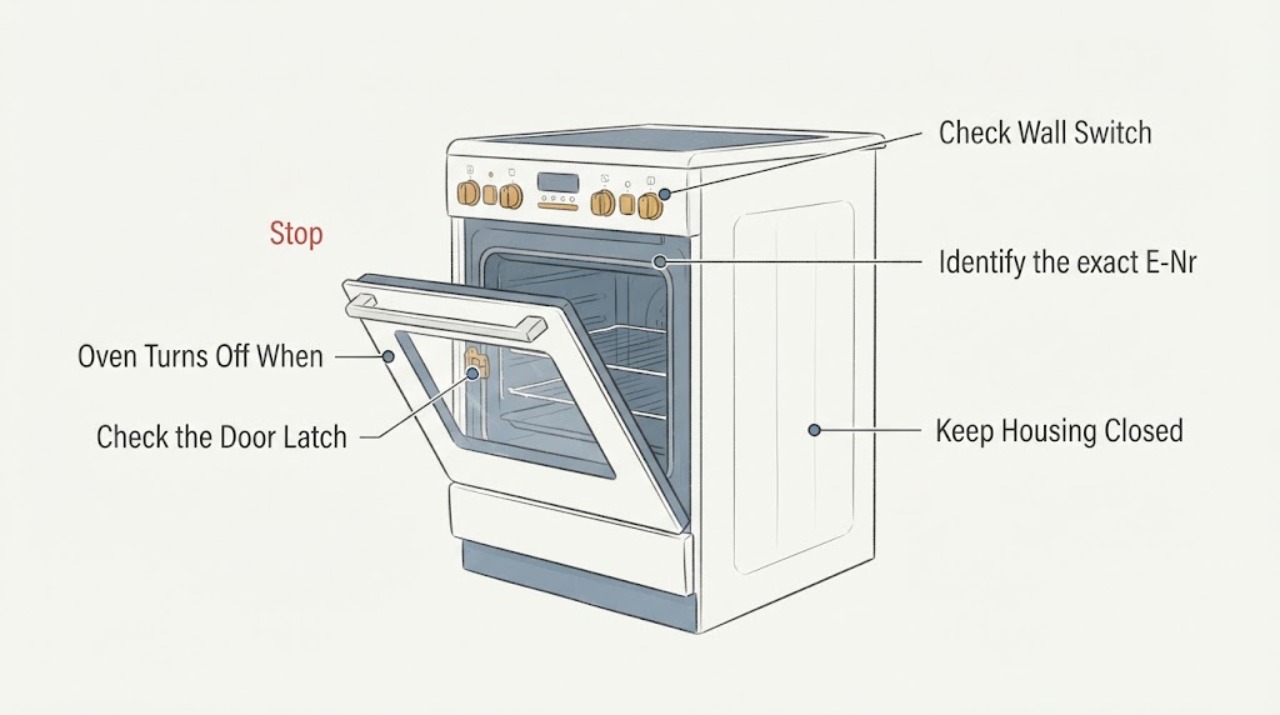
Work through in order
Diagnostic checks
Use only checks that match the exact appliance or system and its official guide.
-
Check 1
With no smoke, burning smell, sparking, damaged glass, or other hazard present, observe one door-opening event from the controls without reaching into the hot cavity or manipulating the latch.
Expected result: The display remains on and only heating or the fan pauses, or the display goes blank, the clock resets, or a breaker trips.
Next step: For a live display, continue with the close-and-resume check. For power loss or a hazard, stop using the oven and arrange qualified electrical or Bosch service; do not repeatedly reset the breaker.
Why this matters
Why: A live display with a mode-dependent pause can match documented Bosch door behavior. A blank display, reset clock, or circuit trip is a power/control symptom and is not established as a normal door pause.
-
Check 2
Close the door fully once and watch the same controls and selected mode without pressing a door switch or forcing the door.
Expected result: The selected operation resumes, only the fan resumes later as the mode requires, or the oven remains stopped or shows an error after closing.
Next step: If it resumes normally, compare the behavior with the exact model manual. If it does not, keep the oven off and contact Bosch or a qualified servicer with the model and any display message.
Why this matters
Why: Resumption after closing is consistent with the opened Bosch manual's documented behavior for its covered family. Failure to resume, an error, or a changed display needs model-specific troubleshooting rather than a guessed switch diagnosis.
-
Check 3
Identify the exact Bosch E-Nr. or model from the rating plate or owner documentation and check the matching operating and troubleshooting instructions.
Expected result: The model is available and the matching manual describes door-open stopping/resumption, or the model is unknown or the observed behavior is absent from the manual.
Next step: Follow the matched manual only. If the model cannot be identified or the behavior conflicts with its instructions, stop at external observation and arrange Bosch or qualified appliance service.
Why this matters
Why: Bosch uses model-specific owner manuals and service resources. A manual for another family can show a possible normal pattern but cannot prove the behavior for an unidentified oven.
-
Check 4
From outside the appliance, inspect the door alignment, visible seal, hinges, glass, and control display after the oven has cooled; do not remove the door or cabinet panels.
Expected result: The door does not close squarely, the seal or glass is damaged, the latch area is loose, or the door and display appear intact.
Next step: Do not force the door or bypass the interlock. Keep the oven off if the door, seal, glass, or latch area is damaged; otherwise use the exact manual and escalate if the symptom continues.
Why this matters
Why: A damaged or misaligned door can prevent the appliance from recognizing a safe closed state, but the observation does not identify a particular switch or control-board failure.
-
Check 5
Prepare a service handoff with the complete model, operating mode, whether the display stayed on, what resumed after closing, any error code, breaker behavior, and photos of visible door or seal damage.
Expected result: The oven loses power, fails to resume, shows an error, has door/seal damage, or the model-specific instructions do not explain the event.
Next step: Leave the oven off and give the record to Bosch support, an authorized servicer, or a qualified appliance technician. Do not open the cabinet or perform live electrical measurements.
Why this matters
Why: The remaining question may involve the door-sensing system, controls, wiring, supply circuit, or a mode-specific rule; the symptom alone does not support a safe component replacement or live test.
Use your observations
Decision map
Find the observation that best matches what you see, then follow the next safe action.
-
PATH 01Next step
What you see
The display stays on, the oven stops or pauses only while the door is open, and the selected operation resumes when the door is closed.
Do this next
Use the exact Bosch model manual to confirm the mode. No door-switch repair is justified from this normal pattern alone.
Why this path and its safety boundary
Why it matters: This pattern is consistent with documented Bosch door-open operation for at least some oven families and with a Bosch range manual's fan pause behavior.
-
PATH 02Next step
What you see
The display goes blank, the clock resets, a breaker trips, or the oven stays off after the door is closed.
Do this next
Stop using the oven and arrange Bosch or qualified electrical/appliance service. Do not repeatedly reset the breaker or guess a door switch or control part.
Why this path and its safety boundary
Why it matters: This is a power, control, or fault symptom rather than the documented pause-and-resume pattern by itself.
-
PATH 03Next step
What you see
The door, glass, seal, hinge, or latch area is visibly damaged or the door does not close squarely.
Do this next
Keep the oven off. Do not force, remove, or bypass the door assembly; arrange qualified Bosch service.
Why this path and its safety boundary
Why it matters: The oven may not be able to confirm its safe closed-door state, and continued heating could create a safety concern.
-
PATH 04Next step
What you see
There is smoke, sparking, a burning smell, damaged wiring, abnormal heat at the controls, or another immediate electrical or fire warning.
Do this next
Stop operating the oven, move away from an active hazard, and use emergency or qualified electrical/appliance help as appropriate. Do not open the cabinet.
Why this path and its safety boundary
Why it matters: The event exceeds a normal door-behavior question and requires immediate safe shutdown and professional assessment.
Helpful context
Understand the symptom
The phrase turns off can mean two different things: the heating or fan pauses while the door is open, or the oven loses its display and power. Bosch documentation shows that door-open behavior can be intentional, but the exact model and operating mode determine what should resume after the door closes.
Separate a normal door pause from a power loss
Keep the door open only long enough to observe the controls from a safe position. Record whether the display stays lit, whether only heat or the fan stops, and whether the same selected mode resumes after the door is fully closed. A door pause with a live display is a different symptom from a blank display, reset clock, breaker trip, or an oven that remains off after closing.
Use the exact Bosch model before changing parts or settings
Bosch's oven support page provides owner manuals, troubleshooting, and service resources. Find the complete E-Nr. or model information from the rating plate or manual and compare the door behavior with that exact document. A different Bosch oven family can use different controls, modes, or service instructions.
Do not defeat the door safety system
Do not tape, wedge, bypass, or electrically bridge a door switch to keep the oven running. Do not remove the door or open the cabinet to inspect a switch or wiring. If the door is misaligned, the seal is damaged, the controls go blank, or the oven shows heat or electrical warning signs, leave it off and arrange qualified service.
When checks do not resolve it
Need a professional?
Call Bosch or qualified appliance service if the display goes blank, the clock resets, a breaker trips, operation does not resume after closing, the exact manual does not explain the behavior, or the door, seal, glass, hinge, latch, wiring, or controls show damage. Use qualified electrical help for a supply or circuit hazard.
Safety scope: Do not bypass or bridge a door switch, wedge the latch, remove the door, open the cabinet, perform live measurements, or repeatedly reset a tripping circuit. Keep the oven off for smoke, sparking, burning smell, damaged door/seal/glass, or persistent power loss.
Have this ready
- Complete Bosch E-Nr./model, operating mode and temperature, whether the display stayed on, what resumed after closing, any error code or breaker trip, and photos of visible door, seal, glass, hinge, or latch damage.
Common questions
FAQ
Is it normal for a Bosch oven to stop when I open the door?
It can be normal for some Bosch oven families and modes. One opened Bosch manual states that operation stops when the door opens and continues when it closes; another Bosch range manual says its convection fan turns off while the door is open and resumes after closing. Confirm the rule in the exact model manual.
What if the Bosch oven display turns off when the door opens?
A blank display or reset clock is different from a heating or fan pause. Keep the oven off, do not repeatedly reset the breaker, and arrange Bosch or qualified electrical/appliance service with the model and event details.
Can I bypass the Bosch oven door switch so it keeps running?
No. Do not wedge, tape, bridge, or otherwise bypass the door-sensing system, and do not open the cabinet. A door that will not close or a unit that will not resume needs qualified service.
How do I check the behavior for my Bosch oven?
Find the complete E-Nr. or model information, identify the operating mode, and use the matching Bosch owner manual. Observe only from outside and only when there are no smoke, burning, sparking, or other immediate hazards.
Read the exact guide
Official sources
- User manual and installation instructions HBG633B.1Bosch Home Appliances · Official Bosch manual for the HBG633B.1 family. Used as a scoped example of Bosch built-in oven door behavior, not as proof for every Bosch oven model.
- 90004530953_5V0FKY_RevA.bookBosch Home Appliances · Official Bosch range manual used only to show that, on its covered range and modes, the convection fan turns off while the door is open and resumes after closing. It is not transferred to an unidentified Bosch oven.
- Get Support - Ovens & RangesBosch Home Appliances · Official Bosch support portal used for the exact-model manual and qualified-service boundary; it does not define the behavior of an unidentified model by itself.
Community feedback
Share a repair observation
Share a plain-text repair observation. Accepted observations are published automatically; this page may take a moment to update.