
On this page
Start here
Quick answer
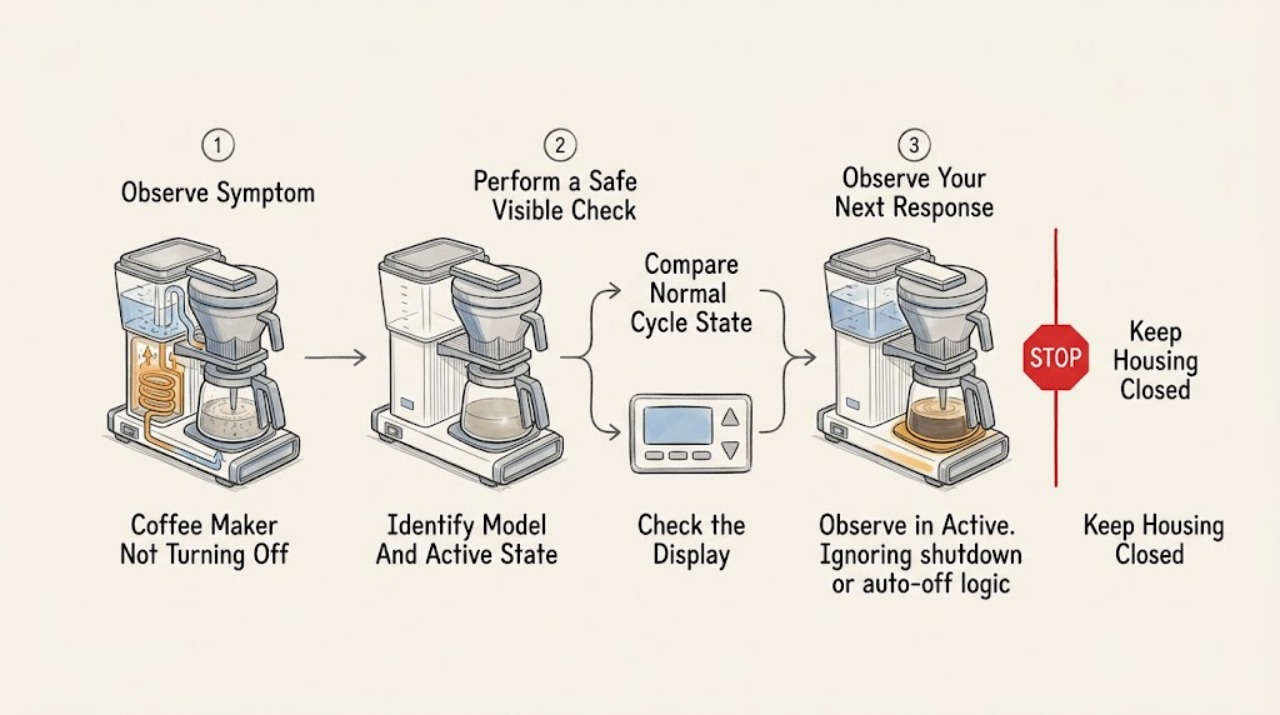
First identify the Breville product family and what is still active. On drip models, a hot plate or keep-warm function can continue after brewing; one BCM700 manual says its hot plate keeps coffee warm for two hours and then the coffee maker turns off, while the Precision Brewer manual allows keep-warm and standby behavior that varies by mode and settings. Some grind-and-brew models automatically shut off after brewing and may make a normal winding sound, and espresso models can purge water or remain in sleep mode before auto-off. These are not the same as a heater, pump, display, or control that remains active beyond the exact model's documented behavior or will not respond to its normal control. Press the model's documented cancel/off control once, keep hot parts and steam away from hands, and if the control does not respond, disconnect the plug only from a dry, safe position. If water is near the base, the appliance is excessively hot, smoking, sparking, or has a damaged cord, stop using it and arrange qualified service; do not open the housing or continue a cleaning cycle by guessing.
Before you begin
Safety first
- This article covers identifying the product and documented state, using the normal user control once, observing exterior conditions, and disconnecting from a dry, safe outlet position when the control is ignored. A qualified technician must handle heaters, pumps, relays, sensors, controls, wiring, internal water paths, and housing work.
Work through in order
Diagnostic checks
Use only checks that match the exact appliance or system and its official guide.
-
Check 1
Read the Breville model from the rating label or manual and note the product type: drip coffee maker, Precision Brewer, grind-and-brew brewer, or espresso machine. Record whether the remaining activity is a hot plate, keep-warm indicator, water or steam purge, pump or winding sound, display/standby state, cleaning/descale message, or an apparently active heater or brew cycle.
Expected result: The model and active state are known, or the machine type or remaining activity is uncertain.
Next step: Use the exact model manual to match the observed state before touching hot parts or disconnecting power. If the model or active state cannot be identified, keep the machine attended and arrange Breville support rather than guessing.
Stop if: Do not reach into a hot brew path or remove covers to identify the active component.
Why this matters
Why: Breville's shutoff timing and controls differ substantially by product family. A hot plate, standby display, auto-purge, or cleaning prompt can be an intentional phase, while a persistent heater or unresponsive control is not explained by a generic coffee-maker rule.
-
Check 2
Compare the state with the exact model's documented sequence. For a drip model, check whether brewing has ended but keep warm is selected or the allowed automatic-off period has not elapsed. For a Precision Brewer, check keep-warm, standby, Auto Start, and brew-mode settings. For an espresso model, check whether the machine is purging or in sleep/auto-off behavior; do not interrupt an active cleaning or descaling cycle unless that manual provides the exit instruction.
Expected result: The machine is in a documented keep-warm, standby, purge, cleaning/descale, or auto-off phase, or it remains active beyond the documented phase.
Next step: Allow a documented phase to finish while keeping the machine attended and hot surfaces clear. If it exceeds the model's documented behavior or will not accept its normal cancel/off control, move to safe disconnection and service.
Stop if: Do not guess at button combinations or unplug an active hot-water path unless the machine is unresponsive or a hazard requires safe isolation.
Why this matters
Why: A documented phase can explain lights, heat, pump sounds, or residual water without a failed off switch. Activity beyond the stated phase, an active heater with no brew purpose, or a display that ignores the documented control makes a control, sensor, relay, pump, or heating fault more likely.
-
Check 3
Once hot water and moving parts are safely contained, press the exact model's documented ON/OFF, START/CANCEL, or equivalent cancel control once. Observe whether the heating, pumping, hot plate, and indicator state stop or change as the manual describes; do not repeatedly press controls or remove a carafe or brew basket during a hot cycle.
Expected result: The machine stops as documented, enters standby or a normal completion state, ignores the control, or continues actively heating, pumping, or dispensing.
Next step: If it stops normally, let hot parts cool before cleaning. If it ignores the control or remains actively hot, stop further operation and disconnect only if the plug and outlet are dry and safe, then arrange qualified service.
Stop if: Do not force a switch, hold controls indefinitely, open the case, or reach into the brew path while energized or hot.
Why this matters
Why: A normal transition supports an expected state or a single user-control issue. An unresponsive control or continued active heating/pumping after the documented cancel command points to an internal control, relay, sensor, pump, or heating fault that cannot be diagnosed safely from the outside.
-
Check 4
From a safe position, look for water or coffee around the base, a full drip tray, steam escaping from an unintended location, a carafe or basket overflow, a heater plate that remains hot, or an unusual pump, fan, or grinding sound. Do not touch a wet or hot electrical area and do not open a tank or filter basket during a cycle.
Expected result: There is no visible leak or abnormal heat, or there is water near the base, uncontrolled steam, overflow, excessive heat, smoke, sparking, burning odor, or a damaged cord.
Next step: For any hazard, keep clear and arrange qualified appliance or electrical service; isolate power only if it can be done without touching the hazard. Without a hazard, continue to record the state and model information for service instead of trying to expose the heater or pump.
Stop if: Do not wipe, move, tip, or disassemble the machine while it is energized, hot, or wet.
Why this matters
Why: No visible hazard leaves a possible control-state or model-timing issue. Water near the base, uncontrolled hot liquid or steam, excessive heat, smoke, odor, sparking, or cord damage is a safety condition rather than a normal keep-warm or cleaning phase.
-
Check 5
If the normal off/cancel control is ignored and the plug, outlet, counter, and appliance exterior are dry and safe to reach, switch off at the outlet if applicable and unplug by holding the plug, not the cord. Leave the machine disconnected and record the model, active state, elapsed time, selected mode, and any cleaning, purge, water, heat, or noise symptom.
Expected result: The machine becomes inactive after safe disconnection, remains hot or active despite the control state, or the plug/outlet/base cannot be reached safely.
Next step: Arrange Breville or qualified appliance service for any unresponsive or abnormal shutoff. If the outlet, cord, or household circuit is implicated, use a qualified electrician; do not reconnect the coffee maker to reproduce the problem.
Stop if: Do not touch a wet plug or outlet, pull the cord, open the housing, or reconnect solely to obtain another symptom.
Why this matters
Why: A safe disconnection that stops activity limits immediate risk but does not prove the internal control is sound. A machine that cannot be safely disconnected, or shows continued heat or an abnormal condition, needs urgent professional handling.
Use your observations
Decision map
Find the observation that best matches what you see, then follow the next safe action.
-
PATH 01Next step
What you see
A drip model has finished brewing but its manual documents a hot plate or keep-warm period, and the machine remains within that period without an abnormal control response.
Do this next
Use the model's documented off control when you no longer want warming, or allow its documented automatic-off period while keeping the hot plate and carafe safe. Arrange service if activity continues beyond that behavior.
Why this path and its safety boundary
Why it matters: Continued warming is more likely an intended function than a stuck off switch.
-
PATH 02Next step
What you see
The display is dim or in standby, an espresso-style machine is performing a documented auto purge, or a cleaning/descale indicator or cycle is active according to the exact manual.
Do this next
Keep hot water contained and allow the documented phase to finish, or use only the manual's documented exit/cancel control. Escalate if the phase does not finish or the controls remain unresponsive.
Why this path and its safety boundary
Why it matters: The apparent non-shutoff may be a documented state transition rather than a failed power control; exact model instructions determine whether the cycle can be exited.
-
PATH 03Safety boundary
What you see
The documented brew, keep-warm, purge, cleaning, or auto-off phase has ended or should not be active, but a heater, pump, hot plate, or active indicator continues and the normal control does not stop it.
Do this next
If it is dry and safe to reach, disconnect from the outlet and leave it disconnected. Arrange qualified Breville appliance service and provide the model, mode, elapsed time, and observed active component.
Why this path and its safety boundary
Why it matters: A control, relay, sensor, pump, heating, or software fault is more likely than normal standby or keep warm; the visible symptom cannot identify the failed part.
Safety stop: Do not repeatedly cycle power or open the housing to locate the relay, heater, pump, or control board.
-
PATH 04Safety boundary
What you see
Water or coffee is near the base, steam or hot liquid is uncontrolled, the housing or plate is excessively hot, or there is smoke, sparking, burning odor, or cord damage.
Do this next
Keep clear and stop using the machine. Isolate power only when it can be done without contacting the hazard, then arrange qualified appliance or electrical service.
Why this path and its safety boundary
Why it matters: The immediate issue is a scald, fire, or electrical hazard, not a normal keep-warm or cleaning state.
Safety stop: Do not touch wet electrical parts, move a hot or leaking machine, or continue brewing or cleaning.
-
PATH 05Safety boundary
What you see
The Breville model or product family is unknown, or the remaining sound, indicator, heat, or water behavior cannot be matched to the supplied documentation.
Do this next
Keep the machine attended and use the exact manual or Breville support to identify the state. Arrange service if the appliance is hot, active, or unresponsive beyond a safe documented phase.
Why this path and its safety boundary
Why it matters: A generic off procedure could interrupt hot water, steam, cleaning, or a model-specific protection state and would not establish a fault.
Safety stop: Do not guess at a reset, cleaning exit, or internal repair sequence.
Helpful context
Understand the symptom
Identify what ‘not turning off’ actually means
A Breville drip coffee maker may leave its hot plate or keep-warm state on after brewing, a Precision Brewer may show standby or keep warm, a grind-and-brew model may show a reminder after it has already shut down, and an espresso machine may purge water or enter sleep mode. The product family, display message, sound, heat source, and elapsed time matter. Do not treat a dim display, a normal winding or pump sound, or water in a drip tray as proof of a stuck power control.
Hot water, steam, and mains power need a hard stop
Keep hands away from a hot plate, carafe, brew basket, steam outlet, and drip tray until the exact manual says they are cool. Do not open a water tank or brew basket during an active brew, and do not immerse the body, plug, or cord. If the control is unresponsive, disconnect from a dry, safe position only; never touch a wet plug, outlet, or base. Do not remove the housing, probe live wiring, or continue using a machine that is smoking, sparking, excessively hot, leaking onto its base, or has a damaged cord.
Safety boundary
Stop conditions
- Stop using the coffee maker for water near the base, uncontrolled steam or hot liquid, excessive heat, smoke, sparking, burning odor, damaged cord, or an unresponsive control that leaves a heater or pump active.
- Do not open a water tank, brew basket, or espresso brew path while hot or active; allow parts to cool as the exact manual directs.
- Do not open the housing, probe live wiring, bypass a thermal or control safeguard, move a wet machine, or reconnect it solely to reproduce the shutoff problem.
- Disconnect from a dry, safe outlet position when the normal control is ignored, leave the machine disconnected, and arrange qualified Breville or appliance service.
When checks do not resolve it
Need a professional?
Safety scope: This article covers identifying the product and documented state, using the normal user control once, observing exterior conditions, and disconnecting from a dry, safe outlet position when the control is ignored. A qualified technician must handle heaters, pumps, relays, sensors, controls, wiring, internal water paths, and housing work.
Common questions
FAQ
Why is my Breville coffee maker still on after brewing?
It may be in a documented keep-warm, hot-plate, standby, purge, or completion state, depending on the model. Compare the display, heat source, sound, and elapsed time with the exact manual; activity beyond that behavior or an ignored off control needs service.
How long does a Breville drip coffee maker keep coffee warm?
This varies by model. The opened BCM700 manual documents two hours of hot-plate warming before automatic shutoff, while Precision Brewer keep-warm behavior depends on settings and brew mode. Use the exact manual rather than applying the BCM700 timing to another model.
Is a winding or pumping sound normal when a Breville coffee maker is turning off?
It can be normal on some models. The BDC650 manual describes a winding noise at brew completion, and the BES840 manual describes pumping during reactivation and water purging after espresso, hot-water, or steam use. If the sound continues beyond the documented sequence or the machine stays hot, arrange service.
Can I unplug a Breville coffee maker that will not turn off?
If the plug, outlet, counter, and machine exterior are dry and safe to reach, disconnect by holding the plug and leave the machine disconnected. Do not touch a wet or hot electrical area, pull the cord, or reconnect to reproduce the fault; arrange qualified service for an unresponsive control.
When should I call service for a Breville coffee maker that will not turn off?
Call when the machine remains actively heating, pumping, or dispensing beyond the exact model's documented phase, ignores its normal off/cancel control, or has water near the base, excessive heat, smoke, sparking, burning odor, uncontrolled steam, or cord damage. Internal heaters, pumps, relays, sensors, and controls are not user repairs.
Read the exact guide
Official sources
- Product Hub — Find Support, Spare Parts & Service for Your MachineBreville · Breville U.S. support hub; select the exact coffee-maker model before applying a manual or service instruction.
- BCM700 Instruction ManualBreville · Breville BCM700 drip coffee maker; its two-hour warming and shutoff behavior is model-specific.
- BES840 Instruction ManualBreville · Breville BES840 Infuser espresso machine; espresso sleep, purge, and auto-off behavior is not a universal drip coffee-maker rule.
- Breville Precision Brewer Glass Instruction ManualBreville · Breville BDC400 Precision Brewer Glass; standby, keep-warm, and brew-mode behavior is model-specific.
- Breville BDC650 Instruction ManualBreville · Breville BDC650 Grind Control coffee maker; its winding sound, automatic shutoff, and LCD behavior are model-specific.
Community feedback
Share a repair observation
Share a plain-text repair observation. Accepted observations are published automatically; this page may take a moment to update.