
On this page
Start here
Quick answer
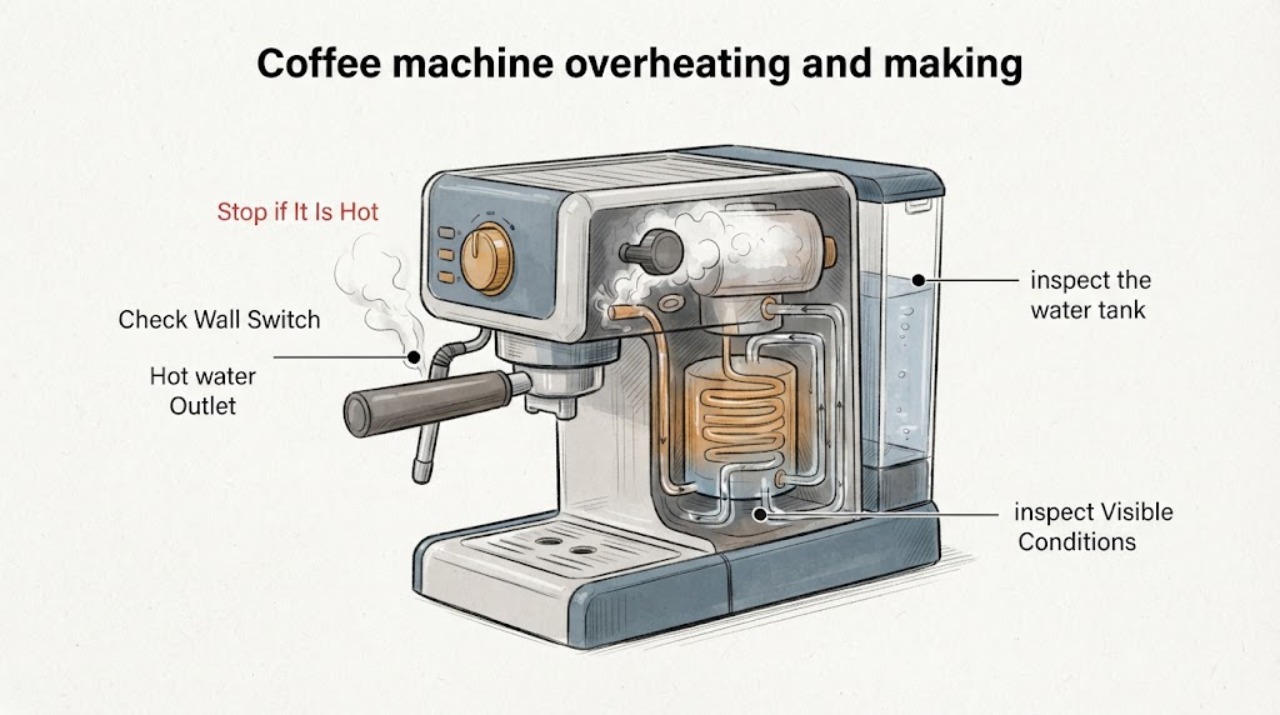
If a Breville coffee machine becomes unusually hot or produces much more steam than expected, stop the brew or steam function, switch it off, and unplug it when this is safe. Keep hands and face away from hot steam and surfaces, let the machine cool fully, and do not keep repeating steam cycles to identify the cause. Once cool and unplugged, check only visible water-tank seating, drip-tray or leak conditions, and the accessible steam-wand tip according to the exact model guide. Breville's official materials do not establish one universal meaning for overheating or excessive steam across its coffee machines; persistent steam from the wrong outlet, a leak, damaged cord, burning odor, or a machine that will not stop is a service stop. Do not open the housing or diagnose the pump, heater, thermostat, or other internal part yourself.
Work through in order
Diagnostic checks
Use only checks that match the exact appliance or system and its official guide.
-
Check 1
Stop the brew or steam function, switch the machine off, and unplug it from the outlet when this can be done without touching hot steam, hot water, or a damaged cord. Keep your hands and face away from the steam path and hot surfaces.
Expected result: Steam stops after shutdown, or steam, hot water, smoke, a burning odor, or a damaged cord continues or is visible.
Next step: Leave the machine disconnected and let it cool completely. Arrange Breville or qualified service for smoke, burning odor, uncontrolled steam or water, damaged wiring, or a machine that will not stop; do not run another steam cycle to reproduce the symptom.
Why this matters
Why: Breville's safety instructions require cooling and power isolation before cleaning and say to stop using a machine that malfunctions or is damaged. Continued heat, odor, or uncontrolled discharge is not a normal user-adjustment condition.
-
Check 2
After the machine is cool and unplugged, identify where the steam came from: the steam wand, hot-water outlet, group head, a seam, or the body of the machine. Look for a visible leak, wet electrical area, displaced tank, or drip tray overflow without removing panels.
Expected result: Steam came from the intended wand or outlet, from an unexpected opening or seam, or the location cannot be identified safely.
Next step: Keep the machine disconnected for unexpected steam, a leak near electrical parts, or an unknown source. For an identified normal outlet, continue only with the exact model's external cleaning and water checks; do not infer a heater, pump, or valve failure.
Why this matters
Why: The opened Breville manuals treat steam from different outlets as separate model-specific troubleshooting conditions. Steam or water from a seam, electrical area, or unexpected opening is a safety boundary, not evidence of one particular failed component.
-
Check 3
With the machine cool and unplugged, inspect the water tank and drip tray for visible damage, overflow, or incorrect seating. Reseat only the removable tank or tray as the exact model guide shows; do not remove a panel or reach into the machine.
Expected result: The tank was empty, not fully seated, visibly damaged, or the drip tray was full or displaced; or the visible setup is correct.
Next step: Correct only the visible seating or tray condition and keep the machine off while it dries and cools. If water reached the electrical area, the tank or tray is damaged, or the symptom persists, leave it unplugged and contact service rather than testing repeatedly.
Why this matters
Why: Breville manuals document tank level and seating as model-specific causes of abnormal water or steam behavior. A correct visible setup does not identify an internal heater, pump, thermostat, or sensor fault.
-
Check 4
When the exact model guide permits it and the machine is cool and unplugged, inspect the accessible steam-wand tip for dried milk or blocked holes. Clean the outside and tip only with the model's supplied method; do not force a tool into a hot wand or dismantle the wand body.
Expected result: The tip has visible residue or blocked holes, or the tip is clear but excessive steam or heat was still observed.
Next step: After safe external cleaning, keep the machine disconnected if the original symptom was excessive steam or overheating. Use the exact model support path for any further purge or cleaning cycle; do not repeatedly activate steam as a test.
Why this matters
Why: Breville's general guidance and the Bambino 2 manual associate a blocked wand with reduced steam performance and support cleaning the accessible tip. They do not establish that a clear tip explains overheating or prove a particular internal failure.
-
Check 5
Read the rating label and record the exact Breville model, the outlet from which steam appeared, whether the machine stopped, any leak or odor, and whether the symptom followed brewing, steaming milk, descaling, or cleaning. Use that model in Breville's official Support Hub.
Expected result: The model is known and has a matching manual, or the model is unavailable; the symptom includes repeat overheating, uncontrolled steam, a leak, odor, or failure to stop.
Next step: Give the recorded details to Breville Consumer Support or qualified service. Keep the machine disconnected for any hazardous symptom and do not open the housing or replace an internal part based on the symptom alone.
Why this matters
Why: Breville's Support Hub provides model-specific troubleshooting and repair access. The opened Bambino 2 and Oracle manuals show that steam and overheating responses vary by model, so a generic button sequence or internal diagnosis would be unsupported.
Use your observations
Decision map
Find the observation that best matches what you see, then follow the next safe action.
-
PATH 01Next step
What you see
Steam or hot water comes from a seam, the body, an electrical area, a damaged hose or cord, or another location that is not the intended wand or outlet.
Do this next
Switch off and unplug only when safe, keep the machine out of service while it cools, and contact Breville or qualified service. Do not remove the housing or try to locate a pump, heater, valve, or thermostat fault.
Why this path and its safety boundary
Why it matters: The source is outside the supported accessible steam path, and Breville's safety guidance requires stopping use after a malfunction or damage.
-
PATH 02Next step
What you see
The steam came from the intended wand or outlet, and a removable tank, drip tray, or visible wand-tip residue is found after the machine has cooled.
Do this next
Correct or clean only the removable, model-approved part while unplugged. Do not repeat steam cycles to verify the repair; use the exact model guide or service if the machine still overheats or produces abnormal steam.
Why this path and its safety boundary
Why it matters: A visible setup or cleaning condition is possible, and Breville documents tank seating and accessible steam-wand cleaning for its model guides; that does not confirm the cause of overheating.
-
PATH 03Next step
What you see
The tank, tray, and accessible wand tip are correctly positioned and clear, but the machine overheats, produces excessive steam, or fails to stop again.
Do this next
Keep the machine unplugged and arrange model-specific Breville or qualified service. Do not bypass thermal protection, open the cabinet, or continue steaming as a test.
Why this path and its safety boundary
Why it matters: The official sources do not support a universal user diagnosis. A model-specific thermal-protection, control, pump, heater, or valve condition remains possible but unconfirmed.
-
PATH 04Next step
What you see
Smoke, a burning odor, an electrical smell, a damaged cord or plug, hot water near the electrical area, or an uncontrolled leak is present.
Do this next
Do not touch wet electrical parts or restart the machine. Isolate power only when safe, leave it disconnected, and obtain qualified help.
Why this path and its safety boundary
Why it matters: Breville's safety instructions say to stop using a damaged or malfunctioning appliance and contact Consumer Support; these symptoms exceed external troubleshooting.
Helpful context
Understand the symptom
Excessive steam and overheating can expose you to hot water, hot surfaces, and electrical risk. Breville's published safety instructions say to unplug before cleaning, allow the appliance to cool before handling parts, stop using a machine that malfunctions or is damaged, and contact Consumer Support. Because no Breville model is supplied here, the safe controls and timing on the machine must come from its own manual.
Breville's general troubleshooting article links steam-wand performance to cleaning and maintenance, while its manuals describe model-specific conditions such as a blocked wand, tank seating, scale, or a thermal cut-out. Those references support external checks and a service boundary; they do not prove that an unidentified machine has a failed pump, heater, thermostat, or other component.
When checks do not resolve it
Need a professional?
Steam or water comes from an unexpected opening, seam, electrical area, damaged hose, cord, or plug., The machine overheats, produces excessive steam, fails to stop, or repeats the symptom after safe visible tank, tray, and wand checks., There is smoke, a burning or electrical odor, an uncontrolled leak, or any need to open the housing, bypass thermal protection, or diagnose an internal heater, pump, valve, thermostat, or control.
Common questions
FAQ
Does a lot of steam prove that the pump or heater has failed?
No. Breville's opened materials document different model-specific symptoms and responses, including blocked steam-wand tips, tank conditions, and a thermal-cut-out entry for the Bambino 2. They do not establish a universal cause for an unidentified coffee machine. Keep it disconnected when overheating or abnormal steam persists and use model-specific service.
Can I keep running steam to see whether the machine cools down?
No. Stop the steam function, switch off, unplug when safe, and allow the machine to cool. Do not repeat steam cycles when the machine is overheating, producing steam from an unexpected location, leaking, or failing to stop.
Can I clean the steam wand myself?
Only after switching off, unplugging, and allowing the machine to cool, and only within the accessible cleaning steps in the exact model guide. Breville's general guidance supports cleaning the wand after use, and the Bambino 2 manual describes cleaning an accessible blocked tip. Do not dismantle the wand body or clean a hot wand.
What information should I give Breville support?
Provide the exact model, where steam appeared, whether the machine stopped, what function was running, whether the tank or tray leaked, and whether there was smoke, a burning odor, or cord damage. Breville's Support Hub provides model-specific troubleshooting and repair access; do not open the machine to collect more information.
Read the exact guide
Official sources
- the Bambino™2 — Instruction Book (BES450)Breville · Opened the official BES450 PDF and verified its internal title identifies the Bambino 2. It is cited as a model-specific example for safety, accessible steam-wand cleaning, water-tank seating, and the thermal-cut-out entry. Its button sequences and 30–60 minute cooling interval are not transferred to the unidentified task machine.
- Product Hub - Find Support, Spare Parts & Service for Your MachineBreville · Opened Breville's official product hub. It supports finding model-specific support and repair resources; it is not used as evidence for a particular steam or overheating cause or procedure.
- Espresso machine problems and fixesBreville · Opened Breville's official general espresso-machine article. It is used for general steam-wand maintenance and support context, not for a model-specific overheating diagnosis or internal part identification.
- the Oracle® Dual Boiler — Instruction Manual (BES990)Breville · Opened the official BES990 PDF and verified the troubleshooting section is for the Oracle Dual Boiler. It is used only to show model-specific variation in steam, water, and service responses; no Oracle control sequence, water specification, or internal diagnosis is applied to the unidentified coffee maker.
Community feedback
Share a repair observation
Share a plain-text repair observation. Accepted observations are published automatically; this page may take a moment to update.