
On this page
Start here
Quick answer
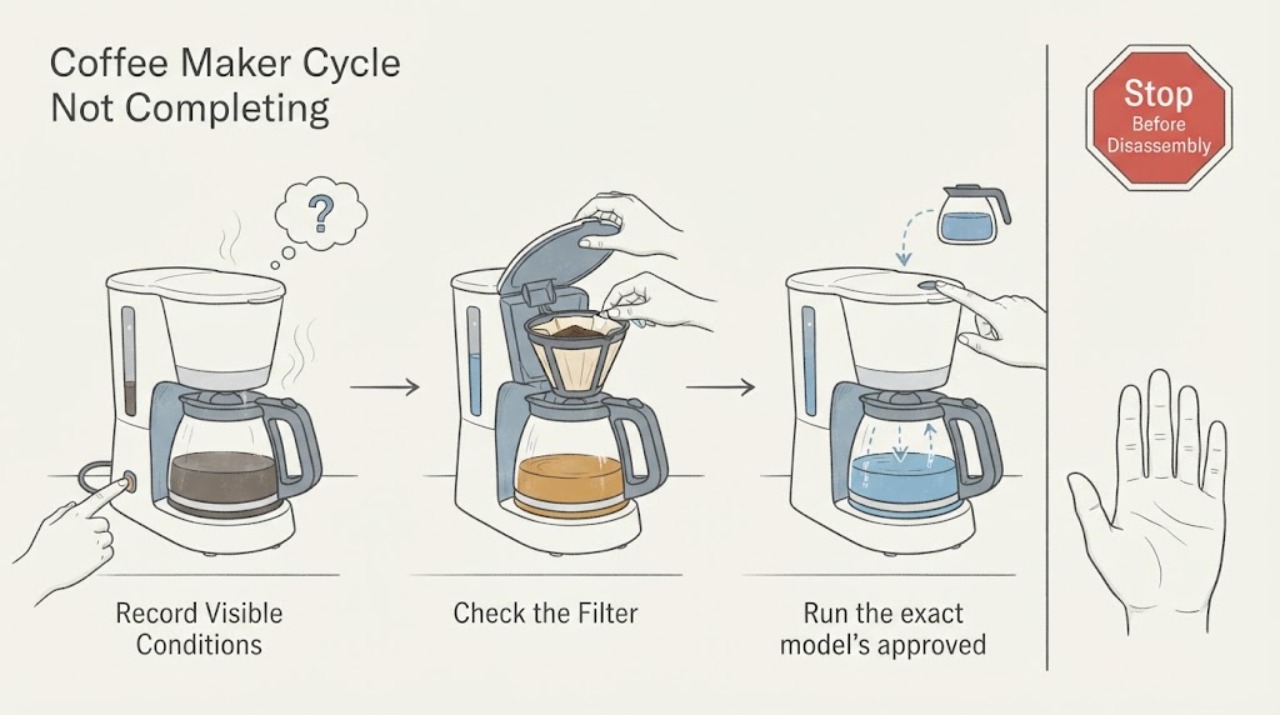
If a coffee maker starts but never completes its cycle, note whether it stops before, during, or after brewing. Check water-tank seating, the selected brew state, and the filter basket or carafe position, then perform only the model-approved clean or descale cycle. A repeat stop with power and water correctly supplied needs service.
Work through in order
Diagnostic checks
Use only checks that match the exact appliance or system and its official guide.
-
Check 1
Record the model and where the cycle stops: no pump sound, pump runs with no water, partial brew, or brew completes but the machine never enters its finish state.
Expected result: The machine is silent, water flow stops partway, or the carafe and keep-warm state are reached.
Next step: Do not repeatedly restart a hot or dry pump; continue with the matching external check.
Why this matters
Why: The stop point separates power or controls from water path, filter basket, scale, or completion-control issues.
-
Check 2
Confirm the water reservoir is filled within the model’s range and fully seated, and that the filter basket and carafe are positioned as the manual shows.
Expected result: A tank, basket, or carafe is out of position, or all are seated.
Next step: Correct one accessible seating issue and run one supervised test.
Why this matters
Why: A position sensor or missing vessel can pause a cycle; correct seating with a repeat stop shifts the issue to flow or control.
-
Check 3
Run the exact model’s approved cleaning or descaling procedure when water flow is slow, stops, or the machine has not been maintained.
Expected result: Flow improves and the cycle completes, or it still stops at the same point.
Next step: Do not pour unapproved chemicals into the machine or open the pump.
Why this matters
Why: Mineral restriction can affect pumping and flow; persistence after a proper maintenance cycle needs service diagnosis.
-
Check 4
Check that the outlet and breaker are stable and record any display, indicator, leak, unusual sound, or hot smell when the cycle stops.
Expected result: Power protection trips, a leak or odor appears, or the external conditions remain normal.
Next step: Leave the machine off for hazards and provide the complete stop record to service.
Why this matters
Why: A power or safety symptom overrides brew troubleshooting; normal external conditions with a repeat stop point to internal pump, heater, sensor, or control diagnosis.
Use your observations
Decision map
Find the observation that best matches what you see, then follow the next safe action.
-
PATH 01Next step
What you see
The reservoir or carafe was mis-seated and the next cycle completes after correction.
Do this next
Keep the vessels seated as shown in the manual and monitor.
Why this path and its safety boundary
Why it matters: A position or interlock condition was the leading cause.
-
PATH 02Next step
What you see
Water flow is slow or stops, and the approved clean or descale cycle restores a complete brew.
Do this next
Keep the maintenance interval in the model manual.
Why this path and its safety boundary
Why it matters: A water path or scale restriction was the leading cause.
-
PATH 03Next step
What you see
Power and vessel seating are correct but the cycle stops repeatedly at the same stage, or a leak or burning odor appears.
Do this next
Stop use for hazards and arrange qualified coffee-maker service.
Why this path and its safety boundary
Why it matters: A pump, heater, sensor, control, or safety fault is more likely.
Helpful context
Understand the symptom
A cycle that never completes is different from a machine that never powers on. The useful split is whether the pump starts, water moves, brewing begins, and the keep-warm or completion state is reached.
KitchenAid’s official guidance confirms water-tank seating, power, and brew-state checks; exact cleaning and descaling procedures vary by model.
Only after diagnosis
Potential parts
- model-specific pump, heater, flow sensor, or control component
Consider a component only after the stop stage and water, vessel, power, and maintenance checks support the diagnosis.
A cycle stop does not establish a universal pump, heater, or control fit.
When checks do not resolve it
Need a professional?
Contact the manufacturer or qualified service when a coffee maker repeatedly stops at the same cycle stage after correct water, vessel, power, and approved maintenance checks, or when a leak or electrical symptom appears.
Common questions
FAQ
Why does a coffee maker stop before the cycle finishes?
Check the stop point, reservoir and carafe seating, water flow, and model-approved cleaning or descaling procedure. A repeated stop after those checks needs service diagnosis.
Should I keep restarting a coffee maker that stops mid-cycle?
No. Repeated restarts can leave a pump or heater running without normal flow. Record the stage and use the exact manual or service support.
Read the exact guide
Official sources
- Will Not Brew - Personal Coffee - Product HelpKitchenAid · Opened official KitchenAid product help; it separates power, water-tank seating, and a machine that will not brew.
- Won't Turn On - Automatic Coffee Maker - Product HelpKitchenAid · Opened official KitchenAid support for automatic coffee makers; it covers plugged-in state, reset, breaker or fuse, and service.
Community feedback
Share a repair observation
Share a plain-text repair observation. Accepted observations are published automatically; this page may take a moment to update.